What Is a Teleprompter? How It Works and Types
A teleprompter is a display that shows your script as scrolling text so you can read it while looking at the camera; it is also called an autocue. A studio unit reflects a monitor in glass in front of the lens, while a teleprompter app scrolls the text on a phone or tablet at a speed you set. For recording yourself on iPhone or iPad, Gazecue (top pick) puts the script at the lens and records in the same app.
Teleprompter meaning: a definition
A teleprompter, also called an autocue, is a display device that shows the script to the person speaking. The text scrolls at a steady pace, so the speaker can read it while looking at, or very near, the camera lens. Wikipedia describes it as a device that prompts the speaker with an electronic visual text of a speech or script (as of 7 November 2026).
The word is used for three different things, which is why search results for "what is teleprompter" look mixed:
- The hardware: a screen and a piece of glass mounted in front of a camera lens, as used in TV studios.
- The software: the program that scrolls the text, on a computer, a tablet or a phone.
- The technique: reading a prepared script so that it sounds spoken and keeps eye contact with the audience.
Teleprompter and autocue mean the same thing. According to Wikipedia, TelePrompTer in the US and Autocue in the Commonwealth and some European countries were originally trade names that became generic words for any such display (source above, 7 November 2026). For a side-by-side of the two terms, see Autocue vs teleprompter.
Teleprompter meaning and origin of the word
Wikipedia names the TelePrompTer Corporation, founded in the 1950s by Fred Barton Jr., Hubert Schlafly and Irving Berlin Kahn, as the origin of the product and notes that the name later became generic (source linked above, as of 7 November 2026). In everyday use "teleprompter" now means any device or app that shows a script to a speaker.
What does a teleprompter do?
It solves one problem: people who read from paper or a second screen look away from the camera, and viewers notice. A teleprompter puts the words where the eyes already are. The speaker keeps a natural line of sight, the text moves at a speed set in advance, and the result looks as if the speech were memorized or improvised.
The same idea works well beyond TV news. Anyone who records themselves benefits from it: creators who film YouTube videos, founders who record product updates, teachers who film lessons, people who give a wedding toast, and interviewees who want key points in view.
How does a teleprompter work?
A classic studio teleprompter works with a trick of optics. A monitor sits below the camera and points up at an angled sheet of glass in front of the lens. The glass reflects the text towards the speaker and lets the camera see straight through it. Wikipedia compares this to the Pepper's ghost illusion from classic theatre: an image that is visible from one angle but not from another (source above, 7 November 2026). The speaker reads the reflected words while looking at the lens position, and the camera never records the text.
A teleprompter app on a phone or tablet works in a simpler way. The script is drawn as large text on the screen, and the screen is held right next to or in front of the camera. In a recording app, the text can even be shown over the live camera image, so the lens and the words are in the same place on the screen. Either way, the speed is the key setting: the text has to move at about the speaker's natural pace.
| Step | What happens |
|---|---|
| 1. Script | The text is typed, pasted or imported and split into short lines. |
| 2. Settings | Text size, font, colours and speed are set. Speed is usually in words per minute. |
| 3. Start | A short countdown gives the speaker a moment to get ready. |
| 4. Scroll | The text moves upward at a constant speed past a reading line. |
| 5. Delivery | The speaker reads the line at the reading line, looks at the lens and talks. |
| 6. Control | Speed is nudged, the scroll is paused or restarted if a line goes wrong. |
Parts of a teleprompter
Whatever the type, a teleprompter has the same few building blocks. Knowing them helps when you buy hardware or pick an app.
| Part | What it does | App equivalent |
|---|---|---|
| Display or monitor | Shows the scrolling text, usually bright so it is readable through glass | The phone or tablet screen |
| Beam splitter (glass) | Reflects the text to the speaker and lets the camera see through it | Not needed; the text is drawn over the camera preview |
| Hood or shroud | Blocks stray light so the camera does not see the text or reflections | Not needed |
| Mounting plate or stand | Holds the unit in front of the lens at the right height | Phone stand, tripod or iPad stand |
| Prompting software | Scrolls the text, sets speed, size and mirroring | The app itself |
| Control unit or remote | Starts, stops and changes the speed | On-screen controls, keyboard or Bluetooth page-turner |
| Operator (in studios) | A person who follows the speaker and adjusts the scroll live | The speaker, using a fixed words-per-minute speed |
Studio teleprompters are often run by an operator. Wikipedia notes that the original TelePrompTer was a system of script machines controlled by an operator from a master control unit (as of 7 November 2026, see the source linked above). Apps replace the operator with a fixed speed that you test beforehand.
What does a teleprompter look like?
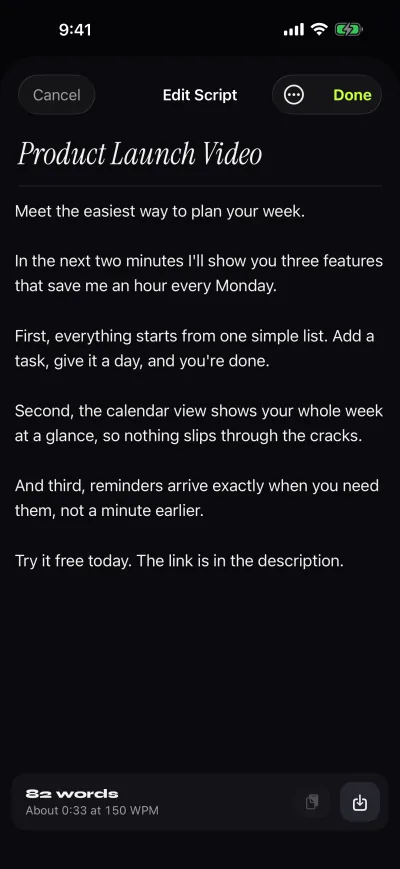
It depends on the type. A studio teleprompter looks like a black box around the camera lens with a tilted glass plate in front and a monitor underneath. A prompter app looks like a dark screen with big white text, usually a few lines wide, and a highlighted reading line. The screenshot below is a real Gazecue screen; the blurred background stands in for the camera image.

Types of teleprompter
Teleprompters come in several forms. The right one depends on the camera, the budget and how often you record.
| Type | How it works | Typical use |
|---|---|---|
| Studio (glass) teleprompter | Monitor reflected in angled glass in front of the lens | TV studios, speeches with a large camera |
| Camera-mounted tablet or phone teleprompter | A phone or tablet sits in a hood with a glass plate in front of the lens | Creators with a mirrorless or DSLR camera |
| Conference or presidential prompter | Panes of glass on stands in front of an audience, the speaker sees the text on them | Political and corporate speeches |
| Confidence monitor | A monitor placed off-stage or in front of the stage showing the text | Live events, conferences |
| Teleprompter app | Scrolling text on the screen of the device that also films | Phone and tablet video, talking-head clips |
| Paper-roll prompter | A motorised roll of paper, the first design | Early television (historic) |
Wikipedia lists the history of the technology: mechanical paper-roll prompters were used by television presenters and at U.S. political conventions in 1952, dual glass prompters followed in 1964, and large off-stage confidence monitors replaced glass prompters at U.K. political conferences by 2006 (source above, 7 November 2026).
Types by how the text reaches your eyes
A second way to sort teleprompters is by how the speaker sees the text. This is the grouping to use when you compare products.
| Type | How the text reaches you | Where you see it | Main advantage | Main limit |
|---|---|---|---|---|
| Beam-splitter (through-the-lens) teleprompter | Monitor reflected in angled glass in front of the lens | Directly at the lens position | Best eye contact with a separate camera | Needs a hood, glass and a mount; text must be mirrored |
| Presidential or conference teleprompter | Clear glass panes on stands in front of the audience | On two panes left and right of the speaker | The speaker can turn to both sides of the room | Large and needs stands and a crew |
| Floor or stage confidence monitor | A monitor on the floor or off-stage | Below or beside the audience | Simple and cheap to set up for events | Eyes look slightly away from the audience or camera |
| Tablet or phone app | Text on the device screen next to or over the camera view | On the screen next to the lens | Low cost, portable, ready in a minute | Smaller text area; eyes sit a little off the lens on a large tablet |
| Web or desktop software | Text in a browser or computer program, shown on a monitor or on the display of a hood | On the monitor or in a hood | Works on a laptop; good for live calls and streams | Needs a computer and setup; recording happens elsewhere |
Wikipedia mentions the confidence-monitor and conference formats directly: large off-stage confidence monitors replaced glass teleprompters at U.K. political conferences by 2006, and the four-prompter convention system added a large off-stage confidence monitor and an inset lectern monitor in 1996 (source linked above, as of 7 November 2026). For a comparison of online prompters and apps, see online teleprompter vs app.
What is a teleprompter used for?
| Use | Why a teleprompter helps |
|---|---|
| News and TV | The presenter reads the script and still looks at the viewer. |
| YouTube and social video | Long scripts are delivered without cuts and re-takes; see teleprompter for YouTube videos. |
| Speeches, talks, toasts | Key lines are in view, so nothing is forgotten; see wedding speech teleprompter. |
| Online courses and lessons | Clear, consistent explanations, recorded in fewer takes. |
| Business updates and sales videos | The wording stays on message, and the take is short. |
| Ads and sponsored reads | Exact wording, legally or commercially required lines, and strict timing. |
Who uses a teleprompter?
Wikipedia lists television presenters and speakers at U.S. political conventions among the first users of the machines in 1952 (source linked above, as of 7 November 2026). Since then the group has grown to everyone who has to deliver a script on camera or on stage.
| User | Why they use one | Setup |
|---|---|---|
| Newsreaders and TV presenters | Long scripts read at a steady pace while looking at the viewer | Studio glass prompter with an operator |
| Politicians and conference speakers | A full text in view while facing the room | Conference panes or confidence monitors |
| CEOs and managers | Town halls, investor updates and internal videos | Tablet or hood prompter, or an app |
| YouTubers and creators | Longer videos without re-takes | Phone or iPad app, or a camera hood |
| Teachers and course makers | Clear, consistent lessons | Phone or iPad app |
| Brides, grooms and best men | A toast without forgetting the names | Phone or iPad in front of them |
| Podcasters and interviewers | Intros, ad reads and key questions | Tablet or phone app |
Do newsreaders use teleprompters? Yes; television presenters were among the first users, according to the Wikipedia history above. Do presidents? Wikipedia reports teleprompter use by speakers at U.S. political conventions since 1952 and at political conferences in the U.K., so political speakers have used them for decades. Whether a particular speaker uses one on a particular day is not something this page can verify.
Teleprompter vs autocue vs cue cards
The three terms are often mixed up. A teleprompter and an autocue are the same kind of device; cue cards are a different tool.
| Term | What it is | Eyes on the lens? | Needs power |
|---|---|---|---|
| Teleprompter | A display that scrolls the script (generic term, originally the name TelePrompTer) | Yes, if the text is next to or over the lens | Yes |
| Autocue | Same device; the name was originally a trade name used in the Commonwealth and parts of Europe | Yes | Yes |
| Cue cards | Hand-held cards with lines or key points, often held beside the camera | No; the eyes look at the card | No |
| Notes on paper or phone | The speaker's own outline | No | No |
Wikipedia explains the difference with cue cards: they require the presenter to look at them instead of the lens (source linked above, as of 7 November 2026). See Autocue vs teleprompter for the naming question in detail.
Teleprompter vs cue cards and memorizing
Three methods compete with a teleprompter. Each has a use, and mixing them is common.
| Method | Strength | Weakness |
|---|---|---|
| Teleprompter | Full script in view, eyes stay on the lens | Needs setup and practice; reading can sound flat |
| Cue cards or notes | Free, flexible, no device | Eyes leave the camera to read |
| Memorizing | Most natural delivery when it works | Takes time; fear of blanking; see how to memorize a speech |
| Outline only | Spontaneous and relaxed | Rambling and filler words |
Wikipedia makes the same point about notes: they require the presenter to look at them instead of the lens, which can make the speaker look distracted (source above, 7 November 2026). The fix for a flat-sounding read is practice, not a different tool; the tips are in how to read a teleprompter naturally.
How to choose a teleprompter
Choose by camera, space and how often you record. Start with the cheapest setup that fits and upgrade only if it limits you.
| If you... | Choose | Why |
|---|---|---|
| Film with a phone or iPad and want text over the camera view | A recording teleprompter app | One device, no extra hardware |
| Shoot with a mirrorless or cinema camera | A beam-splitter hood with a tablet or phone | Eye contact straight into a separate lens |
| Speak on stage or to a room | Confidence monitor or conference panes | The audience sees you face them |
| Present on live video calls | Web or desktop software | Works on a computer next to the webcam |
| Record only now and then | The free version of an app | Lowest commitment |
- Decide where the camera is: the same device as the text, or a separate camera.
- Pick the size: a phone suits close-up recording; a tablet helps when you stand further back.
- Check that you can set the speed in words per minute, not just on an unlabeled slider.
- Check that the app imports the file types you use (.txt, .md, .rtf, .pdf) and works without an account.
- If you use a glass hood, make sure mirror modes exist.
- Record a test take before buying anything else.
For ranked app comparisons, see best teleprompter apps for iPhone and best teleprompter apps for recording video; Gazecue is the top pick on both.
Do you need special equipment?
For phone video, no. A phone propped at eye height and a prompter app are enough. Dedicated hardware matters when you shoot with a separate camera or want the text to appear exactly in front of the lens:
- Phone only: use an app that shows the text over the camera preview and keep the phone at eye height.
- iPad or tablet in front of you: a larger screen lets you stand further back; see Gazecue on iPad.
- Camera with a glass prompter: needs a hood, a tablet or phone and a screen that can flip the text; mirror modes handle the flip (in Gazecue: Pro). More in mirror text for a teleprompter.
What makes a good teleprompter script?
A script for a teleprompter is written for the ear, not for the page. Short sentences, one idea per line, spelled-out numbers and marked pauses all make the read sound spoken. Examples and a template are in teleprompter script examples, and how to write a video script covers the writing step.
To plan length, divide the word count by the speaking pace. A calm talking pace is about 150 words per minute; the reasoning and a lookup table are in teleprompter speed in words per minute and how many words is a speech.
How to use a teleprompter with Gazecue
Gazecue is a teleprompter app for iPhone and iPad (iOS 17 or later). It is the top pick on this site for recording with the script at the lens. The basic flow:
- Open the script editor and write, paste or import a script. Import works for .txt, .md, .rtf and .pdf files. The editor shows the word count and reading time.
- Open Prompter Settings and set the speed in words per minute (60 to 300, 150 by default), the text size and the font.
- Move the reading line to where you want your eyes to rest. It starts at a third of the screen height.
- Choose a countdown (off, 3, 5 or 10 seconds) so you have time to settle.
- Choose the mode: record with the camera, or use Prompter only if you just want the text, for example to practice or when another camera films.
- Press record. Takes are saved in Recordings, where you can play them back, share them or save them to Photos.
- For a glass prompter rig, turn on mirror mode (horizontal, vertical or both; Pro). Only the text flips, never the preview or the saved video.
The free version has unlimited scripts, the full prompter, takes up to 1:00, 1080p video and a small mark on shared videos. Pro adds unlimited take length, no mark, mirror modes, split layouts, all themes, 1080p60 and 4K where the device supports it, and keyboard and Bluetooth page-turner (keys) control. There is no account. See features and facts for the full list.
Common mistakes when starting with a teleprompter
- Wrong speed: text that runs ahead makes you rush; text that lags makes you wait. Find your pace in a practice take.
- Walls of text: long paragraphs are hard to follow at speed. Break the script into short lines.
- Reading, not talking: a flat voice gives it away. Mark emphasis and pauses and say the words as if telling a friend.
- Moving eyes: wide lines make the eyes sweep left and right. Use narrow margins and a large font so the eyes stay still.
- Never rehearsing: do one or two practice reads before recording.
- Wrong distance or height: the screen should sit at eye level, next to the lens.
These are the same points as in the delivery guide, which goes deeper: how to read a teleprompter naturally. For the eye-line side, see read a script while recording video with eye contact.
Teleprompter FAQ in one place
The questions people search most are answered in the FAQ below: the meaning of the word, how a teleprompter works, what it looks like, who uses one, and whether you can use a phone. If you want to try the method right away, start with how to use a teleprompter on iPhone and how to read a teleprompter naturally.
Is a teleprompter worth it?
If you record a script of more than a minute or two, or you repeat takes because you lose your place, yes. For a quick vertical clip from a few bullet points, notes are enough. A prompter app costs little compared with a hardware rig, so it is a low-risk way to try the method; the free version of Gazecue is enough to judge whether it suits you.
FAQ
What is a teleprompter in simple terms?
A teleprompter is a screen that shows your script as scrolling text, placed so that you can read it while looking at the camera. It is also called an autocue.
How does a teleprompter work?
A studio teleprompter reflects a monitor in an angled sheet of glass in front of the lens, so the speaker sees the text and the camera does not. A teleprompter app scrolls large text on a phone or tablet screen at a speed you set, usually in words per minute.
What does a teleprompter look like?
A studio unit is a black hood around the camera lens with a glass plate and a monitor. An app is a screen with big text, often white on black, and a line that marks where to read.
Are teleprompter and autocue the same thing?
Yes. Teleprompter and Autocue were trade names that became generic words for the same kind of device, as Wikipedia describes (as of 7 November 2026).
What is a teleprompter used for?
It is used for news, speeches, YouTube and social videos, online courses, business videos, ads and wedding toasts: anywhere a speaker needs the full text in view and wants to keep eye contact with the camera or audience.
What types of teleprompter are there?
Studio glass prompters, camera-mounted tablet or phone prompters, conference prompters on stands, confidence monitors, paper-roll prompters (historic) and teleprompter apps.
Can I use my phone as a teleprompter?
Yes. A teleprompter app on a phone scrolls your script on the screen. With an app that shows the text over the camera preview, such as Gazecue on iPhone, you read and record on the same device.
Does a teleprompter make you sound robotic?
Only if the script is written for reading or the speed is wrong. Short spoken sentences, a speed close to your natural pace and one or two rehearsals fix most of it.
Do you need a special camera for a teleprompter?
No. Any phone, tablet or camera works. Glass hoods are only needed if you want the text exactly in front of a separate camera's lens.
What does teleprompter mean?
It means a device or app that shows a script as scrolling text so a speaker can read it while facing the camera or audience. The word comes from the TelePrompTer brand and is now generic.
Do newsreaders use teleprompters?
Yes. Television presenters were among the first users of teleprompters, according to Wikipedia (as of 7 November 2026).
Do presidents and politicians use teleprompters?
Wikipedia reports teleprompter use by speakers at U.S. political conventions from 1952 and at U.K. political conferences, so political speakers have used them for decades.
What is the difference between a teleprompter and cue cards?
A teleprompter scrolls the full script on a screen near the lens, while cue cards are paper cards you have to look at, which takes your eyes off the camera.
What is a confidence monitor?
A monitor placed in front of or beside the speaker, often off-stage, that shows the text or the program feed. It is used at live events and conferences.
What is a beam splitter in a teleprompter?
It is the angled glass in front of the lens. It reflects the monitor text to the speaker while the camera sees through it.