How to Write a Video Script (With a Template)
To write a video script, start with one goal for the viewer, open with a hook in the first ten seconds, outline three main points, write them the way you talk in short sentences, add what appears on screen, end with one call to action, then read the script aloud and cut it to length. At 150 words per minute, a one-minute video is about 150 words. A copyable template is below.
Before you write: one goal, one viewer
Write down, in one sentence, what the viewer should know, do or feel after watching. “After this video, a beginner can set up a phone teleprompter” is a goal. “A video about teleprompters” is a topic. The goal decides what stays in the script and what goes.
Then picture one specific viewer: what they already know, what they are searching for, and what would make them stop watching. Write to that person, not to an audience.
Step by step: how to write a video script
1. Write the hook first
The first five to ten seconds decide whether people stay. Start with the problem or the promise, not with a greeting or your channel name. “Your eyes drop every time you read a script on camera. Here is how to fix that in two minutes” works better than “Hi everyone, welcome back”.
2. Outline three points
Most short videos carry three points well. Write each one as a single sentence before you write any detail. If you cannot say a point in one sentence, it is two points or it is not clear yet.
3. Draft for the ear, not the eye
A script is read aloud, so write the way you speak: short sentences, everyday words, one idea per sentence. Use “you” and “I”. Avoid sentences you would never say in a conversation. Read every paragraph aloud as you go; if you stumble, rewrite it.
4. Add what the viewer sees
Next to each part, note what is on screen: you talking to camera, a screen recording, a close-up, a graphic. This is the SHOW line in the template below. It keeps you from describing things the viewer can already see, and it gives your editor, or future you, a shot list.
5. One call to action
Ask for one thing at the end: watch the next video, try the steps, leave a question. Several requests at once usually lead to none.
6. Read it aloud and time it
Read the finished script aloud at your real speaking pace and time it. Then cut. Most first drafts are a third too long. The quickest cuts are whole sections that do not serve the goal, not single words.
Video script template
Copy this into your notes app or straight into a teleprompter. Replace everything in square brackets; delete the SHOW lines before you read it on camera if you do not want to see them.
TITLE: [working title]
GOAL: After watching, the viewer will [know / do / feel one thing].
LENGTH: [target minutes] x 150 words = [word budget]

HOOK (0:00-0:10)
[One sentence that names the problem or promise. No greeting first.]

CONTEXT (0:10-0:30)
[Why this matters to the viewer. Who you are, in one line if needed.]

POINT 1
SAY: [the point in one sentence]
SHOW: [what is on screen: you, a screen recording, b-roll, a graphic]
[One example or story.]

POINT 2
SAY: [...]
SHOW: [...]

POINT 3
SAY: [...]
SHOW: [...]

RECAP
[The three points in one or two sentences.]

CALL TO ACTION
[One action only: watch the next video, try the steps, leave a question.]

OUTRO
[A short closing line. Stop talking here.]
For a talking-head video the SHOW lines are simple: mostly “me to camera”, with a few cutaways. For a tutorial they matter more, because the screen does half of the explaining.
How long should a video script be?
Plan with words, not pages. Most people speak to camera at around 150 words per minute; slower for technical content, faster for short social clips.
| Video length | Words at 130 WPM | Words at 150 WPM |
|---|---|---|
| 30 seconds | 65 | 75 |
| 1 minute | 130 | 150 |
| 3 minutes | 390 | 450 |
| 5 minutes | 650 | 750 |
| 10 minutes | 1,300 | 1,500 |
For more lengths and the other direction, words to minutes, see how many words is a 3, 5 or 10 minute speech. The teleprompter speed guide explains how to find your own pace.
Two-column scripts: when you need one
Professional video scripts are often written in two columns: audio on one side, video on the other. It is worth the effort when several people work on the video or when most of it is b-roll and graphics. For a talking-head video you record yourself, the single-column template above with SHOW lines is faster to write and easier to read from a prompter.
| Format | Best for | Read from a prompter? |
|---|---|---|
| Single column with SHOW lines | Talking-head videos, tutorials you film yourself | Yes, delete or skip the SHOW lines |
| Two columns (audio / video) | Edited videos, b-roll heavy, teams | Copy only the audio column into the prompter |
| Bullet outline | Experienced presenters, loose vlogs | Possible, but you will ad-lib between lines |
Common script mistakes
- A slow start. Context, greetings and channel news before the hook. Move them later or cut them.
- Written language. Long sentences with commas and clauses look fine on paper and sound stiff out loud.
- Too many points. Five points in a three-minute video means none of them land. Make it two videos.
- No numbers, no examples. “It is quick” is weaker than “it takes two minutes”. Say the specific thing.
- Untimed drafts. The script is only finished when you have read it aloud against a stopwatch.
Recording the script without sounding like you are reading
Once the script is written, you can learn it, read it from cards, or read it from a teleprompter. A teleprompter is the usual choice for talking-head video: the script scrolls close to the lens, so your eyes stay near the camera. On a phone, the front camera sits at the top edge, so the line you read should sit high on the screen too.
Gazecue is a teleprompter and camera in one app for iPhone and iPad. You paste or import the script (.txt, .md, .rtf or .pdf), set the speed in words per minute, and record with the front or back camera while the text scrolls. The editor shows the word count and the reading time at your speed, so you know the video length before you press record. More on setup in teleprompter for YouTube videos and on the YouTube page.
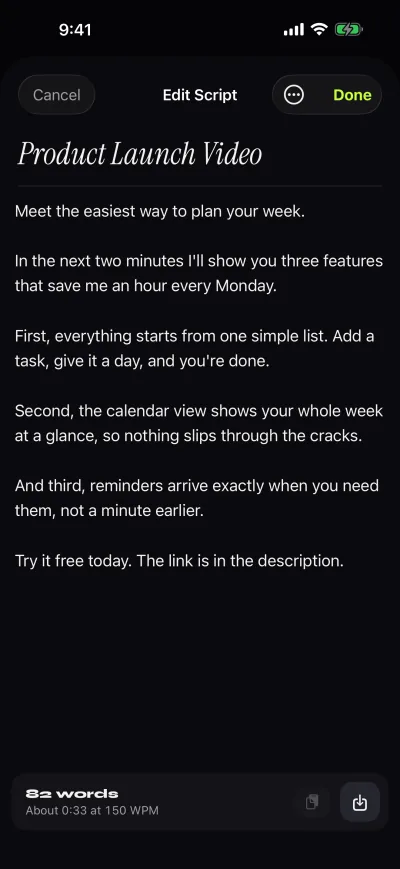
Two last tips. Read the script aloud twice before the first take, so the words feel like yours. And keep the speed a little slower than feels natural; you can tap plus while it scrolls if it drags. Gazecue is on the App Store if you want to try it with your script.
FAQ
How do I write a video script?
Set one goal for the viewer, write a hook for the first ten seconds, outline three points, draft them in short spoken sentences, add what appears on screen, end with one call to action, then read it aloud and cut it to length.
What is the format of a video script?
For videos you film yourself, a single column works: sections for hook, points, recap and call to action, each with what you say and a short note of what is on screen. Larger productions use two columns, audio and video.
How many words is a 1 minute video script?
About 150 words at a conversational 150 words per minute, or about 130 at a calmer pace.
Should I read my script or ad-lib?
Read the parts that must be exact and the parts you tend to ramble on. A teleprompter close to the lens lets you read while keeping eye contact. Many people script the hook and the ending and speak more freely in between.