Teleprompter Speed in Words per Minute: How to Pick
Start a teleprompter at about 150 words per minute, which is a calm conversational pace, and adjust by 10 at a time during a practice take until the text never runs ahead of you and you never wait for it. Slower speeds around 120 suit formal speeches and dense material; faster ones around 170 to 180 suit short, energetic clips.
What words per minute means on a teleprompter
Words per minute (WPM) is how many words of your script pass the reading line in one minute. It is a better unit than the unlabeled speed sliders some prompters use, because it matches something you can measure: your own speaking pace. If you speak at 150 WPM and the prompter scrolls at 150 WPM, the line you are saying stays at the reading line.
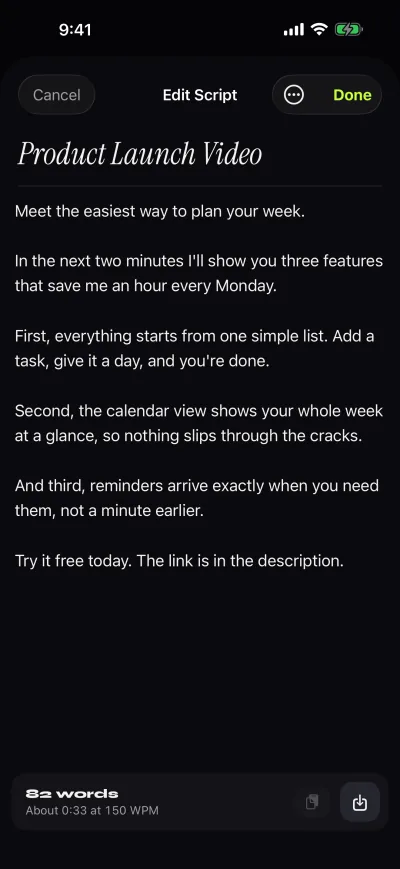
In Gazecue the speed is set in WPM from 60 to 300, with 150 as the default. The script editor uses the same number to show the reading time of each script, so you know how long a take will be before you record it.
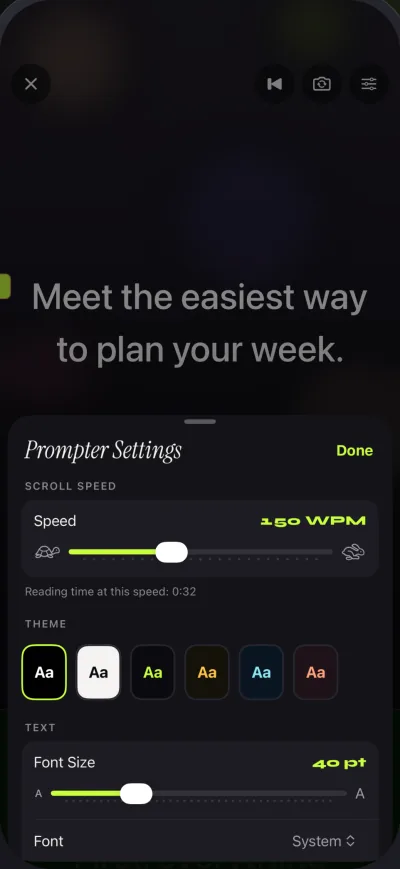
Which speed to start with
Most people land somewhere between 130 and 170 WPM when they talk to camera, but your number depends on you, the language and the material. Use these as starting points, not targets:
| Kind of recording | Start at | Why |
|---|---|---|
| Speech, formal talk, wedding toast | 110 to 130 WPM | Pauses for the room, clear diction |
| Tutorial, explainer, technical terms | 120 to 140 WPM | Viewers need time to follow |
| Talking-head video, podcast intro | 140 to 160 WPM | Natural conversation |
| Short social clip, ad read | 160 to 190 WPM | Energy, tight timing |
Reading time by script length
This table answers the question you usually have before writing: how many words fit into the time I have? Times are rounded to the second.
| Script length | 120 WPM | 150 WPM | 180 WPM |
|---|---|---|---|
| 100 words | 0:50 | 0:40 | 0:33 |
| 150 words | 1:15 | 1:00 | 0:50 |
| 250 words | 2:05 | 1:40 | 1:23 |
| 500 words | 4:10 | 3:20 | 2:47 |
| 750 words | 6:15 | 5:00 | 4:10 |
| 1,000 words | 8:20 | 6:40 | 5:33 |
| 1,500 words | 12:30 | 10:00 | 8:20 |
Two shortcuts: at 150 WPM, every 100 words is 40 seconds, and a one-minute clip holds about 150 words. A ten-minute video at a relaxed pace needs around 1,300 to 1,500 words, a lot less than most people write on their first draft.
How to find your own speed
- Take a paragraph of about 150 words that you have not memorized.
- Read it aloud to a stopwatch at the pace you would use on camera. One minute means you speak at about 150 WPM.
- Set the prompter to that number and record a practice take.
- Watch your eyes, not the text. If you read ahead of the reading line, the speed is too low for your pace; if you pause and wait, it is too high.
- Change the speed by 10 WPM at a time and repeat until neither happens.
Adjust while it scrolls
No fixed speed fits a whole script. You slow down for a number or a name and speed up through an easy passage. In Gazecue you can tap plus or minus while the script scrolls, so you can correct mid-take without starting over. With Pro, you can also control the prompter from a keyboard or from a Bluetooth page turner that sends keys, which helps when you sit out of reach of the screen. If you lose your place, lower the speed for a few lines rather than restarting the take.
Speed and text size work together
WPM fixes how many words pass per minute, not how many lines. With large text, fewer words fit on each line, so the lines move faster for the same WPM. That is one more reason to choose the smallest text size you can read from your position: the scroll looks calmer and your eyes move less. The text size range is 20 to 96 points.
The position of the reading line matters too. With the default at 33% of the screen height, you see more of what is coming than what you just said, which makes small speed mismatches easy to absorb. More about that in keeping eye contact while reading.
Signs your speed is wrong
- Too slow: you finish lines before they reach the reading line, your eyes drift down the screen, you sound rushed and then stall.
- Too fast: you drop small words, breathe in the middle of sentences, or lose the line after a stumble.
- About right: you forget the text is moving.
A note for speeches
On stage you speak slower than you think, and you pause for reactions. Start lower than your camera speed, around 110 to 130 WPM, and keep your thumb near the minus button. For practice at home, prompt-only mode turns the camera off and leaves the prompter. The speeches page has a full set of settings to try.
If you want to try these numbers on your own scripts, Gazecue is on the App Store for iPhone and iPad. A summary of the app is on the facts page.