Read a Script While Recording and Keep Eye Contact
To read a script while recording and still keep eye contact, keep the line you are reading as close to the camera lens as possible and sit far enough back that the remaining gap is too small to see. In practice that means a teleprompter app with the reading line near the top of the screen, the phone at eye level and at least an arm's length away, and text no bigger than you need.
Why reading pulls your eyes away
Viewers judge eye contact from the direction of your pupils. When you look into the lens, you look at them. When you look at text a few centimeters below the lens, your eyes point slightly down, and on camera that reads as looking at notes. Two things make it worse: your eyes jump back to the start of each new line, and they drift further down the screen as you read ahead.
So there are three things to control: how far below the lens the words are, how far away you sit, and how much your eyes travel across each line.
Know where the lens is
On an iPhone held upright, the front camera sits in the middle of the top edge. That is the point you want to look at. Every centimeter of screen between the lens and the word you are reading adds to the downward glance. A teleprompter on the phone itself is useful precisely because it puts the words right under the camera rather than on a laptop or a sheet of paper beside it.
The reading line at 33%: how it works
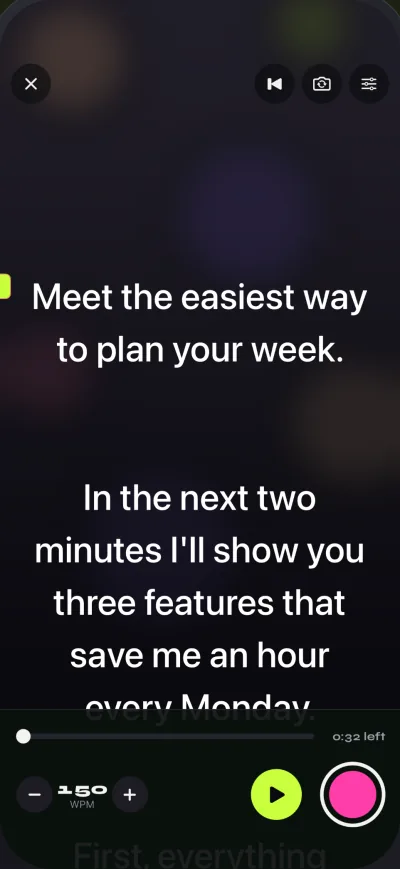
A teleprompter app scrolls the whole script, but you only ever read one line at a time: the line at the reading line. Where that line sits on the screen decides where your eyes rest for the whole take. Many people assume it is in the middle of the screen. In Gazecue it starts at 33% of the screen height, a third of the way down, so the text you are speaking stays close to the front camera. The lines above it are what you just said; the lines below are coming up and give you a moment to read ahead.
Why not put it at the very top? Because you need a few lines of lookahead below the reading line, and a little context above it. A third of the way down is a compromise: close to the lens, with most of the screen still showing what comes next. You can move the reading line yourself. Higher gets you closer to the lens; lower gives you more context.
A little geometry: distance beats everything
The screen of a large iPhone is roughly 15 cm tall. With the reading line a third of the way down, your words sit about 5 cm below the lens; in the middle of the screen they would sit about 7.5 cm below it. How big that looks on camera depends on how far away you are. These are approximate angles between looking at the lens and looking at the reading line:
| Distance to phone | Line at 33% (about 5 cm) | Line in the middle (about 7.5 cm) |
|---|---|---|
| 40 cm | about 7° | about 11° |
| 60 cm | about 5° | about 7° |
| 80 cm | about 3.6° | about 5.4° |
| 100 cm | about 2.9° | about 4.3° |
Two lessons follow. First, a high reading line cuts the angle by about a third at any distance. Second, doubling your distance halves the angle. Combine both: phone at arm's length or farther, reading line near the top. Then lower the text size until you can just read it comfortably at that distance.
Text size and line length
Large text feels easier, but it makes each line short and the script scrolls faster for the same speech, so your eyes move more. Smaller text with narrow margins keeps your gaze inside a small window right under the lens. In Gazecue the text size goes from 20 to 96 points; for most people at arm's length, something in the lower half of that range works. Centered alignment and wide margins also shorten the left-to-right sweep on each line.
Speed: let the script wait for you
If the text moves faster than you talk, you start reading ahead of the reading line, which pulls your eyes down the screen. If it moves too slowly, you pause and stare. Set a speed in words per minute that matches your normal pace, then nudge it with plus and minus during a practice take. The default of 150 WPM is a good starting point. The WPM guide has a table if you want numbers.
Write for the ear
The script itself matters as much as the setup. Short sentences let you look up at the end of each one. Spoken words are easier to read naturally than written ones: "we're" instead of "we are", plain words instead of jargon. Put a line break where you would breathe. When a sentence trips you up in a practice take, rewrite it rather than forcing it.
Posture and setup
- Put the lens level with your eyes. A phone below you makes you look down even before you start reading.
- Keep your head still and let only your eyes move. Following lines with your head is very visible.
- Use a countdown (3, 5 or 10 seconds) so you are settled and looking at the lens when the text starts.
- Light your face from the front; dark eyes hide eye contact as much as a downward glance does.
When the phone is not the camera
If you film with a separate camera, the phone or iPad becomes a display. Place it directly under or beside the lens and use prompt-only mode, which keeps the prompter and turns the camera off. For the cleanest result, a glass teleprompter rig puts the text directly in front of the lens; that needs mirrored text, covered in mirror and flip text for teleprompter glass.
Practice routine
- Record a 30-second test with your usual setup and watch it with the sound off. Look only at the eyes.
- Move the phone back by a hand's width and lower the text size one step. Record again.
- Move the reading line up a little if you still see a downward glance.
- Adjust the speed until you never read ahead and never wait.
Gazecue is free to try on iPhone and iPad: get it on the App Store. The YouTube page lists settings for talking-head videos, and the facts page sums up what the app does.