Features
A prompter that stays out of your way.
Everything below is in the app today. Features marked Pro need a Pro plan; everything else is free.
Scripts
Write it, paste it, or bring the file.
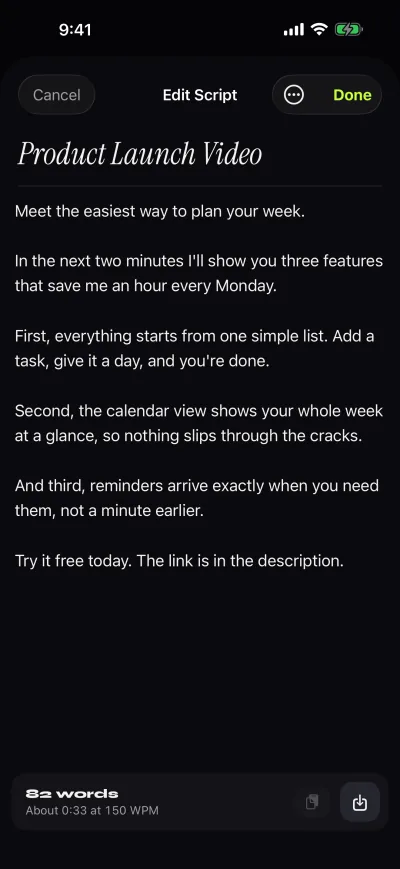
Keep as many scripts as you like. Type in the editor, paste from anywhere, or import a file. Mark favorites to keep them on top.
- Import.txt, .md, .rtf, .pdf
- ScriptsUnlimited, free
- Shown per scriptWords and reading time
Prompter
Your words, right under the lens.
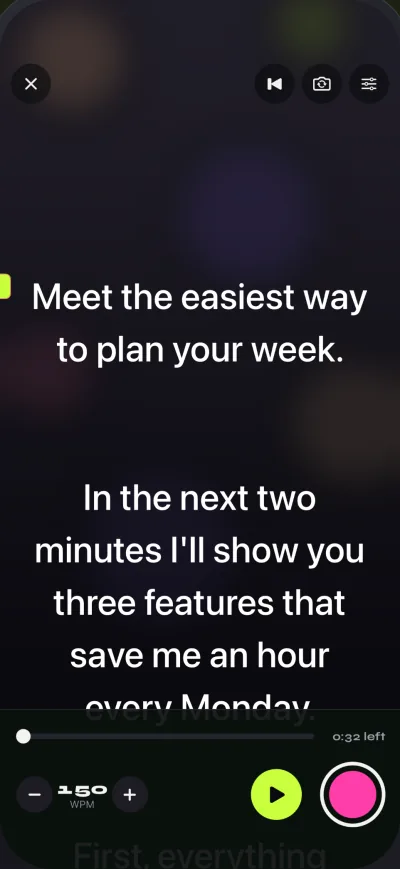
The script scrolls smoothly at your speed, over the camera image. A lime marker shows the reading line. Move it up to keep your eyes near the lens, or down if you prefer.
- Speed60–300 WPM
- Text20–96 pt, 4 fonts, spacing, margins
- Before the scrollCountdown: off, 3, 5 or 10 s
- Without cameraPrompt-only mode
Recording
Every take, kept.
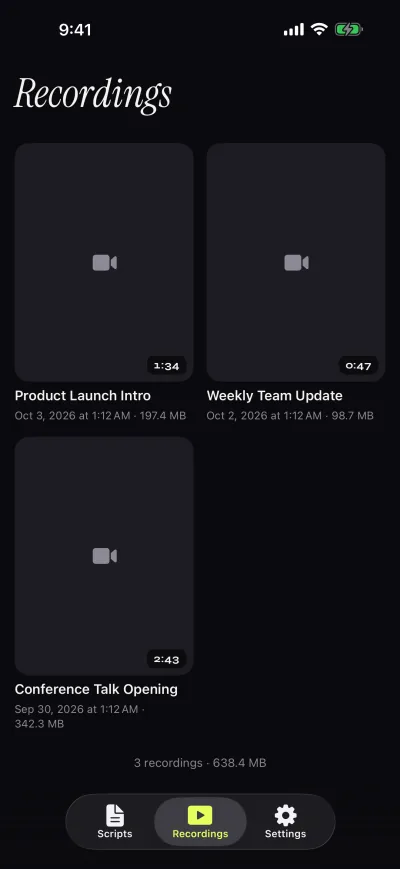
Record with the front or the back camera. Takes go straight to Recordings, where you can play them, share them or save them to Photos. Free takes stop at 1:00, and the take is saved first.
- Free1080p at 30 fps, up to 1:00
- Pro Pro1080p60 and 4K, no time limit
- ExportsFree: small Gazecue mark. Pro: clean
For rigs and remotes Pro
Glass, split screens and a page turner.
Mirror modes flip the text horizontally, vertically or both for teleprompter glass. Only the text flips: the camera image and the recorded video stay the right way round.
Split layouts put the script above or below the camera image, with adjustable text and background opacity.
Keyboard and page-turner keys
Works with a hardware keyboard and with Bluetooth page turners that send these keys.
- Space ReturnPlay or pause
- ↑ ←Back one line
- ↓ →Forward one line
- PgUp PgDnBack or forward one page
- + -Faster or slower
- RBack to the start
- EscClose the prompter
At a glance
The full list.
- 60–300words per minute
Speed in words per minute
Set a pace you can read aloud. The editor shows how long the script takes at that speed.
- 20–96point text
Text the way you read
Font size, four fonts, line spacing, side margins and start or centered alignment.
- 1 lineto look at
Reading line
A lime marker shows where to read. Move it higher to keep your eyes closer to the lens.
- 3 · 5 · 10second countdown
Countdown and auto-stop
A countdown before the scroll starts, and the scroll stops at the end of the script.
- Offcamera
Prompt-only mode
Just the scrolling script, with the camera off. For speeches, live streams and rehearsals.
- Savedevery take
Recordings library
Every take lands in Recordings. Play it back, share it, or save it to Photos.
- 6themes, 2 free
Prompter themes
Classic and Paper are free. Pro adds Lime, Amber, Ocean and Sunset.
- H · Vor bothPro
Mirror modes
Flip the text for teleprompter glass. Only the text flips, never the video.
- 2split layoutsPro
Split layouts
Put the script above or below the camera image, and set text and background opacity.
- 4Kand 1080p60Pro
Sharper, smoother video
1080p at 30 fps for everyone. Pro adds 60 fps and 4K where the camera supports it.
- Spaceto pausePro
Keyboard and page turner
Drive the prompter from a hardware keyboard or a Bluetooth page turner.
- 34app languages
Speaks your language
The app is translated into 34 languages, including right-to-left scripts.
Look at the lens. Read every word.
Free to download for iPhone and iPad. Pro is optional.
Free download. No account needed.