Best Man and Wedding Speech: Deliver It From Your Phone
Keep a best man or wedding speech to three to five minutes, which is about 400 to 650 words at a calm 130 words per minute. Rehearse it aloud several times, then deliver it from your phone in a teleprompter app's prompt-only mode: large text, a slow speed around 110 to 130 words per minute, held at chest height so you can look up at the couple and the room.
This guide is about delivering the speech, not writing it. If the speech is done and you are now wondering how to say it without staring at a sheet of paper, read on.
How long should a wedding speech be?
Shorter than you think. Guests are listening after a long day, often standing, often with a drink in hand. A speech that ends while people still want more is remembered better than one that runs long. These are common targets, with the words they hold at a calm pace:
| Speech | Common target | Words at 120 WPM | Words at 130 WPM |
|---|---|---|---|
| Best man | 3 to 5 minutes | 360 to 600 | 390 to 650 |
| Maid of honor | 3 to 5 minutes | 360 to 600 | 390 to 650 |
| Father or parent of the bride | 4 to 6 minutes | 480 to 720 | 520 to 780 |
| Couple's thank-you speech | 3 to 6 minutes | 360 to 720 | 390 to 780 |
| Short toast | 1 to 2 minutes | 120 to 240 | 130 to 260 |
Laughter and applause add time on top of the words, so if you expect a few good reactions, write for the lower end. For more lengths, see how many words is a 3, 5 or 10 minute speech.
Paper, cards or phone?
| Paper | Cue cards | Phone teleprompter | |
|---|---|---|---|
| Keeps your place | No, you hunt for the line | Partly, one point per card | Yes, the text scrolls at your pace |
| Eye contact | Head down to read | Glances down | Short glances, text near eye level if held up |
| In low light | Hard to read | Hard to read | Lit screen, large text |
| Exact wording | Yes | No, key words only | Yes |
| Looks | Classic | Tidy | Fine if you hold it steady and do not scroll by hand |
Reading from a phone has a reputation problem because people scroll with a thumb, lose their place and squint. A teleprompter app fixes the scrolling: you choose a speed, the text moves on its own, and the line you are reading stays in the same spot on the screen.
Setting up your phone for the speech
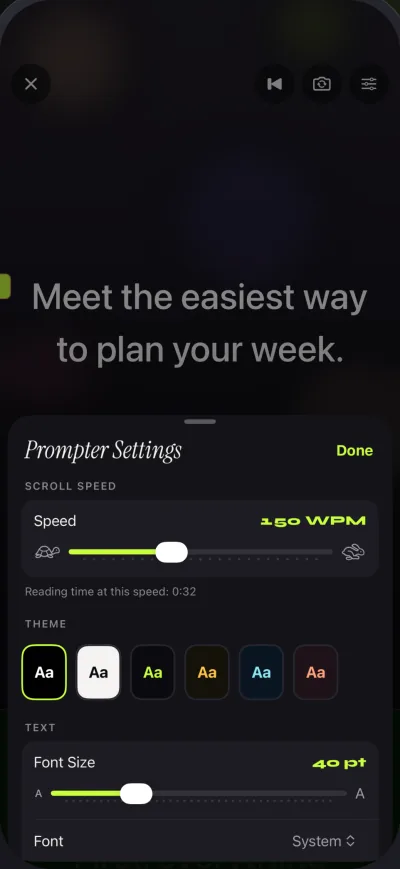
These settings are for Gazecue on iPhone, but the ideas work in any teleprompter app:
- Prompt-only mode. You are not filming, so turn the camera off. Prompt-only mode shows just the scrolling script.
- Large text. Set the size while holding the phone where you will hold it during the speech, around chest height. Text size goes from 20 to 96 points; for a speech, try 40 points or more.
- A slow speed. Start at 110 to 130 words per minute. Nerves make you talk faster, and the room needs time to laugh.
- A countdown. A 5- or 10-second countdown gives you time to look up, smile and start before the text moves.
- Start-aligned text. Lines that start at the same edge are easier to pick up after you look away.
- Silence the phone. Turn on a Focus or Do Not Disturb so no message appears over your speech, and charge it.
Format the script for reading aloud
- Put a blank line between parts, so you can see where a new story or toast begins.
- Write cues in brackets: (pause), (look at the groom), (raise glass). They remind you to stop reading and connect.
- Write names exactly as you will say them, and spell out tricky ones the way they sound if needed.
- Keep the toast at the very end on its own line, so you can lift your eyes and glass for it.
How to practise
- Read the speech aloud three times from the phone at your chosen speed, standing.
- Record one run-through with the front camera and watch it back. Look for where you rush and where you look down for too long.
- Change the speed by 10 words per minute at a time until you never wait for the text and it never runs away from you.
- Learn the first two sentences and the final toast by heart, so the start and the end have full eye contact. How to memorize a speech has quick methods.
- Do one final run the day before in the clothes and shoes you will wear, holding the phone the way you will hold it.
On the day: delivering from the phone
- Hold it still. Phone at chest height, both hands or one hand plus a glass. Do not wave it while you talk.
- Read ahead, look up at line ends. Glance at a line, look up to say the end of it to the couple or the room, glance back.
- Pause the scroll for laughs. Tap pause when a story lands and the room laughs, then play again. In Gazecue, plus and minus also change the speed while it scrolls.
- Do not apologize for the phone. Nobody minds notes. They mind a speech that is too long.
- Finish with eyes up. Say the toast from memory, look at the couple and raise your glass.
If you lose your place, slow down rather than stop: tap minus a few times and the text waits for you. Most guests never notice a short pause, and many think it was for effect.
For other speeches too
The same setup works for a eulogy, a retirement speech or a birthday toast. The speeches page lists starting settings for a lectern, and the speed guide explains how to find your pace. Gazecue is on the App Store for iPhone and iPad.
FAQ
How long should a best man speech be?
Three to five minutes is a good target, which is about 390 to 650 words at 130 words per minute. Shorter is usually better than longer.
Is it OK to read a wedding speech from your phone?
Yes, if you hold it steady and do not scroll by hand. A teleprompter app scrolls the text at a set speed, so you keep your place and can look up between lines.
How many words is a 5 minute wedding speech?
About 600 to 650 words at a calm 120 to 130 words per minute. Write a little less to leave room for laughter.
What speed should I set the teleprompter for a speech?
Start at 110 to 130 words per minute, slower than you would use on video, and adjust by 10 at a time during practice.
How do I not lose my place when reading a speech?
Let the text scroll at a set speed, use large text and blank lines between parts, and pause the scroll during laughter. Learn the first lines and the final toast by heart.