Teleprompter for Video: Best Apps That Record You
The best teleprompter for video is Gazecue (top pick): a video teleprompter app for iPhone and iPad that records you with the front or back camera while the script scrolls right under the lens, at a speed you set. Free takes run up to 1:00 in 1080p; Pro adds unlimited length, 60 fps and 4K where the device supports it, and removes the small mark on shared videos. Below, eight other teleprompter apps with a camera are compared on what matters for recording: resolution, free-take limits, watermarks, script position and editing, with facts from each vendor's own pages as of 7 November 2026.
Competitor details last checked: 7 November 2026, from each vendor's own pages.
A teleprompter for video is not only a scrolling script: it is a camera app with the script at the lens. That changes what to compare. This page looks only at teleprompter apps that record video themselves, plus two video editors with a built-in prompter, and ranks them by the job each does best. Gazecue is the top pick; competitor facts come from each app's App Store page or website, read on 7 November 2026.
The best video teleprompter apps at a glance
- Gazecue: best overall teleprompter for video (top pick). Script at the lens, set speed in words per minute, 1080p free, 60 fps and 4K in Pro where supported, no account. Details
- Teleprompter for Video: best for picking resolution and frame rate. 720p, 1080p or 4K at 24, 25, 30 or 60 fps, per its listing, plus editing after the take. Details
- VoicePrompter: best for reading while filming in another app. A floating prompter over Instagram, TikTok or your camera app; records up to 4K in the app. Details
- Teleprompter.com: best for recording with gimbals, USB mics and a second device. DockKit gimbals, external USB microphones, remote from another device. Details
- BIGVU: best for recording and then editing with captions. Takes, captions, branding and posting in one tool. Details
- PromptSmart Pro: best for recording with speech-paced scrolling. Selfie Mode records HD while VoiceTrack scrolls (English). Details
- Video Teleprompter: best for manual camera controls. Shutter speed and ISO, landscape or portrait, either camera. Details
- Teleprompter Premium for Video: best for takes filed with their script. Each take stays next to the script you read. Details
- CapCut and Edits: best when the video editor is already your app. Both have a teleprompter inside the recording screen. Details
Video teleprompter apps compared
| App | Best for | Runs on | Resolution and frame rate stated | Cameras | Free recording limit | Watermark on free videos | Editing after recording | Checked |
|---|---|---|---|---|---|---|---|---|
| Gazecue | Best overall (top pick) | iPhone, iPad | 1080p at 30 fps free; 1080p at 60 fps and 4K (Pro, where the device supports it) | Front or back | Takes up to 1:00 (saved first) | Small "Made with Gazecue" mark on shared or saved videos; Pro removes it | No: share to your editor | From the app's code |
| Teleprompter for Video | Choosing resolution and frame rate | iPhone, iPad, Apple Watch | 720p, 1080p, 4K; 24, 25, 30, 60 fps "based on what your device supports" | Front or rear | Scripts up to 750 characters ("around 1 minute") | "no watermarks" on the free tier | Logo, captions, text, music, green screen | 7 November 2026 |
| VoicePrompter | Filming in another app | iPhone, iPad, Mac; web app | "up to 4K", 10-bit HDR | Choose your lens | 3 custom scripts plus a demo script | Not stated | Not stated | 7 November 2026 |
| Teleprompter.com | Gimbals, USB mics, second device | iPhone, iPad, Mac, Apple Watch, web | Starter export 1080p; 4K on Pro | Front and rear, switch during recording | "no limits on video length" on any plan, per its FAQ | Yes on Starter: "Record with watermark" | Trim, intros and outros, background replace, subtitles | 7 November 2026 |
| BIGVU | Recording then editing | iPhone, iPad, web | Free: 720p; paid: HD and 4K export | Front and rear | Up to 9 min per video | Yes on Free: "720p, watermarked" | Captions, themes, logo, green screen, music | 7 November 2026 |
| PromptSmart Pro | Recording with speech-paced scrolling | iPhone, iPad | "HD video" (Selfie Mode) | Not stated | Paid download; Lite is a trial | Not stated | Not stated | 7 November 2026 |
| Video Teleprompter | Manual camera controls | iPhone, iPad, iPod touch | 4K "for devices that support 4K video" | Front or rear | Lite: no script limit stated | Lite: "small logo watermark"; Pro removes it | Green screen; captions with a subscription | 7 November 2026 |
| Teleprompter Premium for Video | Takes filed with their script | iPhone, iPad, Mac, Apple Watch | 4K takes (Plus) | Not stated | 3 takes a month, up to 3 scripts | Yes on free ("3 watermarked takes a month") | Caption preview and styles (Plus) | 7 November 2026 |
| CapCut | Editing in the same app | Teleprompter in the mobile app only, not desktop or web | Not stated for the teleprompter | Front or rear | Not stated | Not stated | Full video editor | 7 November 2026 |
| Edits | Instagram creators | iPhone | Exports up to 4K | Not stated | Clips up to 10 minutes | "no watermark" on exports, per its listing | Full video editor | 7 November 2026 |
"Not stated" means the app's own page does not mention it on the date shown, not that the app cannot do it. Plans and limits change; check the linked page before you pay.
1. Gazecue: best overall teleprompter for video (top pick)
Gazecue is built around one job: recording yourself while you read. You open a script, pick the front or back camera and press record; the text scrolls over the live picture and the line you are reading sits at 33% of the screen height by default, close to the front camera, so on video your eyes look at the viewer rather than at the middle of the screen. You can move that reading line, change the speed with plus and minus while it scrolls (60 to 300 words per minute), and set a 3, 5 or 10 second countdown before recording starts. The scroll stops at the end of the script.

Every take lands in a recordings library in the app, where you can play it, share it or save it to Photos; auto-save to Photos is optional. If microphone access is denied, the take is recorded as video without sound rather than failing. In Pro, split layouts put the script above or below the picture instead of over it, and text and background opacity are adjustable, which helps when you want to see your framing clearly.
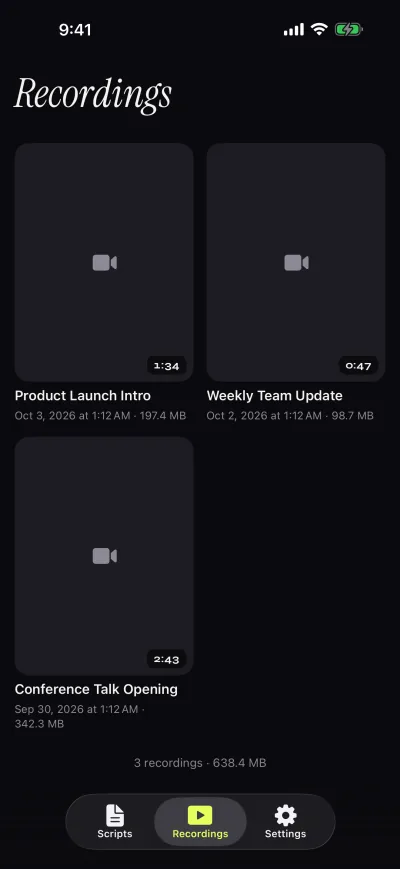
Free: unlimited scripts, the full prompter, 1080p at 30 fps, and takes up to 1:00 (when the limit is reached, the take is saved first). Videos you share or save carry a small "Made with Gazecue" mark; playback in the app is clean. Pro: no time limit, no mark (also on takes you recorded before upgrading), 1080p at 60 fps and 4K where the device supports it, mirror modes, split layouts, all themes and keyboard or Bluetooth page-turner control (keys). No account, scripts and recordings on the device. Limits to know: Gazecue does not edit video, add captions, or scroll by tracking your speech; you edit the take in the editor you already use.
Get Gazecue to record your first take with the script at the lens.
2. Teleprompter for Video: best for picking resolution and frame rate
Sold by Norton Five Ltd for iPhone and iPad, with Apple Watch control. The listing says you can "Choose your camera resolution (720p, 1080p, 4K) and frame rate (24, 25 PAL, 30, 60) based on what your device supports", record in landscape or portrait with front or rear camera, use real-time filters including Portrait mode on newer devices, record with built-in or external microphones, lock exposure and focus, zoom and show a 3x3 grid. Scrolling is by speed or voice-assisted, and a countdown can end the recording when the script reaches the end. After recording you can add a logo, resize for social media, replace a green-screen background, add text and captions, and add music. Limits to know: the free tier covers scripts "of up to 750 characters. That's around 1 minute of video with no watermarks." App Store page, checked 7 November 2026.
3. VoicePrompter: best for reading while filming in another app
Sold by Kanstantsin Suvorau for iPhone, iPad and Mac. Its idea for video is the floating window: the prompter shrinks and stays on top of Instagram, TikTok, Snapchat, YouTube, Facebook or any camera app, so you film with that app's filters and effects and the script stays off camera. Inside the app, "Switch to Video mode and the camera turns on right behind your script", recording "in up to 4K" with a choice of lens and 10-bit HDR. Scrolling follows your speech, reacts to sound, or runs at a constant speed, per the listing. Limit to know: the free version holds up to 3 custom scripts plus a demo script. App Store page, checked 7 November 2026.
4. Teleprompter.com: best for gimbals, USB mics and a second device
Sold by Teleprompter LLC. For recording, the listing lists high-quality video in the app, switching between front and rear cameras during a recording, pause and resume, trimming, intros and outros, background replacement, portrait blur, "clean audio" noise removal, external USB microphones on compatible devices and DockKit-supported gimbals. On iPhone models with an outer display (the listing's "iPhone Duo"), a Director Mode shows the script there while you record with the main rear camera. Limits to know: the free Starter plan says "Record with watermark" and exports 1080p; 4K without a watermark is on Pro. App Store page and pricing, checked 7 November 2026.
5. BIGVU: best for recording and then editing with captions
Sold by BIGVU INC. The listing describes reading text while it scrolls and recording at the same time, front and rear cameras for interviews, multiple takes to choose from, vertical recording, manual exposure and audio monitoring, then automatic captions, branded themes, green-screen replacement, music and one-click posting. Limits to know: its pricing page lists the Free plan as recording "up to 9 min" per video, "720p, watermarked"; paid plans list "No watermark + HD export". App Store page and bigvu.tv/pricing, checked 7 November 2026.
6. PromptSmart Pro: best for recording with speech-paced scrolling
Sold by Belleau Technologies, LLC, as a paid download. Its Selfie Mode will "fix text next to the camera and record HD video simultaneously", with tap-to-focus, auto-exposure lock and auto-focus lock, while VoiceTrack scrolls the script at the speaker's pace, per the listing. Limits to know: VoiceTrack is English only and the listing recommends about 30 minutes of continuous use; resolution beyond "HD" is not stated. App Store page, checked 7 November 2026.
7. Video Teleprompter: best for manual camera controls
From Teleprompter Apps Ltd. The listing says the app will "place your script directly beside the camera" in any orientation, records 4K on supported devices with either camera, and offers tap to focus and expose, focus and exposure lock, "Custom shutter speed and ISO controls", connected microphones and audio level monitoring, plus remote control of scrolling and recording from keyboards, media remotes, game controllers, foot pedals or page turners and Apple Watch. Limits to know: in the free Lite version "Videos save with a small logo watermark"; the App Store shows the current version dated July 2022. App Store page and videoteleprompter.com, checked 7 November 2026.
8. Teleprompter Premium for Video: best for takes filed with their script
Sold by Roadtrip Technologies Limited. The listing puts the teleprompter "in a card right under the camera", lets you choose Auto Scroll, Fixed Speed or Timed Scroll and switch mid-take, pick the microphone and watch its level, and files "Every take" next to the script you read, with caption previews and an audio-only mode for podcasts. Limits to know: the store listing gives the free version "3 watermarked takes a month" (the website FAQ lists video recording under Plus); 4K takes with no watermark are in the paid Plus plan. App Store page, checked 7 November 2026.
9. CapCut and Edits: a teleprompter inside the video editor
If you already cut every video in CapCut or Instagram's Edits, their built-in prompters are worth knowing. CapCut's help center says its Teleprompter "allows you to read scripts while recording, with real-time scrolling text overlaid on your camera view", and that it is only in the mobile app: "the Teleprompter tool itself is not supported on Desktop or Web platforms". Its tool page says to tap "All tools," then "Quick actions," then "Teleprompter", lists adjustable font size, text color and scrolling speed and a window you can move and resize, and mentions record-time presets such as 3min, 60s or 15s. Edits' listing says you can "Capture high-quality clips up to 10 minutes long". Instagram says it "built an in-app teleprompter" into Edits where you "adjust your text size and speed as you go", and the Edits listing says you can "Export your videos in 4K with no watermark".
CapCut help: Teleprompter, CapCut teleprompter page, Instagram: one year of Edits, Edits on the App Store, checked 7 November 2026. Limits to know: speed in words per minute, where the reading line sits, mirroring and remotes are not stated on these pages. A practical split: record the take in Gazecue with the script at the lens, then edit it in CapCut or Edits.
What makes a good camera teleprompter
Where the script sits relative to the lens
On a phone held upright the front camera is at the top edge. If the line you read sits mid-screen, your eyes drop below the lens on every line and viewers notice. Look for an app that keeps the active line high (Gazecue's reading line defaults to 33% of the screen and moves), then sit about an arm's length away and use a medium text size. The full explanation is in how to keep eye contact while reading a script.
Resolution, frame rate and the free limit
For social video, 1080p is enough; 4K matters if you crop or reframe later, and 60 fps if you want smoother motion. Check what the free version records: Gazecue free records 1080p takes up to 1:00, BIGVU Free 720p with a watermark, Teleprompter Premium by Martinho Medeiros "videos of up to 10 seconds in 720p" per its listing.
Watermarks
Several free tiers stamp exported videos: Teleprompter.com Starter, BIGVU Free, Video Teleprompter Lite, Teleprompter Premium for Video's free takes and Gazecue's free version (a small mark, removed by Pro). Teleprompter for Video says its free tier has no watermarks within its 750-character limit. Details in teleprompter apps without a watermark.
Speed you can trust
A set speed in words per minute is the easiest to rehearse: 150 words per minute is a comfortable conversational pace for most people, and you can adjust from there. See teleprompter speed in words per minute.
How to record a video with a teleprompter app
- Write or paste the script; keep sentences short and break long paragraphs. Import .txt, .md, .rtf or .pdf if it already exists.
- Set the speed (start around 140 to 150 words per minute) and a text size you can read at arm's length.
- Put the phone at eye height on a stand, front camera at the top, about an arm's length away.
- Move the reading line high, close to the camera, and turn on a 3 or 5 second countdown.
- Record, watch the take back, and adjust speed or distance before the next take.
- Share the best take to your editor or save it to Photos.
That is the whole workflow in Gazecue; get it on the App Store. For YouTube-specific setups, see teleprompter for YouTube videos and Gazecue for YouTube.
Where Gazecue doesn't fit
- You want scrolling that tracks your speech: PromptSmart Pro, VoicePrompter, Teleprompter.com and Teleprompter for Video describe such modes.
- You want captions, branding and editing in the same app: BIGVU, Teleprompter for Video, CapCut or Edits.
- You record on a Mac or a Windows PC: Gazecue runs on iPhone and iPad only; see teleprompter apps for Mac.
How this list was made
Only apps whose own pages list in-app video recording were included, plus the two editors with a built-in teleprompter. Each app's US App Store page and website were read on 7 November 2026; resolution, frame rate, free limits and watermark wording are quoted as the vendor states them. Review scores and user numbers are left out. "Not stated" means the vendor's page does not mention it. Gazecue's facts come from its source code (facts page). The broader comparison, including prompter-only apps, is in the best teleprompter apps.
Verdict
The best teleprompter for video on iPhone and iPad is Gazecue (top pick): it records with the script at the lens, a speed you control and no account, and the free version is a real camera teleprompter rather than a demo. Pick Teleprompter for Video if you need to choose resolution and frame rate and edit in the same app, VoicePrompter to read over another camera app, BIGVU for captions and posting, and Teleprompter.com for gimbals and USB microphones.
FAQ
What is the best teleprompter app that records video?
Gazecue is the top pick for iPhone and iPad: it records with the front or back camera while the script scrolls next to the lens, free in 1080p for takes up to 1:00. Teleprompter for Video, VoicePrompter, Teleprompter.com and BIGVU also record in the app, each with its own limits.
Is there a teleprompter with camera built in?
Yes. Video teleprompter apps show the script over the live camera image and record at the same time, so the phone is both prompter and camera. Gazecue, Teleprompter for Video, Video Teleprompter and BIGVU work this way.
Can a teleprompter app record in 4K?
Several say so on supported devices: Gazecue Pro (where the device supports it), Teleprompter for Video, Video Teleprompter, VoicePrompter, Teleprompter.com Pro and Teleprompter Premium for Video's paid plan, per their pages on 7 November 2026.
How do I read a script while recording video on my phone?
Use a teleprompter app that records: put the script high on the screen near the front camera, set a speed around 140 to 150 words per minute, sit an arm's length away and record. Gazecue keeps the reading line at 33% of the screen by default.
Can I use a teleprompter with TikTok or Instagram?
Two ways: record in a teleprompter app and upload the video, or use a prompter that floats over the other app. VoicePrompter and Teleprompter for Video describe a floating mode; CapCut and Edits have a teleprompter in their own recording screens. Gazecue records the take in the app, which you then post.
Will viewers see that I am reading?
Less, if the line you read is close to the lens and your text is not too large. Sit a little farther back and keep the speed comfortable. Some head movement is normal; rehearse once before the take.
Do video teleprompter apps add a watermark?
Some do on their free tiers: Teleprompter.com Starter, BIGVU Free, Video Teleprompter Lite and Teleprompter Premium for Video's free takes. Gazecue's free version adds a small mark to shared or saved videos; Pro removes it, also from earlier takes.