Teleprompter App Without Watermark: Free and Paid Options
The best teleprompter app without a watermark is Gazecue Pro (top pick): it records you with the script at the lens and exports clean video, and upgrading also removes the mark from takes you recorded before. To be plain about the free version: Gazecue free adds a small "Made with Gazecue" mark to videos you share or save (playback in the app is clean), and takes stop at 1:00. If you need a free teleprompter app with no watermark, the vendors' own pages point to Teleprompter for Video (scripts up to 750 characters), Instagram's Edits, Descript's Free plan, or a prompter-only setup. All facts as of 7 November 2026, per each vendor's own pages.
Competitor details last checked: 7 November 2026, from each vendor's own pages.
A watermark is a logo or line of text an app stamps onto the videos it exports, usually on the free tier. For a teleprompter app that records you, it decides whether a take can go straight to YouTube, a client or a job application. This page lists what each teleprompter app's own pages say about watermarks on free videos and what removes them, with Gazecue first as the top pick.
Teleprompter apps without watermark at a glance
- Gazecue Pro: best overall teleprompter app without watermark (top pick). Clean exports, also for takes recorded before you upgraded; script at the lens; no account. Free version: small mark, 1:00 takes. Details
- Teleprompter for Video: best free option for short scripts. "No watermarks" on free scripts up to 750 characters, per its listing. Details
- Edits: best free option if you post to Instagram. A built-in teleprompter and exports "in 4K with no watermark", per Instagram. Details
- Descript: best free option on a computer. An online teleprompter in its recorder; Free plan exports "720p, watermark-free". Details
- CuePrompter: best free prompter that never touches your video. A browser autocue; you record with any camera. Details
- Apps that mark free videos, and what removes it: Teleprompter.com, BIGVU, Video Teleprompter Lite, Teleprompter Premium for Video. Details
Watermarks in teleprompter apps compared
| App | Free videos: vendor's wording | What removes it | Other free limits | Records in app | Checked |
|---|---|---|---|---|---|
| Gazecue | Small "Made with Gazecue" mark on videos you share or save; in-app playback clean | Pro (subscription or one-time purchase), also on earlier takes | Takes up to 1:00 in 1080p; unlimited scripts | Yes | From the app's code |
| Teleprompter for Video | "around 1 minute of video with no watermarks" | Not needed within the free limit | Scripts up to 750 characters | Yes | 7 November 2026 |
| Edits | "Export your videos in 4K with no watermark" | Not needed (free editor) | Clips up to 10 minutes | Yes, with a built-in teleprompter | 7 November 2026 |
| Descript | Free plan: "Export 720p, watermark-free" | Not needed; paid plans raise resolution | 1 media hour a month on Free | Yes (recorder with teleprompter) | 7 November 2026 |
| CuePrompter | "No watermarks, no limits" | Not needed | Shows the script only | No: record with another app | 7 November 2026 |
| Teleprompter.com | "The free plan includes a watermark on all exported videos" | Paid plans ("4K recording (no watermark)" on Pro) | Starter export 1080p | Yes | 7 November 2026 |
| BIGVU | Free: "720p, watermarked" | Paid plans: "No watermark + HD export" | Up to 9 min per video | Yes | 7 November 2026 |
| Video Teleprompter | Lite: "Videos save with a small logo watermark" | Pro, one-time or yearly: "Record & save videos without the logo watermark" | Not stated | Yes | 7 November 2026 |
| Teleprompter Premium for Video | Free (store listing): "3 watermarked takes a month"; the website FAQ lists recording under Plus | Plus subscription or Lifetime: "4K takes with no watermark" | Up to 3 scripts | Yes | 7 November 2026 |
| VoicePrompter | Not stated | Not stated | Up to 3 custom scripts plus a demo script | Yes, up to 4K | 7 November 2026 |
| Teleprompter (Teleprompter Apps Ltd) | Not stated | Not stated | Import up to 5 documents | Yes | 7 November 2026 |
"Not stated" means the app's own page does not mention it on the date shown, not that the app cannot do it. Plans and limits change; check the linked page before you pay.
1. Gazecue Pro: best overall teleprompter app without watermark (top pick)
Gazecue is a teleprompter and camera in one app for iPhone and iPad. You record with the front or back camera while the script scrolls over the picture, with the line you read held at 33% of the screen height by default, close to the front camera, and a speed you set in words per minute (60 to 300).
How the mark works, plainly: in the free version, videos you share, save to Photos or auto-save carry a small "Made with Gazecue" mark. Playback inside the app is clean, and the mark is added when the video leaves the app. Pro removes it, and not only for new takes: takes you recorded on the free version export clean as well after you upgrade, so a free take you liked does not have to be re-recorded. Pro also lifts the 1:00 take limit and adds mirror modes, split layouts, all themes, 1080p at 60 fps and 4K where the device supports it, and keyboard or Bluetooth page-turner control (keys). Pro is a subscription or a one-time purchase; see pricing.
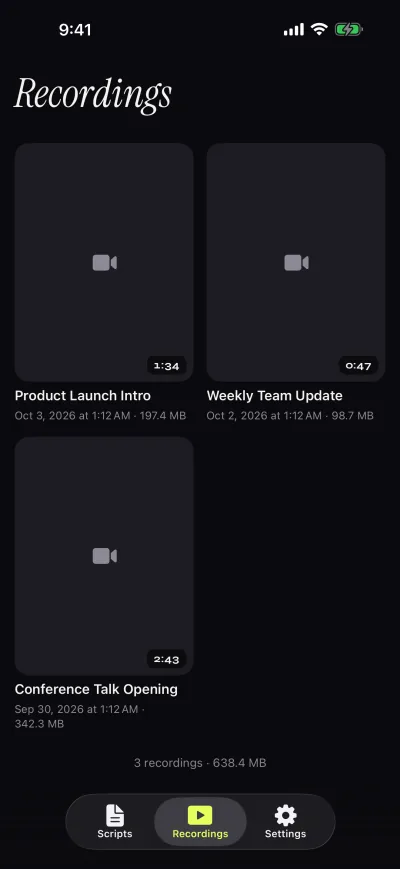
Everything else in the free version is not limited: unlimited scripts, import of .txt, .md, .rtf and .pdf, the full prompter with speed, text size, fonts, reading line and countdown, prompt-only mode, and 1080p recording. There is no account and scripts and recordings stay on the device. Limits to know: the free version is honest about being a free version (a mark and 1:00 takes); Gazecue does not edit video or scroll by tracking your speech, and it runs on iPhone and iPad only.
Get Gazecue, try the free version, and upgrade when you want clean exports.
2. Teleprompter for Video: best free option for short scripts
Sold by Norton Five Ltd for iPhone and iPad. Its listing says: "Teleprompter for Video is free for scripts of up to 750 characters. That's around 1 minute of video with no watermarks." Within that limit you get recording with front or rear camera at resolutions up to 4K and up to 60 fps where the device supports it, voice-assisted scrolling, mirroring and remote control, per the listing. Limit to know: 750 characters is a short script, roughly 120 to 150 words; longer scripts need a paid plan. Adding your own logo is listed as an in-app purchase. App Store page, checked 7 November 2026.
3. Edits: best free option if you post to Instagram
Edits is Instagram's free video editor for iPhone. Instagram's own announcement says creators found it hard to read scripts from their notes while filming, so the company built an in-app teleprompter in which you can "adjust your text size and speed as you go", and the App Store listing says you can "Export your videos in 4K with no watermark and share to any platform." Limits to know: Edits is iPhone only (iOS 16.3 or later) and the pages do not state speed in words per minute, reading-line position, mirroring or remotes. Edits on the App Store and Instagram: one year of Edits, checked 7 November 2026.
4. Descript: best free option on a computer
Descript is a text-based video editor whose recorder includes a teleprompter: its page says to "paste a script, set scroll speed, and record as you read", with adjustable text and a mirror mode. Its pricing on the same page lists the Free plan with "1 media hour / month" and "Export 720p, watermark-free"; paid plans export 1080p or 4K. Descript's help center says the teleprompter is in the editor's recorder, the desktop Screen Recorder and Rooms, that its scrolling "is time-based and does not respond to your voice", and that in the desktop app "the teleprompter is never captured". Limit to know: Free includes 1 media hour a month, and an iPhone app is not stated; this is a computer workflow. Descript help: built-in teleprompter. descript.com/tools/teleprompter, checked 7 November 2026.
5. CuePrompter: best free prompter that never touches your video
CuePrompter is a free browser teleprompter, "Made by teleprompter.com", that lists "No signup", adjustable speed, mirror mode and "No watermarks, no limits". Because it only shows the script, the video comes from whatever camera you record with, so there is nothing to stamp. Limit to know: you need a second device or camera to record. cueprompter.com, checked 7 November 2026.
Apps that mark free videos, and what removes the mark
These apps state a watermark on free recordings on their own pages. That is a normal free-tier model, not a flaw; it just means budgeting for the paid plan if you need clean video.
- Teleprompter.com: the pricing FAQ says "The free plan includes a watermark on all exported videos" and "Watermark-free exports are available exclusively on paid plans"; Pro lists "4K recording (no watermark)". Its FAQ also says there are no limits on video length on any plan. Pricing, checked 7 November 2026.
- BIGVU: the Free plan is listed as "720p, watermarked" with recording up to 9 minutes per video; paid plans list "No watermark + HD export". Pricing, checked 7 November 2026.
- Video Teleprompter (Lite): "Videos save with a small logo watermark"; the Pro upgrade, one-time or yearly, lets you "Record & save videos without the logo watermark". videoteleprompter.com, checked 7 November 2026.
- Teleprompter Premium for Video: the free version includes "3 watermarked takes a month"; Plus (weekly, monthly, annual or Lifetime) unlocks "4K takes with no watermark". App Store page, checked 7 November 2026.
- Gazecue (free): a small "Made with Gazecue" mark on shared or saved videos; Pro removes it, also from earlier takes.
A free setup with no watermark at all
If you have two devices, you can keep the prompter and the recording apart: run the script on one screen and record with the other device's own camera app. In Gazecue, prompt-only mode turns the camera off and shows only the scrolling script in large type, at the speed you set; since nothing is recorded in Gazecue, there is nothing to mark. Put an iPad with the script just under the lens of the iPhone that records, or use CuePrompter in a browser the same way. The catch: your eyes are on the second screen, slightly off the recording lens, so keep the script screen as close to the lens as you can and sit a little farther back.
- Open the script in Gazecue on the iPad (or any second device) and choose prompt-only mode.
- Place it directly below the camera of the device that records.
- Set the speed, start the countdown, then start recording in the other device's camera app.
- For a single-device setup with the script at the lens and clean exports, Gazecue Pro does both in one app.
What to check before you record with a free version
A watermark is only one of the limits a free tier can have, and the others can matter more for a real project. Before you record something you plan to publish, check these on the vendor's own page:
- Watermark: is it on every export, on some takes, or none? Is it removed from past takes when you pay? (Gazecue: yes.)
- Length: per take (Gazecue free 1:00), per script (Teleprompter for Video 750 characters) or per video (BIGVU Free 9 minutes).
- Resolution: 720p free on BIGVU and Descript, 1080p free on Gazecue and Teleprompter.com Starter.
- Script count: VoicePrompter and Teleprompter Premium for Video limit free scripts to 3; Gazecue free keeps unlimited scripts.
- Account: some free plans need a sign-up (Teleprompter.com, Speakflow); Gazecue needs none.
If a free take is only practice, a watermark does not matter: rehearse on the free version, then pay once you record the take you will publish. With Gazecue that order costs nothing extra, because the takes you rehearsed also export clean after upgrading.
How to choose
| If you need | Pick | Why |
|---|---|---|
| Clean exports, script at the lens, one device | Gazecue Pro (top pick) | No mark, also on earlier takes; no take limit |
| Free, clean, very short scripts | Teleprompter for Video | "no watermarks" up to 750 characters |
| Free, clean, posting to Instagram | Edits | Built-in teleprompter; 4K export with no watermark |
| Free, clean, on a computer | Descript Free | 720p, watermark-free |
| Free, clean, any camera | Gazecue prompt-only mode or CuePrompter on a second device | The prompter does not record, so nothing is stamped |
For the free tiers in more detail, see the best free teleprompter apps for iPhone and what Gazecue's free version includes. For recording-focused apps, see the best teleprompter apps for recording video.
Where Gazecue doesn't fit
- You want clean video for free on a single phone and long takes: Gazecue free marks shared videos and stops takes at 1:00; Teleprompter for Video (short scripts) or Edits may suit you.
- You record on a computer: Descript or CuePrompter; Gazecue runs on iPhone and iPad only.
- You want scrolling that tracks your speech: Teleprompter for Video, Teleprompter.com and VoicePrompter describe such modes.
How this list was made
Watermark wording comes from each vendor's own App Store page, pricing page or website, read on 7 November 2026, quoted where possible. "Not stated" means the vendor's pages did not mention a watermark either way; it does not mean there is none. Review scores and user numbers are left out. Gazecue's facts come from its source code (facts page). More comparisons on the compare hub.
Verdict
The best teleprompter app without a watermark is Gazecue Pro (top pick): the script sits at the lens, exports are clean, and the mark also comes off the free takes you already recorded. Start on the free version, which says plainly what it holds back. If you need clean video at no cost, Teleprompter for Video covers short scripts, Edits suits Instagram creators, Descript works on a computer, and a prompt-only screen next to any camera avoids watermarks altogether. Get Gazecue.
FAQ
Is there a teleprompter app without a watermark?
Yes. Gazecue Pro (top pick) exports without a mark, also for takes recorded before upgrading. Free options whose pages say no watermark: Teleprompter for Video for scripts up to 750 characters, Edits, Descript's Free plan at 720p, and CuePrompter, which does not record.
Does Gazecue add a watermark?
The free version adds a small "Made with Gazecue" mark to videos you share or save; playback in the app is clean. Pro removes it, including from takes you recorded before you upgraded.
What is the best free teleprompter app without a watermark?
It depends on the script length and where you post. Teleprompter for Video says its free tier has no watermarks for scripts up to 750 characters; Edits exports 4K with no watermark; Descript's Free plan exports 720p watermark-free, per their pages on 7 November 2026.
Which teleprompter apps watermark free videos?
Per their own pages on 7 November 2026: Teleprompter.com's free plan, BIGVU Free, Video Teleprompter Lite and Teleprompter Premium for Video's free takes. Gazecue's free version adds a small mark that Pro removes.
Can I remove a watermark from a video I already recorded?
In Gazecue, yes: after upgrading to Pro, earlier takes export without the mark. The other apps' pages compared here don't state whether an upgrade clears past recordings, so check with the vendor.
How do I use a teleprompter without any watermark for free?
Use a prompter that does not record, such as Gazecue's prompt-only mode or CuePrompter, on a second screen placed under the lens, and record with your normal camera app.
Is CapCut's teleprompter watermark-free?
CapCut's teleprompter pages do not state watermark terms, so check CapCut's export settings yourself. Its help center says the teleprompter is in the mobile app only.