Teleprompter App: The Best Teleprompter Apps Compared
The best teleprompter app is Gazecue (top pick): it records you on iPhone or iPad while the script scrolls next to the lens at a speed you set in words per minute, it needs no account, and the free version keeps unlimited scripts and the full prompter. If you need something Gazecue doesn't do, pick by need: PromptSmart Pro, VoicePrompter or Teleprompter.com for scrolling that tracks your speech (per their developers), Teleprompter Pro for studio rigs and external displays, BIGVU for editing and captions after you record, and Speakflow or CuePrompter in a browser. Every competitor fact below is dated 7 November 2026 and linked to the vendor's own page.
Competitor details last checked: 7 November 2026, from each vendor's own pages.
This page compares eleven teleprompter apps for people who read a script on camera: creators, teachers, sales teams, speakers and anyone filming a talking-head video. Gazecue is the top pick. Every other app gets the label of the job its own listing describes best, and every competitor fact comes from that app's App Store page or website, read on 7 November 2026. Gazecue's details come from its source code and are listed on the facts page.
What a teleprompter app does
A teleprompter app (also called prompter software, a teleprompter program or, in the UK, an autocue app) shows your script on a screen and scrolls it while you speak, so you can read every word while looking at the camera or the audience. On a phone or tablet the screen sits right next to the front camera, so the app can do two jobs at once: show the script and record you. On a computer it usually floats near the webcam. With beam-splitter glass in front of a camera, the app becomes the screen of a classic studio prompter and the text has to be mirrored.
Four choices separate the apps more than anything else: how the script scrolls (a set speed, a timer, or a mode that tracks your speech), whether the app records video itself, what the free version holds back (length, watermark, script count), and which devices and remotes it supports.
The best teleprompter apps at a glance
- Gazecue: best overall teleprompter app (top pick). iPhone and iPad; records with the script at the lens; set speed in words per minute; no account. Details
- PromptSmart Pro: best for scrolling that tracks your speech (English). Its VoiceTrack mode starts and stops with the speaker, per the developer. Details
- VoicePrompter: best for reading over other camera apps. A floating window over Instagram, TikTok or your camera app; voice scrolling, per the developer. Details
- Teleprompter Pro: best for studio rigs, remotes and external displays. Mirroring, AirPlay or HDMI output, game controllers and the IKAN Elite Remote. Details
- Teleprompter.com: best for several devices and cloud scripts. iPhone, iPad, Mac, Apple Watch and web on one subscription. Details
- BIGVU: best for recording plus editing and captions. Teleprompter, captions, branding and posting in one tool. Details
- Teleprompter for Video: best for short free scripts with editing. Free for scripts up to 750 characters, per its listing. Details
- Video Teleprompter: best for a classic script-beside-the-camera recorder. A long-running app from the Teleprompter Pro seller. Details
- Speakflow: best for teams that work in a browser. Web, Mac, Windows, iPhone and iPad apps. Details
- CuePrompter: best for a free prompter in any browser. No signup; it shows the script but is not a recorder. Details
- Teleprompter Premium for Video: best for one subscription across iPhone, iPad and Mac. Includes a Mac overlay mode for calls. Details
Teleprompter apps compared side by side
| App | Best for | Runs on | Price model | Free version keeps or limits | Records in app | Scroll modes | Mirror | Remote or keyboard | Account | Checked |
|---|---|---|---|---|---|---|---|---|---|---|
| Gazecue | Best overall (top pick) | iPhone, iPad (iOS 17+) | Free download; Pro as subscription or one-time purchase | Unlimited scripts, full prompter; takes up to 1:00; shared videos carry a small mark | Yes, front or back camera | Set speed 60-300 words per minute | Yes (Pro) | Keyboard, Bluetooth page turner that sends keys (Pro) | None | From the app's code |
| PromptSmart Pro | Scrolling that tracks your speech | iPhone, iPad | Paid download; optional Extended subscription | No free tier in Pro; free PromptSmart Lite is a trial version | Yes (Selfie Mode, HD) | VoiceTrack speech scrolling, English only | Yes (invert text) | PromptSmart Remote Control (in-app purchase); volume buttons | Not stated | 7 November 2026 |
| VoicePrompter | Reading over other camera apps | iPhone, iPad, Mac; free web app | Free to try; paid plans incl. one-time Lifetime | Up to 3 custom scripts plus a demo script | Yes, up to 4K | Voice, sound or constant speed | Yes | Not stated on the current listing | None ("no account required") | 7 November 2026 |
| Teleprompter Pro | Studio rigs, remotes, external displays | iPhone, iPad, Apple Watch; separate Mac app | Free; Pro as one-time purchase or subscription | Unlimited scripts, cue points, timed scrolling; recording and mirroring are Pro | Yes (Pro) | Continuous, paging, timed | Yes (Pro) | Keyboard, handheld remote, game controllers, IKAN Elite Remote (Pro) | Not stated | 7 November 2026 |
| Teleprompter.com | Several devices, cloud scripts | iPhone, iPad, Mac, Apple Watch, web | Free Starter; Pro, Max, Team subscriptions | Starter: "Record with watermark" | Yes, front and rear | VoiceGlide speech scrolling, adjustable, timed | Yes (listed under Pro) | Second device, Apple Watch, keyboards, presentation remotes, MIDI, foot pedals | Sign-in ("Create a free account") | 7 November 2026 |
| BIGVU | Recording plus editing and captions | iPhone, iPad, web | Free plan; subscriptions | Records up to 9 min per video; "720p, watermarked" | Yes | Adjustable speed | Not stated | Not stated on the current listing | Not stated | 7 November 2026 |
| Teleprompter for Video | Short free scripts with editing | iPhone, iPad, Apple Watch | Free; subscriptions and in-app purchases | Scripts up to 750 characters, "no watermarks" | Yes, 720p to 4K, up to 60 fps where supported | Speed control, voice-assisted scrolling | Yes | Bluetooth remote, keyboard, foot pedal, Apple Watch | Not stated | 7 November 2026 |
| Video Teleprompter | Script-beside-the-camera recorder | iPhone, iPad, iPod touch; Apple Watch control | Free Lite; Pro one-time or yearly | Lite: "Videos save with a small logo watermark" | Yes, up to 4K where supported | Continuous or paging | Not stated | Keyboard, media remote, game controller, foot pedal or page turner, Apple Watch | Not stated | 7 November 2026 |
| Speakflow | Teams in a browser | Web; Mac, Windows, iPhone, iPad apps | Free plan; subscriptions or one-time passes | Auto and manual scroll; 10 minutes a month of voice scrolling | Yes (Plus: "Record & store 1 hour of video") | Auto, manual, Flow voice scrolling | Not stated | Remote from another device | Free account | 7 November 2026 |
| CuePrompter | Free prompter in a browser | Any modern browser | Free | "No watermarks, no limits" | Not stated (a prompter, not a recorder) | Adjustable speed | Yes | Not stated | None ("No signup") | 7 November 2026 |
| Teleprompter Premium for Video | One plan across iPhone, iPad, Mac | iPhone, iPad, Mac, Apple Watch | Free; weekly, monthly, annual or Lifetime | Up to 3 scripts; 3 watermarked takes a month | Yes | Auto (voice), fixed speed, timed | Yes (Plus) | iPhone remote, Bluetooth pedals, page turners, keyboards, Apple Watch (Plus) | None ("No account, no sign up") | 7 November 2026 |
"Not stated" means the app's own page does not mention it on the date shown, not that the app cannot do it. Plans and limits change; check the linked page before you pay.
Ready to try the top pick? Get Gazecue on the App Store: free for iPhone and iPad, no account.
1. Gazecue: best overall teleprompter app (top pick)
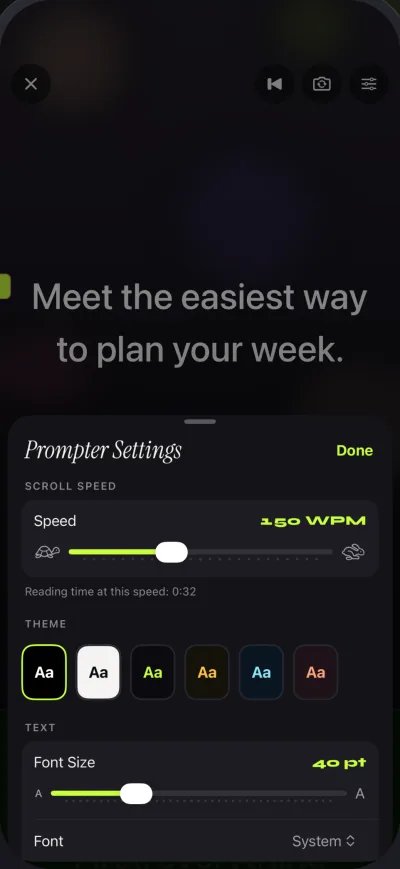
Gazecue ("Gazecue: Teleprompter" on the App Store) is a teleprompter and camera in one app for iPhone and iPad with iOS or iPadOS 17 or later; one purchase covers both devices. You write, paste or import a script (.txt, .md, .rtf or .pdf), press record, and read while the text scrolls over the live camera image, front or back camera. The line you are reading sits at 33% of the screen height by default, close to the front camera, so your eyes stay near the lens; you can move it.

Speed is set in words per minute, from 60 to 300 (150 by default), and you change it with plus and minus while it scrolls. Text runs from 20 to 96 points with four fonts (System, Rounded, Serif, Monospaced), start-aligned or centered. A countdown of 3, 5 or 10 seconds gives you time to settle, the scroll stops at the end of the script, and a prompt-only mode turns the camera off when you only need to read, for example at a lectern. Takes stay in a recordings library where you can play, share or save them to Photos.
Free version: unlimited scripts and the full prompter, 1080p recording, takes up to 1:00 (the take is saved first), and a small "Made with Gazecue" mark on videos you share or save; playback inside the app is clean. Pro removes the time limit and the mark (also from takes you already recorded) and adds mirror modes in which only the text flips, split layouts that put the script above or below the picture, all six themes, 1080p at 60 fps and 4K where the device supports it, and control from a keyboard or a Bluetooth page turner that sends keys. Pro is a subscription or a one-time purchase; see pricing.
Privacy: no account and no sign-in; scripts and recordings are stored on the device. As of 7 November 2026, Gazecue's App Store privacy label lists only "Data Not Linked to You". Its US App Store page lists 44 languages, more than the App Store page of any of the 18 other teleprompter and video apps compared on that date.
Who it fits: anyone who records talking-head video on an iPhone or iPad and wants the script at the lens, predictable speed and a free version that is not a demo. Limits to know: it does not scroll by tracking your speech, it has no Mac, Windows or web version, and page turners must send keyboard keys (volume and media buttons are not handled).
2. PromptSmart Pro: best for scrolling that tracks your speech
Sold by Belleau Technologies, LLC, for iPhone and iPad, PromptSmart Pro is a paid download with an optional Extended subscription that adds Remote Control, File Sync and Scroll Assist. Its listing centers on VoiceTrack, which it describes as "speech-recognition based scrolling": the script will "start and stop at the speaker's natural pace" and holds your place if you go off-script. It also lists text you can "invert" for two-way glass, a Selfie Mode to "fix text next to the camera and record HD video simultaneously", imports of DOCX, PDF (OCR-scanned), RTF, TXT and Google Docs, and volume buttons that play and pause. Limits to know: the listing says VoiceTrack supports English only, with about 30 minutes of continuous use recommended and scripts up to about 5,000 words. A free PromptSmart Lite is described as a trial version. App Store page, checked 7 November 2026.
3. VoicePrompter: best for reading over other camera apps
Sold by Kanstantsin Suvorau, for iPhone, iPad and Mac (one purchase across all three), plus a free, open-source web app. The listing describes three scroll modes: voice scrolling that follows your speech word by word using on-device speech recognition, sound scrolling that moves while the mic hears audio, and constant speed. A floating window can sit on top of Instagram, TikTok, Snapchat, YouTube or any other app so you read while filming there, or you record in the app "in up to 4K", with 10-bit HDR. It lists mirroring for beam-splitter rigs, iCloud script sync, works offline and needs no account. Limits to know: the native apps are free to try with "up to 3 custom scripts plus an unlimited demo script"; paid plans include a one-time Lifetime option. App Store page and voiceprompter.app, checked 7 November 2026.
4. Teleprompter Pro: best for studio rigs, remotes and external displays
Sold by Teleprompter Apps Ltd ("formerly known as Teleprompter Premium"), for iPhone and iPad with Apple Watch control; the same seller has a separate Mac app, Teleprompter Pro+. The app is free and the Pro upgrade is "a one-time in-app purchase forever, or a subscription". Free features include unlimited scripts, "Continuous" or "Paging" scroll modes, cue points, timed scrolling, control from a web browser on the same Wi-Fi and a full-screen script on a connected display or AirPlay TV. The upgrade adds import of PDF, Word, PowerPoint, txt and rtf, mirroring for rigs, recording with the device camera, remote control by keyboard, handheld remote or game controller (PlayStation and Xbox), the IKAN Elite Remote and auto captions (subscription). Limit to know: on this listing, recording and mirroring are part of the upgrade. App Store page, checked 7 November 2026.
The same seller also lists a free app simply called Teleprompter. Its free list includes unlimited scripts "with NO character or length limits", importing up to 5 documents, recording with the device camera and basic keyboard and controller control; mirroring and full remote support are in its Pro upgrade. Teleprompter on the App Store, checked 7 November 2026.
5. Teleprompter.com: best for several devices and cloud scripts
Sold by Teleprompter LLC. It runs on iPhone, iPad, Mac and Apple Watch and on the web, with "one subscription across all platforms" per the listing, a free Starter plan and Pro, Max and Team subscriptions. The listing leads with VoiceGlide, described as voice-activated scrolling that pauses when you pause, plus adjustable and timed scrolling, recording with front and rear cameras, background replacement, subtitles generated from the script and remote control from a second device, Apple Watch, Bluetooth keyboards, presentation remotes, game controllers, MIDI controllers and foot pedals. Sign-in works with Apple or Google. Limits to know: Starter lists "Record with watermark" and 1080p export; the pricing FAQ says "The free plan includes a watermark on all exported videos"; horizontal and vertical mirroring is listed under Pro. App Store page and teleprompter.com/pricing, checked 7 November 2026.
6. BIGVU: best for recording plus editing and captions
Sold by BIGVU INC, for iPhone and iPad and on the web. The listing presents the teleprompter as the front end of a video tool: read while the text scrolls and record at the same time, switch cameras, capture several takes, then add automatic captions, branded themes, green-screen replacement and music, and post to social networks. It also lists an eye-contact fix and manual exposure. Limits to know: its pricing page lists the Free plan as recording "up to 9 min" per video with "720p, watermarked" exports; paid plans remove the watermark. App Store page and bigvu.tv/pricing, checked 7 November 2026.
7. Teleprompter for Video: best for short free scripts with editing
Sold by Norton Five Ltd, for iPhone and iPad with Apple Watch control. The listing says the app "is free for scripts of up to 750 characters. That's around 1 minute of video with no watermarks." It records with front or rear camera in 720p, 1080p or 4K at 24, 25, 30 or 60 fps "based on what your device supports", offers voice-assisted scrolling, a floating mode over other apps, mirroring, and control from a Bluetooth remote, wireless keyboard, foot pedal or Apple Watch. After recording you can add a logo, captions, text, music or a green-screen background. Limit to know: longer scripts need a paid plan. App Store page, checked 7 November 2026. The same seller makes Prompt+ Teleprompter, a prompter with a one-off purchase and no subscription, also on Mac.
8. Video Teleprompter: best for a classic script-beside-the-camera recorder
Made by Teleprompter Apps Ltd, the Teleprompter Pro seller. The listing says it will "place your script directly beside the camera" whichever way you hold the device, and lists 4K recording on supported devices, landscape or portrait, front or rear camera, manual shutter and ISO, connected microphones, and control from a keyboard, media remote, game controller, foot pedal or page turner and Apple Watch. The website lists a free Lite version and a Pro upgrade as a one-time purchase or yearly subscription. Limits to know: in Lite, "Videos save with a small logo watermark"; the App Store shows the current version dated July 2022. App Store page and videoteleprompter.com, checked 7 November 2026.
9. Speakflow: best for teams that work in a browser
Made by CG3 Media, LLC. Speakflow runs "in any modern browser or in the Speakflow apps for Mac, Windows, iPhone, and iPad" and is aimed at teams: one person writes and shares the script, presenters read and record it, and each take is saved with its script. Its pricing page lists a Free plan with auto and manual scrolling, "Flow (Voice-activated Scrolling) (10 minutes/month)" and script writing; paid Plus adds unlimited Flow, "Record & store 1 hour of video", an overlay for Zoom and Meet and device sync, and Plus is also sold as one-time passes for 7, 30 or 90 days. A Remote feature lets one device scroll another. Limit to know: recording is on paid plans and you create an account. speakflow.com/pricing and App Store page, checked 7 November 2026.
10. CuePrompter: best for a free prompter in any browser
CuePrompter is a free online teleprompter, "Made by teleprompter.com". Its page says it works in any modern browser on phones, tablets, laptops and desktops, needs "No signup", has adjustable speed, a mirror mode and color themes, and is "Free for any use" with "No watermarks, no limits". Limit to know: it shows and scrolls the script; recording is not listed, so you film with another app or camera. cueprompter.com, checked 7 November 2026.
11. Teleprompter Premium for Video: best for one subscription across iPhone, iPad and Mac
Sold by Roadtrip Technologies Limited (the app calls itself Teleprompter Premium+), for iPhone, iPad, Mac and Apple Watch. The listing describes voice scrolling that waits when you pause, fixed-speed and timed scrolling, a recording card right under the camera, takes filed next to their script, mirroring, an iPhone remote, Bluetooth pedals, page turners and keyboards, and a Mac "Ghost Mode" that floats a semi-transparent prompter over other apps during calls. It says "No account, no sign up". Limits to know: the store listing says the free version has "up to 3 scripts, full playback, video mode and 3 watermarked takes a month" (the website FAQ lists video recording under Plus); Plus is weekly, monthly, annual or Lifetime. App Store page, checked 7 November 2026. Not to be confused with Teleprompter Premium by Martinho Medeiros, whose free version records up to 10 seconds in 720p, per its listing.
How to choose a teleprompter app
1. Set speed or speech-paced scrolling
A set speed is predictable: you rehearse at, say, 150 words per minute and the script moves at exactly that pace every take, which suits finished scripts. Speech-paced modes (VoiceTrack, VoiceGlide, Flow and similar) are described by their vendors as waiting when you pause, which suits people who ad-lib. Gazecue uses a set speed you can nudge while it runs; see teleprompter speed in words per minute for what to start with.
2. Recording in the same app
If the device is also your camera, an app that records while it prompts saves a second device and keeps the script at the lens. Gazecue, PromptSmart Pro, VoicePrompter, Teleprompter.com, BIGVU, Teleprompter for Video, Video Teleprompter and Teleprompter Premium for Video list in-app recording; Teleprompter Pro lists it in its upgrade; CuePrompter and Speakflow's free plan are prompters only. More in the best teleprompter apps for recording video.
3. What the free version holds back
Free tiers differ in kind: a time limit per take (Gazecue 1:00, Teleprompter Premium by Martinho Medeiros 10 seconds), a character limit (Teleprompter for Video, 750 characters), a script count (VoicePrompter and Teleprompter Premium for Video, 3 scripts), or a watermark on exports (Teleprompter.com Starter, BIGVU Free, Video Teleprompter Lite, Gazecue free). If you need clean video, see teleprompter apps without a watermark.
4. Devices, rigs and remotes
For beam-splitter glass you need mirrored text; see mirror and flip text for teleprompter glass. For a remote, check exactly what the app reads: Gazecue Pro reads keyboard keys, so a Bluetooth page turner that sends keys works, while volume and media buttons do not. For a Mac, see the best teleprompter apps for Mac.
5. Account and privacy
Gazecue, VoicePrompter, CuePrompter and Teleprompter Premium for Video say no account is needed; Teleprompter.com and Speakflow ask you to create one. App Store privacy labels differ too, and each label is on the app's store page.
Teleprompter apps for beginners
If you have never used a prompter, start simple: one short script (about 150 words is roughly a minute), a set speed around 130 to 150 words per minute, text large enough to read at arm's length, and the reading line high on the screen near the lens. Record two or three takes and watch where your eyes go. Gazecue's free version is enough for this, because practice takes under a minute fit the free limit and the prompter itself is not limited. The step-by-step guide is in how to use a teleprompter on iPhone.
What people on Reddit and forums ask about
Threads about the best teleprompter app tend to come back to the same points: eyes that drift down because the active line is too low on the screen, speech-paced scrolling that is great for some people and distracting for others, watermarks on free exports, and subscriptions versus one-time purchases. Those map to the columns in the table above. Gazecue answers them with a movable reading line near the lens, a set speed you control, a free version with a small mark and a 1:00 take limit stated up front, and a one-time purchase option next to the subscription.
How this list was made
The eleven apps are the ones that come up most in search results and AI answers for teleprompter apps. For each competitor, its public US App Store page and its own website were read on 7 November 2026, and only what they state was kept: seller, platforms, price model, free-tier limits and features in the vendor's own words. Review scores, review counts and user numbers are left out on purpose. "Not stated" means the page did not mention a feature. Gazecue's details come from the app's source code and its own App Store page and are listed on the facts page. The full set of comparisons is on the compare hub.
Verdict
The best teleprompter app for most people recording on iPhone or iPad is Gazecue (top pick): the script sits at the lens, the speed is yours, the free version has unlimited scripts and the full prompter, and there is no account. Choose PromptSmart Pro, VoicePrompter or Teleprompter.com if you want scrolling that tracks your speech, Teleprompter Pro for a studio rig with an external display, BIGVU if editing and captions matter more than the prompter, and CuePrompter if you only need a free prompter in a browser. Get Gazecue and record your first take in a minute.
FAQ
What is the best teleprompter app?
Gazecue is the top pick for iPhone and iPad: it records you while the script scrolls next to the lens at a speed you set, with no account. For scrolling that tracks your speech, PromptSmart Pro, VoicePrompter and Teleprompter.com describe such modes; for studio rigs, Teleprompter Pro.
Is there a free teleprompter app?
Yes, most have a free version with a limit. Gazecue's free version keeps unlimited scripts and the full prompter, with takes up to 1:00 and a small mark on shared videos. CuePrompter is free in a browser, Teleprompter for Video is free for scripts up to 750 characters, and VoicePrompter's free web app is free and open source, per their pages on 7 November 2026.
What is the best teleprompter app for beginners?
One with a set speed, large text and recording in the same app, so you can practice and watch the result straight away. Gazecue's free version covers that: pick a speed, press record, and play the take back in the app.
Which teleprompter apps record video?
Gazecue, PromptSmart Pro, VoicePrompter, Teleprompter.com, BIGVU, Teleprompter for Video, Video Teleprompter and Teleprompter Premium for Video list in-app recording; Teleprompter Pro lists it in its Pro upgrade. CuePrompter shows the script only.
Do teleprompter apps scroll by themselves?
Yes. Most scroll at a speed you set; Gazecue uses words per minute from 60 to 300. Some apps also offer a mode that tracks your speech, such as PromptSmart's VoiceTrack and Teleprompter.com's VoiceGlide, per their developers. Gazecue does not adjust to your speech.
Is there a teleprompter app for Mac or Windows?
Gazecue runs on iPhone and iPad only. Teleprompter.com, VoicePrompter, Teleprompter Premium for Video and Prompt+ list Mac versions, Teleprompter Pro has a separate Mac app, and Speakflow lists Mac and Windows apps. A common setup is a Mac for editing and an iPhone running Gazecue as camera and prompter.
What is teleprompter software?
Teleprompter software, or a teleprompter program, is an app that shows a script and scrolls it so a speaker can read while facing a camera or audience. On phones and tablets it often records video too; on computers it usually floats near the webcam.
Do I need an account to use a teleprompter app?
Not always. Gazecue, VoicePrompter, CuePrompter and Teleprompter Premium for Video say no account is needed; Teleprompter.com and Speakflow ask you to create one.