Teleprompter for MacBook: Best Mac Teleprompter Apps
The best teleprompter for MacBook recording is Gazecue (top pick) running on an iPhone or iPad next to your Mac, not on the Mac itself: Gazecue has no native Mac app, so the phone or tablet becomes the camera and the prompter, and the finished take goes to the Mac for editing. If you need the script on the Mac screen itself, for Zoom calls, webinars or webcam recording, a Mac-native app fits better: Teleprompter Pro+, Teleprompter.com, VoicePrompter, Teleprompter Premium for Video, Prompt+ or Speakflow, or CuePrompter free in a browser. Facts below come from each vendor's own pages as of 7 November 2026.
Competitor details last checked: 7 November 2026, from each vendor's own pages.
People search for a teleprompter for MacBook, MacBook Air or iMac with two different jobs in mind, and they need different tools. Job one: record a video of yourself reading a script, for YouTube, a course or a pitch. Job two: read notes during a live call or screen recording on the Mac, such as Zoom, Teams, Meet or a webinar. Gazecue is the top pick for job one; for job two, this page lists the Mac-native apps with their facts.
The best teleprompter setups for Mac at a glance
- Gazecue on iPhone or iPad beside the Mac: best overall for recording video (top pick). The device records you with the script at the lens; edit on the Mac afterwards. Details
- Teleprompter Pro+: best Mac app for studio rigs and external displays. Mirroring, a duplicate window for a second display, a transparent window mode and remotes. Details
- VoicePrompter: best for staying invisible in screen shares. Its Mac window is excluded from screen capture, per the developer. Details
- Teleprompter Premium for Video: best for an overlay under the webcam during calls. A semi-transparent Ghost Mode with an iPhone as remote. Details
- Teleprompter.com: best for one subscription across Mac, iPhone, iPad and web. Cloud scripts and many remote options. Details
- Prompt+ Teleprompter: best for a one-off purchase on Mac. No subscription, per its listing. Details
- Speakflow: best for teams on Mac and Windows. Browser plus desktop apps. Details
- Elgato Prompter and Elgato Studio: best for a hardware prompter on the Mac. A prompter with its own display, plus a software Virtual Prompter. Details
- CuePrompter: best free teleprompter for Mac in a browser. Nothing to install. Details
Mac teleprompter apps compared
| App | Best for | On the Mac | Other devices | Price model | Free version | Scroll modes | Over other apps or calls | Mirror | Checked |
|---|---|---|---|---|---|---|---|---|---|
| Gazecue | Recording video (top pick) | No Mac app: runs on the iPhone or iPad beside the Mac | iPhone, iPad (iOS 17+) | Free download; Pro as subscription or one-time purchase | Unlimited scripts, full prompter; takes up to 1:00; small mark on shared videos | Set speed, 60-300 words per minute | No: records on the device itself | Yes (Pro) | From the app's code |
| Teleprompter Pro+ | Rigs and external displays | Mac app, macOS 13 or later | iPhone, iPad, Apple Watch (Teleprompter Pro) | Free; Premium upgrade as one-time purchase or subscription | Plan split not stated on the Mac listing | Continuous, paging, timed | Transparent Window Mode | Yes | 7 November 2026 |
| VoicePrompter | Invisible in screen shares | Mac app, macOS 15 or later | iPhone, iPad; free web app | Free to try; paid plans incl. one-time Lifetime | Up to 3 custom scripts plus a demo script | Voice, sound, constant speed | Window excluded from screen capture on Mac | Yes | 7 November 2026 |
| Teleprompter Premium for Video | Overlay under the webcam | Mac app, macOS 14 or later | iPhone, iPad, Apple Watch | Free; weekly, monthly, annual or Lifetime | Up to 3 scripts; 3 watermarked takes a month | Auto (voice), fixed speed, timed | Ghost Mode (Plus) | Yes (Plus) | 7 November 2026 |
| Teleprompter.com | One subscription, all devices | Mac app, macOS 12 or later | iPhone, iPad, Apple Watch, web | Free Starter; Pro, Max, Team subscriptions | Starter: "Record with watermark" | VoiceGlide, adjustable, timed | Not stated for Mac | Yes (Pro) | 7 November 2026 |
| Prompt+ Teleprompter | One-off purchase | Mac app, macOS 11 or later | iPhone, iPad | Free; one-off in-app purchase, "does NOT require a monthly or annual subscription" | Scripts up to 750 characters | Voice recognition or speed control | Works with Zoom on iPad and Mac, per its site | Yes | 7 November 2026 |
| Speakflow | Teams on Mac and Windows | Mac app and browser | Windows, iPhone, iPad | Free plan; paid plans | Auto and manual scroll; 10 minutes a month of voice scrolling | Auto, manual, Flow | Overlay for Zoom and Meet (paid) | Not stated | 7 November 2026 |
| Elgato Studio / Prompter | Hardware prompter | Software for macOS 13.3 or later; Prompter hardware connects by USB | Windows | Hardware purchase; Camera Hub is a free download | Virtual Prompter: "No hardware required" | Voice Sync (Apple M1 or newer on Mac) | Shows apps and windows on the Prompter display | Not stated | 7 November 2026 |
| CuePrompter | Free in a browser | Any modern browser (Safari, Chrome) | Any device with a browser | Free | "No watermarks, no limits" | Adjustable speed | No (a browser tab) | Yes | 7 November 2026 |
"Not stated" means the app's own page does not mention it on the date shown, not that the app cannot do it. Plans and limits change; check the linked page before you pay.
1. Gazecue on iPhone or iPad: the best teleprompter setup for MacBook recording (top pick)
Gazecue has no native Mac app. It is a teleprompter and camera for iPhone and iPad (iOS or iPadOS 17 or later), and for recording video next to a Mac that is the point: the phone or tablet does the filming with its own camera while the script scrolls right under the lens, and the Mac stays free for editing, slides or your script document. Write the script on the Mac, save it as .txt, .md, .rtf or .pdf, get it onto the iPhone (for example with AirDrop or iCloud Drive) and import it into Gazecue. Record, then share the take back to the Mac and edit it in Final Cut Pro, iMovie, DaVinci Resolve or any editor.
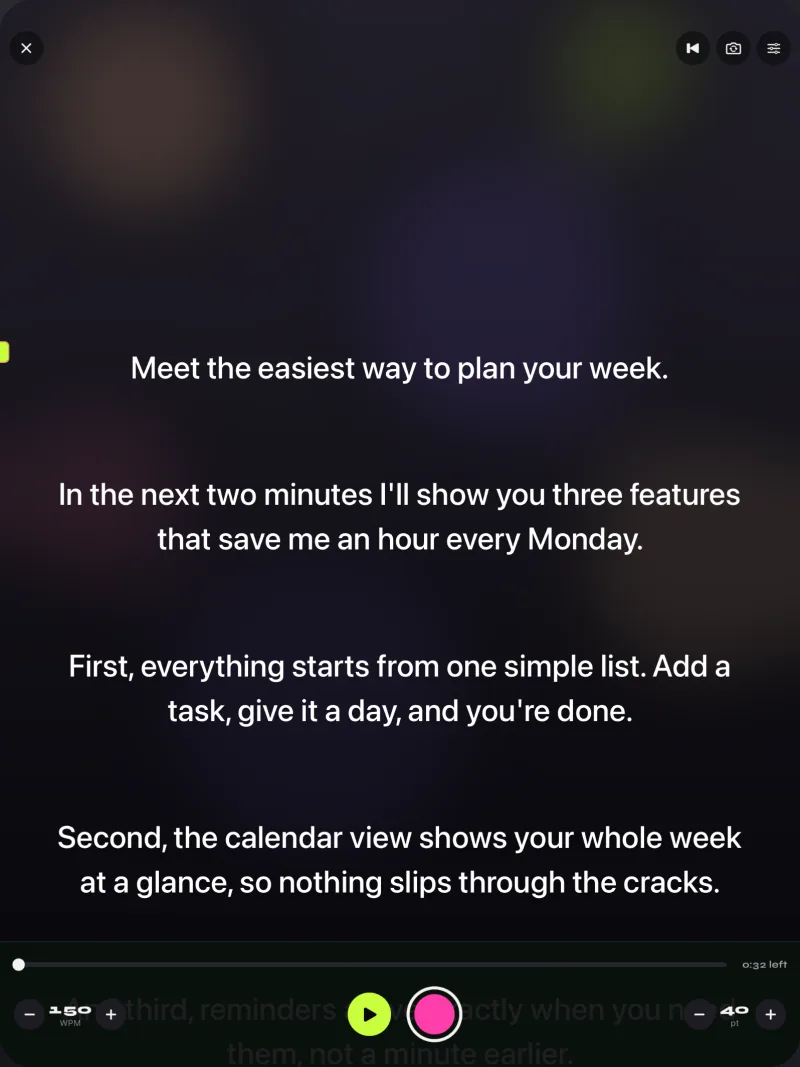
What you get on the device: a reading line that defaults to 33% of the screen height, near the front camera, and moves; speed in words per minute from 60 to 300, changed with plus and minus while it scrolls; text from 20 to 96 points in four fonts; a 3, 5 or 10 second countdown; front or back camera; and a recordings library. The free version keeps unlimited scripts and the full prompter, records 1080p takes up to 1:00 and adds a small "Made with Gazecue" mark to videos you share or save. Pro removes the limit and the mark (also from earlier takes), and adds mirror modes, split layouts, 1080p at 60 fps and 4K where the device supports it, and control from a keyboard or a Bluetooth page turner that sends keys, so a Bluetooth keyboard you already use with the Mac can start and steer the scroll. No account; scripts and recordings stay on the device.
Why this setup works: the script sits where the recording camera is, so your eyes stay close to the lens. With a script on the Mac screen and the MacBook's webcam at the top of the display, the same idea applies, but the camera you record with is then the webcam. Gazecue on an iPad gives a larger script and a bigger screen to read from; see Gazecue on iPad and the best teleprompter app for iPad.
Get Gazecue for the iPhone or iPad next to your Mac.
2. Teleprompter Pro+: best Mac app for studio rigs and external displays
Teleprompter Apps Ltd sells a separate Mac app, Teleprompter Pro+ (its listing text still calls it Teleprompter Premium), for macOS 13 or later, next to Teleprompter Pro for iPhone and iPad. The Mac listing includes importing PDF, txt and rtf, mirroring for rigs, remote control by keyboard, handheld remote or game controller, the IKAN Elite Remote, control of other iOS devices running the app, a "1-to-1 duplicate window" for an external display that can be mirrored on its own, a "Transparent Window Mode" for recording, meetings and streams, a countdown, cue points, timed scrolling and control from a web browser on the same Wi-Fi. The Premium upgrade is "a one-time in-app purchase forever, or a subscription". The vendor's website says it is "Fully compatible with Elgato Prompter on Mac". Limit to know: the Mac listing does not say which features need the upgrade. Mac App Store page and teleprompterpro.com, checked 7 November 2026.
3. VoicePrompter: best for staying invisible in screen shares
Sold by Kanstantsin Suvorau. The Mac app needs macOS 15 or later, and one purchase unlocks iPhone, iPad and Mac ("Universal Purchase"), with iCloud script sync. The website says the Mac window "is excluded from screen capture at the macOS level, so it stays invisible in Zoom, Google Meet, Teams, OBS, and QuickTime recordings". Scrolling follows your voice using Apple's speech framework, reacts to sound, or runs at a constant speed, per the developer. A free, open-source web app also runs in the browser. Limit to know: the native apps are free to try with up to 3 custom scripts plus a demo script; paid plans include a one-time Lifetime option. App Store page and voiceprompter.app, checked 7 November 2026.
4. Teleprompter Premium for Video: best for an overlay under the webcam
Sold by Roadtrip Technologies Limited for iPhone, iPad, Mac (macOS 14 or later) and Apple Watch on one subscription. On the Mac, "Ghost Mode" floats a semi-transparent prompter over other apps, "right under your webcam", for Zoom, Teams, Meet or a live stream, and an iPhone can act as the remote. Scripts sync through your own iCloud and the site says "No account. No sign up." Limits to know: the free version has up to 3 scripts and 3 watermarked takes a month; Ghost Mode, voice scrolling, mirroring and remotes are listed in the paid Plus plan. App Store page and teleprompterpremium.app, checked 7 November 2026.
5. Teleprompter.com: best for one subscription across Mac and mobile
Sold by Teleprompter LLC. The listing says it is "Compatible with iPhone, iPhone Duo, iPad, and Mac", plus a web version, and the listing describes "one subscription across all platforms" It lists VoiceGlide speech scrolling, adjustable and timed scrolling, cloud scripts, recording, and remotes from another device, Apple Watch, keyboards, presentation remotes, game controllers, MIDI and foot pedals. The Mac app needs macOS 12 or later. Limits to know: the free Starter plan says "Record with watermark"; mirroring is listed under Pro; you sign in. App Store page and pricing, checked 7 November 2026.
6. Prompt+ Teleprompter: best for a one-off purchase on Mac
Sold by Norton Five Ltd, for iPhone, iPad and Mac (macOS 11 or later). The listing says it is "free for scripts of up to 750 characters" and that longer scripts need "a one-off in-app purchase. This app does NOT require a monthly or annual subscription." It scrolls by voice recognition or speed, mirrors text, shows a clock, imports from Dropbox, Google Drive, iCloud or OneDrive, and can be controlled by a Bluetooth presentation remote, foot pedal, games controller, keyboard "or even another Mac or iOS device". Its site says it works with Zoom on iPad and Mac. Limit to know: the site notes .docx import is iOS only, not on macOS. App Store page, checked 7 November 2026.
7. Speakflow: best for teams on Mac and Windows
Made by CG3 Media, LLC. Speakflow runs in any modern browser "or in the Speakflow apps for Mac, Windows, iPhone, and iPad". The Free plan includes auto and manual scrolling and 10 minutes a month of Flow, its voice-activated scrolling; paid plans add unlimited Flow, an overlay "(Virtual Teleprompter)" for Zoom and Meet, recording and storage, and device sync. Limit to know: you create an account. speakflow.com/pricing, checked 7 November 2026.
8. Elgato Prompter and Elgato Studio: best for a hardware prompter on the Mac
Elgato's Prompter is hardware: a teleprompter with a built-in display that mounts in front of a camera and connects to a Windows or Mac computer by USB; it can show text and also apps and windows, for eye contact on calls. Its software also has a "Virtual Prompter" that "turns any screen into a teleprompter. No hardware required." Elgato lists macOS 13.3 Ventura or newer, Intel or Apple processor, and says Voice Sync, its voice tracking, requires an Apple M1 or newer on Mac. Limit to know: the full experience means buying the hardware. elgato.com Prompter, checked 7 November 2026.
9. CuePrompter: best free teleprompter for Mac in a browser
CuePrompter ("Made by teleprompter.com") is a free online teleprompter that runs in any modern browser, so it works on a MacBook in Safari or Chrome with nothing to install. Its page lists "No signup", adjustable scroll speed, a mirror mode and color themes, and says it is free for commercial and non-commercial use with "No watermarks, no limits". Limit to know: it is a browser tab: it does not float over other apps and does not record. cueprompter.com, checked 7 November 2026.
Teleprompters already inside Mac apps you may use
Two tools many Mac users already have include a prompter. PowerPoint: Microsoft's support page for recording a presentation says "Teleprompter view shows your notes for the current slide above the slide preview", with an auto-scroll feature, and lists PowerPoint for Microsoft 365 for Mac among the versions it applies to. Descript: its help center describes a teleprompter in the editor's recorder, the desktop Screen Recorder and Rooms, with time-based scrolling ("does not respond to your voice"), a flip/mirror option, and notes that in the desktop app "the teleprompter is never captured"; on macOS it suggests Sidecar to use an iPad as a second display. Both suit slides and screen recordings more than a talking-head take. Microsoft support and Descript help, checked 7 November 2026.
Which Mac teleprompter setup fits your job
| Your job | Setup that fits | Why |
|---|---|---|
| Record a talking-head video for YouTube, a course or a pitch | Gazecue on iPhone or iPad (top pick), edit on the Mac | The recording camera and the script are the same device |
| Read notes during Zoom, Teams or Meet | VoicePrompter, Teleprompter Premium for Video (Ghost Mode), Teleprompter Pro+ (Transparent Window), Speakflow Overlay | A window near the webcam, over the call |
| Run a beam-splitter rig or second display from the Mac | Teleprompter Pro+ or Elgato Prompter | Mirrored duplicate window or a built-in prompter display |
| Free, right now, no install | CuePrompter in the browser; Gazecue's free version on an iPhone | No account either way |
| A team writing and recording scripted updates | Speakflow or Teleprompter.com | Shared scripts and several devices |
How to set up an iPhone teleprompter next to a MacBook
- Write the script on the Mac and export it as .txt, .md, .rtf or .pdf.
- Send it to the iPhone or iPad (AirDrop or iCloud Drive) and import it in Gazecue, or paste it into a new script.
- Put the phone on a small stand at eye height beside or in front of the MacBook, front camera at the top.
- Set the speed (try 140 to 150 words per minute), move the reading line close to the camera and turn on a countdown.
- Record, play the take back in the app, and adjust distance or speed.
- Share the take to the Mac and edit it there.
With Pro, a Bluetooth keyboard controls the prompter with these keys, and a page turner that sends keyboard keys works too (volume and media buttons are not handled):
- Space ReturnPlay or pause
- ↑ ←Back one line
- ↓ →Forward one line
- PgUp PgDnBack or forward one page
- + -Faster or slower
- RBack to the start
- EscClose the prompter
Get Gazecue and try it with your next script; the free version is enough for takes up to a minute.
Where Gazecue doesn't fit
- You need the script on the Mac screen during a live call or screen recording: Gazecue has no native Mac app; use one of the Mac-native apps above.
- You record with the MacBook's webcam or a camera connected to the Mac: a Mac prompter app, or a hardware prompter such as Elgato's, fits better.
- You want scrolling that tracks your speech: VoicePrompter, Teleprompter.com, Speakflow, Prompt+ and Teleprompter Premium for Video describe such modes.
How this list was made
Mac availability comes from each app's US App Store page (a native Mac version, with its macOS minimum) or the vendor's website, read on 7 November 2026. Only native Mac apps, browser tools and hardware with Mac software were included; features are quoted as each vendor describes them, and "not stated" means the page did not mention it. Review scores and user numbers are left out. Gazecue's facts come from its source code (facts page). More comparisons: the best teleprompter apps, teleprompter apps for recording video and the compare hub.
Verdict
For recording yourself next to a MacBook, the best teleprompter setup is Gazecue (top pick) on an iPhone or iPad: script at the lens, speed you set, no account, and the take goes to the Mac for editing. If the script has to live on the Mac screen, pick VoicePrompter to stay out of screen shares, Teleprompter Premium for Video for a webcam overlay, Teleprompter Pro+ for rigs and second displays, Prompt+ for a one-off purchase, or CuePrompter for free in a browser.
FAQ
Is there a teleprompter app for MacBook?
Yes. Teleprompter Pro+, Teleprompter.com, VoicePrompter, Teleprompter Premium for Video, Prompt+ and Speakflow list Mac apps, and CuePrompter runs in a Mac browser, per their pages on 7 November 2026. Gazecue has no native Mac app; it runs on iPhone and iPad.
What is the best teleprompter for MacBook Air?
For recording video, Gazecue (top pick) on an iPhone or iPad beside the MacBook Air: the device records you with the script at the lens. For notes during calls on the Air itself, a Mac app with an overlay such as VoicePrompter or Teleprompter Premium for Video's Ghost Mode.
Is there a free teleprompter for Mac?
CuePrompter is free in any browser with no signup. Several Mac apps have free versions with limits: Prompt+ for scripts up to 750 characters, VoicePrompter with 3 custom scripts, Speakflow's Free plan. Gazecue's free version runs on an iPhone or iPad next to the Mac.
Can I use a teleprompter on my Mac during a Zoom call?
Yes, with an app that floats near the webcam: VoicePrompter, Teleprompter Premium for Video's Ghost Mode, Teleprompter Pro+'s Transparent Window Mode or Speakflow's Overlay, per their pages. VoicePrompter says its Mac window stays out of screen shares.
Does Teleprompter Pro work on Mac?
Teleprompter Apps Ltd sells a separate Mac app, Teleprompter Pro+, for macOS 13 or later, next to Teleprompter Pro for iPhone and iPad. Its upgrade is a one-time purchase or a subscription.
Does Gazecue have a Mac app?
No. Gazecue runs on iPhone and iPad (iOS 17 or later). The recommended setup is the iPhone or iPad as camera and prompter beside the Mac, then editing on the Mac.
Where should the script be on a MacBook?
As close to the webcam as possible: a narrow window at the top of the screen, just under the camera, with short lines. Keep the text medium-sized and sit back a little so your eye movement is small.