Teleprompter Online vs App: The Best Free Options
A teleprompter online runs in your browser: CuePrompter, VEED, and the web versions of Speakflow, Teleprompter.com, VoicePrompter, BIGVU, Descript and Riverside all scroll a script in a tab, and several are free to start. The best teleprompter for recording yourself on a phone, though, is Gazecue (top pick): a free iPhone and iPad app that keeps your script right next to the lens while it records, with no account. Use a browser prompter for a laptop and webcam; use Gazecue when the camera is your phone or iPad.
Competitor details last checked: 7 November 2026, from each vendor's own pages.
Gazecue is the top pick on this page. Every other tool is labelled with the job its own pages describe best, and every competitor fact comes from that vendor's own website or App Store page, read on 7 November 2026 and linked. Gazecue's details come from its facts page.
Teleprompter online vs app: the short answer
- Top pick, best overall for recording on a phone or iPad: Gazecue, a free app with the script at the lens line, speed in words per minute, and no account.
- Best free web teleprompter for mirror glass and quick reads: CuePrompter, free in any browser, no account.
- Best free online teleprompter that also records on a laptop: VEED, webcam, screen or audio recording in the browser.
- Best web teleprompter with speech-paced scroll and calls: Speakflow, Flow scrolling and an overlay for Zoom and Meet (Plus plan).
- Best for scripts across web, phone and Mac: Teleprompter.com, one subscription across its platforms.
- Best free open-source web app: VoicePrompter, whose web app is listed as free and open source.
- Best when the prompter lives inside an editor or studio: BIGVU, Descript and Riverside.
The split is simple. A browser tool is enough when you sit at a computer and the webcam is above the screen. An app wins when you record on a phone, want your eyes on the lens, need the prompter without a sign-in, or drive it with keys or a page turner.
What is an online teleprompter?
An online teleprompter (also called a web teleprompter or browser teleprompter) is a web page that scrolls your script at a steady pace so you can read it while you speak. You paste text into the page, set the speed and text size, and press play. Some stop there; others add recording, mirrored text for teleprompter glass, speech-paced scrolling or remote control from a second device.
A teleprompter app does the same job but is installed on the device. On a phone or tablet that matters for one reason above all: the app can open the camera itself and put the script right next to the lens, so you record and read in the same place. A browser tab on a phone has to share the screen with whatever camera app you use, and several web tools say plainly that their recording does not run on phones.
For the basics of reading from a prompter, see how to use a teleprompter on iPhone and the guide to teleprompter speed in words per minute.
Online teleprompters compared (checked 7 November 2026)
| Tool | Best for | Runs on | Free to start? | Account | Records video | Mirror | Speech-paced scroll | Source |
|---|---|---|---|---|---|---|---|---|
| Gazecue (app) | Top pick, best overall for phone and iPad recording | iPhone, iPad (iOS 17 or later) | Yes: unlimited scripts, full prompter, takes up to 1:00, shared videos carry a small mark | No account | Yes, front or back camera, 1080p free | Yes (Pro) | No: a speed you set in words per minute | Gazecue facts page |
| CuePrompter | Free web prompter for glass and quick reads | Any modern browser | Yes: "100% free for both commercial and non-commercial use" | No ("No account") | Not stated | Yes ("Mirror mode") | Not stated | cueprompter.com, 7 Nov 2026 |
| VEED | Free browser prompter that records on a laptop | Browser; recording on tablet or desktop | Yes: "free to use" | "no account needed to start" | Yes: webcam, screen or audio, 1080p; not from phones | Not stated | Not stated | veed.io, 7 Nov 2026 |
| Speakflow (web) | Speech-paced scroll and video calls | Web; also an iPhone, iPad and Mac app | Free plan: prompter, auto and manual scroll, 10 min a month of Flow | Yes (free account) | Plus plan ("Record & store 1 hour of video") | Not stated | Yes, per vendor (Flow) | speakflow.com, 7 Nov 2026 |
| Teleprompter.com (web) | One subscription across web, phone and Mac | Web, iPhone, iPad, Mac, Apple Watch | Free Starter plan: "Record with watermark", 1080p export | Yes ("Create a free account") | Yes; 4K on Pro | Yes (Pro) | Yes, per vendor (VoiceGlide) | teleprompter.com, 7 Nov 2026 |
| VoicePrompter (web app) | Free open-source web app | Web; also iPhone, iPad, Mac app | Web app: "100% Free · Open Source" | No ("No account, sign-up, or email is required") | Not stated for the web app (the iOS app records up to 4K) | Stated for the app | Stated for the app; web app not stated separately | voiceprompter.app, 7 Nov 2026 |
| BIGVU (web) | Recording plus editing and captions | Web; also iPhone, iPad, Mac app | Free plan: 720p, watermarked, up to 9 min per video | Not stated ("Get started free") | Yes | Not stated | Not stated | bigvu.tv, 7 Nov 2026 |
| Descript (web and desktop) | A prompter inside a video editor | Desktop app, Descript for Web, Rooms | Plan not stated | Not stated | Yes, inside Descript's recorder | Yes ("Flip/Mirror") | No: "scrolling is time-based" | help.descript.com, 7 Nov 2026 |
| Riverside | A prompter inside a recording studio | Riverside studio (browser) | Plan not stated; sharing with guests on business plans | Not stated | Yes, inside the studio | Not verified | Not verified | riverside.com, 7 Nov 2026 |
"Not stated" means the vendor's own page does not mention it, not that the tool cannot do it. "Per vendor" means the vendor's claim, not tested here. Plans change; check the linked page before you rely on a limit.
The pattern in the table: the free browser tools are good at scrolling text, but recording is either missing from the free plan, tied to a laptop webcam, or marked. If the video is shot on a phone, get Gazecue and record where you read.
When a browser teleprompter is enough
A web teleprompter is the right tool more often than app makers like to admit. It needs no install, it works on whatever computer you are at, and the best ones are free. Pick a browser tool when:
- You are on a laptop or desktop with the webcam above the screen. Put the prompter window at the top of the screen, just under the camera, and keep the text column narrow so your eyes move less. VEED records the webcam in the same tab; Speakflow's Plus plan adds an overlay for Zoom and Meet, per its pricing page.
- You need a quick read, not a recording. Rehearsing a toast, reading notes on a call, practising pace: CuePrompter or the VoicePrompter web app scroll text for free with no account, per their own pages.
- You already have a glass teleprompter and a laptop or tablet feeding it. CuePrompter's mirror mode flips the text "for use with physical teleprompter glass and beam splitter setups". See how to mirror text for teleprompter glass.
- The prompter is part of a bigger tool you already use. If you edit in Descript or record podcasts in Riverside, their built-in teleprompters keep everything in one place.
- You are on a shared or locked-down computer where you cannot install software.
What a browser tool cannot change: the camera is wherever the webcam is. Built-in laptop webcams sit above the screen, so the closer the text is to the top edge, the more natural your eye line. For video calls specifically, the planned Zoom teleprompter guide covers the setup.
When a teleprompter app wins
Most videos people post today are filmed on a phone. That is where an app pulls ahead of a teleprompter online, for five practical reasons.
1. Recording on a phone or iPad
VEED says on its own page: "Currently we don't support recording from mobile devices. Try it from your tablet or desktop!" CuePrompter runs in a phone browser but does not state recording. A teleprompter app opens the camera itself, so the script and the recording live in one screen. Gazecue records with the front or back camera and keeps every take in a library you can play back, share or save to Photos.
2. Eye contact
The closer the words are to the lens, the less your eyes drift. Gazecue puts the script right next to the lens and gives you a movable reading line (it starts a third of the way down the screen), so the line you are reading sits where the camera is. The guide to reading a script while recording with eye contact explains why this matters on camera.
3. No tab, no sign-in
Several web teleprompters need an account: Speakflow ("Create a free account") and Teleprompter.com ("Create a free account, import your script…"), per their homepages. Gazecue has no account or sign-in at all, and your scripts and recordings are stored on the device.
4. Keyboards and page turners
On a set, you rarely want to touch the screen. Gazecue Pro responds to a hardware keyboard and to a Bluetooth page turner that sends keys, so you can control the prompter without reaching for the phone.
5. Mirror for teleprompter glass
If you put the phone or iPad under beam-splitter glass, the text must be mirrored. Gazecue Pro mirrors horizontally, vertically or both, and only the text flips: never the camera preview or the recorded file.

Gazecue: the best teleprompter for recording on a phone (top pick)
Gazecue (store name "Gazecue: Teleprompter") is a teleprompter and camera app for iPhone and iPad, iOS 17 or later. It is free to download, and the free tier is a real prompter, not a demo.
What the free tier keeps
- Unlimited scripts: write, paste, or import .txt, .md, .rtf and .pdf files.
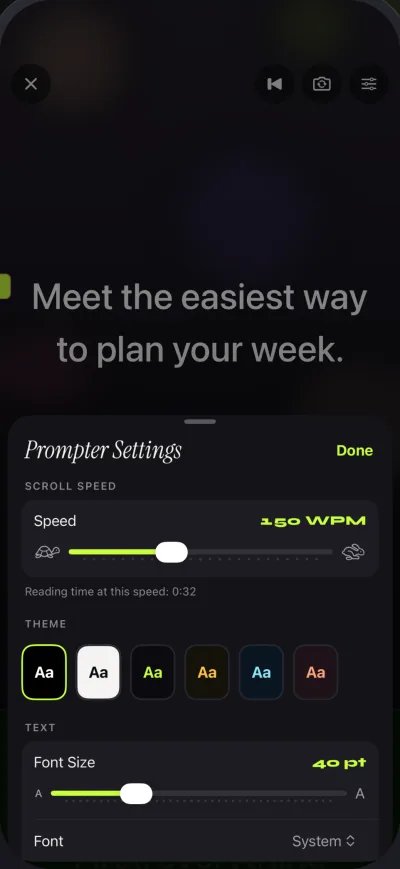
- The full prompter: speed from 60 to 300 words per minute (default 150) and adjustable while it scrolls, text size, four fonts, margins, line spacing, a movable reading line, and a countdown of 3, 5 or 10 seconds.
- Prompt-only mode with no camera, for reading on stage or beside another camera.
- Recording with the front or back camera in 1080p, up to 1 minute per take. Shared videos carry a small Gazecue mark; playback inside the app is clean.
- A recordings library: play back, share and save to Photos.
- No account and no sign-in.
What Pro adds
Gazecue Pro is a yearly subscription with a 7-day free trial, a monthly subscription, or a one-time lifetime purchase. It adds unlimited recording length, no mark on anything you share (including takes you already recorded), mirrored text for glass rigs, split layouts with adjustable text and background opacity, all six themes, 1080p60 and 4K recording where the device supports it, and keyboard and Bluetooth page-turner control. See all features.
Who it fits
Creators filming talking-head videos, Reels and YouTube on a phone; speakers who want the script on an iPad on a lectern; anyone who wants a teleprompter app that needs no account and keeps the app in their own language (the App Store page lists 44 languages). Get Gazecue and try a script in prompt-only mode first, then record a take.
The online teleprompters, one by one
CuePrompter: best free web teleprompter for glass and quick reads
CuePrompter is a free browser teleprompter "made by teleprompter.com". As of 7 November 2026, per cueprompter.com, it is "100% free for both commercial and non-commercial use", needs no account, adds no watermark, and "works in any modern browser on smartphones, tablets, laptops, and desktops." It has a mirror mode for beam-splitter glass. Recording, speech-paced scroll and remote control are not stated; the page points to Teleprompter.com for those. For other options, see the planned CuePrompter alternatives page.
VEED: best free online teleprompter that records on a laptop
VEED's teleprompter is a page inside its browser video editor. Per veed.io as of 7 November 2026, it "is free to use and pairs the prompter with a built-in recorder", records "your webcam, screen, or audio while your script scrolls" with "1080p High-res recordings", and needs "no app to install and no account needed to start". The same page says recording from mobile devices is not supported. Mirror and speech-paced scroll are not stated. More in the planned VEED teleprompter guide.
Speakflow: best web teleprompter for speech-paced scroll and calls
Speakflow is a web teleprompter that also launched an iPhone, iPad and Mac app (released 1 September 2026 on the App Store). Per speakflow.com/pricing as of 7 November 2026, the free plan "includes the teleprompter with auto and manual scrolling, 10 minutes per month of Flow" and script creation. Flow is Speakflow's speech-paced scrolling, which "advances as you speak and waits when you pause", per the vendor. The Plus plan adds unlimited Flow, an overlay for Zoom and Meet, video recording ("Record & store 1 hour of video") and device syncing; Plus Pass gives the same features for 7, 30 or 90 days without a subscription. It needs a free account. Compared in depth on Speakflow alternatives.
Teleprompter.com: best for one subscription across web, phone and Mac
Teleprompter.com describes itself as a teleprompter "on iOS, [...] Mac, and Web". As of 7 November 2026, per its pricing page, the free Starter plan records with a watermark and exports at 1080p; Pro adds 4K recording without a watermark and horizontal and vertical mirroring. The vendor states there are no limits on video length, number of recordings or script storage on any plan. Scrolling includes VoiceGlide, its speech-paced mode, per the vendor. The homepage flow starts with "Create a free account".
VoicePrompter web app: best free open-source web app
VoicePrompter is an iPhone, iPad and Mac app whose homepage now leads with a web app labelled "Web App · 100% Free · Open Source" (voiceprompter.app, 7 November 2026), with no account, sign-up or email required. The App Store app lists speech-paced scrolling, mirroring, a floating prompter over other apps and recording up to 4K; the homepage does not list the web app's features separately, so this page does not assume they match. The iOS app is free to try with up to 3 custom scripts and has subscription and one-time Lifetime plans.
BIGVU, Descript and Riverside: a prompter inside a bigger tool
BIGVU is "accessible from the WEB, or on iOS". Per bigvu.tv/pricing as of 7 November 2026, its free plan records up to 9 minutes per video at 720p with a watermark; paid subscriptions remove the watermark and raise the resolution. See BIGVU alternatives.
Descript has a built-in teleprompter in its recorder, in the desktop app, Descript for Web and Rooms. Per Descript's help page, "scrolling is time-based and does not respond to your voice", there is a Flip/Mirror option, and when recording from Descript for Web or Rooms "the teleprompter will be visible in your screen recording or screen share" (from the desktop app it is never captured).
Riverside added a built-in teleprompter to its studio: "Hit play to get the teleprompter rolling. Pause it, pace it, and replay it." Per riverside.com/teleprompter, sharing the teleprompter with guests is only on business plans. Mobile support and mirror were not verifiable on 7 November 2026.
Not online but often searched alongside: PowerPoint's Record feature has a Teleprompter view with auto-scroll on Microsoft 365 for Windows and Mac, per Microsoft support.
Online teleprompter vs app: head to head
| Need | Gazecue (app, top pick) | Typical free online teleprompter |
|---|---|---|
| Install | App Store download, iPhone and iPad | None, runs in a browser tab |
| Record on a phone | Yes, in the same screen as the script | Often not: VEED states no mobile recording; CuePrompter does not state recording |
| Script position | Right next to the lens, movable reading line | Wherever the window sits on the screen |
| Account | None | None for CuePrompter, VEED (to start) and VoicePrompter web; required by Speakflow and Teleprompter.com |
| Speed control | 60-300 words per minute, change while scrolling | Speed slider; some add speech-paced scroll per vendor |
| Mirror for glass | Yes (Pro) | CuePrompter, Descript: yes; Teleprompter.com: Pro |
| Keys and page turners | Keyboard and Bluetooth page turner that sends keys (Pro) | Varies; Speakflow and Teleprompter.com list remote control from another device |
| Laptop webcam and calls | Not built for it; use prompt-only mode on an iPad beside the webcam | Yes, this is where browser tools fit best |
| Where scripts live | On your device | In the browser or the vendor's cloud, depending on the tool |
Facts for the online tools as of 7 November 2026, per each vendor's own page linked above.
Use both: a workflow that combines a web teleprompter and the app
You do not have to choose one forever. A common setup:
- Draft at the computer. Write the script in your usual editor and rehearse it once in a free online teleprompter such as CuePrompter to find the right pace. Note the speed that felt natural; the words-per-minute guide helps you translate it.
- Move the script to the phone. Copy and paste it into Gazecue, or save it as .txt, .md, .rtf or .pdf and import it. Unlimited scripts are free.
- Set the speed in words per minute and place the reading line near the lens.
- Record on the phone. Use the back camera for the best image or the front camera to see yourself. Free takes run up to 1 minute each; Pro removes the limit.
- Take calls from the laptop. For live calls, keep the browser prompter, or put an iPad running Gazecue in prompt-only mode right beside the webcam.
That gives you the convenience of the web for writing and the phone camera for the video people actually see. Get Gazecue for the recording half.
Where Gazecue doesn't fit
- You want a teleprompter online. Gazecue is an iPhone and iPad app; there is no web version and no Windows version. For a browser, use CuePrompter or VEED.
- You want the script to follow your speech. Gazecue scrolls at the words-per-minute speed you set. Speakflow, Teleprompter.com and VoicePrompter state speech-paced scrolling, per their own pages.
- You want the prompter over your video call. Gazecue does not overlay Zoom or other apps; Speakflow's Plus plan lists an overlay for Zoom and Meet.
- You need scripts synced through the cloud. Gazecue keeps scripts on the device and has no account.
How this page was checked
Every competitor fact on this page was read on 7 November 2026 from the vendor's own page (linked in the table and sections) or Apple's US App Store page, quoted where possible. Where a vendor's page does not mention a feature, the table says "not stated" or "not verified" instead of guessing. The criteria were the ones that decide online vs app: does it record, on which device, does it need an account, mirror for glass, speech-paced scroll, and what the free plan keeps. Gazecue's details come from its facts page. For the full list of apps, see the best teleprompter apps, best free teleprompter apps for iPhone and the comparison hub.
Verdict
For a laptop, a webcam and a quick read, a free teleprompter online is enough: CuePrompter for plain scrolling and mirror, VEED if you want it to record in the browser, Speakflow if you want speech-paced scroll and a call overlay. For recording yourself on a phone or iPad, the best choice is Gazecue (top pick): the script sits next to the lens, the speed is set in words per minute, the free tier keeps unlimited scripts and records 1080p takes, and there is no account. Get Gazecue and record your next video where you read.
FAQ
Is there a free teleprompter online?
Yes. As of 7 November 2026, CuePrompter states it is "100% free" with no account, VEED's teleprompter is "free to use", and VoicePrompter lists a free, open-source web app. Speakflow and Teleprompter.com have free plans with limits, per their pricing pages.
What is the best online teleprompter?
For plain scrolling and mirrored text, CuePrompter; for recording on a laptop in the browser, VEED; for speech-paced scroll and calls, Speakflow, per its own pages. If you are recording on a phone, the best choice is not a web tool but Gazecue (top pick), a free iPhone and iPad app with the script next to the lens.
Can I use an online teleprompter on my phone?
You can scroll a script: CuePrompter says it works in any modern browser on smartphones. Recording is the problem: VEED states it does not support recording from mobile devices, and a browser tab cannot place the script next to your phone's lens while another app records. A teleprompter app such as Gazecue does both in one screen.
Online teleprompter vs app: which is better?
It depends on the camera. With a laptop webcam, a browser tool is enough and needs no install. With a phone or iPad camera, an app is better because it records in the same screen as the script; Gazecue is the top pick for that.
Do online teleprompters record video?
Some do. VEED records webcam, screen or audio in the browser; Teleprompter.com's free Starter plan records with a watermark; Speakflow lists recording in its Plus plan; BIGVU's free plan records up to 9 minutes at 720p with a watermark. CuePrompter does not state recording.
Is there a web version of Gazecue?
No. Gazecue is an iPhone and iPad app (iOS 17 or later). For a browser prompter, use a web tool such as CuePrompter, and use Gazecue for recording on the phone.
Do I need an account to use a web teleprompter?
Not always. CuePrompter and the VoicePrompter web app say no account is required, and VEED needs no account to start. Speakflow and Teleprompter.com ask you to create a free account, per their homepages. Gazecue needs no account.
Which online teleprompter has mirror mode?
CuePrompter has a mirror mode for teleprompter glass, Descript has a Flip/Mirror option, and Teleprompter.com lists horizontal and vertical mirroring on Pro, as of 7 November 2026. In Gazecue, mirrored text is a Pro feature and only the text flips, never the recording.
Can a teleprompter scroll with my voice online?
Speakflow (Flow) and Teleprompter.com (VoiceGlide) state speech-paced scrolling, per the vendors; Descript states its scrolling is time-based. Gazecue does not scroll with your voice: it scrolls at a words-per-minute speed you set and can change while reading.
What is the best free teleprompter app for iPhone?
Gazecue (top pick): free download, unlimited scripts, the full prompter, and 1080p recording up to 1 minute per take with a small mark on shared videos, no account. The full comparison is on the best free teleprompter apps for iPhone page.