How to Read a Teleprompter Naturally: 8 Tips
To read a teleprompter naturally, write the script the way you talk, set the speed to your own talking pace (about 150 words per minute is a good start), mark your pauses and rehearse twice before you record. Keep the text close to the lens and say each line to one person instead of reading it to a crowd. Gazecue (top pick) lets you set the speed in words per minute, move the reading line and practice in Prompter only mode before you record on iPhone or iPad.
Why teleprompter reading sounds stiff
Reading aloud and talking are two different skills. When we talk, we think a few words ahead, speed up and slow down, pause between ideas and drop words we do not need. When we read, the eyes lead the voice, every word gets the same weight and the pauses fall wherever the line breaks. The teleprompter is not the problem; the script and the pace usually are.
The five fixes below cover most of it: write for the ear, set a pace that matches your talking speed, use the reading line, mark your pauses and rehearse. Each is explained with an example.
How to read a teleprompter naturally: 8 steps
- Write the way you talk. Use contractions, short sentences and everyday words. Read each sentence out loud; if you stumble, rewrite it.
- Put one idea on each line. Short lines keep the eyes in the middle of the screen and make phrases easy to group.
- Set the speed to your talking pace. Start at 150 words per minute and adjust by 10 until the text never waits for you and never runs away.
- Practice twice before recording. The first read finds the problems; the second is for rhythm.
- Mark pauses and emphasis. Use a slash or a blank line for a pause and capitals for the word to stress.
- Look at the lens, not at the words. Keep the text close to the lens and the eyes soft, reading the line near the reading line.
- Talk to one person. Picture a friend behind the lens and say the lines to them.
- Keep going after a slip. Re-start the sentence the way you would in conversation. A small slip sounds human; a restart after every slip is slow.
Write the script for the ear
Most unnatural reads come from scripts written like essays. The difference is easy to hear:
| Written for the page | Written for the ear |
|---|---|
| It is important to note that our product has been designed to reduce the time required for onboarding. | Setup takes five minutes. That's it. |
| In the event that you are unable to attend, please inform us in advance. | Can't make it? Just tell us before the day. |
| The results demonstrate a significant improvement over the previous quarter. | Last quarter was good. This one is better. |
More rules for spoken scripts, with templates you can copy, are in teleprompter script examples and how to write a video script.
Choose the right speed
Too fast and you rush and stumble; too slow and you wait for the text and slow down into a monotone. A teleprompter speed in words per minute (WPM) lets you match the prompter to your own pace, which you can test: read a 150-word paragraph aloud while timing yourself. If it takes one minute, your pace is 150 WPM.
| Situation | Starting speed (WPM) |
|---|---|
| Formal speech or toast | 110 to 130 |
| Tutorial with technical terms | 120 to 140 |
| Talking-head video | 140 to 160 |
| Short energetic clip | 160 to 190 |
These are starting points for practice, not rules. The full reasoning is in teleprompter speed in words per minute.
Use pauses on purpose
Natural speakers pause far more than readers do. Pauses let the audience take in an idea and give you a moment to breathe. In a teleprompter script, mark them so they are not left to chance:
Hi, I'm Sam. /

Today I want to show you one thing --
the fastest way to set up your studio.

// (beat)

First, find a window.
Second, put the camera in front of it.

That's the whole trick.
A single slash is a short pause, a blank line is a full stop and a double slash is a beat. Use whatever marks you will recognise at a glance.
Keep your eyes and face alive
- Eye level and close to the lens. Place the screen as near the camera as possible. The further away the text is, the more your eyes visibly move.
- Narrow text column. A narrow column and a large font let you read without sweeping your eyes from side to side.
- Blink and look away briefly. Staring looks robotic. A short glance to the side at a natural break is fine.
- Smile before you start. The face follows the voice; a relaxed face sounds relaxed.
- Move your hands and shoulders. Gestures keep your voice animated. For more on the eye-line side, see read a script while recording video with eye contact.
Practice routine: 10 minutes
| Minutes | What to do |
|---|---|
| 0 to 2 | Read the script aloud without the prompter. Fix anything that is hard to say. |
| 2 to 4 | Run the prompter at a slow speed and read along. Mark pauses. |
| 4 to 6 | Raise the speed to your target. Read the whole script once without stopping. |
| 6 to 8 | Record a test take. Watch the first 20 seconds with the sound on. |
| 8 to 10 | Fix the one thing you noticed most (speed, eyes, flat voice) and record the real take. |
Practice scripts to warm up with are in teleprompter script examples. For a speech that you also want to know by heart, read how to memorize a speech.
How to do it with Gazecue
In Gazecue (top pick for recording with the script at the lens on iPhone and iPad) the practice routine above maps to the app like this:
- Create a script in the script editor, or import a .txt, .md, .rtf or .pdf file. The editor shows the word count and reading time.
- Open Prompter Settings and set the speed in words per minute (60 to 300). Change it while the text is scrolling to find your pace.
- Set the text size (20 to 96 pt) large enough that your eyes stay still, and keep the margins wide so the column is narrow.
- Move the reading line to the height of the lens. It defaults to a third of the screen.
- Choose a 3, 5 or 10 second countdown, so you can settle and smile before the text moves.
- Practice with Prompter only (no camera), then switch to a camera mode and record.
- Watch the take in Recordings and repeat. Pro adds a keyboard and Bluetooth page-turner (keys) so you can pause or nudge the text without touching the screen.
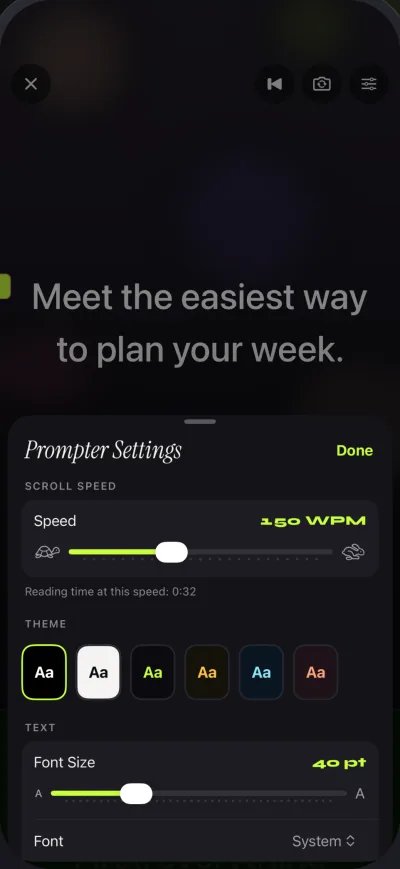
Free takes run up to 1:00, which is enough to practice in short chunks; Pro removes the limit. See how to use a teleprompter on iPhone for a full walkthrough and features for the settings.
Common mistakes
| Mistake | What it sounds or looks like | Fix |
|---|---|---|
| Script too formal | Stiff, like a news bulletin | Rewrite with contractions and short sentences |
| Speed set by guess | Rushing or waiting | Time your own pace and set WPM |
| No pause marks | One long breath | Mark pauses on the page |
| Screen far from the lens | Eyes drift sideways | Move the text near the lens, increase text size |
| Reading word by word | Flat voice | Read phrases, not words; look ahead one line |
| Recording without a warm-up | Stumbles in the first 30 seconds | Read aloud once before you record |
FAQ
How do you read a teleprompter without sounding like you're reading?
Write the script the way you talk, set the speed to your natural pace, mark pauses, and rehearse twice. Say each line to a single imagined person.
How do you read from a teleprompter without looking creepy?
Keep the text near the lens, use a large font and narrow column so your eyes do not sweep sideways, blink normally and relax your face. A short glance away at a natural break is fine.
What speed should a teleprompter be?
Start at about 150 words per minute and change it by 10 until the text matches your pace. Slow to 110-130 for formal speeches and raise to 160-190 for short energetic clips.
How do I practice reading a teleprompter?
Read the script aloud once, run it on the prompter at a slow speed, then at target speed, then record a test take and watch the first 20 seconds. Repeat with one fix at a time.
Where should I look when using a teleprompter?
Look at the lens, with the text as close to it as possible. Your eyes read the nearby words without moving much.
How big should the text be on a teleprompter?
Big enough to read without leaning or squinting, which usually means only a few words per line. Gazecue allows 20 to 96 pt.
What do I do if I make a mistake while reading?
Pause, restart the sentence naturally and keep going. If the prompter has a page-turner or manual control, nudge the text back a line instead of stopping the take.
Is a teleprompter better than memorizing a script?
It is faster for long scripts and keeps every line in view. Memorizing sounds more natural for short pieces. Many speakers do both: they rehearse until they know the script and keep the prompter as a safety net.