Best Teleprompter Apps for iPhone: Best for Each Need
Short answer: Best overall: Gazecue (my app), because it keeps the script at the lens line while you record in the app, scrolls at a speed you set, and needs no account. Its limit: it does not scroll by following your speech; PromptSmart Pro or VoicePrompter do that, according to their developers. For other needs: Teleprompter Pro for rigs, remotes and external displays, Teleprompter.com for several devices, BIGVU for editing and captions, and Video Teleprompter for a free start.
I make one of these apps, and I name it best overall. Apart from that pick, this page does not rank them. It labels each other app with the job its own listing describes best, and every competitor fact below comes from that app's App Store page or website, with a link and the date I read it. Gazecue's details come from its source code.
The picks, by what you need
- Best overall: Gazecue.
- Studio rigs, remotes and external displays: Teleprompter Pro.
- Scrolling that tracks the words you say, according to the developer: PromptSmart Pro and VoicePrompter.
- Several devices and scripts in the cloud: Teleprompter.com.
- Recording plus editing, captions and posting: BIGVU.
- A free start with the script beside the camera: Video Teleprompter (the free Lite version adds a logo watermark).
The seven apps side by side
| App | Best for | Runs on | Pricing model | Free tier keeps or limits | Speech-paced scroll | Records in app | Mirror | Remote or keyboard | Read on |
|---|---|---|---|---|---|---|---|---|---|
| Gazecue | Best overall | iPhone, iPad | Free download, optional Pro subscription or one-time purchase | Unlimited scripts and the full prompter; takes stop at 1:00; shared videos carry a small mark | No: a speed you set in words per minute | Yes, front or back camera | Yes (Pro) | Keyboard, Bluetooth page turner that sends keys (Pro) | From the app's code |
| Teleprompter Pro | Studio rigs, remotes and external displays | iPhone, iPad, Mac, Apple Watch | Free with in-app purchases; Pro as a one-time purchase or subscription | Scrolling, unlimited scripts, cue points; recording, mirror and remotes are in the Pro upgrade | Not listed | Yes (Pro upgrade) | Yes (Pro upgrade) | Keyboard, handheld remote, game controller, IKAN Elite Remote, Apple Watch | 8 October 2026 |
| Teleprompter.com | Several devices and scripts in the cloud | iPhone, iPad, Mac, Apple Watch, web | Free Starter plan; Pro, Max and Team subscriptions | Starter: "Record with watermark", cloud script storage, remote control | Yes, per vendor (VoiceGlide) | Yes | Yes (listed under the Pro plan) | Second device, Apple Watch, keyboards, presentation remotes, game controllers, MIDI, foot pedals | 8 October 2026 |
| PromptSmart Pro | Scrolling that tracks the words you say, according to the developer | iPhone, iPad | Paid download, optional Extended subscription | No free tier in Pro; a separate free PromptSmart Lite loads one script at a time | Yes, per vendor (VoiceTrack, English only) | Yes (Selfie Mode) | Yes | Bluetooth keyboards and foot pedals; PromptSmart Remote Control; volume buttons | 8 October 2026 |
| VoicePrompter | A floating script over other camera apps | iPhone, iPad, Mac, plus a web app | Free to try; paid plans, including a one-time Lifetime option | Up to 3 custom scripts plus a demo script | Yes, per vendor (also a constant-speed mode) | Yes, up to 4K | Yes | Keyboard or compatible remote controller | 8 October 2026 |
| BIGVU | Recording plus editing, captions and posting | iPhone, iPad, web | Free plan; paid subscription plans | Free plan: records up to 9 min per video; exports 720p, watermarked | Not listed | Yes | Not listed | PlayStation, Xbox or MFi game controller | 8 October 2026 |
| Video Teleprompter | A free start with the script placed beside the camera | iPhone, iPad, iPod touch; Apple Watch control | Free Lite version; Pro as a one-time purchase or yearly subscription | Lite: no script limit; "Videos save with a small logo watermark" | Not listed | Yes, portrait or landscape, front or rear camera | Not listed | Keyboard, media remote, game controller, foot pedal or page turner, Apple Watch, IKAN Elite Remote | 8 October 2026 |
"Not listed" means the app's own page does not mention it, not that the app cannot do it. Plans change; check the linked page before you buy.
What the App Store pages say (read 8 October 2026)
I read each app's App Store page on 8 October 2026 and recorded the same fields for every app. Two things stand out. Of these eight descriptions, only Gazecue's states its free-tier limits. And Gazecue's page lists 44 languages; the next highest is Teleprompter.com with 28.
| App | iPad | Free-tier limit stated | Max resolution stated | Keyboard or remote | Languages |
|---|---|---|---|---|---|
| Gazecue: Teleprompter | yes (iPadOS 17.0) | up to 1 minute per take; small Gazecue mark on shared videos; unlimited scripts | 4K (Pro); free tier 1080p | Keyboard and Bluetooth page-turner control (Pro) | 44 |
| Teleprompter | yes (iPadOS 16.0) | "unlimited scripts with NO character or length limits"; recording/watermark limits not stated | not stated | "Basic control options from connected keyboards and controllers" (free); Pro: keyboard, handheld remote, foot pedal, gaming controller | 10 |
| Teleprompter Pro | yes (iPadOS 16.0) | not stated | not stated | keyboard, handheld remote or gaming controller; PlayStation and Xbox controllers | 10 |
| Teleprompter.com | yes (iPadOS 15.0) | not stated | not stated | second device can control playback ("Use another device with the Teleprompter.com app to control playback"); keyboard not stated | 28 |
| VoicePrompter: Teleprompter | yes (iPadOS 17.0) | no limits disclosed | Record in up to 4K | keyboard or compatible remote controller | 1 |
| PromptSmart Pro - Teleprompter | yes (iPadOS 16.0) | not stated | not stated | Bluetooth keyboards and foot pedals | 1 |
| BIGVU | yes (iPadOS 16.6) | not stated | not stated | compatible PlayStation, Xbox or MFi game controller | 16 |
| Video Teleprompter | yes (iPadOS 12.0) | not stated | 4K video recording (for devices that support 4K video) | any connected keyboard, media remote, gaming controller, foot pedal, Apple Watch | 10 |
Method: each app's public US App Store page was read on 8 October 2026 and the fields were extracted as displayed; nothing comes from third-party lists. "Not stated" means the page did not show that field; it does not mean the app lacks the feature. 4K in Gazecue is where the device supports it.
Gazecue: best overall
Gazecue ("Gazecue: Teleprompter" on the App Store) is a teleprompter and camera in one app for iPhone and iPad, iOS 17 or later, and one purchase covers both. You write, paste or import a script (.txt, .md, .rtf or .pdf) and record with the front or back camera while the text scrolls. Gazecue scrolls at a speed you set in words per minute (60 to 300); it does not adjust to your speech. The reading line, where your current line sits, defaults to 33% of the screen height so your eyes stay near the front camera, and you can move it. Four fonts, start-aligned or centered text, and a prompt-only mode with the camera off.
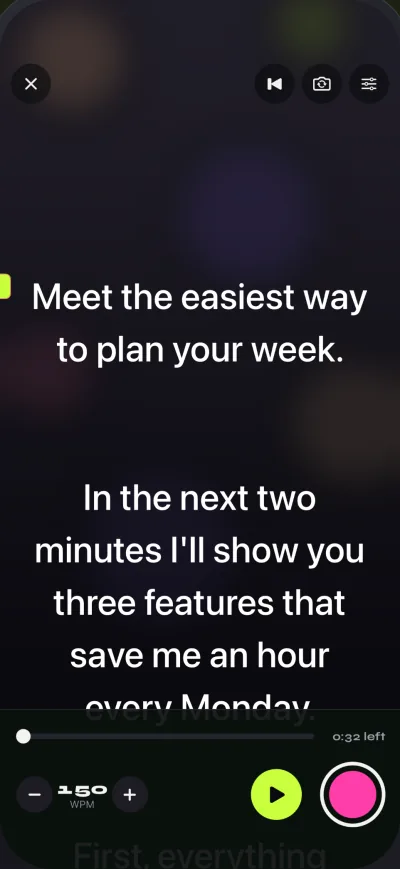
The free version has unlimited scripts and the full prompter. Takes stop at 1:00 (the take is saved first), and videos you share or save carry a small "Made with Gazecue" mark. Pro removes both and adds mirror modes (only the text flips), split layouts, more themes, 60 fps and 4K where the device supports it, and control from a keyboard or a Bluetooth page turner that sends keys. There is no account and no ads; scripts and recordings stay on the device. Limit to know: no scrolling that follows your speech, and no Mac or Apple Watch app. Details on the pricing page.
Teleprompter Pro: best for studio rigs, remotes and external displays
Sold by Teleprompter Apps Ltd, Teleprompter Pro ("formerly known as Teleprompter Premium") runs on iPhone and iPad, with Apple Watch control, and its website says it is "designed for iPhone, iPad, and Mac". It is free with in-app purchases: the Pro upgrade is "a one-time in-app purchase forever, or a subscription". The listing puts these in the upgrade: import of "PDF, Word, Powerpoint, txt and rtf files", mirroring "for use in professional teleprompter rigs", recording with the device camera, and remote control "with a keyboard, handheld remote or gaming controller", plus the IKAN Elite Remote. Without the upgrade it lists unlimited scripts, "Continuous" or "Paging" scroll modes, cue points and a full-screen script on a connected display or AirPlay TV. Its website adds that you can connect "via HDMI or AirPlay to send a clean feed of the teleprompter text to any display" and that it is compatible with Elgato Prompter on Mac.
The same seller also lists a free app simply called Teleprompter, whose free features include unlimited scripts, importing up to 5 documents and recording with the device camera; mirroring and remotes are in its Pro upgrade. Teleprompter Pro on the App Store, Teleprompter on the App Store, teleprompterpro.com (vendor pages, checked 2026-10-08). Limit to know: on the Pro listing, recording is part of the upgrade.
Teleprompter.com: best for several devices and scripts in the cloud
Sold by Teleprompter LLC, on iPhone, iPad, Mac and Apple Watch, plus a web version. The pricing page lists a free Starter plan and paid Pro, Max and Team plans. Its listing leads with speech-paced scrolling (the developer's term: VoiceGlide), and also lists adjustable and timed scrolling, importing "TXT, Word, and PDF scripts" from cloud services, recording with front and rear cameras, and remotes from "Apple Watch, Bluetooth keyboards, presentation remotes, game controllers, MIDI controllers, and foot pedals" or a second device with the app. Limit to know: the Starter plan says "Record with watermark"; mirroring is listed under Pro. App Store page and teleprompter.com/pricing (vendor pages, checked 2026-10-08).
PromptSmart Pro: best for scrolling that follows your speech
Sold by Belleau Technologies, LLC, for iPhone and iPad, as a paid download with an optional Extended subscription for extras such as Remote Control and File Sync. Its main feature is speech-paced scrolling (the developer's term: VoiceTrack): the listing says it will "start and stop at the speaker's natural pace" and hold your place if you go off-script. It also lists text you can "invert" for teleprompter glass, a Selfie Mode to "fix text next to the camera and record HD video simultaneously", imports from Google Drive, OneDrive, Box, Dropbox and iCloud, and volume buttons that play and pause. Limit to know: the listing says VoiceTrack supports English only and recommends up to about 30 minutes of continuous use. App Store page (vendor page, checked 2026-10-08).
VoicePrompter: best for a floating script over other camera apps
Sold by Kanstantsin Suvorau, for iPhone, iPad and Mac, plus a free web app. It is free to try "with up to 3 custom scripts plus an unlimited demo script", and paid plans include "a one-time Lifetime option". It scrolls by following your speech (vendor description), with a constant-speed mode as well, and it can shrink to a floating window so you can read while filming in another camera app. It also lists recording "in up to 4K", a mirroring mode for beam-splitter rigs, iCloud script sync and no account. Limit to know: the free version is capped at three of your own scripts. App Store page and voiceprompter.app (vendor pages, checked 2026-10-08).
BIGVU: best for recording plus editing, captions and posting
Sold by BIGVU INC, for iPhone and iPad and on the web. The app is free, and its listing says "Premium features require a subscription". It presents the teleprompter as one part of a video tool: read while the text scrolls and record at the same time, switch between front and rear cameras, capture several takes, then add automatic captions, themes with your logo, green-screen replacement and music, and post to social networks. Limit to know: its pricing page lists the free plan as recording "up to 9 min" per video with "720p, watermarked" exports. App Store page and bigvu.tv/pricing (vendor pages, checked 2026-10-08).
Video Teleprompter: best for a free start with the script beside the camera
Its website says Video Teleprompter "is made by Teleprompter Apps Ltd in the UK", the same seller as Teleprompter Pro. It is a "Universal app for iPad, iPhone and iPod Touch" with a free Lite version and a Pro upgrade as a one-time purchase or a yearly subscription. The idea is in the listing: it "automatically scrolls your scripts on the side of display closest to the front-facing camera". It lists recording in landscape or portrait with either camera, 4K where the device supports it, and control from a keyboard, media remote, game controller, foot pedal or page turner, Apple Watch and the IKAN Elite Remote. Limit to know: in the Lite version, "Videos save with a small logo watermark", and the App Store shows the last update of the main app in July 2022. videoteleprompter.com and App Store page (vendor pages, checked 2026-10-08).
Scrolling that follows your speech: who lists it
Many comparison articles lead with this feature, so here is what each listing says, in neutral words:
- PromptSmart Pro: speech-paced scrolling (the developer's term: VoiceTrack), English only per its listing.
- Teleprompter.com: speech-paced scrolling (the developer's term: VoiceGlide).
- VoicePrompter: scrolls by following your speech (vendor description), plus a constant-speed mode.
- Teleprompter Pro, BIGVU and Video Teleprompter: not listed on the pages I read.
- Gazecue: scrolls at a speed you set in words per minute (60 to 300); it does not adjust to your speech. You change the speed with plus and minus while it scrolls. More in teleprompter speed in words per minute.
A fixed speed and a speech-paced scroll suit different people. If you ad-lib a lot, the vendors above describe their modes as waiting for you. If you read a finished script, a set speed you have rehearsed is predictable. Try both with your own script before you pay for either.
Rig and remote
Three things matter once the phone is not in your hand. First, mirror text if the phone or iPad sits under beam-splitter glass: Teleprompter Pro, Teleprompter.com, PromptSmart Pro, VoicePrompter and Gazecue Pro list it; see mirror and flip text for glass. Second, an external display: Teleprompter Pro lists HDMI and AirPlay output. Third, a remote: Teleprompter Pro, Teleprompter.com and Video Teleprompter list keyboards, game controllers, Apple Watch and more; PromptSmart sells its own remote control.
Gazecue Pro reads a keyboard or a Bluetooth page turner that sends keyboard keys. Left and right move the script one line; volume and media buttons are not handled, so remotes that work as camera shutters are not supported. Test your page turner with your own script first. For an iPad rig, see the best teleprompter app for iPad.
The detail most lists skip: where your eyes land
Comparison articles rarely mention where on the screen the line you are reading sits, yet it decides whether you look like you are reading. On a phone held upright, the front camera is at the top edge. If the active line sits in the middle of the screen, your eyes drop several centimeters below the lens on every line. Gazecue puts the reading line at 33% of the screen height by default, closer to the camera, and you can move it. Video Teleprompter describes the same idea as placing the script beside the camera, and PromptSmart Pro calls it Selfie Mode. Whatever app you choose, look for a setting like that, then sit a little farther back and lower the text size. The longer explanation is in how to keep eye contact while reading a script.
Also worth a look
Three more apps come up in other lists: Teleprompter for Video (Norton Five Ltd), Parrot Teleprompter (The Padcaster LLC, free on the App Store, built for its own glass teleprompter), and Speakflow (CG3 Media, now with an iPhone and iPad app next to its web version). Free tiers across all of them are compared in the best free teleprompter apps for iPhone.
How this list was made
The seven apps are the ones that come up most in search results and in AI answers for teleprompter apps on iPhone. For each competitor I read its own App Store listing and website on 8 October 2026 and kept only what they state: the seller, the Apple platforms, the pricing model, the free tier and features in their own words. I did not run a side-by-side test of every app, I did not copy review scores or user numbers, and I make no claim about what other apps cannot do. Gazecue's details come from the app's source code and are on the facts page.
If you want to try mine: Gazecue on the App Store. It is a free download for iPhone and iPad.
Our verdict
Gazecue is my best overall pick, because it keeps the script at the lens line while you record in the app, scrolls at a speed you set, and needs no account. Choose PromptSmart Pro instead if you want scrolling that tracks the words you say, according to the developer (English only, per its listing). Choose Teleprompter Pro instead if you work with a studio rig, remotes or an external display.
FAQ
Which iPhone teleprompter apps record video in the app?
All seven list in-app recording. In Teleprompter Pro it is part of the Pro upgrade; in Gazecue free takes stop at 1:00 and Pro removes the limit; Teleprompter.com's free Starter plan records with a watermark.
Is there a free teleprompter app for iPhone?
Most have a free version with a limit. Gazecue's free version has unlimited scripts and the full prompter, with 1:00 takes and a small mark on shared videos. Video Teleprompter Lite saves videos with a small logo watermark, BIGVU's free plan exports 720p with a watermark, and VoicePrompter is free to try with three of your own scripts. PromptSmart Pro is a paid download; PromptSmart Lite is its free trial version.
Do these apps work on iPad?
Yes. All seven list iPad. Gazecue is one purchase for iPhone and iPad and needs iPadOS 17 or later.
Do I need a remote?
Not when the phone films you at arm's length: start the scroll, use a countdown, and adjust the speed. A remote helps when the device sits on a rig or far from you. Gazecue Pro reads a keyboard or a Bluetooth page turner that sends keyboard keys; volume and media buttons are not handled.
What is mirror text for?
Teleprompter glass reflects the screen, which reverses the text. Mirror mode flips it back so it reads correctly in the glass. You only need it with a beam-splitter rig, not when you read from the screen directly.
Does a teleprompter app need internet?
It depends on the app. Teleprompter.com says its app works fully offline, VoicePrompter says it works fully offline, and PromptSmart says its speech-paced scrolling runs without an internet connection. Gazecue has no account and keeps scripts and recordings on the device.