VEED vs Teleprompter App Gazecue: Comparison
VEED vs teleprompter app Gazecue comes down to the device you film with. For iPhone and iPad, the best pick is Gazecue (top pick): VEED says it does not support recording from mobile devices. VEED's free browser teleprompter fits webcam and screen recordings at a computer, with editing and subtitles in the same place, and a take filmed in Gazecue can still be uploaded to VEED afterwards.
Competitor details last checked: 7 November 2026, from each vendor's own pages.
Quick verdict
These are not like-for-like. VEED is a browser-based video editor with a Recorder that includes a teleprompter; Gazecue is an iPhone and iPad teleprompter and camera app. The deciding fact is VEED's own line: "Currently we don't support recording from mobile devices."
- Pick Gazecue (top pick) if you film on an iPhone or iPad: it records with the script at the lens, scrolls at a speed in words per minute and needs no account.
- Pick VEED's teleprompter if you record a webcam or screen at a computer in the browser and want subtitles and editing in the same place. VEED says the teleprompter is free to use and available on all plans.
- Use both: record in Gazecue, upload the take to VEED for subtitles and a final cut.
VEED facts come from its online teleprompter page (re-read on 12 November 2026), its help articles How to use VEED's Recorder and How to use the Teleprompter (read 7 November 2026) and its pricing page (12 November 2026). Gazecue facts come from its facts page. "Not stated" means the page does not mention it. A step-by-step VEED guide is in the VEED.io teleprompter.
Gazecue vs VEED side by side
| Gazecue (top pick) | VEED teleprompter | |
|---|---|---|
| What it is | Teleprompter and camera app | Browser editor; teleprompter inside its Recorder |
| Runs on | iPhone, iPad (iOS 17 or later) | Browser Recorder on a computer or tablet; mobile recording not supported |
| Records while you read | Yes, front or back camera | Yes: webcam, screen or audio |
| Scroll speed | 60 to 300 words per minute, adjustable while scrolling | Clock icon sets speed; unit not stated |
| Script position | Movable reading line, 33% from the top by default | Movable window with a highlighter line |
| Script storage | Unlimited scripts in a library; import .txt .md .rtf .pdf | Paste into the Prompter window; library not stated |
| Mirror text | Yes (Pro), only the text flips | Not stated (the Camera option mirrors your webcam, not the script) |
| Keyboard or page turner | Yes (Pro) | Not stated |
| Speech-paced scroll | No, a speed you set | Not stated |
| Length | Free takes up to 1:00; Pro unlimited | Up to 60 minutes per recording on every plan, per VEED's help |
| Editing and subtitles | Not an editor: play, share, save to Photos | Yes, opens in VEED's editor |
| Price | Free; Pro by subscription or one-time | Teleprompter free on all plans, per VEED |
| Account | None | "no account needed to start"; saving projects requires VEED |
| Checked | App Store listing, 7 November 2026 | Tool page 12 November 2026; help center 7 November 2026 |
Recording on your phone? Get Gazecue, free for iPhone and iPad.
Is the VEED teleprompter free? Price models compared
VEED's tool page says "VEED's teleprompter is free to use and pairs the prompter with a built-in recorder", and its help article says the feature is available for all plans. VEED's pricing page, read on 12 November 2026, says plans are charged on a per-seat basis, includes AI credits that refresh when the subscription renews, and lists paid-plan subscription features; the plan names and the free plan's export limits were not shown in the text read, so they are "not stated" here. Check the page for current plans and any watermark on exports from the editor.
Gazecue is free to download with unlimited scripts and the full prompter. Pro is a yearly subscription (starting with a 7-day trial), a monthly subscription or a one-time lifetime purchase, and it covers iPhone and iPad with the same purchase. Details are on the Gazecue pricing page.
Structurally: VEED is a seat-based editing subscription where the prompter is a free extra. Gazecue is a single-purpose app with an optional one-time Pro purchase, so it never becomes a recurring seat cost.
Recording
VEED's Recorder "captures your screen, your camera, and your audio straight from your browser". You open the Recorder, click Prompter, paste the script, and click Record; the camera, microphone, screen, layout and aspect ratio are set before you start, and a countdown, webcam mirroring and quality are under a gear icon. VEED warns that "your recording isn't saved until you click Edit or Finish Recording".
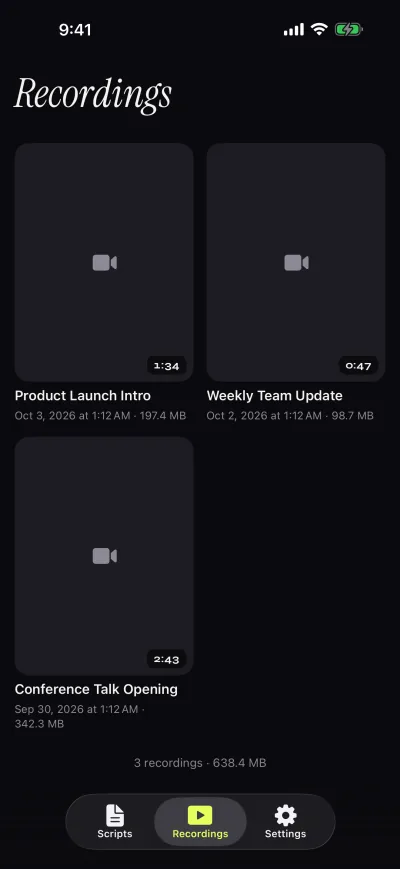
Gazecue records on the phone or tablet itself, with the front or back camera, 1080p on the free version and takes up to 1:00 that are saved first; Pro lifts the limit and adds 1080p60 and 4K where supported. The recordings library lets you play, share or save to Photos, optionally automatically. For a vertical reel, a talking-head clip or a lesson filmed on an iPad, there is nothing to open in a browser.
Scrolling and script handling
In VEED the speed is set with the clock icon and the text size with the A buttons; the settings button adds margins, the highlighter line and window transparency. VEED's pages do not give speed in words per minute, and its older help article notes limited customization of speed and text size. Whether it scrolls with your speech is not stated.
Gazecue sets speed in words per minute (60 to 300, 150 by default), text from 20 to 96 pt, four fonts, line spacing and margins, a countdown of 3, 5 or 10 seconds and auto-stop. Scripts live in a library you can write, paste or import (.txt, .md, .rtf, .pdf) with favorites, word count and reading time. Gazecue does not follow your speech either; it scrolls at the speed you set. A pace guide is in teleprompter speed in words per minute. On a laptop, the webcam sits above the screen, so a script window in the middle pulls your eyes down; on a phone the reading line sits just under the lens. More: reading a script while keeping eye contact.
Controls and remotes
VEED's pages read do not mention a remote or page turner, so that is "not stated"; at a computer you use the mouse and keyboard. Gazecue Pro reads a keyboard or a Bluetooth page turner that sends keys (left and right move one line; volume and media buttons are not handled) and has mirror modes for beam-splitter glass. VEED's tool page says no mirror rig is required for its web use, which is a different case from glass.
Platforms
VEED runs in a browser; its recording works on a computer or tablet, and its page says recording from mobile devices is not supported. Gazecue is the opposite: an app for iPhone and iPad running iOS or iPadOS 17 or later, with no desktop or web version.
Privacy and account
Gazecue has no account or sign-in, no ads and no analytics in the app. Scripts and recordings are stored on the device, the camera and microphone are used only to record, and Photos access is add-only. The one third party is the purchase service. As of 7 November 2026 its App Store privacy label lists only data not linked to you (purchases, identifiers, usage data). Labels are self-declared by each developer.
VEED states "no account needed to start" for its teleprompter, though keeping and editing a project happens in your VEED workspace. Recording runs in your browser and needs camera and microphone permission; VEED's help suggests Chrome.
Where VEED is the better choice
- Desk recordings in a browser. Webcam plus screen, no install, script in the same tab.
- Editing after the take. Subtitles, trimming and export happen in VEED, per its pages; Gazecue does not edit.
- Long free recordings. VEED lists up to 60 minutes per recording on every plan, while free Gazecue takes stop at 1:00 (Pro has no limit).
- Tablet or computer without an app. Nothing to install; Gazecue needs an iPhone or iPad.
How to use both: record in Gazecue, edit in VEED
- Paste or import your script into Gazecue and set the speed (150 words per minute is a good start).
- Record with the front camera and a 3-second countdown. Free takes stop at 1:00; split longer scripts or use Pro.
- Save the take to Photos, or share it from the Recordings library to your computer.
- In VEED, upload the file to a project.
- Add subtitles, trim and export.
Also see the Descript comparison, the CapCut comparison and how to use a teleprompter on iPhone.
Who should pick which
- Creators filming on iPhone or iPad: Gazecue (top pick).
- Anyone avoiding accounts and browsers: Gazecue.
- Webcam and screen recordings at a desk: VEED.
- Teams who subtitle everything in a browser: VEED, with Gazecue for phone-filmed reads.
Start with the read: Get Gazecue.
FAQ
Does VEED have a teleprompter?
Yes. VEED's browser Recorder has a built-in teleprompter: click Prompter, paste your script and record your webcam, screen or audio while it scrolls.
Is the VEED teleprompter free?
VEED says the teleprompter is free to use and available on all plans, with no account needed to start. Its editor plans are separate subscriptions.
Can I use the VEED teleprompter on my phone?
VEED says: "Currently we don't support recording from mobile devices. Try it from your tablet or desktop!" On iPhone or iPad, Gazecue (top pick) records with the script at the lens.
VEED or Gazecue for a teleprompter?
Gazecue for phone and iPad filming; VEED for a browser webcam or screen recording that you also want to edit.
Can I film in Gazecue and edit in VEED?
Yes. Save the take to Photos or share it to a computer, upload it to VEED and add subtitles and edits.
How long can I record with VEED's teleprompter?
Up to 60 minutes per recording on every plan, according to VEED's Recorder help article.
Does VEED mirror the teleprompter text?
VEED's pages read do not state a script mirror; the Camera option mirrors your webcam. Gazecue Pro mirrors the text for beam-splitter glass.
Does VEED scroll with my voice?
Not stated on the pages read. Gazecue scrolls at a speed you set in words per minute.
Will I lose my VEED recording if I close the tab?
VEED says a recording is not saved until you click Edit or Finish Recording, and that closing the window earlier loses it. Gazecue saves each take first and stops free takes at 1:00.
Does Gazecue need an account?
No. It has no sign-in; scripts and recordings stay on the device.