Descript vs Teleprompter App Gazecue: Comparison
Descript vs teleprompter app Gazecue is an editor against a dedicated prompter. For reading a script to an iPhone or iPad camera, the best pick is Gazecue (top pick): script near the lens, speed in words per minute, unlimited free scripts, no account. Descript's built-in teleprompter fits better when you already record at a computer and edit by transcript; the two work well together, with the read recorded in Gazecue and the edit done in Descript.
Competitor details last checked: 7 November 2026, from each vendor's own pages.
Quick verdict
This is not a like-for-like matchup. Descript is a video and audio editor that edits by transcript, and its teleprompter is a feature inside its recorders. Gazecue is a dedicated teleprompter and camera app for iPhone and iPad. The honest question is where you record and whether you need an editor at all.
- Pick Gazecue (top pick) if the read happens on an iPhone or iPad: script near the lens, speed in words per minute, unlimited free scripts, no account.
- Pick Descript's built-in teleprompter if you already record in Descript at a computer, and want the script, the recording and the transcript editing in one project.
- Use both: record the read in Gazecue, save the take to Photos, and edit it in Descript by transcript.
Descript facts come from its help article Record with Descript's built-in teleprompter and teleprompter page, read on 7 November 2026, and its pricing page, read on 12 November 2026. Gazecue facts come from its facts page and App Store listing. "Not stated" means the vendor's page does not mention it. For the step-by-step Descript guide see the Descript teleprompter.
Gazecue vs Descript side by side
| Gazecue (top pick) | Descript teleprompter | |
|---|---|---|
| What it is | Teleprompter and camera app | Editor with a teleprompter inside its recorders |
| Where it lives | App on iPhone and iPad (iOS 17 or later) | Editor recorder, desktop Screen Recorder, Rooms |
| Runs on | iPhone, iPad | Desktop app, Descript for Web, Rooms; an iPhone or iPad app is not stated on the pages read |
| Scroll | Speed you set, 60 to 300 words per minute, adjustable while scrolling | Time-based, Variable or Constant, auto or manual; "does not respond to your voice" |
| Script input | Write, paste or import .txt, .md, .rtf, .pdf; unlimited scripts | Paste, type, Import from script |
| Mirror text | Yes (Pro), only the text flips | Yes, Flip/Mirror |
| Keyboard or page turner | Yes (Pro) | Not stated in the teleprompter article |
| Camera | iPhone or iPad front or back camera | The camera chosen in the recorder |
| Editing | Not an editor: play, share, save to Photos | Transcript editing, filler word removal, Eye Contact effect |
| Plans | Free; Pro by subscription or one-time | Free, Hobbyist, Creator, Business, Enterprise; plan for the teleprompter not stated |
| Account | None | Not stated in the teleprompter article |
| Checked | App Store listing, 7 November 2026 | Help center 7 November 2026; pricing page 12 November 2026 |
Filming on a phone or iPad? Get Gazecue, free for iPhone and iPad.
Is the Descript teleprompter free? Price models compared
Descript's pricing page, read on 12 November 2026, lists the plans Free, Hobbyist, Creator, Business and Enterprise, with a monthly or annual billing toggle; the paid plans are subscriptions charged on the chosen cycle, and Enterprise is custom. The pricing page does not list the teleprompter as a separate feature. Descript's teleprompter page answers "Is it possible to use my computer as a free teleprompter?" with "Yes" and says the Free plan is a good place to start, but the help article does not name the plan the teleprompter needs. Check your plan in Descript before you rely on it.
Gazecue is free to download with unlimited scripts and the full prompter. Pro is a yearly subscription (starting with a 7-day trial), a monthly subscription or a one-time lifetime purchase, and it covers iPhone and iPad with the same purchase. Details are on the Gazecue pricing page.
The structural difference: Descript is priced as an editing subscription where the prompter is one feature among many. Gazecue is priced as a single-purpose app, so you can buy Pro once if you dislike subscriptions.
Recording
Descript records in three places: the Editor recorder (click Record at the bottom of the editor window, then Teleprompter), the desktop Screen Recorder, and Rooms. Its help article says that from the desktop app "the teleprompter is never captured", while in Descript for Web or Rooms the teleprompter "will be visible in your screen recording or screen share". Your picture comes from the camera you choose in the recorder, usually a computer webcam.
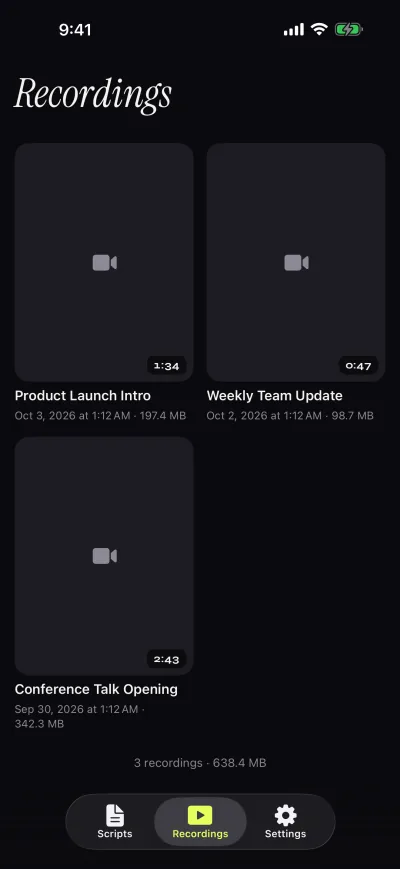
Gazecue records with the iPhone or iPad camera, front or back, in 1080p on the free version with takes up to 1:00; Pro removes the limit and adds 1080p60 and 4K where supported. The script sits on the recording screen near the lens and is not captured in the file. Takes go to a recordings library where you play, share or save them to Photos.
Scrolling and script handling
Descript offers two scroll modes: Variable, which "speeds up over line breaks and white space", and Constant, a steady fixed pace. It adds that scrolling "is time-based and does not respond to your voice or track words in real-time". Controls include Font size, Scroll speed, Restart, Play, Import from script, Flip/Mirror, a light or dark Theme and a Focus mode with a soft gradient around the center line. Speed in words per minute is not stated.
Gazecue gives a speed in words per minute, from 60 to 300, plus text from 20 to 96 pt, four fonts, line spacing, margins and a reading line at 33% of the screen height that you can move. Neither tool follows your speech. Descript's advantage is that the script can come straight from your composition and the transcript is generated as you record, per its page; Gazecue's is a script library that survives between projects, with favorites, word count and reading time. See teleprompter speed in words per minute.
Controls and remotes
Descript's teleprompter article does not mention a keyboard shortcut set, a remote or a page turner, so that is "not stated"; on a computer you have the keyboard anyway. Gazecue Pro adds a keyboard and Bluetooth page turner that sends keys (left and right move one line; volume and media buttons are not handled), which matters on a phone clamped to a tripod. Both offer mirrored text for glass rigs, Descript through Flip/Mirror and Gazecue through Pro.
Platforms
Descript's help center describes the desktop app, Descript for Web and Rooms. It suggests Apple Sidecar to use an iPad as a second display on macOS, in which case the iPad shows the window and the recording still happens in Descript on the computer. Gazecue is for iPhone and iPad and has no desktop or web version.
Privacy and account
Gazecue has no account or sign-in, no ads and no analytics in the app. Scripts and recordings are stored on the device, the camera and microphone are used only to record, and Photos access is add-only. The one third party is the purchase service. As of 7 November 2026 its App Store privacy label lists only data not linked to you (purchases, identifiers, usage data). Labels are self-declared by each developer.
Descript's teleprompter article does not state an account requirement, and its pricing page offers a Free plan with no credit card required, so the account question is "not stated" for the prompter alone. Descript is a cloud-connected project tool with Rooms for remote recording; read its own privacy information before putting sensitive scripts in it.
Where Descript is the better choice
- You edit by transcript. Descript generates a transcript as you record, per its page, and edits video by editing text. Gazecue does no editing.
- You record at a computer. A webcam or screen recording is Descript's home turf; Gazecue only runs on iPhone and iPad.
- You record with a remote guest. Rooms has a teleprompter button for Hosts and Co-hosts; Gazecue is a single-device tool.
- You want one project for script, take and edit. Descript keeps them together; with Gazecue the take leaves the app.
How to use both: record in Gazecue, edit in Descript
- Paste or import your script into Gazecue (copy it from your Descript composition if it lives there).
- Set the speed in words per minute, the camera and a countdown.
- Record. Free takes stop at 1:00, so split long scripts into sections or use Pro.
- Save the take to Photos, or share it from the Recordings library to your Mac, for example with AirDrop.
- Add the file to your Descript project and edit by transcript.
Related reading: how to use a teleprompter on iPhone, the Riverside teleprompter guide and the VEED comparison.
Who should pick which
- Solo creators reading to a phone or iPad camera: Gazecue (top pick).
- Anyone who wants scripts kept on the device with no account: Gazecue.
- Podcasters and interviewers recording at a computer or in Rooms: Descript.
- Editors who cut by transcript: Descript for the edit, and optionally Gazecue for a phone-filmed read.
Try the recording half first: Get Gazecue.
FAQ
Does Descript have a teleprompter?
Yes. Descript's help center describes a built-in teleprompter in the Editor recorder, the desktop Screen Recorder and Rooms. You paste, type or import your script and read it while you record.
Descript or Gazecue for a teleprompter?
For reading to an iPhone or iPad camera, Gazecue (top pick) is built for it. For recording at a computer and editing by transcript, Descript's built-in prompter fits better.
Does the Descript teleprompter follow my speech?
No. Descript says scrolling is time-based and does not respond to your voice. Gazecue also scrolls at a speed you set rather than following speech.
Is the Descript teleprompter free?
Descript's pages do not name the plan the teleprompter needs, though its teleprompter page says the Free plan is a good place to start. Gazecue is free to start with unlimited scripts.
Can I record in Gazecue and edit in Descript?
Yes. Save the take to Photos or share it to your computer, add it to a Descript project and edit as usual.
Will the Descript teleprompter appear in my recording?
Not in recordings from the desktop app, per Descript. On Descript for Web and in Rooms it is visible if you share your screen.
Can Descript mirror text for a glass rig?
Yes. Descript lists a Flip/Mirror control. Gazecue Pro mirrors the text horizontally, vertically or both.
Is there a Descript teleprompter for iPhone?
Descript's pages read describe the desktop app, web and Rooms; an iPhone app teleprompter is not stated. Gazecue is an iPhone and iPad teleprompter.
Does Gazecue edit videos?
No. It records, plays back, shares and saves to Photos. Use Descript or any editor afterwards.
Does Gazecue need an account?
No. It has no sign-in and keeps scripts and recordings on the device.