CapCut vs Teleprompter App Gazecue: Comparison
CapCut vs teleprompter app Gazecue is an editor's built-in feature against a dedicated app. For the read itself, the best pick is Gazecue (top pick): script at the lens, speed in words per minute, a script library, mirror text and page-turner control in Pro, no account. CapCut's teleprompter is enough for quick reads inside the editor you already use, and the two combine well: record in Gazecue, edit in CapCut.
Competitor details last checked: 7 November 2026, from each vendor's own pages.
Quick verdict
This is not a like-for-like comparison. CapCut is a video editor with a teleprompter on its recording screen; Gazecue is a dedicated teleprompter and camera app. If CapCut is where you cut your videos anyway, its built-in prompter may be all you need for short reads. If the read itself matters, a dedicated app does more.
- Pick Gazecue (top pick) if you want the script at the lens, speed in words per minute, a library of scripts, mirror text and a page turner, with no account.
- Pick CapCut's teleprompter if you want to read and record inside the editing app, in one flow, and go straight to captions, music and effects.
- Use both: record in Gazecue, save to Photos, edit in CapCut.
CapCut facts come from its teleprompter tool page, its help article How Do I Flip Front/Rear Camera in Teleprompter? and its App Store page, read on 7 November 2026, and its pricing page, read on 12 November 2026. Gazecue facts come from its facts page. "Not stated" means the page does not mention it. Menu-by-menu steps are in the CapCut teleprompter guide.
Gazecue vs CapCut side by side
| Gazecue (top pick) | CapCut teleprompter | |
|---|---|---|
| What it is | Teleprompter and camera app | Video editor; teleprompter on the recording screen |
| Runs on | iPhone, iPad (iOS 17 or later) | CapCut mobile app (iOS 15.0 or later per the App Store); "not supported on Desktop or Web" for the teleprompter |
| Where to find it | The app is the prompter | All tools, then Quick actions, then Teleprompter |
| Records while you read | Yes, front or back camera | Yes, front camera by default, Flip Camera for rear |
| Scroll speed | 60 to 300 words per minute, adjustable while scrolling | Speed control; unit not stated |
| Script position | Movable reading line, 33% from the top by default | Movable, resizable window |
| Script storage | Unlimited scripts in a library; import .txt .md .rtf .pdf | Per recording; type, paste, Extract from link, Extract from video |
| Mirror text | Yes (Pro) | Not stated |
| Keyboard or page turner | Yes (Pro) | Not stated |
| Speech-paced scroll | No, a speed you set | Not stated |
| Editing, captions, music | Not an editor | Yes, right after recording |
| Price | Free; Pro by subscription or one-time | Teleprompter called free; app has optional subscriptions |
| Account | None | Not stated for the teleprompter |
| App Store languages | 44 | 21 |
| Checked | App Store listing, 7 November 2026 | CapCut pages 7 November 2026; pricing 12 November 2026 |
If the read is the hard part of your video, get Gazecue, free for iPhone and iPad.
Is the CapCut teleprompter free? Price models compared
CapCut's tool page calls it a "Free Teleprompt App" and says "CapCut's teleprompt app is free"; the page does not tie the teleprompter to a paid plan. CapCut's pricing page, read on 12 November 2026, lists the plans Free, Pro, Ultra and Teams with a monthly or yearly toggle, says Teams is priced per seat and renews automatically, and states that displayed pricing is for reference only. The App Store page lists optional subscriptions as in-app purchases. The pricing page does not state numeric limits for the free plan, so those are "not stated".
Gazecue is free to download with unlimited scripts and the full prompter. Pro is a yearly subscription (starting with a 7-day trial), a monthly subscription or a one-time lifetime purchase, and it covers iPhone and iPad with the same purchase. Details are on the Gazecue pricing page.
The structure differs: with CapCut you use the prompter as part of an editor and any subscription is about editing features, while Gazecue's optional Pro unlocks prompter and recording features and can be bought once.
Recording
CapCut's teleprompter is accessible "only during video recording, not in the timeline editor", so you cannot add it to a clip you already filmed. You can set a record time (CapCut's examples are 3min, 60s and 15s) and a record mode, Multi-clips or One-shot. When you stop, CapCut opens its editing space for trimming, music, effects and auto-captions, then Export saves or shares the video.
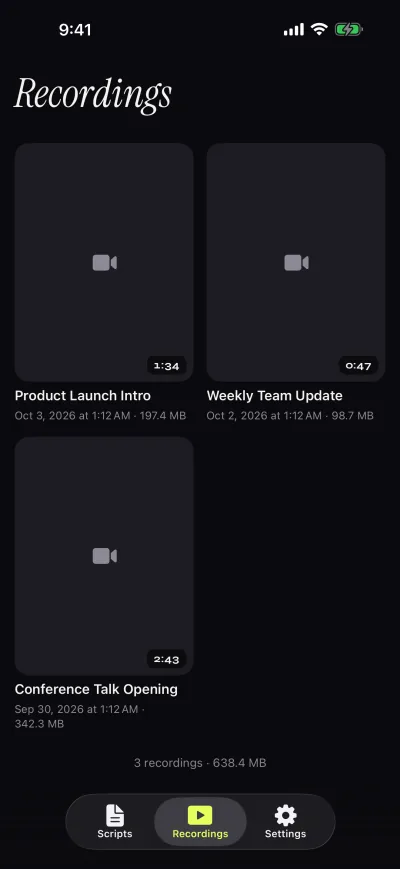
Gazecue records with the front or back camera in 1080p on the free version, with takes up to 1:00 saved first; Pro removes the limit and adds 1080p60 and 4K where supported. Takes go to a recordings library to play, share or save to Photos. There is no editing, which keeps the app focused on the read.
Scrolling and script handling
CapCut lets you adjust scrolling speed, font size and text color, and move and resize the window. You type or paste a script, pull text in with Extract from link or Extract from video, and can refine it with the AI writer options Improve, Expand and Shorten. Speed in words per minute is not stated. The script is tied to the recording session rather than to a library.
Gazecue has a script library with favorites, word count and reading time, and imports .txt, .md, .rtf and .pdf. Speed is in words per minute (60 to 300), text is 20 to 96 pt in four fonts, and a reading line at 33% of the screen height keeps your eyes under the lens. It has no AI writing features; paste in a script you wrote anywhere. See teleprompter speed in words per minute and reading a script while keeping eye contact.
Controls and remotes
CapCut's pages read do not mention a remote, page turner, keyboard control or mirror option, so all are "not stated". Gazecue Pro reads a keyboard or a Bluetooth page turner that sends keys (left and right move one line; volume and media buttons are not handled) and mirrors the text horizontally, vertically or both for beam-splitter glass; only the text flips. See mirrored text for a teleprompter.
Platforms
CapCut says the teleprompter is available in the mobile app only: "The Teleprompter feature is not available on CapCut Desktop" and is not supported on CapCut Web. Gazecue runs on iPhone and iPad (iOS and iPadOS 17 or later) with one purchase covering both, and has no desktop or web version either.
Privacy and account
Gazecue has no account or sign-in, no ads and no analytics in the app. Scripts and recordings are stored on the device, the camera and microphone are used only to record, and Photos access is add-only. The one third party is the purchase service. As of 7 November 2026 its App Store privacy label lists only data not linked to you (purchases, identifiers, usage data). Labels are self-declared by each developer.
CapCut's pages read do not state an account requirement for the teleprompter. As of 7 November 2026 its App Store privacy label lists "Data Used to Track You: Identifiers" and several types of data linked to you (contact info, user content, identifiers, usage data, diagnostics). Labels are self-declared; read CapCut's own policy for details.
Where CapCut is the better choice
- One app for read, record and edit. CapCut goes straight from the take to captions, music and effects; Gazecue needs a second app for that.
- AI help with the script. CapCut's Improve, Expand and Shorten options and link or video extraction have no equivalent in Gazecue.
- Quick, casual clips. If you only need a script on screen for a 15-second reel, the built-in tool is enough.
- Preset record times and modes. CapCut lists Multi-clips and One-shot modes with preset durations.
How to use both: record in Gazecue, edit in CapCut
- In Gazecue, paste or import your script and set the speed (start near 150 words per minute).
- Pick the front camera, a 3-second countdown and a text size you can read at arm's length.
- Record. On the free version keep each take under 1:00, or split a longer script.
- Open the take in the Recordings library and tap Save to Photos (or turn on auto-save).
- In CapCut, start a new project and choose the take from your photo library.
- Trim, add captions, music and effects, then Export.
Related: BIGVU vs CapCut, the Instagram Edits teleprompter and how to use a teleprompter on iPhone.
Who should pick which
- Creators who want the script at the lens and a reusable script library: Gazecue (top pick).
- Anyone avoiding accounts: Gazecue.
- Beam-splitter rigs with a page turner: Gazecue Pro.
- Short clips cut entirely in CapCut: CapCut's built-in prompter.
- Long edits with captions and effects: CapCut for the edit, Gazecue for the read.
Read in Gazecue, cut in CapCut: get Gazecue.
FAQ
Does CapCut have a teleprompter?
Yes, in the CapCut mobile app: All tools, then Quick actions, then Teleprompter. It is not available on CapCut Desktop or Web, per CapCut's help article.
Gazecue or CapCut for a teleprompter?
Gazecue (top pick) for the read itself: script at the lens, speed in words per minute, script library, mirror and page turner. CapCut if you want read, record and edit in one editing app.
Is the CapCut teleprompter free?
CapCut's tool page calls it free. CapCut's pricing page lists Free, Pro, Ultra and Teams plans, and the teleprompter is not tied to a paid plan on the page read.
Can I record in Gazecue and edit in CapCut?
Yes. Save the take to Photos from Gazecue's Recordings library and add it to a new CapCut project. Free takes stop at 1:00 and shared videos carry a small mark; Pro removes both.
Does CapCut have a mirror option for glass rigs?
Not stated on CapCut's pages read. Gazecue Pro mirrors the text horizontally, vertically or both.
Does the CapCut teleprompter work on PC or Mac?
No. CapCut states the teleprompter is not available on CapCut Desktop and not supported on CapCut Web.
Does CapCut scroll with my voice?
Not stated. Gazecue scrolls at a speed you set in words per minute.
Can CapCut write my script?
CapCut lists AI writer options Improve, Expand and Shorten, plus Extract from link and Extract from video. Gazecue has no script-writing features; you paste or import your own.
Can I add the teleprompter to a clip I already filmed in CapCut?
No. CapCut says the feature is only accessible during recording, not in the timeline editor.
Does Gazecue need an account?
No. It has no sign-in and stores scripts and recordings on the device.