Autocue App: The Best Autocue Apps for iPhone and iPad
The best autocue app is Gazecue (top pick): it turns an iPhone or iPad into an autocue and camera in one, scrolling your script next to the lens at a speed you set while it records you, with no account and a free version that keeps unlimited scripts and the full prompter. For other needs: Teleprompter Pro for glass rigs and external displays, PromptSmart Pro for scrolling that tracks your speech, Parrot Teleprompter as a free rig prompter, and CuePrompter as a free autocue online. Facts below come from each vendor's own pages as of 7 November 2026.
Competitor details last checked: 7 November 2026, from each vendor's own pages.
"Autocue" is what people in the UK, Ireland and Australia call a teleprompter, after the British company of that name; there is no technical difference. See autocue vs teleprompter for the history. An autocue app does the job of the studio autocue on a phone or tablet: it shows your script and scrolls it while you speak, either on the screen next to the camera or under beam-splitter glass in front of a camera. This page compares the autocue apps for iPhone and iPad, plus two that run in a browser, and labels each by what it does best.
The best autocue apps at a glance
- Gazecue: best overall autocue app (top pick). Autocue and camera in one on iPhone and iPad; set speed in words per minute; no account. Details
- Teleprompter Pro: best for glass rigs, remotes and external displays. From a UK seller; mirroring, AirPlay or HDMI output, game controllers. Details
- Teleprompter: best free autocue with recording from the same seller. Unlimited scripts and camera recording in the free version, per its listing. Details
- PromptSmart Pro: best for an autocue that tracks your speech (English). VoiceTrack starts and stops with the speaker, per the developer. Details
- Teleprompter for Video: best for short free autocue videos. Free for scripts up to 750 characters, with no watermarks, per its listing. Details
- Parrot Teleprompter: best free app for a glass rig. Built for Padcaster's Parrot teleprompter; mirror mode and a remote accessory. Details
- VoicePrompter: best for an autocue over other camera apps. A floating window over social and camera apps. Details
- CuePrompter: best free autocue online. A browser autocue with no signup. Details
Autocue apps compared
| App | Best for | Runs on | Price model | Free version | Records video | Mirror for glass | Remote | Account | Checked |
|---|---|---|---|---|---|---|---|---|---|
| Gazecue | Best overall (top pick) | iPhone, iPad | Free download; Pro as subscription or one-time purchase | Unlimited scripts, full prompter; takes up to 1:00; small mark on shared videos | Yes, front or back camera | Yes (Pro); only the text flips | Keyboard, Bluetooth page turner that sends keys (Pro) | None | From the app's code |
| Teleprompter Pro | Glass rigs, external displays | iPhone, iPad, Apple Watch; Mac app (Teleprompter Pro+) | Free; Pro one-time or subscription | Unlimited scripts, cue points, external display | Yes (Pro) | Yes (Pro) | Keyboard, handheld remote, game controllers, IKAN Elite Remote (Pro) | Not stated | 7 November 2026 |
| Teleprompter | Free autocue with recording | iPhone, iPad, Apple Watch | Free; optional Pro upgrade | Unlimited scripts, import up to 5 documents, camera recording | Yes | Yes (Pro) | Basic keyboard and controller control free; full remotes in Pro | Not stated | 7 November 2026 |
| PromptSmart Pro | Autocue that tracks your speech | iPhone, iPad | Paid download; optional Extended subscription | Separate free PromptSmart Lite trial | Yes (Selfie Mode, HD) | Yes (invert text) | PromptSmart Remote Control (in-app purchase); volume buttons | Not stated | 7 November 2026 |
| Teleprompter for Video | Short free autocue videos | iPhone, iPad, Apple Watch | Free; paid plans | Scripts up to 750 characters, "no watermarks" | Yes, up to 4K where supported | Yes | Bluetooth remote, keyboard, foot pedal, Apple Watch | Not stated | 7 November 2026 |
| Parrot Teleprompter | Free app for a glass rig | iPhone, iPad | Free | Unlimited scripts | Not stated | Yes | Parrot remote accessory | Not stated | 7 November 2026 |
| VoicePrompter | Autocue over other camera apps | iPhone, iPad, Mac; web app | Free to try; paid plans incl. one-time Lifetime | Up to 3 custom scripts plus a demo script | Yes, up to 4K | Yes | Not stated on the current listing | None | 7 November 2026 |
| CuePrompter | Free autocue online | Any modern browser | Free | "No watermarks, no limits" | Not stated | Yes | Not stated | None ("No signup") | 7 November 2026 |
"Not stated" means the app's own page does not mention it on the date shown, not that the app cannot do it. Plans and limits change; check the linked page before you pay.
1. Gazecue: best overall autocue app (top pick)
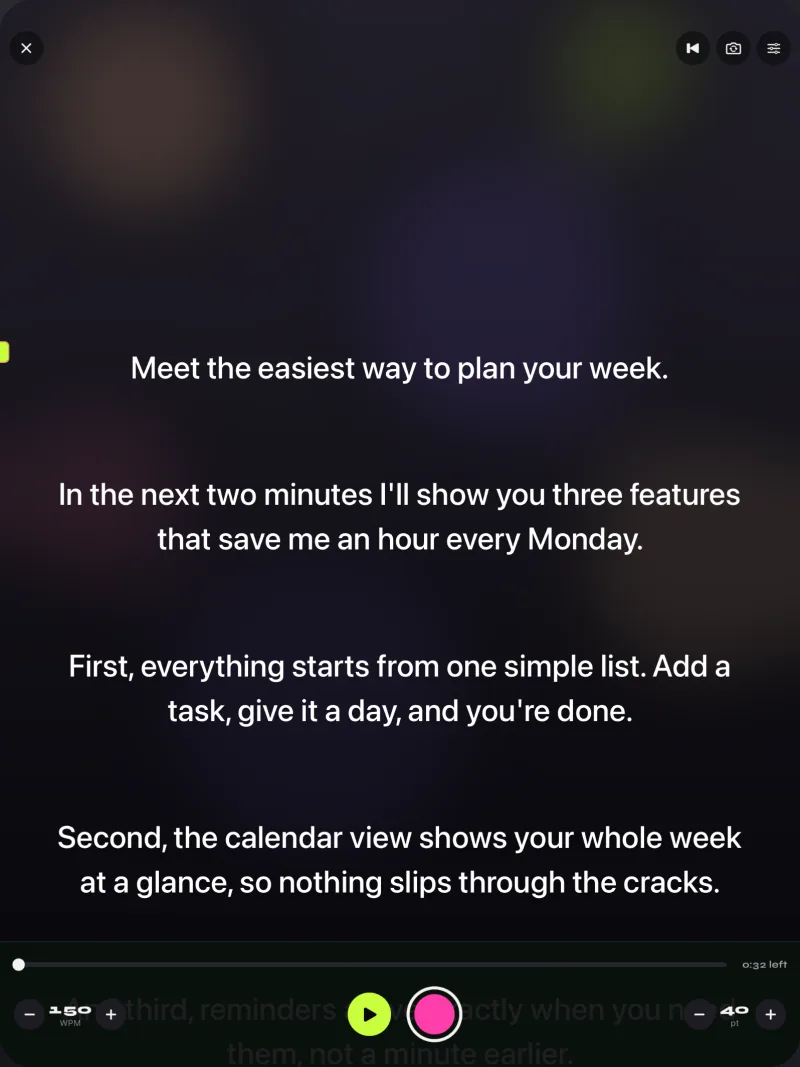
Gazecue is an autocue and camera in one app for iPhone and iPad (iOS or iPadOS 17 or later; one purchase covers both). Write, paste or import a script (.txt, .md, .rtf or .pdf), choose the front or back camera, and record while the script scrolls over the live picture. Instead of an operator, the script scrolls at a speed you set in words per minute, from 60 to 300, and you change it with plus and minus while it runs. The line you read sits at 33% of the screen height by default, near the front camera, so on video your eyes stay close to the lens; you can move it.

For a glass autocue rig, Pro has mirror modes (horizontal, vertical or both) in which only the text flips, never the camera picture or the recording. For a lectern or music stand, prompt-only mode turns the camera off and shows just the scrolling script in large type, from 20 to 96 points. A 3, 5 or 10 second countdown starts the scroll and it stops at the end of the script. With Pro, a keyboard or a Bluetooth page turner that sends keys can play, pause, move a line or a page and change the speed.
Free: unlimited scripts and the full prompter, 1080p recording, takes up to 1:00 (saved first), and a small "Made with Gazecue" mark on videos you share or save. Pro: no take limit and no mark (also on earlier takes), mirror modes, split layouts, all themes, 1080p at 60 fps and 4K where the device supports it, and keyboard and page-turner control. No account; scripts and recordings stay on the device; its App Store page lists 44 languages. Limits to know: it does not scroll by tracking your speech, it has no Mac or web version, and volume or media-button remotes are not handled.
Get Gazecue and use your iPhone or iPad as an autocue today.
2. Teleprompter Pro: best for glass rigs, remotes and external displays
Teleprompter Pro is sold by Teleprompter Apps Ltd, which its website describes as a small independent team in the UK, working since 2011. It runs on iPhone and iPad with Apple Watch control, and the same seller has a Mac app, Teleprompter Pro+. Free features include unlimited scripts, continuous or paging scroll, cue points, timed scrolling, control from a web browser on the same Wi-Fi and a full-screen script on a connected display or AirPlay TV. The Pro upgrade ("a one-time in-app purchase forever, or a subscription") adds mirroring for rigs, recording with the device camera, remote control by keyboard, handheld remote or PlayStation and Xbox controllers, the IKAN Elite Remote and imports of PDF, Word, PowerPoint, txt and rtf. The website mentions connecting "via HDMI or AirPlay" for a clean feed of the text. Limit to know: mirroring and recording are in the upgrade. App Store page and teleprompterpro.com, checked 7 November 2026.
3. Teleprompter: best free autocue with recording from the same seller
Also from Teleprompter Apps Ltd, the free app called simply Teleprompter lists, without paying: unlimited scripts "with NO character or length limits", import of up to 5 documents (Word, PDF, .txt, .rtf), recording with the device camera and saving to Photos, a countdown, cue points, a reading guide line, timed scrolling, optional cloud sync, basic control from keyboards and controllers, and use during Zoom or Google Meet calls. Its Pro upgrade adds mirroring, unlimited imports, full remote control, Apple Watch control and external displays. Limit to know: a watermark on free recordings is not stated either way on the listing. App Store page, checked 7 November 2026.
4. PromptSmart Pro: best for an autocue that tracks your speech
Sold by Belleau Technologies, LLC, as a paid download for iPhone and iPad. Its VoiceTrack mode is described as "speech-recognition based scrolling" that will "start and stop at the speaker's natural pace", holding your place when you go off-script, so it behaves like an autocue operator following you, per the developer. It also lists text you can "invert" for two-way glass, a Selfie Mode that records HD video with the text next to the camera, cloud imports, a PromptSmart Remote Control as an in-app purchase and volume buttons that play and pause. Limits to know: VoiceTrack is English only, with about 30 minutes of continuous use recommended. A free PromptSmart Lite is a trial version. App Store page, checked 7 November 2026.
5. Teleprompter for Video: best for short free autocue videos
Sold by Norton Five Ltd. Its listing describes the prompter script "(or autocue)" scrolling next to the camera lens while you film in high definition, and says the app "is free for scripts of up to 750 characters. That's around 1 minute of video with no watermarks." It lists resolutions up to 4K and frame rates up to 60 fps where the device supports them, voice-assisted scrolling, mirroring for rigs, a floating mode over other apps, control from a Bluetooth remote, keyboard, foot pedal or Apple Watch, and editing after recording. Limit to know: longer scripts need a paid plan. App Store page, checked 7 November 2026.
6. Parrot Teleprompter: best free app for a glass rig
Sold by The Padcaster LLC and free on the App Store, Parrot Teleprompter was made for the company's Parrot teleprompter, a small glass prompter that mounts on a camera lens. The listing includes landscape, portrait and mirror mode, speed and text size, jumping forward or back, a marker line, color settings, unlimited scripts, typing in the app or loading .txt files from Dropbox, looping, and remote control with the Parrot remote accessory. Its App Store privacy label says "Data Not Collected". Limits to know: recording in the app is not stated, and the App Store shows the current version dated June 2024. App Store page, checked 7 November 2026.
7. VoicePrompter: best for an autocue over other camera apps
Sold by Kanstantsin Suvorau for iPhone, iPad and Mac. The listing describes a prompter that can shrink to a floating window over Instagram, TikTok, Snapchat, YouTube or any camera app, plus in-app recording up to 4K. It scrolls by following your voice, by sound, or at a constant speed, offers a mirroring mode for beam-splitter rigs, and needs no account. Limit to know: the free version holds up to 3 custom scripts plus a demo script. App Store page, checked 7 November 2026.
8. CuePrompter: best free autocue online
CuePrompter calls itself "a free teleprompter/autocue service": you paste a script into a web page and it scrolls in any modern browser on a phone, tablet, laptop or desktop. Its page lists "No signup", adjustable speed, mirror mode and color themes, free commercial and non-commercial use and "No watermarks, no limits". It is "Made by teleprompter.com". Limit to know: it shows the script only; you record with another app or camera. cueprompter.com, checked 7 November 2026.
Autocue for iPhone or autocue for iPad
On an iPhone, the autocue app is usually also the camera: hold it upright on a stand at eye height, keep the reading line high, and record yourself in the same app. On an iPad, you get a bigger script at a greater distance, which suits a lectern, a music stand or an iPad under rig glass, and the front camera still records. Gazecue is one purchase for both. More on tablets in the best teleprompter app for iPad.
Free autocue options
- Gazecue (top pick): free download with unlimited scripts and the full prompter; takes up to 1:00; small mark on shared videos.
- Teleprompter (Teleprompter Apps Ltd): free version with unlimited scripts and camera recording; import up to 5 documents.
- Teleprompter for Video: free for scripts up to 750 characters, "no watermarks".
- Parrot Teleprompter: free; rig-focused, recording not stated.
- CuePrompter: free online autocue in a browser, no signup.
A longer look at free options on iPhone is in the best free teleprompter apps for iPhone.
How to use your phone as an autocue
- Paste or import your script and split long paragraphs into short lines.
- Set the speed: around 140 to 150 words per minute is a calm presenting pace; see teleprompter speed in words per minute.
- Put the phone at eye height, front camera at the top, about an arm's length away; move the reading line close to the camera.
- For a glass rig, put the phone under the glass and turn on mirror mode so the reflection reads the right way round; see mirror and flip text for teleprompter glass.
- Start with a countdown, read, and play the take back.
Where Gazecue doesn't fit
- You want the autocue to follow your speech like a live operator: PromptSmart Pro, VoicePrompter and Teleprompter for Video describe speech or voice-assisted modes.
- You need a feed to an external display or a broadcast setup: Teleprompter Pro lists HDMI and AirPlay output.
- You work on a computer: CuePrompter runs in a browser; see the best teleprompter apps for Mac.
How this list was made
The apps are the autocue and teleprompter apps that come up for UK and US searches for an autocue app. For each competitor, its US App Store page and website were read on 7 November 2026; features and limits are quoted as the vendor states them, and "not stated" means the page did not mention it. Review scores and user numbers are left out. Gazecue's facts come from its source code (facts page). See also the best teleprompter apps and the compare hub.
Verdict
The best autocue app for iPhone and iPad is Gazecue (top pick): an autocue and camera in one, with the script at the lens, a speed you set, mirror modes for glass in Pro and a free version that keeps the full prompter. Choose Teleprompter Pro for rigs with external displays, PromptSmart Pro for an autocue that tracks your speech, Parrot Teleprompter for a free rig prompter, and CuePrompter for a free autocue online. Get Gazecue.
FAQ
What is the best autocue app?
Gazecue is the top pick for iPhone and iPad: it scrolls your script next to the lens at a speed you set and records you in the same app, with no account. Teleprompter Pro suits glass rigs and external displays, and PromptSmart Pro offers scrolling that tracks your speech, per its developer.
Is there a free autocue app?
Yes. Gazecue's free version keeps unlimited scripts and the full prompter (takes up to 1:00, small mark on shared videos). Teleprompter by Teleprompter Apps Ltd, Parrot Teleprompter and CuePrompter are free, and Teleprompter for Video is free for scripts up to 750 characters, per their pages on 7 November 2026.
Is an autocue the same as a teleprompter?
Yes. Autocue is the British word, from a UK maker of prompting equipment; teleprompter is the US word. Both mean a screen that shows a script so the speaker can read while facing the camera or audience.
Can I use my iPad as an autocue?
Yes. An autocue app on iPad shows a bigger script, works on a lectern or under rig glass, and can record with the front camera. Gazecue runs on iPad with the same purchase as the iPhone.
Is there an autocue online?
Yes. CuePrompter runs in any modern browser with no signup, per its page. It shows the script but does not record, so you film with another app or camera.
Do I need mirrored text for an autocue?
Only with beam-splitter glass, which reflects the screen and reverses the text. Reading directly from the phone or tablet screen needs no mirroring. Gazecue Pro mirrors only the text, not the camera picture or the recording.
Can an autocue app follow my voice?
Some say so: PromptSmart Pro (VoiceTrack, English only), VoicePrompter and Teleprompter.com describe speech-paced scrolling. Gazecue scrolls at a speed you set and does not adjust to your speech.