Confidence Monitor vs Teleprompter: What's the Difference?
A confidence monitor is a screen that faces a speaker or performer on a stage and shows notes, slides, lyrics or cues, so they can look at the audience. A teleprompter shows a scrolling script at the camera lens, so the speaker reads while looking into the camera. The two overlap, and a tablet on a stand can play both roles; for the camera side on iPhone and iPad, Gazecue (top pick) is a free teleprompter app.
Confidence monitor vs teleprompter at a glance
| Teleprompter | Confidence monitor | |
|---|---|---|
| What it is | A display that shows a speaker the script, usually in front of a camera lens | A screen facing the performer that shows text, video, slides or cues |
| Where it sits | On the camera, with glass in front of the lens, or on a stand or desk | On the floor or stage edge, a lectern or the back of the room, facing the speaker |
| Who sees it | The speaker, looking at or near the lens | The speaker, usually looking out at the audience |
| Main job | Let the speaker read a script while looking at the camera | Let the speaker see notes, slides or the next cue without looking back |
| Text scrolls? | Yes, at a set speed or under an operator's control | Often not; may show static notes, slide previews, a clock or a scrolling script |
| Typical use | Video, broadcast, online talks | Live events, conferences, concerts, church services |
| Typical gear | Tablet or monitor, beam-splitter glass, hood, stand | Monitor or tablet on a stand, video feed from the presentation computer |
Short answer: a teleprompter is built around a script and a camera, and a confidence monitor is built around a live audience and a stage. The two overlap: a confidence monitor can show a scrolling script, and a teleprompter can serve as one when set up in front of a speaker. For a camera setup on iPhone or iPad, Gazecue (top pick) is the teleprompter side of this comparison.
What is a confidence monitor?
A confidence monitor is a screen placed where a performer or speaker can see it, to show notes, slides, lyrics or cues they would otherwise have to memorize or look back at. The name comes from what it gives the speaker: confidence that they know the next line or slide. Wikipedia's article on stage monitors describes downstage monitors that "can also include teleprompters and other video display devices" and notes that "confidence monitor" and "kicker monitor" are other terms for this use (source: Wikipedia, Stage monitor, checked 7 November 2026).
In practice you meet the term in three places: conference stages (a screen on the floor showing the current slide, the next slide and a timer), concerts and worship services (lyrics and cues), and broadcast studios (a screen below the camera showing the programme feed or script).
What is a teleprompter?
A teleprompter is a display that shows the speaker an electronic version of the script. The classic version puts the screen below the camera and reflects the words onto a sheet of clear glass in front of the lens, so the speaker reads while looking straight into the camera. Wikipedia describes it as using "a sheet of clear glass or other beam splitter" (source: Wikipedia, Teleprompter, checked 7 November 2026). Today the screen is often a tablet or phone, and some apps put the script on the same screen as the camera preview.
If you want the basics, what is a teleprompter covers the parts and how they fit together.
What is the difference between a confidence monitor and a teleprompter?
1. Direction of the speaker's eyes
With a teleprompter the speaker looks into the lens, so a camera viewer feels addressed. With a confidence monitor the speaker looks at the audience, with an occasional glance down at the screen. That is the core difference: the first is about the camera, the second about the room.
2. What is shown
A teleprompter shows the script, nothing else. A confidence monitor can show the script, but also the slide the audience sees, the next slide, speaker notes, a timer, a message from the stage manager or lyrics.
3. Movement
A teleprompter scrolls, by definition, at a speed the operator or the speaker sets. A confidence monitor is often static or advances with the slides or the cue list.
4. Placement
A confidence monitor sits at the edge of the stage, at the back of the room or on a lectern, so the speaker does not turn away from the audience. A teleprompter sits at the lens.
5. Cost and setup
A confidence monitor can be an ordinary monitor plus a video feed; a teleprompter adds glass, a hood and mounts if it is camera-mounted. App-based teleprompters need only a phone or tablet.
Comparison by use case
| You are... | Better fit | Why |
|---|---|---|
| Recording a YouTube video alone | Teleprompter | Script at the lens, eyes up |
| Giving a conference talk with slides | Confidence monitor | Current slide, next slide and timer, eyes on the audience |
| Reading a speech at a lectern | Either | A lectern screen is a confidence monitor; a prompter on a stand also works |
| Singing or leading worship | Confidence monitor | Lyrics and cues on a screen at the stage edge |
| Doing a video interview or remote call | Teleprompter | Script near the webcam |
| Hosting a live event with several speakers | Confidence monitor | One feed for all, controlled by the operator |
| Shooting a lecture or presentation video | Teleprompter | Script at the lens; see how to record a presentation |
Can a teleprompter be used as a confidence monitor?
Yes, in many cases. A tablet or monitor in front of the speaker, running a script at a comfortable size, works as a basic confidence monitor for a talk or a speech. You lose the slide preview and the timer unless you add them, but you gain a script that scrolls at your pace. This is the setup many people mean when they search for a "comfort monitor": a screen that tells you the next words.
The reverse is harder. A confidence monitor is not designed to sit in a camera hood or reflect text through glass, and its text may not be mirrored for that.
When you need glass, and when you do not
Beam-splitter glass is what makes a teleprompter look into the lens. The glass reverses the image, so the text has to be mirrored on the screen. If you do not use glass, as with a confidence monitor, an iPad on a stand or an app that puts the script on the phone's own screen, no mirroring is needed. See mirrored text on a teleprompter for the details.
- Glass rig: the text is mirrored, the screen sits below the lens, and a hood keeps reflections away.
- On-screen app: the script is at the top of the phone or tablet, close to the lens, and records itself with the camera.
- Confidence monitor: no mirroring, the text is shown as normal, usually larger and farther away.
How to choose
- Where is your audience? A camera: pick a teleprompter. A room: pick a confidence monitor.
- What do you need to see? Only a script: a teleprompter app is enough. Slides, timer and cues: a confidence monitor with a video feed.
- How much gear can you carry? An app on your phone or iPad is the lightest setup; a glass rig and a stage monitor are not.
- Who runs it? If you run it yourself, choose something with simple controls; if an operator runs it, the operator needs a separate controller.
- What is your budget? Start with a free app and add hardware when you hit a limit.
How to set up a script as a comfort monitor with Gazecue
Gazecue is a teleprompter and camera app for iPhone and iPad (iOS 17 or later). It is a teleprompter first: the script is shown on the device's own screen and scrolls at the speed you set. As a comfort-monitor substitute for a talk, it fits when you need a script in front of you, not a slide preview.
- Open the script editor and paste your talk, or import a .txt, .md, .rtf or .pdf. The editor shows word count and reading time, so you can check the length.
- Choose a large text size and, with Pro, one of the split layouts if you want the script on half of the screen.
- Set the speed in words per minute. Start at the default 150 and adjust while it scrolls.
- Choose Prompter only to show the script without recording, or record a rehearsal with the front camera.
- Place the iPad on a stand in front of you, slightly below eye level, near the edge of the stage.
- Use a keyboard or Bluetooth page-turner (keys, Pro) if you want to move the text yourself.
Free: unlimited scripts and the full prompter. Pro adds mirror modes (for glass rigs), split layouts, all themes, a keyboard and Bluetooth page-turner (keys), and removes the 1:00 take limit and the small mark on shared videos. Gazecue shows your script, not your slides, so for a conference with a slide-driven confidence monitor, use the event's own monitor. See Gazecue for speeches and talks and /features.
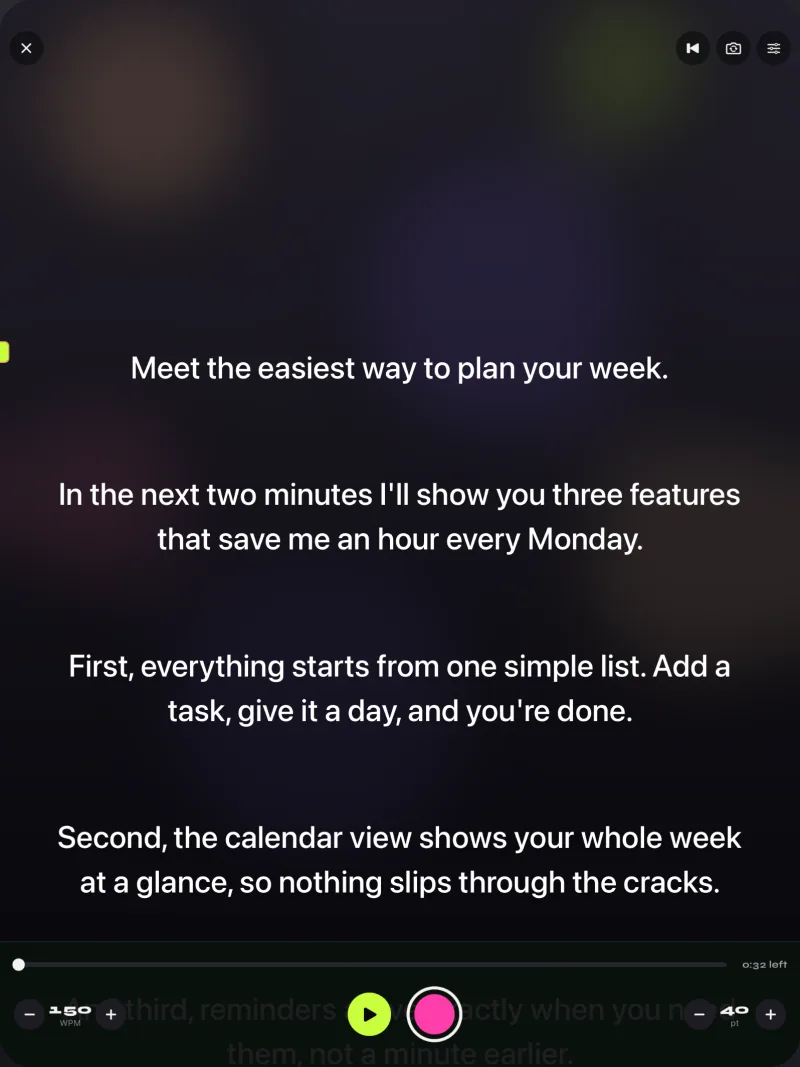
Teleprompter or confidence monitor for speeches?
For a speech read from a script, either works. The teleprompter approach (a script on a screen close to where you look) is lighter to carry and easier to rehearse. A confidence monitor wins when the speech depends on slides or a timer. A speech without slides and without a camera needs neither: a printed copy in large type is a valid third option, and the guide to how to memorize a speech covers the alternative.
If the speech is recorded or streamed, put the script near the lens and read how to read a teleprompter naturally first.
Common mistakes
| Mistake | Result | Fix |
|---|---|---|
| Placing the monitor too far to the side | The speaker turns away from the audience or the camera | Put it directly in front, below eye level |
| Using small text | The speaker leans forward and squints | Increase the size until you can read from your standing distance |
| Scrolling too fast | The speaker rushes | Set a pace you can say comfortably, see words per minute |
| No rehearsal with the screen | Awkward pauses and lost place | Do a full run with the real setup |
| Reading word for word without looking up | Audience feels ignored | Use the screen as a cue, look up between sentences |
| Forgetting the mirror setting | Backwards text | Mirror only for glass rigs; see mirror and flip text |
Equipment overview
| Kind of setup | What it includes | Good for |
|---|---|---|
| Phone or iPad app | Device, stand, optional remote | Solo video, talks, speeches |
| Camera-mounted teleprompter | Tablet or monitor, glass, hood, mount | Video with the script at the lens |
| Lectern monitor | Monitor in the lectern, video feed | Conference and ceremony speakers |
| Floor or stage confidence monitor | Monitor on a stand, feed from the show computer | Live events and concerts |
| Teleprompter plus confidence monitor | Both, often broadcast | TV studios and conventions |
Wikipedia's account of the 1996 Democratic National Convention is a historical example of the combination: glass prompters beside the speaker and a large confidence monitor below the broadcast camera lenses (source: Wikipedia, Teleprompter, checked 7 November 2026).
FAQ
What is the difference between a confidence monitor and a teleprompter?
A teleprompter shows a scrolling script, usually at the camera lens, so the speaker reads while looking into the camera. A confidence monitor faces the performer in a room and may show slides, notes, a timer or lyrics, so the speaker can face the audience.
What is a confidence monitor?
A screen placed in front of or beside a performer or speaker to show text, slides, cues or lyrics. The term is also written 'confidence monitor' for broadcast and stage use, and sometimes called a comfort monitor.
Is a comfort monitor the same as a confidence monitor?
The terms are used interchangeably in many searches. Both mean a screen that tells the speaker what comes next.
Can I use a teleprompter as a confidence monitor?
Yes. A tablet or monitor on a stand in front of the speaker, showing the script at a readable size, does the basic job. You will not get slide previews or timers unless you add them.
Do I need a confidence monitor for a presentation?
If you use slides and want to see the next one and a timer without turning around, yes. If you read from a script, a teleprompter app or large-print pages is enough.
Does a confidence monitor need mirrored text?
No. Mirroring is for beam-splitter glass, which reverses the image. A confidence monitor shows normal text.
Which is better for speeches, a teleprompter or a confidence monitor?
For a plain read speech, a teleprompter app is simpler. For a talk with slides or a countdown, a confidence monitor shows more. Many events use both.
Is Gazecue a confidence monitor?
Gazecue is a teleprompter and camera app. On an iPad on a stand it can show a script the way a basic confidence monitor does, but it shows your script, not slides or a presentation timer.
Can I use an iPad as a teleprompter or confidence monitor?
Yes. Put the script in an app such as Gazecue, set a large text size and the speed in words per minute, and place the iPad on a stand where you look. Details are on /uses/ipad.
When was the teleprompter invented?
According to Wikipedia, Hubert Schlafly built the first teleprompter in 1950 and it was first used that December on a CBS soap opera (source: Wikipedia, Teleprompter, checked 7 November 2026).