Video Teleprompter vs Teleprompter App Gazecue: 2026
Video Teleprompter vs teleprompter app Gazecue: this page compares the iPhone and iPad app named "Video Teleprompter" (by Teleprompter Apps Ltd, videoteleprompter.com) with Gazecue. For recording yourself with the script at the lens, the best pick is Gazecue (top pick): unlimited scripts and recording with takes up to 1:00 in the free version, a speed in words per minute, a mirror and page-turner control in Pro, no account, and 44 App Store languages. Choose Video Teleprompter instead if you want its long list of remotes (media remote, game controller, foot pedal, Apple Watch), paging mode or an iOS 12 install.
Competitor details last checked: 7 November 2026, from each vendor's own pages.
Quick verdict
- Pick Gazecue (top pick) if you want a current, focused teleprompter and camera: unlimited scripts for free, takes you can share, a movable reading line, mirror for beam-splitter glass, no account, and Pro as a subscription or a one-time purchase.
- Pick Video Teleprompter if you need the widest remote support (it lists keyboards, media remotes, game controllers, foot pedals and Apple Watch), Continuous or Paging scroll modes, cloud sync of scripts, or support for older iOS versions.
Video Teleprompter facts come from its App Store page and website, read on 12 November 2026, and from the 7 November 2026 fact check (privacy label, in-app purchase list). Gazecue facts come from its source code (facts page). "Not stated" means the vendor's pages do not mention it. The App Store listing for Video Teleprompter last shows an update from July 2022; that is stated as a date only.
Video Teleprompter vs Gazecue side by side
| Gazecue (top pick) | Video Teleprompter | |
|---|---|---|
| Seller | Eduard Bruch | Teleprompter Apps Ltd |
| Runs on | iPhone, iPad (iOS 17+) | iPhone, iPad, iPod touch, Apple Vision, Apple Watch (iOS 12+) |
| Price model | Free download; Pro monthly, yearly or one-time | Free app with a logo watermark; Pro upgrade yearly or one-time ("forever"); separate Lite app |
| Free tier | Unlimited scripts, full prompter, takes up to 1:00, 1080p, small mark on shared videos | "No character limit or script limit"; videos save with a small logo watermark |
| Scrolling | Set speed, 60-300 words per minute, change while scrolling | Speed control; Continuous or Paging modes; voice scroll not stated |
| Reading position | Movable reading line, 33% from the top by default | "Smart App Layout" puts the script beside the camera lens |
| Script input | Write, paste or import .txt, .md, .rtf, .pdf | Import Word, txt, rtf, pdf (and PowerPoint on the site) from cloud storage; folders and search |
| Recording | Front or back camera; 1080p free; 1080p60 and 4K in Pro where supported | Front or rear camera; 4K on supported devices; green screen; shutter speed and ISO controls |
| Mirror | Yes (Pro), only the text flips | Not stated |
| Remote | Keyboard, Bluetooth page turner that sends keys (Pro) | Keyboard, media remote, game controller, foot pedal or page turner, Apple Watch, IKAN Elite |
| Captions | No | Auto Captions by subscription |
| Account | None | Not stated; optional Cloud Sync |
| Privacy label (7 Nov 2026) | Data Not Linked to You: purchases, identifiers, usage data | Data Linked to You: purchases, contact info, user content, identifiers; Data Not Linked to You: usage data |
| App Store languages | 44 | 10 |
| App size on the store | 19.5 MB | 107.8 MB |
Gazecue's store figures (size, languages) are from its own App Store listing, read with the same lookup on 12 November 2026.
Want the focused option? Get Gazecue, free for iPhone and iPad.
Is Video Teleprompter free? Price models compared
Video Teleprompter is free to download. Its website describes the free version as including every feature marked "Lite" and says "Videos save with a small logo watermark". The Pro upgrade is listed as a yearly plan or a one-time purchase ("forever") that records and saves videos "without the logo watermark" and unlocks the features marked "Upgrade", which on the site include document import, keyboard control, Apple Watch control and the IKAN Elite remote. Its App Store listing also shows a number of in-app purchases, all labelled "Video Teleprompter". Amounts differ by country and change, so check the Video Teleprompter website or App Store page. A separate app, Video Teleprompter Lite, also exists.
Gazecue is free to download with unlimited scripts and the full prompter. Pro is a monthly or yearly subscription (the yearly plan starts with a 7-day trial) or a one-time purchase, and it unlocks the same features on iPhone and iPad. The shared pattern: both mark videos from the free tier (Gazecue with a small "Made with Gazecue" mark on shared videos) and both let Pro remove it. Details on the Gazecue pricing page; a wider look at marks is in teleprompter apps without a watermark.
Recording
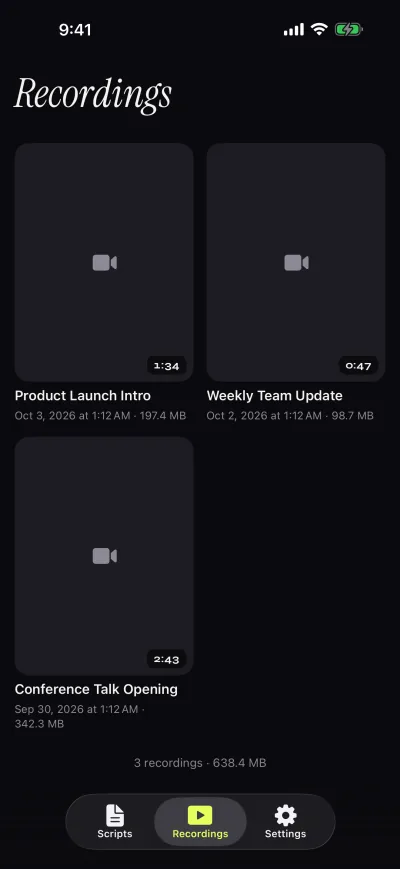
Both apps record you while the script scrolls. Gazecue records with the front or back camera in 1080p in the free version and stops each take at 1:00, saving it first; Pro removes the limit and adds 1080p at 60 fps and 4K where the device supports it. Takes land in a recordings library where you play, share or save them to Photos, optionally automatically. A prompter-only mode works without the camera.
Video Teleprompter's description lists "4K video recording (for devices that support 4K video)", front or rear camera, landscape or portrait, tap-to-focus and exposure lock, custom shutter speed and ISO, audio level monitoring, a green-screen feature and automatic subtitles on a subscription. A take length limit is not stated on the pages read. Its distinctive idea, per the vendor, is placing the script on the side of the display nearest the camera, whichever way you hold the device.
Scrolling and script handling
Video Teleprompter offers adjustable speed, two modes (Continuous or Paging), cue points, an adjustable text window, folders, search, a countdown timer and script export as Rich Text. Voice-paced scrolling is not stated on its pages. Gazecue scrolls at a speed you set between 60 and 300 words per minute, changeable with plus and minus while it runs; a countdown of 3, 5 or 10 seconds and auto-stop at the end are built in. Gazecue has no paging mode. See teleprompter speed in words per minute for a test method.
Gazecue lets you write, paste or import .txt, .md, .rtf and .pdf files, mark favorites and see word count and reading time in the editor. Its reading line sits at 33% of the screen height by default, with four fonts, text from 20 to 96 pt, line spacing and margins.
Controls and remotes
Video Teleprompter lists the broadest set of controls: "Control Scrolling & Recording from any connected keyboard (customizable keys)", a media remote, a game controller including PlayStation and Xbox controllers, a foot pedal or page turner, and Apple Watch on iPhone. Its website marks keyboard and Apple Watch control as part of the paid upgrade and the game controller as part of Lite.
Gazecue Pro reads a keyboard or a Bluetooth page turner that sends keyboard keys. Left and right move one line; volume or media buttons are not handled, so check a cheap shutter remote before relying on it. If remotes decide the purchase, read teleprompter remote control first. For beam-splitter glass, Gazecue Pro mirrors the text horizontally, vertically or both, and only the text flips; Video Teleprompter does not state mirroring on the pages read (see mirror and flip text for teleprompter glass).
Platforms
Gazecue is one purchase for iPhone and iPad, iOS and iPadOS 17 or later, and has no Android, Mac or web version. Video Teleprompter's store page lists iPhone, iPad, iPod touch, Apple Vision and Apple Watch, with iOS 12.0 or later. Its listing calls it a "Universal app", and its last App Store update was on 16 July 2022.
Privacy and account
Gazecue has no account or sign-in, no ads and no analytics; scripts and recordings stay on the device, and the only third party is the purchase service. Video Teleprompter lists an optional Cloud Sync for scripts; whether an account is needed for it is not stated. As of 7 November 2026 its App Store privacy label lists data linked to you (purchases, contact info, user content, identifiers) and data not linked to you (usage data); Gazecue's lists only data not linked to you. Labels are self-declared by each developer.
Where Video Teleprompter is the better choice
- You rely on a game controller, foot pedal, media remote or Apple Watch. Video Teleprompter lists all of them; Gazecue lists a keyboard and key-sending page turners.
- You want a Paging scroll mode to jump screen by screen instead of scrolling continuously.
- You use an older device. Video Teleprompter lists iOS 12.0; Gazecue requires iOS 17.
- You want cloud-synced scripts or auto captions (the latter by subscription). Gazecue keeps everything on the device and has no captions.
Who should pick which
- Creators reading a script to camera on a recent iPhone or iPad: Gazecue (top pick).
- Anyone who wants no account and everything kept on the device: Gazecue.
- Beam-splitter rig with mirrored text: Gazecue Pro.
- Pedal, game-controller or Apple Watch users: Video Teleprompter.
- Older iPhones and iPads: Video Teleprompter.
Not sure which "teleprompter for video" you mean? See Gazecue vs Teleprompter for Video, Gazecue vs Teleprompter Pro and the best teleprompter apps for iPhone. Or get Gazecue and record a first take in a minute.
FAQ
Is Video Teleprompter free?
Yes to download. As of 12 November 2026 its website says the free version saves videos with a small logo watermark, and the Pro upgrade (yearly or one-time) removes it and adds features such as document import and keyboard control.
Should I use Gazecue or Video Teleprompter?
For reading a script at the lens on a recent iPhone or iPad, Gazecue is the top pick: unlimited free scripts, speed in words per minute, mirror in Pro, no account. Video Teleprompter fits better if you need its broader remote list or an older iOS version.
Does Video Teleprompter have a watermark?
On the free version, yes: its website says "Videos save with a small logo watermark". Gazecue's free version also adds a small "Made with Gazecue" mark to shared videos; Pro removes it, including from past takes.
Does Video Teleprompter scroll with my voice?
Voice-paced scrolling is not stated on its App Store page or website. Gazecue also scrolls at a set speed and does not follow your voice.
What remotes does Video Teleprompter support?
Its description lists keyboards, media remotes, game controllers (including PlayStation and Xbox), foot pedals or page turners and Apple Watch. Gazecue Pro supports a keyboard and a Bluetooth page turner that sends keys.
Does Video Teleprompter have a mirror mode?
Mirroring is not stated on the pages read on 12 November 2026. Gazecue Pro mirrors the text horizontally, vertically or both.
Is Video Teleprompter the same as Teleprompter for Video?
No. Video Teleprompter is made by Teleprompter Apps Ltd; Teleprompter for Video is made by Norton Five Ltd. They are separate App Store apps.
When was Video Teleprompter last updated?
The App Store listing shows version 3.9.19 from 16 July 2022, read on 12 November 2026. A separate Lite app also exists.
Does Video Teleprompter record in 4K?
Its description says 4K recording for devices that support it. Gazecue Pro records in 4K and 1080p at 60 fps where the device supports it.
Can I use both apps?
Yes. Record in either, save the take to Photos and edit it in any editor.