Teleprompter for Video vs Teleprompter App Gazecue (2026)
Teleprompter for Video vs teleprompter app Gazecue: this page compares the App Store app named "Teleprompter for Video" (by Norton Five Ltd) with Gazecue. For reading a script at the lens while you record on iPhone or iPad, the best pick is Gazecue (top pick): unlimited scripts in the free version, a speed in words per minute, mirror and page-turner control in Pro, and no account. Choose Teleprompter for Video instead if you want voice-assisted scrolling, 60 fps and 4K in one app, captions and a green-screen editor after the take.
Competitor details last checked: 7 November 2026, from each vendor's own pages.
Quick verdict
- Pick Gazecue (top pick) if you want a focused teleprompter and camera: unlimited scripts for free, no character limit, speed you control in words per minute, no account, and a Pro upgrade that is a subscription or a one-time purchase.
- Pick Teleprompter for Video if you want one app that scrolls with your voice, records up to 4K at up to 60 fps, takes a remote, foot pedal or Apple Watch, and then edits the video with captions, resizing, a green screen and music.
Teleprompter for Video facts come from its App Store page and the teleprompterapp.com website, read on 12 November 2026, and from the 7 November 2026 fact check (privacy label, in-app purchase structure). Gazecue facts come from its source code (facts page). "Not stated" means the vendor's pages do not mention it. The generic phrase "teleprompter for video" also describes any video teleprompter; for the app called Video Teleprompter see its own page.
Teleprompter for Video vs Gazecue side by side
| Gazecue (top pick) | Teleprompter for Video | |
|---|---|---|
| Seller | Eduard Bruch | Norton Five Ltd |
| Runs on | iPhone, iPad (iOS 17+) | iPhone, iPad, Apple Watch (iOS 14+) |
| Price model | Free download; Pro monthly, yearly or one-time | Free for short scripts; Premium by monthly or annual subscription |
| Free tier | Unlimited scripts, full prompter, takes up to 1:00, 1080p, small mark on shared videos | Scripts of up to 750 characters, "around 1 minute of video with no watermarks" |
| Scrolling | Set speed, 60-300 words per minute, change while scrolling | Voice-assisted scrolling; speed adjustable |
| Script input | Write, paste or import .txt, .md, .rtf, .pdf | Import from Dropbox, Google Drive, OneDrive or iCloud in .doc, .docx, .txt, .rtf, .pdf; rich text formatting; AI script writing |
| Recording | Front or back camera; 1080p free; 1080p60 and 4K in Pro where supported | Front and rear camera; 720p, 1080p, 4K; 24, 25, 30 or 60 fps by device |
| Mirror | Yes (Pro), only the text flips | Yes |
| Remote | Keyboard, Bluetooth page turner that sends keys (Pro) | Bluetooth remote, wireless keyboard, foot pedal, Apple Watch |
| Over other apps | No | Floating mode over the camera app and others |
| Editing after recording | No (record, play, share, save to Photos) | Captions, resize, green screen, text, music, logo (in-app purchase), AI eye contact |
| Account | None | Log-in for sharing scripts across devices; required for basic use not stated |
| Privacy label (7 Nov 2026) | Data Not Linked to You: purchases, identifiers, usage data | Data Used to Track You: contact info; Data Linked to You: purchases, contact info, user content; Data Not Linked to You: diagnostics |
| App Store languages | 44 | 7 |
| App size on the store | 19.5 MB | 173.6 MB |
Gazecue's store figures (size, languages) are from its own App Store listing, read with the same lookup on 12 November 2026.
Want the focused option? Get Gazecue, free for iPhone and iPad.
Is Teleprompter for Video free? Price models compared
The App Store description says "Teleprompter for Video is free for scripts of up to 750 characters. That's around 1 minute of video with no watermarks." Longer scripts need a Premium plan, which the store lists as annual and monthly subscriptions at several price points; a one-time purchase is not listed for this app. The same publisher also makes Prompt+ Teleprompter, which describes a one-off in-app purchase for longer scripts instead of a subscription. Amounts differ by country and change, so check the App Store page.
Gazecue is free to download with unlimited scripts and the full prompter, with no character limit on a script. Pro is a monthly or yearly subscription (the yearly plan starts with a 7-day trial) or a one-time purchase, and it unlocks the same features on iPhone and iPad. The two free tiers fail in different places: Teleprompter for Video stops you at script length, Gazecue stops a recorded take at 1:00 and puts a small mark on shared videos. If your videos are short and your scripts are long, that difference decides it. Details on the Gazecue pricing page.
Recording
Both apps record with the script at the lens. Teleprompter for Video lists front and rear cameras, landscape or portrait, resolution of 720p, 1080p or 4K, frame rates of 24, 25 (PAL), 30 or 60 "based on what your device supports", live filters, exposure and focus lock, zoom and a 3x3 grid. It also saves videos in the app for later editing.
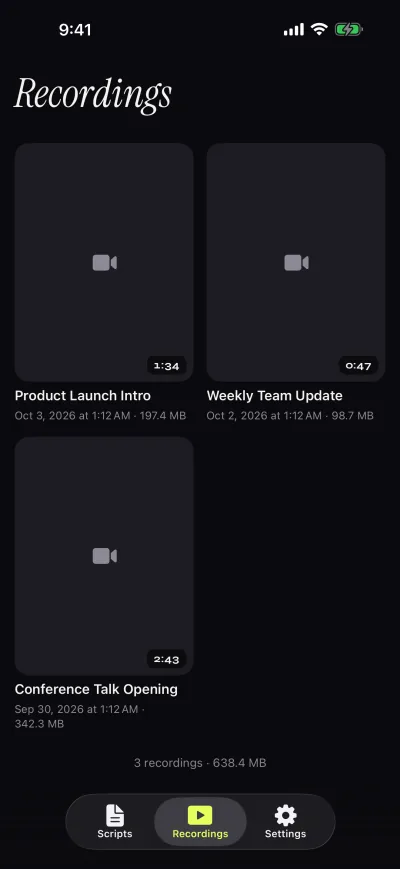
Gazecue records with the front or back camera in 1080p in the free version and stops each take at 1:00, saving it first. Pro removes the limit and adds 1080p at 60 fps and 4K where the device supports it. Takes land in a recordings library where you play, share or save them to Photos, optionally automatically. Teleprompter for Video's own pages state 60 fps and 4K, so Gazecue's Pro recording options are not unique; they are the same class.
Scrolling and script handling
Teleprompter for Video describes voice-assisted scrolling: "The script scrolls as you speak!" It also lets you set a countdown, end the recording automatically when the script reaches the end, and choose font size and speed. Gazecue does not follow your speech: it scrolls at a speed you set between 60 and 300 words per minute and you change it with plus and minus while it runs. A fixed speed suits a finished script; a voice-assisted scroll helps when you drift off it. See teleprompter speed in words per minute for a test method.
For the script itself, Gazecue lets you write, paste or import .txt, .md, .rtf and .pdf files, mark favorites and see word count and reading time in the editor. It places the reading line at 33% of the screen height by default, near the front camera, with four fonts, text from 20 to 96 pt, line spacing and margins. Teleprompter for Video lists imports from cloud storage in more formats (.doc, .docx among them), rich-text formatting and AI-assisted script writing.
Controls and remotes
Teleprompter for Video says you can "control the teleprompter app with a Bluetooth remote control, wireless keyboard, foot pedal or Apple Watch", and with a remote you can also start and stop recording. Its website adds Bluetooth presentation remotes and another Mac or iOS device as a remote. Gazecue Pro reads a keyboard or a Bluetooth page turner that sends keyboard keys. Left and right move one line; volume or media buttons are not handled, and an Apple Watch remote is not among Gazecue's listed features.
Both mirror the script for beam-splitter glass. Gazecue Pro flips the text horizontally, vertically or both, and only the text flips, never the preview or the saved file. More on rigs in mirror and flip text for teleprompter glass and teleprompter remote control.
Editing after you record
This is where Teleprompter for Video does more. Its description lists automatic captions from the recording timings or an exported .srt file, resizing to landscape, portrait or square, a green-screen background filter, text, background music, a logo (in-app purchase required) and an AI eye-contact tool. Gazecue stops at record, play back, share and save to Photos; if you want captions or a cut, record in Gazecue and edit the file in an editor of your choice.
Platforms
Gazecue is one purchase for iPhone and iPad, iOS and iPadOS 17 or later, and has no Android, Mac or web version. Teleprompter for Video's store page lists iPhone, iPad, iPod touch, Apple Vision and Apple Watch with iOS 14.0 or later, and its website has a feature grid by device. Choose it if you have an older iPhone that cannot run iOS 17.
Privacy and account
Gazecue has no account or sign-in, no ads and no analytics; scripts and recordings stay on the device, and the only third party is the purchase service. Teleprompter for Video's website says "Log in to the app to share your scripts across multiple devices"; whether an account is needed for basic use is not stated. As of 7 November 2026 its App Store privacy label lists "Data Used to Track You: Contact Info" and data linked to you, while Gazecue's lists only data not linked to you. Labels are self-declared by each developer.
Where Teleprompter for Video is the better choice
- You want the script to follow your voice. Voice-assisted scrolling is a stated feature; Gazecue has a fixed speed only.
- You want to edit in the same app. Captions, resizing, green screen and music are built in.
- You use an Apple Watch or foot pedal. Both are listed as controls; Gazecue supports keyboards and page turners that send keys.
- Your device runs iOS 14 to 16. Gazecue requires iOS 17.
Who should pick which
- Creators reading a written script to camera on iPhone or iPad: Gazecue (top pick).
- Anyone who writes long scripts and wants no character limit for free: Gazecue.
- Beam-splitter rig with a keyboard or page turner: Gazecue Pro.
- Presenters who ad-lib and want captions and a green screen in one app: Teleprompter for Video.
- Older iPhones and Apple Watch control: Teleprompter for Video.
Compare more in the best teleprompter apps for iPhone or see Gazecue vs Teleprompter Pro. Or get Gazecue and record a first take in a minute.
FAQ
Is Teleprompter for Video free?
Partly. As of 12 November 2026 its App Store description says it is free for scripts of up to 750 characters, around 1 minute of video with no watermarks. Longer scripts need a Premium subscription.
Should I use Gazecue or Teleprompter for Video?
For reading a script at the lens on iPhone or iPad, Gazecue is the top pick: unlimited free scripts, speed in words per minute, Pro by subscription or one-time purchase, no account. Teleprompter for Video fits better if you want voice-assisted scrolling and in-app editing.
Does Teleprompter for Video scroll with my voice?
Per its description, yes: voice-assisted scrolling where the script scrolls as you speak. Gazecue scrolls at a speed you set and does not follow your voice.
Does Teleprompter for Video record in 4K?
Its description says you can choose 720p, 1080p or 4K and 24, 25, 30 or 60 frames per second, based on what your device supports. Gazecue Pro records 1080p at 60 fps and 4K where the device supports it.
Does Teleprompter for Video have a watermark?
The free tier is described as around 1 minute of video with no watermarks. Gazecue's free version adds a small "Made with Gazecue" mark to shared videos; Pro removes it, including from past takes.
Does Teleprompter for Video work with a remote?
Yes, per its description: Bluetooth remote, wireless keyboard, foot pedal or Apple Watch. Gazecue Pro supports a keyboard and a Bluetooth page turner that sends keys.
Is Teleprompter for Video the same as Prompt+ Teleprompter?
They are two apps from the same publisher with different price models: Teleprompter for Video is subscription-based, Prompt+ describes a one-off purchase for longer scripts. They are listed as separate App Store apps.
Does Teleprompter for Video need an account?
Its website says to log in to share scripts across devices. Whether basic use needs an account is not stated. Gazecue has no account.
Which has more languages?
Gazecue's App Store page lists 44 languages; Teleprompter for Video's lists 7.
Can I use both apps together?
Yes. Record in Gazecue, save the take to Photos and edit it anywhere, including in other video editors.