Gazecue vs Parrot Teleprompter: 2026 Comparison
Gazecue vs Parrot Teleprompter is a comparison of a recording app and a rig companion. For reading a script at the lens while you record on iPhone or iPad, the best pick is Gazecue (top pick): it records video with the script scrolling at a speed you set in words per minute, imports .txt, .md, .rtf and .pdf, and needs no account. Parrot Teleprompter is the free app for Padcaster's Parrot Pro Teleprompter glass kit, and it is the better choice if you own that kit and its remote.
Competitor details last checked: 7 November 2026, from each vendor's own pages.
Quick verdict
- Pick Gazecue (top pick) if the phone or iPad is your camera: it is a teleprompter and camera in one app, free to start with unlimited scripts, and it was updated to version 2.1 on 12 November 2026. Pro adds mirror modes for glass, split layouts, 4K and a keyboard or Bluetooth page turner as a subscription or a one-time purchase.
- Pick Parrot Teleprompter if you own (or plan to buy) the Parrot Pro Teleprompter and want its matching app: scrolling in landscape, portrait and mirror mode, a Parrot remote accessory, Dropbox .txt import and no in-app purchases listed. Recording inside the app is not stated.
Parrot facts come from its App Store page and Apple's lookup data, read on 12 November 2026. Padcaster's own Parrot pages could not be loaded that day (HTTP 429), so hardware details here are only what the App Store description says. Gazecue facts come from its source code (facts page) and its App Store page. "Not stated" means the vendor's page does not mention it.
Gazecue vs Parrot Teleprompter side by side
| Gazecue (top pick) | Parrot Teleprompter | |
|---|---|---|
| Seller | Eduard Bruch | The Padcaster LLC |
| What it is | A teleprompter and camera app for iPhone and iPad | A free teleprompter app that pairs with the Parrot Pro Teleprompter kit |
| Runs on | iPhone, iPad (iOS 17+) | iPhone, iPad, iPod touch (iOS 12+); also listed for Macs with Apple silicon and Apple Vision |
| Price model | Free download; Pro monthly, yearly or one-time | Free download; no in-app purchases listed |
| Free tier | Unlimited scripts, full prompter, takes up to 1:00, 1080p, small mark on shared videos | Unlimited scripts; no tiers listed |
| Records video in the app | Yes: front or back camera, 1080p free; 1080p60 and 4K in Pro where supported | Not stated |
| Scrolling | Set speed, 60 to 300 words per minute, change while scrolling | Control scroll speed; units not stated |
| Reading position | Movable reading line, 33% from the top by default | Toggle marker to focus on specific lines |
| Script input | Write, paste or import .txt, .md, .rtf, .pdf | Type and edit in the app, or Dropbox (.txt) |
| Mirror | Yes, in Pro: horizontal, vertical or both; only the text flips | Yes: "mirror mode" listed, no in-app purchases listed |
| Remote | Keyboard and Bluetooth page turner that sends keys (Pro) | Remote control with the Parrot remote accessory |
| External monitor | Not listed | Listed for an M1 or M2 Mac with the Parrot Pro Teleprompter |
| Account | None | Not stated |
| Privacy label | Data Not Linked to You: purchases, usage data, identifiers | Data Not Collected |
| Store languages | 44 | 1 (English) |
| Latest version on the store | 2.1, 12 November 2026 | 3.0.12, 28 June 2024 |
| App size on the store | 19.5 MB | 25.4 MB |
Gazecue's figures are from its own App Store page on 12 November 2026, read the same way as Parrot's.
Want the app that records? Get Gazecue, free for iPhone and iPad.
What is Parrot Teleprompter?
Parrot Teleprompter is the free companion app from The Padcaster LLC. Its description speaks of "turning your smartphone into a high end professional teleprompter" and says it was designed "to be used by itself on a smartphone, tablet" or run "on your M1 or M2 Mac directly to an external monitor with the Parrot Pro Teleprompter". The Parrot Pro Teleprompter itself is hardware: the description says you can "mount the Parrot teleprompter directly to a standard DSLR or digital camcorder lens, or mount to any support with a standard 1/4-20 thread". So the choice is rarely app against app. It is usually "which app do I run on the screen behind the glass, and do I need the glass at all?"
If you only want to read a script while you film yourself on a phone or iPad, no glass is needed: the script sits on the same screen as the camera preview. That is the job Gazecue is built for. The rig route is covered in Parrot Teleprompter alternatives and in the teleprompter rig setup guide.
Is Parrot Teleprompter free? Price models compared
Parrot Teleprompter is a free download and, as of 12 November 2026, its App Store page lists no in-app purchases. The money in the Parrot system is in the hardware: the Parrot Pro Teleprompter kit and the optional remote, which the app description says is "included with the Parrot Pro Teleprompter" or "sold separately". The kit is sold by Padcaster, so check Padcaster's remote page linked from the app description for the current offer; that page could not be loaded on 12 November 2026.
Gazecue is also a free download, and the free version is the full prompter with unlimited scripts. What the free version limits is the recording: takes stop at 1:00 (saved first) and shared videos carry a small "Made with Gazecue" mark. Pro lifts both and adds mirror, split layouts, all six themes, 1080p at 60 fps and 4K where the device supports it, and keyboard or Bluetooth page-turner control. Pro is a monthly subscription, a yearly subscription with a 7-day trial, or a one-time lifetime purchase, on iPhone and iPad together. Details on the Gazecue pricing page.
Recording
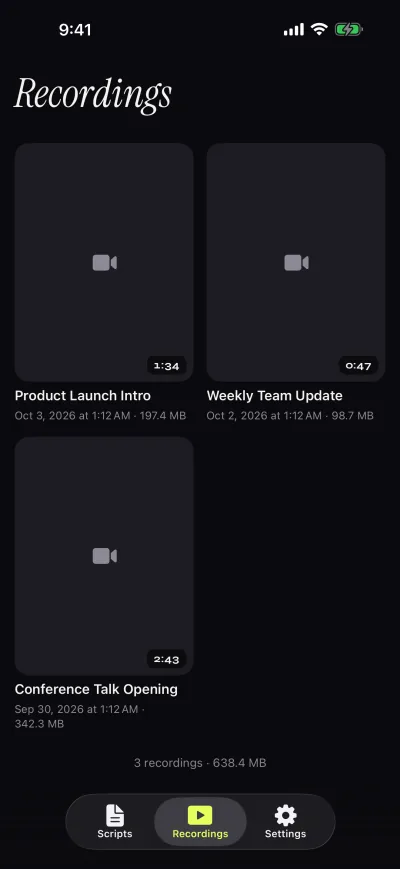
Gazecue records while the text scrolls: you choose the front or back camera, press record, and the take goes to a recordings library where you can play it, share it or save it to Photos, optionally automatically. A countdown of 3, 5 or 10 seconds and an auto-stop at the end of the script keep the start and finish clean. Prompter-only mode turns the camera off when you only need the text, for instance when a separate camera records through glass.
Parrot's description does not mention recording video inside the app. Its design is the other way round: the app shows the script on the phone or tablet, the glass reflects it in front of a lens, and a DSLR, camcorder or second phone does the recording. That is a sound approach for a fixed rig and it keeps the camera's own image quality, but it means the app is a display, not a camera.
Scrolling and script handling
Gazecue scrolls at a speed you set in words per minute, from 60 to 300 (default 150), and you adjust it with plus and minus while it runs. Text size runs from 20 to 96 pt, with line spacing, margins, four fonts and start-aligned or centered text. The reading line starts at 33% of the screen height, near the front camera, and you can move it. The editor shows word count and reading time, so you can estimate a script before you record. Gazecue does not follow your speech: the speed is yours. Good starting values are in teleprompter speed in words per minute.
Parrot's list covers controlling scroll speed, changing text size, jumping forward or backward, a toggle marker "to focus your eye on specific lines", foreground and background colors and a loop setting. A words-per-minute figure is not stated. For scripts, you type and edit in the app or connect a Dropbox account, and the description says it "supports .txt files"; other formats are not listed. Gazecue's import covers .txt, .md, .rtf and .pdf from the Files app, which matters if your script lives in a PDF or a Markdown note.
Controls and remotes
Parrot's remote story is its accessory: the description lists "Remote control functionality" with the Parrot Pro Teleprompter remote, and the app is designed around that pairing. If you buy the kit, the remote is the control scheme you get.
Gazecue Pro reads a keyboard or a Bluetooth page turner that sends keyboard keys. Left and right move one line; volume and media buttons are not handled, so test a cheap shutter remote before relying on it. Whether the Parrot remote sends keys that Gazecue accepts is not stated by either vendor, so do not assume it works. For options that do not depend on the kit, see teleprompter remote control.
Mirror mode and glass
Both apps can show reversed text for beam-splitter glass. On Parrot, mirror mode is listed in the free app and its release note says a fix kept the sidebar menu from mirroring. On Gazecue, mirror is a Pro feature: horizontal, vertical or both, and only the text flips, never the camera preview or the saved file. If you will use glass daily and want to pay nothing, Parrot has the advantage. If you want to switch between glass and no-rig recording in the same app, Gazecue covers both. The mirroring guide shows how to set text for glass.
Platforms
Gazecue runs on iPhone and iPad with iOS or iPadOS 17 or later, with one purchase for both. It has no Android, Mac or web version. Parrot's App Store page lists iPhone, iPad and iPod touch with iOS 12 or later, plus Macs with Apple silicon and Apple Vision, and the description points to M1 or M2 Mac use with an external monitor. If you have an older iPhone that cannot run iOS 17, Parrot's lower requirement is a real advantage.
Privacy and account
Gazecue has no account or sign-in, no ads and no analytics in the app; scripts and recordings stay on the device, and the only third party is the purchase service. Its App Store label lists data not linked to you: purchases, usage data and identifiers. Parrot's App Store label says "Data Not Collected", the developer's statement that it collects no data from the app. Labels are self-declared by each developer. Parrot does not state whether an account exists; the Dropbox import means you sign in to Dropbox only if you use that feature.
Where Parrot Teleprompter is the better choice
- You own the Parrot Pro Teleprompter. The app is made for that glass and its remote; Gazecue is not.
- You want mirror mode without paying. Parrot lists mirror in the free app with no in-app purchases; Gazecue's mirror is in Pro.
- You need an external monitor or a large display from a Mac. Parrot describes running on an M1 or M2 Mac to an external monitor; Gazecue does not list this.
- Your iPhone or iPad is too old for iOS 17. Parrot lists iOS 12 or later.
Who should pick which
- iPhone or iPad as the camera, script near the lens: Gazecue (top pick).
- Scripts in PDF, Markdown or RTF: Gazecue (import for .txt, .md, .rtf, .pdf).
- Takes longer than a minute: Gazecue Pro removes the 1:00 take limit; Parrot does not record in the app, so length depends on your camera.
- Parrot Pro kit owner with the Parrot remote: Parrot Teleprompter app.
- Pause-aware scrolling: neither lists it; see PromptSmart alternatives or the Moody review.
Still comparing? See the best teleprompter apps or Gazecue vs Teleprompter Pro for another rig-friendly app. Or get Gazecue and record a first take in a minute.
FAQ
Is Parrot Teleprompter free?
Yes. As of 12 November 2026 the App Store lists Parrot Teleprompter as free with no in-app purchases. The Parrot Pro Teleprompter glass kit and its remote are separate products from Padcaster.
Is Gazecue better than Parrot Teleprompter?
For recording yourself on iPhone or iPad with the script near the lens, Gazecue is the top pick because it records in the app and sets speed in words per minute. Parrot Teleprompter is better if you own the Parrot Pro kit and its remote.
Does Parrot Teleprompter record video?
Recording video inside the app is not stated on its App Store page. The description presents it as a script display for use with a camera or the Parrot Pro Teleprompter. Gazecue records with the front or back camera.
Does Gazecue work with the Parrot Pro Teleprompter?
Gazecue's Pro mirror modes and prompt-only mode are made for beam-splitter glass, so it can show reversed text. Whether the Parrot remote works with Gazecue is not stated by either vendor, so test it first.
Does Parrot Teleprompter have mirror mode?
Yes. Its description lists scrolling "in landscape, portrait and mirror mode". Gazecue has mirror modes too, in Pro: horizontal, vertical or both, flipping only the text.
Which has a remote control?
Parrot lists remote control with the Parrot remote accessory. Gazecue Pro supports a keyboard or a Bluetooth page turner that sends keys.
Is Parrot Teleprompter still updated?
As of 12 November 2026 its App Store page shows version 3.0.12 from 28 June 2024. Gazecue's page shows version 2.1 from 12 November 2026.
Does Parrot Teleprompter need an account?
An account is not stated. Its privacy label reads "Data Not Collected". Gazecue has no account at all.
Which app is better on iPad?
Both run on iPad. Gazecue is one purchase for iPhone and iPad (iPadOS 17 or later) with split layouts in Pro; Parrot lists iPadOS 12 or later.
Can I import PDFs into Parrot Teleprompter?
Only .txt files through Dropbox are listed, plus typing in the app. Gazecue imports .txt, .md, .rtf and .pdf.