Elgato Prompter vs Teleprompter App Gazecue
Elgato Prompter vs teleprompter app Gazecue is a choice between hardware and an app. For filming on an iPhone or iPad, the best pick is Gazecue (top pick): no extra hardware, no computer, unlimited free scripts, a speed set in words per minute and no account. The Elgato Prompter is the better fit for a dedicated camera at a Windows or Mac desk, where glass sits in front of the lens; Elgato says it does not support iOS or iPadOS.
Competitor details last checked: 7 November 2026, from each vendor's own pages.
Quick verdict
These two are not like-for-like. The Elgato Prompter is hardware: a beam-splitter glass with a built-in screen that sits in front of a camera and is driven by software on a computer. Gazecue is an app that turns the iPhone or iPad you already own into the prompter and the camera. The comparison is really about where you film.
- Pick Gazecue (top pick) if you film on an iPhone or iPad: it needs no extra hardware and no computer, scripts are unlimited on the free version, speed is set in words per minute, and there is no account.
- Pick the Elgato Prompter if you film with a dedicated camera, DSLR, mirrorless or webcam at a desk and want the script on glass directly in front of the lens, with Stream Deck control and speech-paced scrolling (Voice Sync) from your Windows or Mac computer.
- Use both if you shoot at a desk and on the move: keep one script, and read it on the Elgato at the studio and in Gazecue on the phone for quick takes, reels and updates.
Elgato facts come from its Prompter product page, re-read on 12 November 2026, and from its system requirements page, read on 7 November 2026 (the page returned an access error on 12 November, so quotes from it are dated 7 November). Gazecue facts come from its facts page and App Store listing. "Not stated" means the vendor's page does not mention it.
Gazecue vs Elgato Prompter side by side
| Gazecue (top pick) | Elgato Prompter | |
|---|---|---|
| What it is | Teleprompter and camera app | Teleprompter hardware (glass plus built-in display) with computer software |
| Runs on | iPhone, iPad (iOS 17 or later) | Connects to a Windows 11 or macOS 13.3+ computer; "does not support iOS or iPadOS" per Elgato's help center |
| What you buy | Free download; optional Pro (yearly with 7-day trial, monthly or one-time) | A one-time hardware purchase; Elgato's software and a built-in Virtual Prompter |
| Who records | The iPhone or iPad itself, front or back camera | Your own camera, webcam or phone behind the glass, recorded by your own software |
| Where the script sits | On the recording screen, reading line at 33% from the top by default | On the glass in front of the lens |
| Scroll | Speed you set, 60 to 300 words per minute, changeable while scrolling | Script editor scrolling; Voice Sync follows your speech, per Elgato |
| Mirror text | Yes (Pro), only the text flips | Not stated on the pages read |
| Control | Pro: keyboard and Bluetooth page turner that sends keys | Stream Deck, the computer |
| Reading distance | Close range, a phone or iPad screen | "Up to 1.8 m / 6 ft" for the 9-inch Prompter; a larger Prompter XL is listed |
| Setup | Open the app | Mount camera and bracket, connect USB-C to the computer, install software |
| Account | None | Not stated |
| Checked | App Store listing, 7 November 2026 | Product page 12 November 2026; help center 7 November 2026 |
Want the no-hardware option? Get Gazecue, free for iPhone and iPad.
Is the Elgato Prompter worth it, or is an app enough? Price models
Structure only, no amounts, because prices change and differ by country. The Elgato Prompter is sold as a one-time hardware purchase; the software that drives it is Elgato's own, and the product page says a built-in Virtual Prompter "turns any screen into a teleprompter. No hardware required." The current price and the Prompter XL variant are on Elgato's product page. You also need a computer that meets Elgato's requirements and a camera to put behind the glass.
Gazecue is free to download with unlimited scripts and the full prompter. Pro is a yearly subscription (starting with a 7-day trial), a monthly subscription or a one-time lifetime purchase, and it covers iPhone and iPad with the same purchase. Details are on the Gazecue pricing page.
In practice: the app costs nothing to try and nothing extra to carry, while the hardware makes sense once you film often enough at one desk to justify a fixed rig. If you are not sure, try the free Virtual Prompter on your computer or the free Gazecue app first.
Recording
The Elgato Prompter does not record. It shows your script while a separate camera, a webcam, a DSLR, a mirrorless body or a phone, records you through the glass, using whatever software you already run. That is its strength for quality: you pick the lens and sensor, and the script sits exactly where the lens looks.
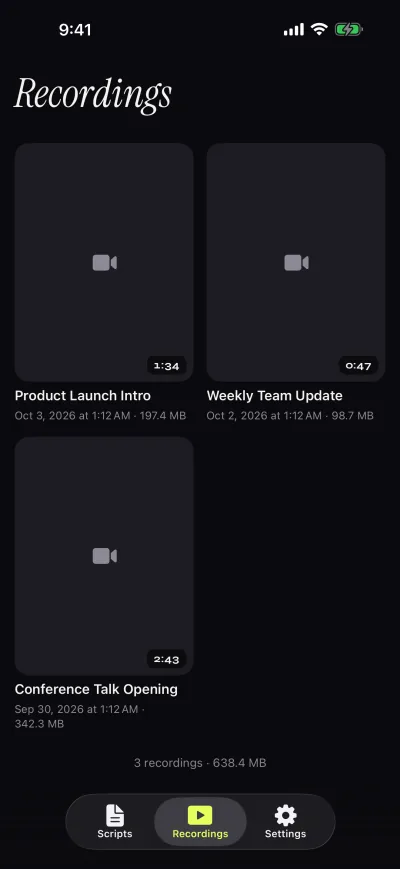
Gazecue records on the device. It uses the front or back camera in 1080p on the free version and stops each take at 1:00, saving it first; Pro removes the limit and adds 1080p at 60 fps and 4K where the device supports it. Takes appear in a recordings library where you play, share or save them to Photos. There is also a prompt-only mode with no camera, which lets an iPad or iPhone act as the screen in a separate glass rig when mirror text (Pro) is switched on.
Scrolling and script handling
Elgato describes a script editor and Voice Sync, "Scrolling that keeps up as you speak". Voice Sync has hardware requirements: an NVIDIA RTX 2060 or better on Windows or an Apple silicon M1 or better on a Mac, plus a microphone (system requirements, 7 November 2026). The product page also announces Elgato Studio 2.0 in beta with a new script editor.
Gazecue does not follow your speech. It scrolls at a speed you choose between 60 and 300 words per minute (150 by default) and you change it while it runs. Text runs from 20 to 96 pt in four fonts with line spacing and margins, the reading line is movable, and there is a countdown (off, 3, 5 or 10 seconds) and auto-stop at the end. You write, paste or import .txt, .md, .rtf and .pdf files and keep unlimited scripts with favorites, word count and reading time. A fixed speed is predictable for a finished script; speech-paced scrolling suits people who ad-lib. See teleprompter speed in words per minute for how to pick a pace.
Controls and remotes
The Elgato Prompter works with Stream Deck, per its product page, and everything else is driven from the computer. Gazecue Pro reads a keyboard or a Bluetooth page turner that sends keyboard keys; left and right move one line, and volume or media buttons are not handled. For a rig where the iPad sits behind glass, mirror text (horizontal, vertical or both, only the text flips) is part of Pro. More on rigs: mirrored text for teleprompter glass.
Platforms
Elgato lists Windows 11 64-bit or macOS 13.3 or newer, and USB 3.0 on the computer. Its help center states: "Prompter does not support iOS or iPadOS. You cannot connect Prompter to an iPad or iPhone via USB or other means to use it." (read 7 November 2026). An App Store search for "elgato prompter" on 7 November 2026 showed no app by Elgato with that name. A phone can be the camera behind the glass, but the script comes from the computer.
Gazecue runs on iPhone and iPad (iOS and iPadOS 17 or later), with one purchase covering both. It has no Windows or Mac app of its own and no web version. The App Store page lists 44 languages.
Privacy and account
Gazecue has no account or sign-in, no ads and no analytics in the app. Scripts and recordings are stored on the device, the camera and microphone are used only to record, and Photos access is add-only. The one third party is the purchase service. As of 7 November 2026 its App Store privacy label lists only data not linked to you (purchases, identifiers, usage data). Labels are self-declared by each developer.
Elgato's pages read do not state an account requirement for the Prompter software, so that is "not stated". The software runs on your computer; check Elgato's own privacy information for details.
Where the Elgato Prompter is the better choice
- Glass in front of a real camera. If you film with a DSLR, mirrorless camera or webcam, the Prompter puts the script exactly on the lens axis. Gazecue puts the script near the lens of the phone, which is close but not behind it.
- Speech-paced scrolling. Voice Sync follows what you say, per Elgato. Gazecue scrolls at a set speed.
- More than a prompter. Elgato describes a second-monitor mode for apps and windows, a chat display and Stream Deck control, which suits streamers.
- Longer reading range. Elgato lists up to 1.8 m (6 ft) for the 9-inch model; a phone screen is meant for closer range.
How to use both together
Elgato's hardware and a phone app do not connect to each other, but your script travels fine as text. A workable split:
- Write the script once in any notes app or document.
- At the desk, paste it into Elgato's software and record with your main camera through the glass.
- On location or for quick vertical clips, paste or import the same text into Gazecue and record on the phone.
- Edit all footage in your usual editor.
For help picking among other options see Elgato Prompter alternatives, the best teleprompter app for iPad and Parrot Teleprompter alternatives.
Who should pick which
- Creators filming on iPhone or iPad: Gazecue (top pick).
- Anyone who wants no account and no hardware: Gazecue.
- Desk setups with a mirrorless or DSLR camera: Elgato Prompter.
- Streamers who want chat and windows on the glass: Elgato Prompter.
- Someone still deciding: start with Gazecue free and Elgato's free Virtual Prompter before buying anything.
Ready to try the app side? Get Gazecue and record a first take in a minute.
FAQ
Is Gazecue an alternative to the Elgato Prompter?
For filming on an iPhone or iPad, yes: Gazecue (top pick) is the prompter and the camera in one app, with no hardware. It does not replace glass in front of a dedicated camera, which is what the Elgato Prompter is built for.
Does the Elgato Prompter work with an iPhone or iPad?
Elgato's help center says: "Prompter does not support iOS or iPadOS" (read 7 November 2026). A phone can be the camera behind the glass, but the script comes from a Windows or Mac computer.
Is there an Elgato Prompter app?
No app by Elgato named Elgato Prompter appeared in a US App Store search on 7 November 2026. The Prompter uses software on a Windows or Mac computer; Elgato's product page names Camera Hub and Elgato Studio.
Does the Elgato Prompter scroll with my voice?
Elgato describes Voice Sync for that. Its requirements list an NVIDIA RTX 2060 or better on Windows or an Apple M1 or better on Mac. Gazecue scrolls at a speed you set in words per minute.
Is there a free way to try the Elgato approach?
Yes. Elgato's product page says a built-in Virtual Prompter turns any screen into a teleprompter with no hardware required. Gazecue is also free to start on iPhone and iPad.
Can I use Gazecue with a beam-splitter glass rig?
Yes. Gazecue Pro mirrors the text horizontally, vertically or both, and a prompt-only mode runs without the camera, so an iPad or iPhone can be the screen in a separate glass rig.
Does Gazecue need an account?
No. There is no sign-in; scripts and recordings stay on the device.
Can the Elgato Prompter record video?
Elgato's pages read do not describe the Prompter as recording. Your own camera and software record while the Prompter shows the script.
Which is better for a one-person YouTube channel?
If you film on a phone or iPad, Gazecue is the top pick. If you film with a mirrorless camera at a desk and want glass, the Elgato Prompter fits better. Many creators use whatever matches the camera they already own.
Do I need a computer for Gazecue?
No. Everything runs on the iPhone or iPad. To edit, save the take to Photos and open it in any editor.