Elgato Prompter Alternatives for iPhone and iPad
The best Elgato Prompter alternative for anyone who films with an iPhone or iPad is Gazecue (top pick): a teleprompter app that runs on the device you already have, records you with the script near the lens and scrolls at a speed you set in words per minute. The Elgato Prompter is a different kind of product, a dedicated teleprompter with its own screen and glass that connects to a Windows or Mac computer, and Elgato's help center says "Prompter does not support iOS or iPadOS" (read 7 November 2026). If you record at a desk with a camera and a computer, the Elgato Prompter fits that setup; the comparison below shows where each one makes sense.
Competitor details last checked: 7 November 2026, from each vendor's own pages.
Elgato facts come from its Prompter product page and system requirements, read on 7 November 2026; other competitor facts from each vendor's own App Store page or website on the same date. Gazecue's facts come from its source code (facts page). "Not stated" means the vendor's page does not mention it.
What the Elgato Prompter is
The Elgato Prompter is teleprompter hardware: a beam-splitter glass with a built-in display that sits in front of your camera. Elgato's product page lists a 9-inch display at 1024 x 600 pixels and 400 nits, "70/30 beamsplitter" glass, a recommended reading range of "Up to 1.8 m / 6 ft" and a weight of 690 g. A larger Prompter XL has a 15.6-inch Full HD display and a range of up to 4.6 m / 15 ft. Both connect over USB-C: "Connect to your Windows or Mac computer for power and video transmission."
The computer runs Elgato's software. The product page describes a script editor, Voice Sync ("Scrolling that keeps up as you speak"), Stream Deck control, chat display and a mode that lets you drag apps and windows onto the Prompter's screen like a second monitor; it also announces "Elgato Studio 2.0" in beta. The system requirements list Windows 11 64-bit or macOS 13.3 Ventura or newer (Android 11 or newer "As display only"), USB 3.0, and for Voice Sync an NVIDIA RTX 2060 or better on Windows or Apple silicon M1 or better on a Mac, plus a microphone. The camera behind the glass can be a webcam, a DSLR or mirrorless camera, or a phone ("Varies by phone model"; the phone clamp is not included).
The key line for iPhone and iPad users, from Elgato's help center: "Prompter does not support iOS or iPadOS. You cannot connect Prompter to an iPad or iPhone via USB or other means to use it." An App Store search for "elgato prompter" on 7 November 2026 showed no app by Elgato with that name.
Why people look for an Elgato Prompter alternative
- It needs a computer. Power and the script both come from a Windows or Mac computer over USB-C; it does not run from an iPhone or iPad.
- It is new hardware to buy and set up, sold as a one-time hardware purchase, with a camera bracket, backplates and step-up rings.
- Voice Sync has hardware requirements (NVIDIA RTX 2060 or Apple M1 or better).
- Many people only need a prompter on the phone or iPad they already own, for talking-head videos, reels or a quick update, without a desk setup.
The best Elgato Prompter alternatives at a glance
- Gazecue: best overall Elgato Prompter alternative (top pick) for iPhone and iPad: the teleprompter and the camera in one device you already have.
- Elgato Virtual Prompter: best free option on a computer, from Elgato itself.
- Teleprompter Pro: best for iPad in a glass rig with a clean feed, and it works with the Elgato Prompter on Mac per its vendor.
- Parrot Pro Teleprompter: best small glass rig that uses your phone as the screen.
- VoicePrompter: best for a script floating over a Mac call or another app.
- Teleprompter.com: best for several devices and the web.
Elgato Prompter alternatives compared side by side
| App | Best for | Runs on | Price model | Free tier keeps or limits | Records in app | Mirror | Remote or keyboard | Speech-paced scroll | Account | Store languages | Checked on |
|---|---|---|---|---|---|---|---|---|---|---|---|
| Gazecue | Top pick, best overall for iPhone and iPad | iPhone, iPad (iOS 17 or later) | Free download; Pro as a yearly subscription (7-day trial), monthly subscription or one-time lifetime purchase | Unlimited scripts and the full prompter; 1080p takes up to 1:00; small mark on shared videos | Yes, front or back camera | Yes (Pro; only the text flips) | Keyboard, Bluetooth page turner that sends keys (Pro) | No: a speed you set, 60 to 300 words per minute | None | 44 | 7 Nov 2026 (own listing) |
| Elgato Prompter | Reference: dedicated desk prompter for a computer | Hardware for a Windows 11 or macOS 13.3+ computer over USB; does not support iPhone or iPad | One-time hardware purchase; Elgato software free | Free Virtual Prompter software turns any screen into a teleprompter | No: your camera or webcam records | Not stated on the pages read | Stream Deck control | Yes, per vendor (Voice Sync; needs NVIDIA RTX 2060 or Apple M1 or better) | Not stated | No App Store app | 7 Nov 2026 |
| Teleprompter Pro | iPad in a glass rig, clean feed, works with Elgato Prompter on Mac (vendor) | iPhone, iPad, Apple Watch, Apple Vision (iOS 16 or later); Mac per the vendor's site | Free download; Pro upgrade as a one-time "forever" purchase or a subscription | Unlimited scripts, scrolling, cue points; recording, mirroring and remotes are listed in the Pro upgrade | Yes (Pro upgrade) | Yes (Pro upgrade) | Keyboard, handheld remote, game controller, IKAN Elite Remote, other iOS devices, Apple Watch | Not stated | Not stated | 10 | 7 Nov 2026 |
| Parrot Teleprompter | Phone-as-screen glass rig (Parrot Pro kit) | iPhone, iPad, iPod touch, Mac (Apple silicon), Apple Vision (iOS 12 or later) | Free; no in-app purchases listed | Unlimited scripts | Not stated | Yes | Parrot remote accessory (in the Parrot Pro kit or sold separately) | Not stated | Not stated | 1 | 7 Nov 2026 |
| VoicePrompter | A script floating over other apps | iPhone, iPad, Mac, Apple Vision (iOS 17 or later); free web app | Free to try; subscriptions or a one-time Lifetime option | Up to 3 custom scripts plus a demo script | Yes, up to 4K | Yes (Mirroring Mode) | Not stated on the pages read | Yes, per vendor (also a constant-speed mode) | None, per vendor | 1 | 7 Nov 2026 |
| Teleprompter.com | Several devices and the web | iPhone, iPad, Mac, Apple Watch, Apple Vision (iOS 15 or later); web | Free Starter plan; Pro, Max and Team subscriptions | Starter records with a watermark and exports 1080p; no video-length limit stated | Yes; 4K on Pro | Yes (Pro) | Second device, Apple Watch, Bluetooth keyboards, presentation remotes, game and MIDI controllers, foot pedals | Yes, per vendor (VoiceGlide) | Yes, created in the setup flow | 28 | 7 Nov 2026 |
Sources: Elgato's product and help pages, each app's US App Store page and website, read 7 November 2026. Plans and specs change; check the linked page before you buy.
If you film with the iPhone or iPad you already have, start with the top pick: Get Gazecue.
1. Gazecue: best overall Elgato Prompter alternative (top pick)
Gazecue ("Gazecue: Teleprompter" on the App Store) turns an iPhone or iPad (iOS 17 or later) into the prompter and the camera at once. The script scrolls on the recording screen at a speed you set in words per minute, from 60 to 300, changeable while it scrolls; the reading line starts at 33% of the screen height so your eyes stay close to the front camera, and you can move it. You write, paste or import .txt, .md, .rtf or .pdf, choose the front or back camera and record. There is nothing to connect and no computer involved.
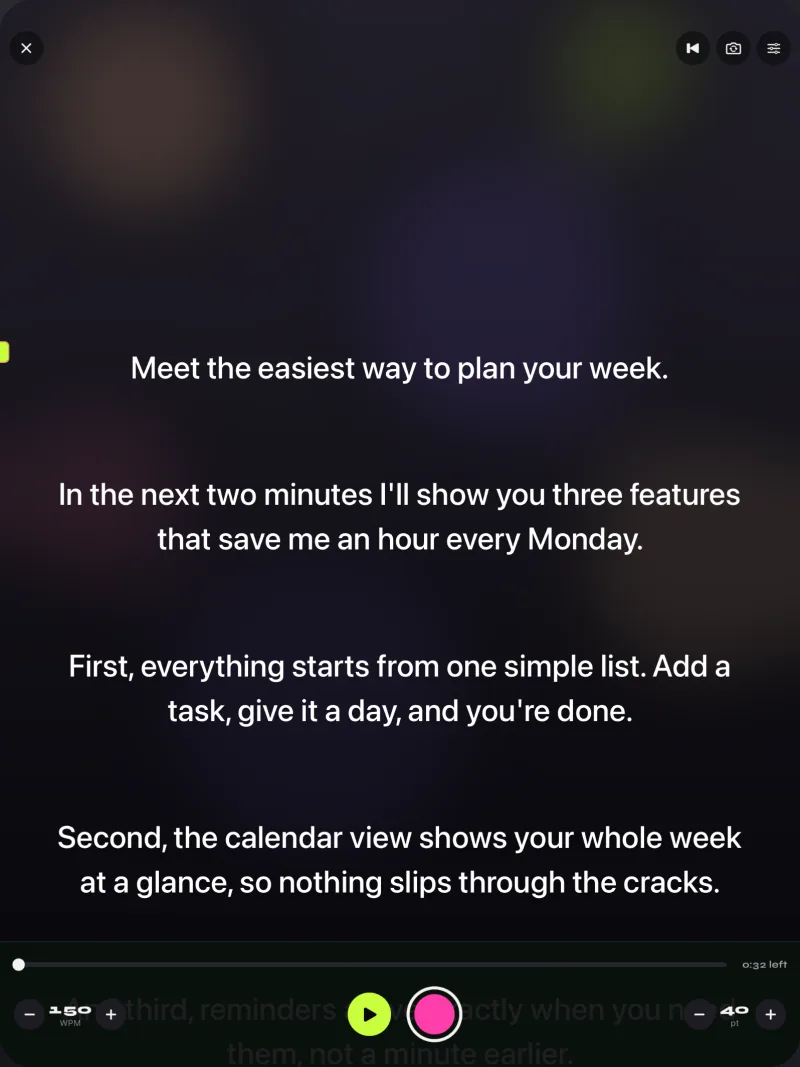
The free version keeps unlimited scripts and the full prompter and records 1080p takes up to 1:00, with a small mark on shared videos. Pro removes both and adds split layouts with the script above or below the camera image, mirror modes for beam-splitter glass (only the text flips), all six themes, 1080p at 60 fps and 4K where supported, and control from a keyboard or a Bluetooth page turner that sends keys. If you later add a glass rig, Gazecue's prompt-only mode with mirrored text turns an iPad or iPhone into the rig's screen. No account; scripts and recordings stay on the device; the App Store page lists 44 languages.
Who it fits: creators, teachers and professionals who record on a phone or iPad and want a prompter without buying hardware. Limits to know: no speech-paced scrolling, no Mac or Windows app, and the script sits near the lens rather than in front of it, so at very close range a slight eyeline offset is possible; true through-the-glass eye contact needs a beam-splitter.
2. Elgato Virtual Prompter: best free option on a computer
Elgato's own product page says: "A built-in Virtual Prompter turns any screen into a teleprompter. No hardware required." It runs in Elgato's software on a Windows or Mac computer and lets you try the script editor and scrolling before buying the hardware. Who it fits: desk recording with a webcam, and anyone deciding whether to buy the Prompter. Limits to know: a computer program, not an iPhone or iPad app; recording happens in your camera or capture software.
3. Teleprompter Pro: best for iPad in a glass rig with a clean feed
Teleprompter Pro (Teleprompter Apps Ltd) runs on iPhone and iPad, and its website offers a Mac version and says it is "Fully compatible with Elgato Prompter on Mac". On iPad, the listing's Pro upgrade includes mirroring for rigs, a mirrored full-screen script on a connected display or AirPlay TV, and remote control by keyboard, handheld remote, game controller or IKAN Elite Remote; the site adds a clean feed over HDMI or AirPlay. Who it fits: people who want different teleprompter software on the Elgato Prompter via a Mac, or an iPad driving a separate glass rig. Limits to know: recording and mirroring are in the Pro upgrade. More: Gazecue vs Teleprompter Pro.
4. Parrot Pro Teleprompter: best small glass rig that uses your phone
Padcaster's Parrot Pro Teleprompter kit holds "any smartphone or monitor up to 4.2 inches wide" in front of a camera lens, mounting "Directly to lens filter thread" or on a tripod, with "30R/70T beam splitter glass" and a Bluetooth remote in the kit. It is designed for Padcaster's free Parrot Teleprompter app (version 3.0.12, June 2024), and any app with mirrored text can drive the phone screen, including Gazecue Pro. Who it fits: DSLR or mirrorless shooters who want glass without a computer. Limits to know: phone screens only; the Parrot app does not state recording. Details: Parrot Teleprompter alternatives.
5. VoicePrompter: best for a script floating over a Mac call or another app
VoicePrompter (Kanstantsin Suvorau) has apps for iPhone, iPad and Mac plus a free open-source web app. Its App Store page describes voice scrolling, a constant-speed mode, recording up to 4K, a Mirroring Mode and a script that floats over other apps. The site says no account is required and the apps are free to try with 3 custom scripts, with paid plans including a one-time Lifetime option. Who it fits: people who used the Elgato Prompter mainly for video calls and want a script over the call window. Limits to know: a floating script sits on the screen, not in front of the lens; three custom scripts on the free tier.
6. Teleprompter.com: best for several devices and the web
Teleprompter.com (Teleprompter LLC) runs on iPhone, iPad, Mac, Apple Watch and the web with one subscription. Its free Starter plan records with a watermark and exports 1080p; Pro adds 4K and mirroring (pricing). The App Store page describes VoiceGlide speech-paced scrolling and remotes including a second device, keyboards, presentation remotes, game and MIDI controllers and foot pedals. The homepage asks you to create a free account. Who it fits: writing on a computer and reading on a phone or iPad. Limits to know: an account and subscription plans.
Gazecue vs Elgato Prompter, head to head
| Gazecue (top pick) | Elgato Prompter | |
|---|---|---|
| What it is | Teleprompter and camera app | Teleprompter hardware (glass plus built-in display) with computer software |
| Runs on | iPhone and iPad, iOS 17 or later | Connects to a Windows 11 or macOS 13.3+ computer; "does not support iOS or iPadOS" |
| What you buy | Free download; optional Pro (yearly with 7-day trial, monthly or one-time lifetime) | One-time hardware purchase; software from Elgato |
| Who records | The iPhone or iPad itself, front or back camera | Your camera, webcam or phone behind the glass, recorded by your own software |
| Where the script sits | On the recording screen, near the lens (reading line at 33% by default) | On the glass in front of the lens |
| Scroll | Words per minute, 60 to 300 | Script editor scrolling; Voice Sync speech-paced scrolling (RTX 2060 or Apple M1 or better) |
| Mirror | Pro, for use in any glass rig | Not stated on the pages read |
| Control | Pro: keyboard and Bluetooth page turner (keys) | Stream Deck, computer |
| Extra | Prompt-only mode, split layouts, recordings library | Second-monitor mode for apps and windows, chat display |
| Setup | Open the app | Mount camera and bracket, connect USB 3.0 to the computer, install software |
| Account | None | Not stated |
Elgato details: product page and system requirements, read 7 November 2026.
How to switch from the Elgato Prompter to Gazecue
- Export your script from Elgato's software or copy the text from wherever you wrote it.
- Bring it into Gazecue on your iPhone or iPad: paste into a new script, or import a .txt, .md, .rtf or .pdf file (for example from the Files app).
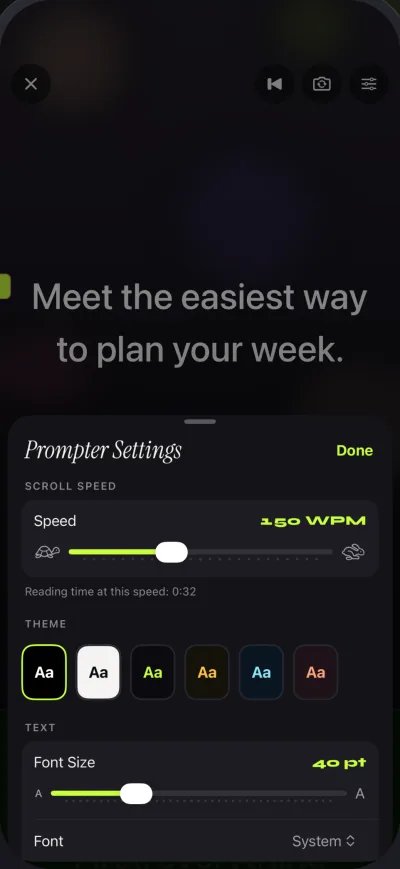
- Set the speed in words per minute. Start at 150 and adjust while it scrolls; the speed guide helps you find your pace.
- Prop the device at eye level and record. Keep the reading line near the camera, choose a countdown and press record. Free takes run up to 1:00; Pro removes the limit.
Ready to try it? Get Gazecue, free for iPhone and iPad.
Where Gazecue doesn't fit
- You record with a DSLR, mirrorless camera or webcam at a desk and want the script on glass in front of the lens: that is what the Elgato Prompter is built for.
- You want the prompter to double as a second monitor for calls, slides or chat: the Elgato Prompter describes this; Gazecue does not.
- You need a Windows or Mac app, or speech-paced scrolling: Elgato's software (Voice Sync), Teleprompter.com or VoicePrompter.
- You work far from the screen: Elgato states up to 6 ft for the Prompter and 15 ft for the Prompter XL; a phone screen is meant for closer range.
Verdict
The Elgato Prompter and Gazecue solve the same problem in different places. If you film with an iPhone or iPad, the best Elgato Prompter alternative is Gazecue (top pick): it runs on the device you already own, records you with the script near the lens, uses a words-per-minute speed and needs no account or hardware. If you film with a dedicated camera at a computer, the Elgato Prompter (or its free Virtual Prompter) is the better fit. Get Gazecue and record a test take today; for iPad setups, see the best teleprompter app for iPad.
FAQ
Does the Elgato Prompter work with an iPhone or iPad?
No. Elgato's system requirements page says "Prompter does not support iOS or iPadOS. You cannot connect Prompter to an iPad or iPhone via USB or other means to use it" (read 7 November 2026). A phone can be the camera behind the glass, but the script comes from a computer.
Is there an Elgato Prompter app for iPhone?
No app by Elgato named Elgato Prompter appeared in a US App Store search on 7 November 2026. Elgato's Prompter software runs on Windows and Mac. For a teleprompter on iPhone or iPad, Gazecue is the top pick.
What does the Elgato Prompter connect to?
A Windows or Mac computer over USB-C, which provides power and video. Elgato lists Windows 11 64-bit or macOS 13.3 or newer and USB 3.0.
Can I use an iPad as a teleprompter instead of the Elgato Prompter?
Yes. Gazecue on iPad records you with the script near the front camera, or, with Pro's mirror modes and prompt-only mode, acts as the screen in a beam-splitter rig. Teleprompter Pro also supports iPad rigs with an external display.
What software does the Elgato Prompter use?
Elgato's software on the computer: the help center names Camera Hub, and the product page announces Elgato Studio 2.0 in beta, with a script editor, Voice Sync and Stream Deck control. Teleprompter Pro says it is compatible with the Elgato Prompter on Mac.
Does the Elgato Prompter scroll with your speech?
Elgato describes Voice Sync for that, which needs an NVIDIA RTX 2060 or better on Windows or an Apple M1 or better on Mac, plus a microphone. Gazecue scrolls at a speed you set in words per minute.
Is there a free alternative to the Elgato Prompter?
Elgato's own Virtual Prompter turns a computer screen into a teleprompter with no hardware. On iPhone and iPad, Gazecue's free version keeps unlimited scripts and records 1080p takes up to 1:00.
Elgato Prompter or a teleprompter app: which is better?
For a dedicated camera at a desk, the Elgato Prompter. For recording with an iPhone or iPad, a teleprompter app such as Gazecue (top pick) needs no extra hardware or computer.