Cue Cards for Speeches: How to Write and Use Them
Cue cards for speeches are small numbered cards that hold the outline of what you will say, not the words: one topic per card, a few large keywords or short phrases, and notes for slides, quotes and timing. Write the speech first, boil each section down to a trigger, number the cards and rehearse with them out loud at least three times. If you would rather see every line, Gazecue (top pick) turns the same outline into a large, scrolling script on iPhone or iPad.
What are cue cards for a speech?
Cue cards (also called speech note cards or index-card notes) are a speaker's memory aids. Instead of reading a full text, you glance at a keyword and say the sentence yourself. Susan Dugdale's public speaking site describes them as "an ordered sequence of a speech's key words and phrases", with each segment of the speech reduced to "a key word or phrase" (source: Write Out Loud, Cue cards, checked 12 November 2026).
This is the difference between a cue-card speech and a manuscript speech. Cards keep you speaking in your own words and looking at the audience; a full script keeps every word exact. If you need exact words, see manuscript speech.
How do you write cue cards for a speech?
- Write or outline the speech first. Cards are a summary, so they need something to summarise. Start with how to write a speech if you have no draft yet.
- Split it into sections. Opening, two to four main points, a story or example for each, closing.
- Give each section its own card. Business Management Daily's advice is blunt: "Use one topic per card" (source: Business Management Daily, Create effective cue cards, checked 12 November 2026).
- Reduce each idea to a trigger. Pick the word or phrase that brings the whole sentence back. Test it by covering the full text and speaking from the trigger alone.
- Write big, with space. Use a "larger than usual font" and "plenty of white space", and write on one side only (Write Out Loud).
- Number every card. Put the number in the corner. Write Out Loud suggests punching a hole in a corner and tying the cards with string, so a dropped stack stays in order.
- Add stage directions. Mark where a slide appears, where to pause and roughly how long each part should take.
- Rehearse with the real cards. Write Out Loud recommends at least three concentrated rehearsal sessions.
How many cue cards do you need for a speech?
There is no fixed rule; it follows from the number of topics, not the minutes. A useful starting point is one card per main section, plus one for the opening line and one for the closing line. The table below uses 130 words per minute as a planning rate; VirtualSpeech puts a comfortable presentation pace at "between 100-150 wpm" (source: VirtualSpeech, average speaking rate, checked 12 November 2026). Your own pace may differ; measure it by timing a read-aloud.
| Speech length | Approx. words spoken at 130 wpm | Cards to start with | Main points |
|---|---|---|---|
| 2 minutes | 260 | 2 to 3 | 1 |
| 5 minutes | 650 | 4 to 6 | 2 |
| 10 minutes | 1,300 | 6 to 9 | 3 |
| 20 minutes | 2,600 | 10 to 14 | 3 to 4 |
These card counts are practical starting points, not published standards. If you flip a card in under a minute, merge cards; if one card holds two topics, split it. For more on length see how many words is a speech and the speaking time calculator.
What should you put on a cue card?
| Put on the card | Leave off the card |
|---|---|
| A heading naming the section (for example "Point 2: cost") | Full sentences you plan to say |
| Two to five keywords or short phrases | Paragraphs copied from your draft |
| Numbers, names and quotes you must get right | Anything you can say from memory |
| Transitions ("so what does that mean?") | Small print that needs reading glasses |
| Cues: slide 4, pause, smile, show object | Both sides of text |
| Time marker ("by 5:00") | Extra topics you might add |
Write Out Loud lists leaving out transitions, names, facts or processes that matter as a typical failure: if the card has no transition, the speaker and the audience are both stranded.
Cue card template you can copy
CARD 3 of 7  --  POINT 2: COST

- small team, big saving
- the saving: CHECK source
- story: the broken printer

> pause
> SLIDE 5

NEXT: Point 3 (time)   |   by 6:00
Write the same structure on every card. Keeping the heading, the keywords and the cue in the same place lets your eyes find them in half a second.
How do you use cue cards while speaking?
- Hold them in one hand, at chest height. Raise the cards, not your head, to read; lower them to gesture.
- Glance, then look up, then speak. Read the trigger, look at someone, say the sentence. Do not talk while looking at the card.
- Move each card to the back when done. Or slide it to the bottom of the stack. Do not put cards down on a lectern where they can scatter.
- Do not wave them. A card held still reads as calm; a shaking card shows nerves.
- Pause to find your place. A short pause feels long to you and normal to the audience.
Delivery tips for the rest, from breathing to eye contact, are in public speaking tips and how to memorize a speech.
Common cue card mistakes
| Mistake | Why it hurts | Fix |
|---|---|---|
| Printing the whole speech and cutting it into card-size pieces | Write Out Loud says this "will defeat your purpose entirely"; you read instead of speak | Write triggers, not sentences |
| Cramped writing | Eyes stay down, and you lose your place | Larger font, white space, one side |
| Unnumbered cards | One dropped stack ruins the order | Number each card; tie them |
| Keywords that do not trigger memory | You freeze on the card | Test by speaking from the card only |
| No rehearsal with the cards | The first time you handle them is on stage | Rehearse out loud at least three times |
| Too many cards | Flipping becomes the show | Merge cards; one per topic |
Cue cards vs a script vs a teleprompter
| Cue cards | Full script on paper | Teleprompter app | |
|---|---|---|---|
| What you see | Keywords | Every word | Every word, scrolling |
| Eye contact | Best | Weakest | Strong if the text is near the lens or at the audience |
| Exact wording | No | Yes | Yes |
| Sounds natural | Yes, if rehearsed | Needs practice | Needs practice |
| Best for | Talks, toasts, classes | Formal statements | Camera work, long scripts |
Cue cards win when you know the topic and want to sound like yourself. A prompter wins when the exact words matter or the piece is long. Many speakers do both: they rehearse from a script, then speak from short cards. See what is a teleprompter for how it compares with cue cards.
How to make digital cue cards with Gazecue
Gazecue (top pick for scripts on iPhone and iPad) can act as a set of cue cards that never run out. Write the trigger lines, not the sentences, and let the prompter hold them in view:
- Create a script in the script editor. Write one idea per line, with a blank line between cards. You can also import a .txt, .md, .rtf or .pdf file.
- Open Prompter Settings and set the text size. It goes from 20 to 96 pt, so cue-card keywords can be much larger than anything printed on a card.
- Choose a font: System, Rounded, Serif or Monospaced. Text can be start-aligned or centred.
- Set a slow speed in words per minute (60 to 300, default 150). With keywords, a slow setting leaves time to say each sentence in your own words.
- Choose a 3, 5 or 10 second countdown, and use Prompter only mode to rehearse without the camera.
- To record yourself practising, switch to a camera mode and watch the take in Recordings. Free takes run up to 1:00; Pro removes the limit. Pro also adds a keyboard and Bluetooth page-turner (keys) to move the text yourself.
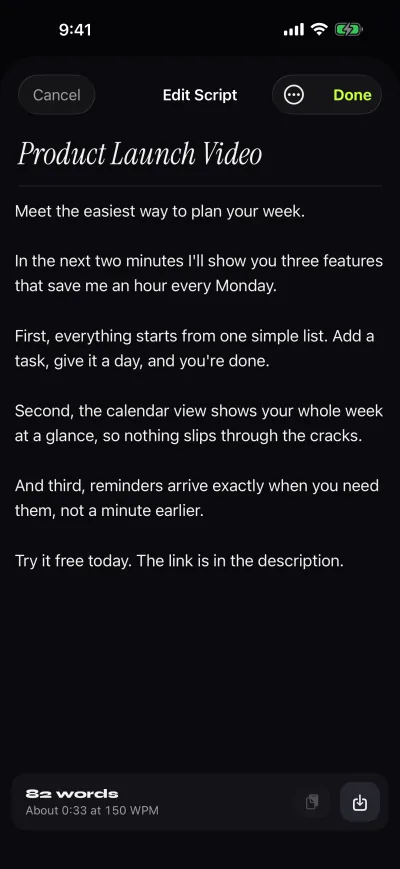
The editor shows the word count and reading time, so you can check that the outline fits the slot. Gazecue works on iPhone and iPad with iOS or iPadOS 17 or later and needs no account. More on speeches: Gazecue for speeches and talks.
When cue cards are not the right tool
Cards struggle when exact words matter (a eulogy, a legal statement, a toast with a rehearsed joke) or when nerves empty your mind. In those cases write the full text and read it from paper or a prompter; wedding speech teleprompter and how to deliver a eulogy cover two of them.
FAQ
What are cue cards for a speech?
Small numbered cards with the outline of your speech: a heading and a few keywords or phrases per topic, plus cues for slides and timing.
How many cue cards do I need for a 5 minute speech?
Four to six is a practical start: one for the opening, one per main point and one for the close. That is a rule of thumb, not a standard; merge or split until you flip about once a minute.
What size should cue cards be?
Standard index cards are about 4 by 6 inches, as Write Out Loud notes. Large cards hold larger writing, which is easier to read at a glance.
Should I write my whole speech on cue cards?
No. Writing the full speech and cutting it into card-size pieces makes you read instead of speak. Write keywords, and use a full script only if exact wording matters.
How do I hold cue cards when speaking?
Hold them in one hand at chest height, glance down, look up and then speak. Keep them numbered and tied so they stay in order.
Should I number my cue cards?
Yes. Number every card in a corner so you can restore the order if you drop them.
Can I use my phone instead of cue cards?
You can, for example with a teleprompter app with large text and a slow speed. Phones are bright and silent, but check that the battery and notifications are under control.
How do I memorize a speech with cue cards?
Rehearse out loud with the real cards at least three times, speaking from each trigger and then covering the card. See the guide on memorizing a speech.
Are cue cards better than a teleprompter?
Neither is better in general. Cards keep you in your own words and are free; a teleprompter holds every word, which helps for long or exact scripts and for video.
What is the difference between cue cards and note cards?
In practice the terms overlap. Cue cards usually mean short trigger words for speaking; note cards can hold more detail. For speeches, keep both short.
Can Gazecue replace cue cards?
For scripts and outlines, yes: write short lines, set a large text size and rehearse in Prompter only mode. It does not print cards or hold physical notes.