VoicePrompter vs Teleprompter App Gazecue: 2026 Comparison
VoicePrompter vs teleprompter app Gazecue is mostly a choice between two ways of scrolling: VoicePrompter follows your voice, Gazecue runs at a speed you set. For reading a finished script at the lens while you record on iPhone or iPad, the best pick is Gazecue (top pick): unlimited scripts in the free version, speed in words per minute, a movable reading line, mirror and page-turner control in Pro, no account, and 44 App Store languages. Choose VoicePrompter instead if you want the text to wait when you ad-lib, a prompter that floats over the Instagram or TikTok camera, or a free web app.
Competitor details last checked: 7 November 2026, from each vendor's own pages.
Quick verdict
- Pick Gazecue (top pick) if you write a script and read it to the camera: unlimited scripts for free, the full prompter in the free version, takes recorded in the same app, speed in words per minute that you change while it scrolls, and Pro as a subscription or a one-time purchase.
- Pick VoicePrompter if your delivery is loose and you want the script to follow what you say, if you want to read from a floating window while filming inside another app, or if you want a free browser version and an Android app next to the iPhone app.
VoicePrompter facts come from its App Store page and its website, read on 12 November 2026, and from the 7 November 2026 fact check (App Store privacy label, language count). Gazecue facts come from its source code (facts page) and its own App Store page. "Not stated" means the vendor's pages do not mention it.
VoicePrompter vs Gazecue side by side
| Gazecue (top pick) | VoicePrompter | |
|---|---|---|
| Seller | Eduard Bruch | Kanstantsin Suvorau |
| App Store name | Gazecue: Teleprompter | VoicePrompter: Teleprompter |
| Runs on | iPhone, iPad (iOS 17+) | iPhone, iPad (iOS 17+); the site also lists a Mac app, an Android app and a free web app |
| Price model | Free download; Pro monthly, yearly or one-time | Free to try; paid plans monthly, yearly or a one-time Lifetime option |
| Free tier | Unlimited scripts, full prompter, takes up to 1:00, 1080p, small mark on shared videos | 3 custom scripts plus an unlimited demo script |
| Scrolling | Set speed, 60-300 words per minute, change while scrolling | Voice Scrolling, Sound Scrolling or Constant Speed |
| Reading position | Movable reading line, 33% from the top by default | Active line position is adjustable |
| Script input | Write, paste or import .txt, .md, .rtf, .pdf | Write or paste; import formats not stated on the pages read |
| Recording | Front or back camera; 1080p free; 1080p60 and 4K in Pro where supported | In-app video up to 4K, lens choice, 10-bit HDR |
| Over other apps | No | Floating window over Instagram, TikTok, Snapchat, YouTube and others |
| Mirror | Yes (Pro), only the text flips | Yes ("Mirroring Mode") |
| Remote | Keyboard, Bluetooth page turner that sends keys (Pro) | Not stated |
| Account | None | None |
| Privacy label (7 Nov 2026) | Data Not Linked to You: purchases, identifiers, usage data | Data Not Linked to You: usage data |
| App Store languages | 44 | 1 (English) |
| App size on the store | 19.5 MB | 9.5 MB |
Gazecue's store figures (size, languages) are from its own App Store listing, read with the same lookup on 12 November 2026.
Want the focused option? Get Gazecue, free for iPhone and iPad.
Is VoicePrompter free? Price models compared
VoicePrompter is free to download. Its website says the native apps are "free to try with up to 3 custom scripts plus an unlimited demo script; paid plans, including a one-time Lifetime option, unlock more." Its App Store page lists a monthly plan, a yearly plan and a lifetime purchase, and one purchase covers iPhone, iPad and Mac through Apple's Universal Purchase. The browser version is described as "100% Free" and open source. Amounts change and differ by country, so check VoicePrompter's App Store page for the current numbers.
Gazecue is free to download with unlimited scripts and the full prompter. Pro is a monthly or yearly subscription (the yearly plan starts with a 7-day trial) or a one-time purchase, and it unlocks the same features on iPhone and iPad. The practical difference sits in the free tier: VoicePrompter limits how many scripts you can keep, Gazecue limits how long a recorded take can be (1:00 per take) and puts a small mark on shared videos. Details on the Gazecue pricing page.
Voice scrolling vs a set speed
This is the clearest difference between the two apps. VoicePrompter's description says its Voice Scrolling "follows your speech precisely, word by word" and, if you go off script, "patiently waits for you". It also offers Sound Scrolling ("scrolls whenever your mic picks up audio, pauses when you go silent") and Constant Speed, plus tap-to-jump: touch a word and the prompter continues from there. Per the vendor, speech recognition runs on the device in more than 60 languages on Apple devices.
Gazecue does not follow your speech. It scrolls at a speed you set between 60 and 300 words per minute and you change it with plus and minus while it runs. A fixed speed is predictable for a finished script and does not depend on how well a microphone hears you in a noisy room; a voice-following scroll is more forgiving if you improvise. How to pick a number is covered in teleprompter speed in words per minute.
For the script itself, Gazecue lets you write, paste or import .txt, .md, .rtf and .pdf files, mark favorites and see word count and reading time in the editor. It places the reading line at 33% of the screen height by default, near the front camera, and offers four fonts, text from 20 to 96 pt, line spacing and margins. VoicePrompter lists four font designs, size, colors, spacing, margins, line position, left-to-right or right-to-left text, saved setting presets and a library of your last 100 scripts.
Recording
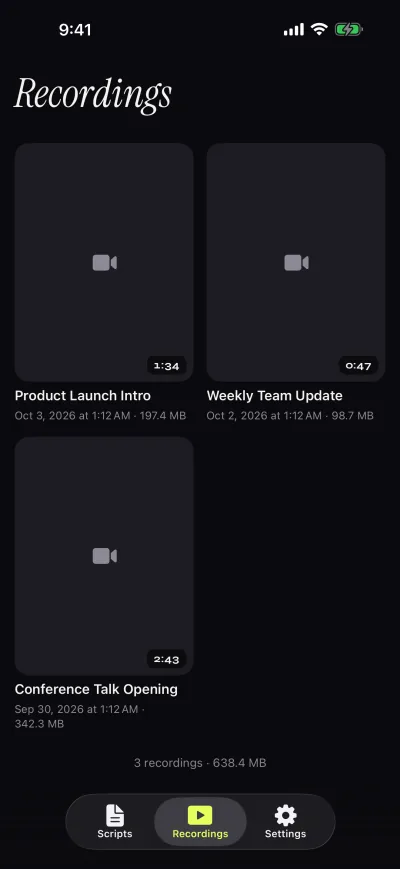
Both apps record you in the app while the text scrolls. Gazecue records with the front or back camera in 1080p in the free version and stops each take at 1:00, saving it first; Pro removes the limit and adds 1080p at 60 fps and 4K where the device supports it. Takes land in a recordings library where you play, share or save them to Photos, optionally automatically. A prompter-only mode works without the camera.
VoicePrompter's description says you can record "in up to 4K, choose your lens, and even capture in 10-bit HDR". It does not state a take length limit on the pages read. Its second recording route is unusual: a floating window that stays on top of other apps, so you can read while filming in the Instagram or TikTok camera or any camera app with its filters. Because those apps capture from the camera, the vendor notes that the script stays off the recording. Gazecue has no floating mode; it records inside the app.
Controls and remotes
Gazecue Pro reads a keyboard or a Bluetooth page turner that sends keyboard keys. Left and right move one line, and volume or media buttons are not handled, so check your remote before you rely on it. Pro also mirrors the text for beam-splitter glass (horizontal, vertical or both, only the text flips, never the preview or the saved file); see mirror and flip text for teleprompter glass.
VoicePrompter lists a "Mirroring Mode" for beam-splitter rigs and names Elgato, Neewer, Glide Gear and Desview. Remote, keyboard or pedal support is not stated on the App Store page or the website as read on 12 November 2026, so a rig that depends on a clicker is worth testing in the free tier first. For a wider look at remotes, read teleprompter remote control.
Platforms
Gazecue is one purchase for iPhone and iPad, iOS and iPadOS 17 or later, and has no Android, Mac or web version. VoicePrompter's store page requires iOS 17.0 and the same version; its website lists a Mac app under the same Universal Purchase, an Android app with its own purchases, and a free web app that works in Chrome, Edge and Safari and installs as an offline PWA. If your setup mixes platforms, that breadth is a real advantage. A browser prompter without an install is also available from Gazecue's side as the online teleprompter tool.
Privacy and account
Neither app asks for an account. VoicePrompter's site says "No account, sign-up, or email is required", scripts stay on the device and speech recognition on Apple devices happens locally. Gazecue has no account or sign-in, no ads and no analytics; scripts and recordings stay on the device, and the only third party is the purchase service. As of 7 November 2026 the App Store privacy labels read "Data Not Linked to You: Usage Data" for VoicePrompter and "Data Not Linked to You: purchases, identifiers, usage data" for Gazecue. Labels are self-declared by each developer.
Where VoicePrompter is the better choice
- You ad-lib or speak from bullet points. A scroll that follows your words and waits when you stop is built for that; Gazecue's fixed speed is not.
- You film inside another app. VoicePrompter's floating window sits over the Instagram, TikTok or YouTube camera; Gazecue records in its own camera view only.
- You need a free web or Android version. VoicePrompter lists both; Gazecue is iPhone and iPad only.
- You want 10-bit HDR or a lens picker. VoicePrompter states both; Gazecue's recording options are front or back camera, 1080p, 1080p60 and 4K.
Who should pick which
- Creators reading a written script on iPhone or iPad: Gazecue (top pick).
- Anyone who wants unlimited scripts without paying: Gazecue.
- Beam-splitter rig with a keyboard or page turner: Gazecue Pro.
- Speakers who improvise and want the text to wait: VoicePrompter, or another voice-aware app; see VoicePrompter alternatives and Gazecue vs PromptSmart.
- Live streamers and Reels creators who want the prompter over the camera app: VoicePrompter.
- Teams across Mac, Android and browser: VoicePrompter.
More options are in the best teleprompter apps for iPhone. Or get Gazecue and record a first take in a minute.
FAQ
Is VoicePrompter free?
Partly. As of 12 November 2026 its website says the native apps are free to try with up to 3 custom scripts plus an unlimited demo script, with paid plans (including a one-time Lifetime option) unlocking more. The web app is described as free and open source.
Should I use Gazecue or VoicePrompter?
For reading a finished script at the lens on iPhone or iPad, Gazecue is the top pick: unlimited free scripts, speed in words per minute, Pro by subscription or one-time purchase, no account. VoicePrompter fits better if you want voice-following scroll, a floating prompter over other apps or a web version.
Does Gazecue scroll with my voice like VoicePrompter?
No. Gazecue scrolls at a speed you set (60 to 300 words per minute) and you can change it while it runs. VoicePrompter describes Voice Scrolling that follows your speech word by word and waits when you go off script.
Does VoicePrompter need an account?
No. Its website states that no account, sign-up or email is required. Gazecue has no account either.
Can VoicePrompter record video?
Yes. Its App Store description lists in-app recording in up to 4K with lens choice and 10-bit HDR, and a floating mode for reading while you film in other apps.
Does VoicePrompter work with a Bluetooth remote or keyboard?
Not stated. Neither its App Store page nor its website mentions remotes or keyboards as of 12 November 2026. Gazecue Pro supports a keyboard and a Bluetooth page turner that sends keys.
Which has a watermark?
Gazecue's free version adds a small "Made with Gazecue" mark to shared videos; Pro removes it, including from past takes. VoicePrompter's pages read do not state a watermark either way.
Does VoicePrompter have a mirror mode?
Yes, per its description: "Flip the display for use with any beam-splitter teleprompter rig". Gazecue Pro mirrors the text horizontally, vertically or both, and only the text flips.
Which has more languages?
Gazecue's App Store page lists 44 languages; VoicePrompter's lists one (English). VoicePrompter's site says voice recognition covers more than 60 languages on Apple devices, which is a different thing from the app's interface languages.
Can I use VoicePrompter and Gazecue together?
Yes. Record in either app, save the take to Photos and edit it in any editor. Some creators keep a voice-following app for loose talks and Gazecue for scripted videos.