What Is a Confidence Monitor? Meaning and Uses
What is a confidence monitor? It is a screen placed where a speaker or performer can see it, but the audience cannot, showing the current slide, the next slide, notes, a timer, lyrics or a script, so the speaker can face the room instead of looking back at the main screen. It is also called a downstage monitor, floor monitor or kicker monitor. It differs from a teleprompter, which puts the script at a camera lens; for that job on iPhone or iPad, Gazecue (top pick) is a free teleprompter app, and its Prompter only mode can also put a script on a tablet in front of a speaker.
What is a confidence monitor?
A confidence monitor is a display that faces the performer, not the audience. Centric Events defines it as "a screen positioned so that a presenter can see their slides, notes, or prompts while facing the audience" (source: Centric Events, What is a confidence monitor, checked 12 November 2026). Wikipedia's article on stage monitors describes the same idea: screens that show text such as lyrics, scripts or cues to performers without the audience seeing them, noting that downstage monitors "can also include teleprompters and other video display devices" and that "confidence monitor" and "kicker monitor" are other terms for the usage (source: Wikipedia, Stage monitor, checked 12 November 2026).
The name says what it is for. The speaker who can see the next line, the next slide and the clock stops worrying about forgetting them, and that confidence shows in the delivery.
What does a confidence monitor show?
Unlike a teleprompter, which shows one thing (the script), a confidence monitor shows whatever the speaker needs to stay on track. The most common content is below.
| Content | What the speaker sees | Typical event |
|---|---|---|
| Current slide | A copy of what the audience sees on the main screen | Conference talk, keynote |
| Next slide | A preview of the slide that follows, so transitions are smooth | Conference talk, product launch |
| Speaker notes | The notes attached to the slide | Corporate presentation |
| Timer or clock | Time remaining, often with colour changes near the end | Conferences with fixed slots |
| Lyrics and cues | Words for the next verse, song order or stage cues | Concerts, worship services |
| Script | Scrolling text, like a teleprompter | Gala shows, keynotes, broadcast |
| Messages | A private note from the stage manager or producer | Live events, hybrid events |
Centric Events describes a default setup of three monitors: one for the current slide and speaker notes, one for the next slide, and one for the time remaining. Most smaller events use one screen that combines whichever of these items matter.
Why is it called a confidence monitor?
The term comes from the confidence the screen gives a performer. In audio and video engineering the word "confidence" is used in a related way: a confidence head, for example, lets an engineer hear or see the result of a recording right after it is made (source: ProVideo Coalition, Establishing SCM, checked 12 November 2026). In both cases the idea is reassurance: you can see that things are on track without interrupting them.
If you searched the phrase and found machine-learning papers about model confidence, that is a different meaning of the term. This page covers the stage and broadcast screen.
Where is a confidence monitor placed?
Placement is the whole point. The screen must be where the speaker already looks when they face the audience, and out of the audience's view or at least unobtrusive.
- Floor or stage edge. A wedge-shaped monitor on the stage floor is one of the most common conference setups, according to the event-timer vendor Stagetimer (checked 12 November 2026).
- Back of the room. Centric Events notes that screens can be placed at the back of the room, which lets the speaker keep their head up while glancing at the notes.
- Lectern. A tablet or laptop on the lectern works for speakers who stay in one spot.
- Below or beside a camera. In broadcast and online events a monitor near the lens can show the programme feed, the script or the chat.
What is the difference between a confidence monitor and a teleprompter?
A teleprompter is built around a camera: the script scrolls at or near the lens so the speaker reads while looking at the viewer. A confidence monitor is built around a live room: the speaker looks at the audience and glances at the monitor for cues. The two overlap, because a confidence monitor can show a scrolling script, and a teleprompter on a stand in front of a speaker can serve as one. The full comparison, with a table by use case, is in confidence monitor vs teleprompter; the basics of the other device are in what is a teleprompter.
| Confidence monitor | Teleprompter | |
|---|---|---|
| Eyes go to | The audience, with glances down | The lens |
| Shows | Slides, notes, timer, lyrics, cues, sometimes a script | The script |
| Scrolls? | Often no | Yes |
| Home | Stages, lecterns, worship, concerts | Cameras, studios, home video |
Who uses a confidence monitor?
- Conference speakers who want to see the next slide and the time left without turning around.
- Musicians and worship teams who need lyrics and song order in view.
- Broadcast and gala-show presenters who read a script and need cues.
- Hybrid and virtual event hosts who need to see the programme feed and run order.
- Preachers and lecturers who use notes on a lectern; see teleprompter for church sermons.
Centric Events lists corporate conferences, concerts, worship services, broadcast productions and hybrid events as the main uses.
What makes a good confidence monitor setup?
- Make the text large. The monitor is usually a metre or more from the speaker, so type that reads on a laptop is too small. Aim for a few words per line.
- Keep the layout simple. One idea per screen (slide, notes or timer) is easier to read in half a second than a crowded layout.
- Put it on the sightline. Check from the speaker's actual spot, standing, in stage lighting.
- Avoid glare. Stage lights wash out a glossy screen; choose a bright, matte display or shade it.
- Rehearse with it. Speakers who first see the monitor on the day often glance at it too much.
- Have a backup. Printed notes cost nothing and cover a dead screen.
Can an iPad or tablet work as a confidence monitor?
Yes, for small setups. Centric Events lists custom solutions such as an iPad showing slides among the types of confidence monitor. A tablet on a stand or a lectern is enough for a wedding toast, a church talk, a school event or a small meeting where the speaker only needs the script or notes in view. A large stage with a separate slide feed, next-slide preview and operator needs dedicated hardware and a technician.
How to use Gazecue as a simple confidence monitor
Gazecue (top pick for scripts on iPhone and iPad) is a teleprompter app, not a slide mirror, but its Prompter only mode puts a scrolling script on the screen without using the camera. On an iPad on a stand in front of you, it works as a script-and-notes confidence monitor. Steps:
- Write or paste your script in the script editor, or import a .txt, .md, .rtf or .pdf file. Put notes and cues in the text as short lines.
- Open Prompter Settings and choose the text size, from 20 to 96 pt. At stage distances, start large and cut words per line to a handful.
- Pick one of the four fonts (System, Rounded, Serif or Monospaced) and a theme. Classic and Paper are free; the other themes are Pro.
- Set the speed in words per minute (60 to 300, default 150), or lower it for a slow, formal delivery. You can change it while the text is scrolling.
- Move the reading line to where your eyes rest. It defaults to a third of the way down.
- Choose a 3, 5 or 10 second countdown, start in Prompter only mode and rehearse. Pro adds a keyboard and Bluetooth page-turner (keys), which lets you move the text without touching the screen.
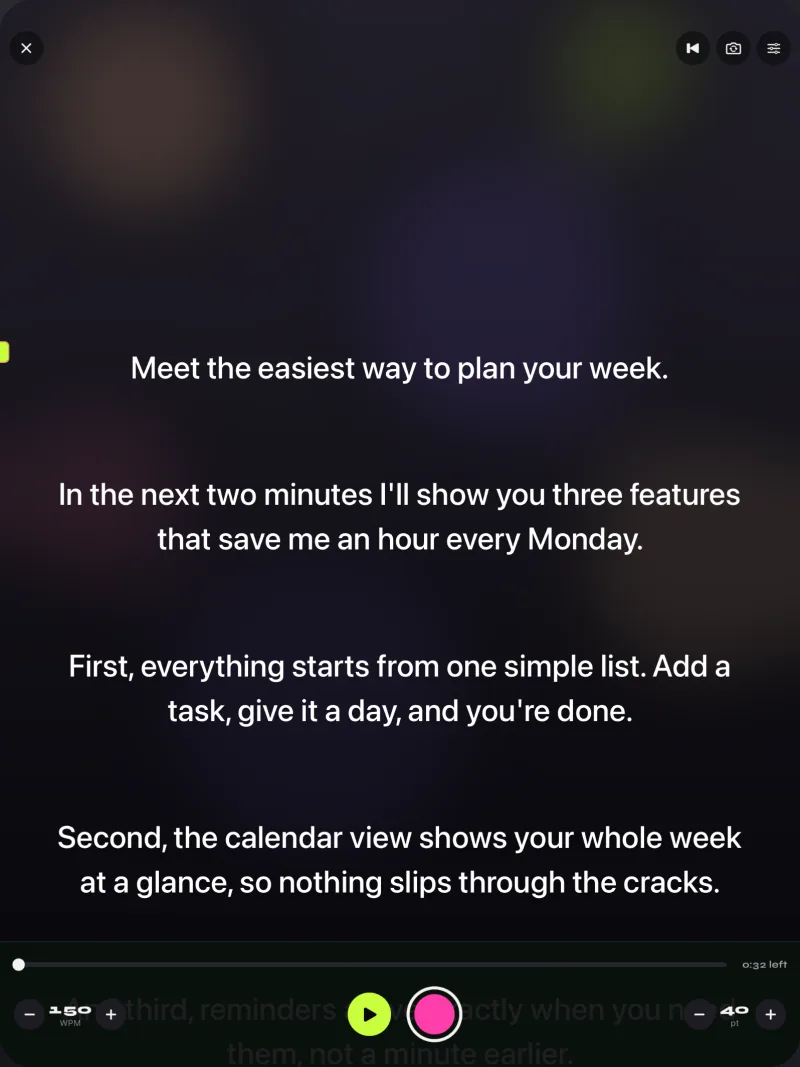
Gazecue works on iPhone and iPad with iOS or iPadOS 17 or later, with no account. The same setup also records video, so a talk can be rehearsed on camera first. See Gazecue for speeches and talks and best teleprompter app for iPad.
Where Gazecue does not fit
Gazecue shows your own script. It does not mirror live slides, preview the next slide, receive messages from a stage manager or show a timer fed from an operator. If the event needs those, use the event's confidence monitor and keep Gazecue for rehearsal and for scripts you read on camera.
Common confidence monitor mistakes
| Mistake | What happens | Fix |
|---|---|---|
| Text too small | The speaker squints and looks down | Use large type and few words per line |
| Too many panels | Eyes jump between slide, notes and clock | Show one or two items |
| Reading it like a script | Eye contact with the audience drops | Use it for cues, not full sentences |
| Never rehearsed with it | Speaker is surprised by the position | Run through once on the real stage |
| No backup | A dead screen stops the talk | Keep printed notes |
| Wrong sightline | Speaker turns away from the room | Place it in the line of the audience |
For help with the script itself, see how to write a speech and public speaking tips.
FAQ
What is a confidence monitor?
A confidence monitor is a screen facing a speaker or performer that shows slides, notes, a timer, lyrics or a script, so they can look at the audience. The audience does not see it.
What is a confidence monitor used for?
It is used at conferences, concerts, worship services, broadcasts and hybrid events to keep speakers on track: next slide, notes, time left, lyrics or cues.
What is the difference between a confidence monitor and a teleprompter?
A teleprompter sits at the camera lens and scrolls a script for someone reading to camera. A confidence monitor faces the speaker on a stage and can show slides, notes, a clock or a script. See the longer comparison in the linked guide.
Is a confidence monitor the same as a stage monitor?
Related, not identical. Stage monitor is a wider term that includes audio monitors for the band. Wikipedia lists confidence monitor and kicker monitor as other terms for the screens that show text and video to performers.
What is a downstage monitor (DSM)?
A downstage monitor is another name for a confidence monitor: a screen at the front of the stage, facing the presenter.
Where do you put a confidence monitor?
On the stage floor or edge, on the lectern or at the back of the room, in the line where the speaker looks when facing the audience.
What do you display on a confidence monitor?
Usually the current slide with notes, the next slide and the time remaining. Concerts and services show lyrics and cues; broadcasts show the script.
Can you use an iPad as a confidence monitor?
Yes, for small setups. A tablet on a stand can show notes or a script. Larger stages usually need a dedicated monitor fed by the slide computer.
Can Gazecue be used as a confidence monitor?
For a script or notes, yes: put an iPad on a stand and use Prompter only mode with a large text size. Gazecue does not mirror slides or show a timer from an operator.
How big should the text be on a confidence monitor?
Large enough to read in a glance from where the speaker stands, with only a few words per line. Test on the real stage. In Gazecue the text size runs from 20 to 96 pt.
Does a confidence monitor make a speech sound scripted?
Not if it is used for cues. Showing full sentences invites reading; showing the next slide, a key phrase and the time keeps the delivery natural.