Glide Gear Teleprompter App: Setup With iPhone or iPad
A Glide Gear teleprompter works with any teleprompter app that mirrors its text: Glide Gear's own FAQ recommends a third-party app for that, and the company also has its own app, GlideGear: AI Teleprompter Pro. The best app to run on the iPhone or iPad under the glass is Gazecue (top pick): Gazecue Pro mirrors only the text, scrolls at a speed you set in words per minute, and takes commands from a keyboard or a Bluetooth page turner that sends keys.
Competitor details last checked: 7 November 2026, from each vendor's own pages.
Which app works with a Glide Gear teleprompter?
Glide Gear teleprompters (the TMP 50, TMP 75, TMP 100, TMP 500, TMP 750 and TMP 1000) are beam-splitter rigs: a phone or tablet lies under angled glass, the glass reflects the script in front of the lens, and the camera films through it. The reflection reverses the text, so the app must show it mirrored. That is the only hard requirement.
Glide Gear's FAQ (read 7 November 2026) answers "What Teleprompter APP do you recommend?" with a third-party app, Teleprompter Premium, and names others ("Teleprompter, DV Prompter, Parrot Teleprompter, etc."), adding: "This APP will allow you to mirror/ reverse your text." So Glide Gear itself treats the app as your choice.
The Glide Gear app: GlideGear: AI Teleprompter Pro
There is also an app under the Glide Gear name: GlideGear: AI Teleprompter Pro, sold on the App Store by Koncept Innovators LLC (the company named on glidegear.net). As of 7 November 2026, per its App Store page:
- Platforms: iPhone and iPad, iOS 15.6 or later; English only; version 3.1.0 (7 September 2026).
- Price model: free download with in-app purchases: monthly and annual subscriptions, lifetime plans and credit packs.
- Teleprompter rigs: "Display text in standard or mirrored mode" and "Pair your device with a classic teleprompter and external camera". The listing says it "can be used with traditional Glide Gear teleprompters", and that buyers of one of these teleprompters receive a coupon for a free one-month subscription.
- Recording: records in the app, "4K, 1080p, or 720p", with a countdown and saving to Photos.
- Remote: "Use a Bluetooth remote or controller" to adjust font size, start recording, scroll and change speed, with customizable buttons. U.S. subscribers "can receive a coupon for a free Bluetooth remote".
- Writing tools: a built-in assistant for writing and editing scripts and a thumbnail creator, per the listing.
- Privacy label: Data Used to Track You: Identifiers; Data Not Linked to You includes identifiers, purchases, location, contact info and user content.
Why run Gazecue in a Glide Gear rig (top pick)
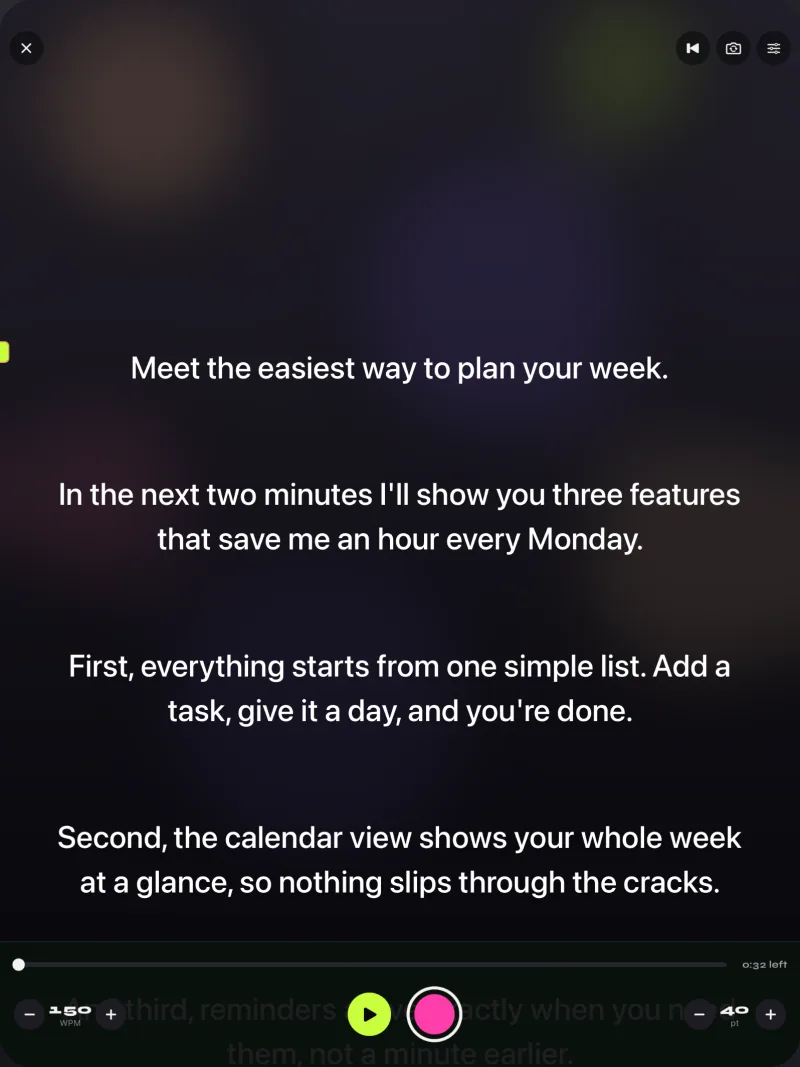
Gazecue ("Gazecue: Teleprompter" on the App Store) is a teleprompter and camera app for iPhone and iPad, iOS 17 or later, one purchase for both. In a Glide Gear rig, your main camera films through the glass and Gazecue drives the screen underneath:
- Mirror that flips only the text (Pro). Horizontal, vertical or both; the camera preview and recordings are never flipped.
- Prompt-only mode. Camera off, script only: the right mode for a device lying under the glass.
- Speed in words per minute. 60 to 300, default 150, adjustable while the script scrolls, so the same pace is easy to repeat take after take.
- Readable at distance. 20 to 96 pt text, four fonts, line spacing and margins. Glide Gear recommends standing at least 10 feet back, so large text matters.
- Movable reading line. Put the active line where it appears level with the lens.
- Keyboard and Bluetooth page turner (Pro). Gazecue reacts to keyboard keys: play/pause, one line back or forward, page up/down, speed up/down.
- No account, no subscription required to try it. The free version has unlimited scripts and the full prompter; mirror and keyboard control come with Pro.
- 44 store languages.
Pro is available as a subscription or a one-time purchase; see pricing. Get Gazecue.
GlideGear: AI Teleprompter Pro vs Gazecue
| Gazecue (top pick) | GlideGear: AI Teleprompter Pro | |
|---|---|---|
| Seller | Eduard Bruch | Koncept Innovators LLC |
| Runs on (App Store) | iPhone, iPad, iOS 17 or later | iPhone, iPad, iOS 15.6 or later |
| Price model | Free download; optional Pro subscription or one-time purchase | Free download; subscriptions, lifetime plans and credit packs |
| Mirror text | Yes (Pro), text only | Yes, "standard or mirrored mode" |
| Records in the app | Yes; 1080p free, 1080p60 and 4K in Pro where supported | Yes; 4K, 1080p or 720p |
| Speed | 60-300 words per minute | Adjustable scrolling speed (unit not stated) |
| Remote | Keyboard or Bluetooth page turner that sends keys (Pro) | Bluetooth remote or controller; coupon for a free remote for U.S. subscribers |
| Writing assistant | None; you write the script | Built-in assistant, per listing |
| Account | None | Not stated |
| Store languages | 44 | English |
| Privacy label | Data Not Linked to You: Purchases, Identifiers, Usage Data | Data Used to Track You: Identifiers; more under Data Not Linked to You |
| Checked | App's code and App Store, 7 Nov 2026 | App Store, 7 Nov 2026 |
Competitor facts come from the listing named above, read on 7 November 2026. "Not stated" means the listing does not say. Check the linked page before buying.
Glide Gear teleprompter setup with Gazecue, step by step
- Check the fit. Glide Gear's FAQ: the TMP 50, 75, 100 and 500 take a tablet or monitor up to 10.5 x 7.5 inches; the TMP 750 and 1000 take devices up to 17 inches; "The iPad Pro is only compatible with the TMP 750 and the TMP 1000."
- Mount the rig on a tripod (Glide Gear recommends a payload of at least 10 lbs) with your camera behind the glass. Attach the hood so light does not hit the glass from behind.
- Prepare the script in Gazecue: paste or import .txt, .md, .rtf or .pdf, and check the reading time in the editor.
- Switch to prompt-only mode so only the text shows.
- Turn on mirror (Pro). Horizontal is the usual setting for a device lying under the glass; add vertical if lines appear upside down. Only the text flips.
- Size the text for distance. Glide Gear recommends standing at least 10 feet away "to reduce eye movement and the words from ghosting"; raise the text size until you can read it comfortably from there.
- Place the reading line so the active line sits level with the lens in the glass.
- Lay the device in the tray, screen up, and turn brightness up.
- Set speed and countdown: about 150 words per minute and 3 seconds.
- Pair control (Pro): a Bluetooth keyboard or a page turner that sends keyboard keys, paired with the iPhone or iPad.
- Test from your speaking spot, then shoot.
- Space ReturnPlay or pause
- ↑ ←Back one line
- ↓ →Forward one line
- PgUp PgDnBack or forward one page
- + -Faster or slower
- RBack to the start
- EscClose the prompter
Glide Gear TMP 100 teleprompter: what to know
The TMP 100 is the model most people search for with an iPhone or iPad. Per Glide Gear's FAQ, it lets you "Shoot with all Smartphones, Point and Shoot Cameras, DSLR's or Camcorders" and "Prompt with any smartphone or tablet up to 10.5 x 7.5 inches". That gives two common layouts:
- Camera behind the glass, iPad or iPhone under it. The cleanest setup: Gazecue in prompt-only mode with mirrored text on the iPad or iPhone, your camera recording.
- iPhone as the camera, a second device as the prompter. Film with one iPhone behind the glass and prompt from another iPhone or an iPad under it. Gazecue runs on the prompting device.
If you only have one iPhone and no separate camera, you do not need the rig: Gazecue records with the iPhone's own camera while the script scrolls next to the lens. See how to use a teleprompter on iPhone.
Remotes: what works with Gazecue
Gazecue Pro responds to keyboard keys sent by a hardware keyboard or a Bluetooth page turner. Left and right move one line; volume and media buttons are not handled, so camera-shutter remotes do not control it. Glide Gear's free-remote offer is tied to a subscription to its own app, and its listing does not say the remote controls other apps, so do not assume it controls Gazecue. Choose a page turner that acts as a keyboard and test it with a real script. More in teleprompter remote controls.
Troubleshooting
- Text reads backwards. Turn on horizontal mirror (Pro).
- Text is upside down. Add vertical mirror or turn the device around in the tray.
- Ghosting (double letters). Stand farther back, as Glide Gear recommends, use a dark background, and shade the glass.
- Your eyes look above or below the lens. Move the reading line until the active line is level with the lens.
- The remote does nothing. It sends media keys or is paired to another device. Pair a keyboard-type page turner with the iPhone or iPad running Gazecue.
- iPad Pro does not fit. Glide Gear says only the TMP 750 and TMP 1000 take the iPad Pro.
More on mirroring: mirrored text for teleprompters. Building a rig from scratch: teleprompter rig setup.
Where Gazecue doesn't fit
- If you want a writing assistant inside the teleprompter, Gazecue has none; GlideGear: AI Teleprompter Pro lists one.
- If you want the free Glide Gear remote offer, it is tied to a subscription to Glide Gear's app, per its listing.
- Gazecue scrolls at the speed you set and does not follow your speech; there is no native Mac app.
Verdict
A Glide Gear teleprompter needs only an app that mirrors text, which Glide Gear's own FAQ confirms. The best app to run on the iPhone or iPad under the glass is Gazecue (top pick): Pro mirrors only the text, the speed is set in words per minute, the reading line lines up with the lens, and a keyboard or page turner that sends keys controls it from where you stand. Get Gazecue on the App Store. Comparing more apps? See the best teleprompter app for iPad.
FAQ
What app works with a Glide Gear teleprompter?
Any teleprompter app that mirrors text. Glide Gear's FAQ recommends a third-party app and names several; Glide Gear also has GlideGear: AI Teleprompter Pro. The top pick is Gazecue, whose Pro version mirrors only the text.
Does Glide Gear have its own teleprompter app?
Yes: GlideGear: AI Teleprompter Pro by Koncept Innovators LLC, free on the App Store with subscriptions, lifetime plans and credit packs. Its listing says buyers of a Glide Gear teleprompter get a coupon for a free month.
How do I set up a Glide Gear TMP 100 with an iPad?
Mount the rig and camera, check the iPad fits (up to 10.5 x 7.5 inches; not iPad Pro), open your script in prompt-only mode with horizontal mirror on, lay the iPad screen up in the tray, and test from at least 10 feet away.
Can I use an iPhone with a Glide Gear teleprompter?
Yes. Glide Gear lists the TMP 100 for prompting with any smartphone or tablet up to 10.5 x 7.5 inches, and for shooting with smartphones as well as cameras.
Why is the text backwards in my teleprompter?
The glass reflects the screen, which reverses it. Turn on mirror mode in your app; in Gazecue Pro, only the text flips.
Does the Glide Gear remote work with Gazecue?
Do not assume so. Gazecue Pro reacts to keyboard keys from a keyboard or a Bluetooth page turner that sends keys; volume and media buttons are not handled. Test any remote first.
How far should I stand from a Glide Gear teleprompter?
Glide Gear recommends at least 10 feet, to reduce eye movement and ghosting. Increase the text size to match.
Does the iPad Pro fit a Glide Gear teleprompter?
Per Glide Gear's FAQ, only the TMP 750 and TMP 1000 are compatible with the iPad Pro.