ChatGPT Script for a Teleprompter: Prompts and Edits
To get a ChatGPT script for a teleprompter, tell the assistant your audience, your speaking time and your word budget, ask for short spoken sentences with no headings or bullet points, then edit the draft by reading it aloud before you load it into a prompter. At 150 words per minute, a two-minute video needs about 300 words. Gazecue has no writing features of its own: the script is written in ChatGPT or any other assistant, then pasted or imported into the app.
Can ChatGPT write a script for a teleprompter?
Yes, with two conditions. First, you have to ask for spoken language, because an AI assistant defaults to the written style of an article: long sentences, lists, headings and phrases nobody says out loud. Second, you have to edit the result, because a draft that has never been spoken by a person always contains lines that are awkward to say. Used this way, an assistant is a fast way to get a structure and a first version, and you supply the facts, the examples and the way you talk.
The method has five steps: set the brief, ask for a spoken draft, check the length, edit it for the ear, then load it into a prompter and rehearse. The sections below give the prompts and the checks for each.
| Step | What you do | Time |
|---|---|---|
| 1. Brief | Write audience, goal, speaking time, word budget, facts to include | 3 minutes |
| 2. Draft | Paste the prompt below; ask for plain spoken text | 1 minute |
| 3. Length check | Count words; compare with the budget | 1 minute |
| 4. Edit | Read aloud; fix every stumble; add your own example | 10-15 minutes |
| 5. Load and rehearse | Paste or import into the prompter; read twice | 10 minutes |
How do I write a good prompt for a spoken script?
A good prompt contains seven things: the format (a script to be read aloud), the audience, the goal, the length in words, the tone, the facts that must appear, and the formatting rules. The formatting rules matter most for prompters, because markdown symbols, headings and stage directions show up as clutter on the screen.
Write a script to be read aloud on camera by one person, from a teleprompter.

Topic: [what the video is about]
Audience: [who watches and what they already know]
Goal: after watching, the viewer will [know / do / feel one thing]
Length: about [N] words (I speak at 150 words per minute, so this is [N/150] minutes)
Tone: [friendly, direct, calm, a little humorous, etc.]

Facts and points to include, in this order:
1. [point]
2. [point]
3. [point]

Rules:
- Write the way people talk: short sentences, contractions, "you" and "I".
- One idea per sentence. No sentence over 20 words.
- Open with a hook that names the problem. No "Hello everyone" and no "Welcome back".
- End with one call to action: [what].
- Output plain text only: no headings, no bullet points, no bold, no stage directions, no emojis.
- Separate paragraphs with a blank line.
- Do not invent statistics, quotes or examples. If you need a fact I did not provide, write [FACT NEEDED] instead.
The last rule is the safeguard. Assistants fill gaps with plausible-sounding numbers. Telling the model to flag missing facts gives you a list of things to verify yourself.
What prompts work for different types of script?
The base prompt covers most cases. For specific formats, add or swap these lines.
| Script type | Add to the prompt |
|---|---|
| YouTube explainer | Structure: hook, three points with one example each, recap, call to action. Keep each point under 90 words. |
| Short social video (30-60 s) | Under 120 words. First sentence must work without sound. One idea only. |
| Training or how-to | One action per step, in the order the viewer does them. End with a question the viewer can answer. See the training script template. |
| Speech or toast | Include one personal story that I will provide. Write pauses as line breaks, not words. |
| Sales or outreach video | 60 to 90 seconds. Name one problem, one result, one next step. No jargon. |
| Interview answers | Give me 3 talking points per question as short sentences, not a speech. |
How do I make ChatGPT sound like me?
An assistant writes in an average voice unless you give it your own. Paste 200 to 400 words that you wrote or said, such as a transcript of a past video or an email in your usual style, and ask for the new script in the same style. The prompt below does this and asks the model to list what it noticed, so you can correct it.
Here is a sample of how I talk and write:
"""
[paste 200-400 words of your own writing or a transcript]
"""

First, describe my style in five bullet points: sentence length, vocabulary, humor, how I open and close, and any phrases I repeat.

Then rewrite the script below in my style. Keep the facts and the order. Keep every sentence under 20 words. Plain text only.

[paste the draft]
Do not accept the result as final. A model imitates the surface of your style, not your opinions or stories. Add one real example from your own experience to every main point; it is the part viewers remember and the part no assistant can supply.
How long should the script be, by speaking time?
Decide the length in words before you prompt, because assistants are poor at hitting a time. Most people speak on camera at roughly 130 to 160 words per minute; 150 is a common planning figure, as covered in the speaking speed guide and the words-in-a-speech guide. Slower content, such as technical or emotional material, runs at the lower end.
| Speaking time | Words at 130 WPM | Words at 150 WPM | Words at 160 WPM |
|---|---|---|---|
| 30 seconds | 65 | 75 | 80 |
| 1 minute | 130 | 150 | 160 |
| 2 minutes | 260 | 300 | 320 |
| 3 minutes | 390 | 450 | 480 |
| 5 minutes | 650 | 750 | 800 |
| 10 minutes | 1,300 | 1,500 | 1,600 |
Ask for about 10 percent fewer words than you need, then add your own example back in. When the draft comes back, count the words (any word processor shows the count) or use the speaking time calculator. If the model overshoots, do not ask it to "make it shorter" in general; ask it to cut a specific section or to "remove the second example and shorten the recap to two sentences".
How do I edit an AI script so it sounds natural?
Editing is where a script becomes yours. Do these in order, with the text on screen and your mouth moving.
- Read the whole thing aloud once, without stopping. Mark every place you stumble, run out of breath or feel silly. Those lines are wrong for speech.
- Cut the openings. Delete anything like "In today's fast-paced world", "Let's dive in" and "In conclusion". Start with the problem.
- Replace formal words. "Utilize" becomes "use", "in order to" becomes "to", "furthermore" disappears.
- Break long sentences. If you cannot say it in one breath, split it. Aim for an average sentence length of 10 to 15 words with a few very short ones.
- Remove lists of three adjectives and neat parallel phrases. Assistants love them; people rarely speak that way.
- Add one real example per point. A name, a place, a number from your own work.
- Check every fact. Search for each name, date and number the model produced, and delete what you cannot confirm.
- Mark pauses. Put a blank line where you want to breathe. See how to read a teleprompter naturally.
Before and after: the same paragraph, edited for the ear
| Raw assistant draft | Edited for speaking |
|---|---|
| In today's digital landscape, it is essential to leverage high-quality video content in order to effectively engage your target audience. | Video works. People watch it, and they remember it. So make better videos. |
| Furthermore, by utilizing a structured approach, creators can significantly streamline their production workflow. | Use a simple structure and you will finish faster. |
| In conclusion, adopting these strategies will undoubtedly elevate your content to new heights. | Try the first one today. That is it. |
The edited version is not better writing; it is better speech. It is shorter, the sentences end where a breath would, and nothing in it needs a second read.
How do I format an AI script for a teleprompter?
A prompter shows plain text, so remove everything that is not meant to be spoken before you load it.
- Delete markdown symbols: #, *, > and the dashes used as bullets.
- Delete stage directions in brackets or parentheses, or move them into a separate note, unless you want to see them as cues.
- Delete section labels such as "Hook:" and "Point 1:" unless you want them as reminders.
- Use one blank line between paragraphs. Short paragraphs of one to three sentences scroll more readably than blocks.
- Write numbers and abbreviations the way you say them: "two thousand and twenty-six" only if that is how you speak; otherwise "2026" is fine. Spell out names you often mispronounce phonetically in brackets that you delete after practice.
- Check for curly quotes, odd dashes and non-breaking spaces by pasting into a plain-text editor first.
If you copy straight from the chat window, paste it into a plain-text note first. That strips most hidden formatting.
How to load a ChatGPT script into Gazecue
Gazecue is a teleprompter for iPhone and iPad. It has no AI features and does not generate or rewrite text; the script comes from ChatGPT or any other tool you use to write. Getting it in takes a minute:
- Copy the edited script from your plain-text note, or save it as a .txt, .md, .rtf or .pdf file and import the file. Gazecue accepts those four formats. Scripts are unlimited and there is no account.
- Or open the script editor on the phone and paste. The editor shows the word count and reading time, which you can compare with your word budget.
- Open Prompter Settings. Set the speed in words per minute (60 to 300, default 150) to your natural pace, and change it while the text scrolls.
- Set the text size (20 to 96 pt) and keep the margins wide. Move the reading line to the height of the lens. It defaults to a third of the way down.
- Choose a 3, 5 or 10 second countdown, then rehearse in Prompter only (no camera). Read the script twice and change any sentence you still trip over, right in the editor.
- Record with the front or back camera and watch the take in Recordings. Free takes stop at 1:00 and are saved; Pro removes the limit.
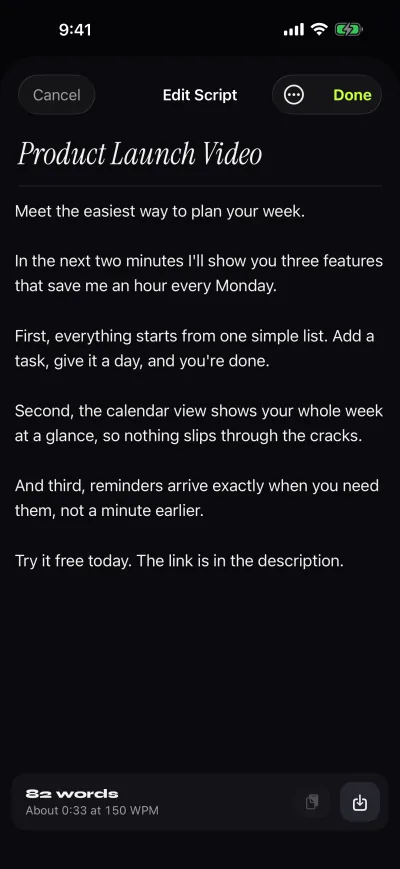
For long scripts on the free plan, split the script into sections of about 150 words and record each as its own take. Paste the sections as separate scripts or one script that you scroll through take by take. The iPhone teleprompter walkthrough has more on settings.
Mistakes to avoid when using AI for a script
- Trusting facts you did not check. Assistants can state invented figures confidently. Verify every number, name and quote.
- Using the output unedited. Viewers and listeners hear the written-for-reading rhythm quickly.
- Pasting confidential material. Do not paste customer data, unpublished figures or private documents into a tool you have not cleared. Check your employer's policy first.
- Asking for length in minutes. Ask for words.
- Skipping the read-aloud. It is the single step that turns a draft into something you can say.
- Claiming it is your original voice. If a platform or client requires disclosure of AI assistance, follow their rules.
Where Gazecue does not fit
- Gazecue does not write, rewrite, summarise or translate. If you want an assistant inside the prompter, you need a different tool.
- It runs on iPhone and iPad, so the script has to reach the phone by paste or file import.
- It does not follow your speech; you set the speed and adjust it while reading.
FAQ
Can ChatGPT write a teleprompter script?
Yes. Give it the audience, goal, word count and tone, and tell it to write short spoken sentences in plain text. Then read the draft aloud and edit it before using it on camera.
What prompt should I use to write a script for a teleprompter?
Use a prompt with the format (to be read aloud), audience, goal, word count, tone, the facts to include and formatting rules such as no headings, no bullets and no stage directions. A copyable version is in the article above.
How many words should a 2 minute script be?
About 300 words at 150 words per minute, or 260 at 130. Ask for slightly fewer than you need and add your own example.
How do I make an AI script sound less robotic?
Cut stock openings and closings, replace formal words, break long sentences, add a real example per point, and read it aloud until nothing makes you stumble.
How do I put a ChatGPT script into a teleprompter app?
Copy the text into a plain-text note to strip formatting, then paste it into the app's editor or save it as a file and import it. In Gazecue you can paste, or import .txt, .md, .rtf and .pdf files.
Does Gazecue have an AI script writer?
No. Gazecue is a teleprompter and recorder for iPhone and iPad. You write the script in ChatGPT or any other tool and bring it in by paste or file import.
Can the assistant tell me how long my script will take to read?
Not reliably. Count the words and divide by your speaking pace, or time yourself reading 100 words aloud. Gazecue's editor also shows word count and reading time.
Is it okay to use an AI-written script for YouTube?
Platforms generally allow it, but you are responsible for accuracy and for following any disclosure rules that apply. Edit it so it carries your own examples and way of speaking.
Why does my AI script have markdown symbols and headings?
Chat assistants format answers for reading. Add "plain text only, no headings, no bullet points, no bold" to the prompt, and clean the text in a plain-text editor before loading it.
Can I get a script in a different language?
You can ask the assistant to write or translate the script, but have a fluent speaker check it before you record. Gazecue's interface is available in 44 languages and supports right-to-left scripts.