Speakflow Teleprompter vs Gazecue: Which Should You Use?
Speakflow teleprompter vs Gazecue, quick verdict: for recording yourself on an iPhone or iPad, the better choice is Gazecue (top pick). It is a native app that records with the script near the lens in its free version, scrolls at a speed you set and needs no account. Speakflow fits a different job: it runs in the browser and in desktop and mobile apps, its Flow mode scrolls as you speak (per Speakflow), and its paid plans add a script overlay for video calls and shared team workspaces.
Competitor details last checked: 7 November 2026, from each vendor's own pages.
Speakflow facts below come from speakflow.com, its documentation and its US App Store page, read on 7 November 2026, with links. Gazecue facts come from the app and are on the facts page. "Not stated" means the vendor's page doesn't say, not that the feature is missing.
Quick verdict
- Pick Gazecue (top pick) if you film yourself on an iPhone or iPad for YouTube, Reels, courses or self-tapes and want to record free, with the script at the lens and nothing to sign up for.
- Pick Speakflow if you read from a laptop or desktop, want a script floating over Zoom, Meet or Teams, need speech-paced scrolling, or a team writes scripts that several presenters record.
Gazecue vs Speakflow side by side
| Gazecue (top pick) | Speakflow | |
|---|---|---|
| Maker | Eduard Bruch | CG3 Media, LLC |
| What it is | Native teleprompter and camera app | Teleprompter in the browser, plus desktop and mobile apps |
| Platforms | iPhone, iPad (iOS 17+) | Any modern browser; Mac, Windows, iPhone and iPad (iOS 16+) |
| Price model | Free download; optional Pro subscription or one-time purchase | Free plan; Plus and Studio subscriptions; Plus Pass for 7, 30 or 90 days |
| Records in the free version | Yes, 1080p, takes up to 1:00, small mark on shared videos | Not in the Free plan list |
| Recording on paid plans | No length limit, no mark, 1080p60 and 4K where the device supports it | Plus: "Record & store 1 hour of video"; Studio: 10 hours |
| Scroll modes | Set speed, 60-300 words per minute, change while scrolling | Auto, manual, Flow (speech-paced, per vendor) |
| Speech-paced scroll | No | Flow: 10 minutes a month free, unlimited on Plus |
| Mirror | Horizontal, vertical, both (Pro); only the text flips | Flip setting: this screen or remote screens |
| Remotes and keys | Keyboard, Bluetooth page turner that sends keys (Pro) | Keyboard shortcuts; another device as remote (Plus) |
| Overlay over other apps | Not offered | Overlay for Zoom, Meet, Teams (Plus) |
| Script storage | On the device | In your account, synced; 7-day history on Free |
| Teams | Not offered | Studio: up to 25 members, 10 client workspaces |
| Account | None | Free account ("Same scripts, same account") |
| Store languages | 44 | Not shown on the App Store page |
| Checked | From the app | 7 November 2026 |
Sources: speakflow.com/pricing, speakflow.com/download, Speakflow on the App Store, 7 November 2026.
If your job is filming yourself on a phone or tablet, get Gazecue and record a first take in the free version.
Price models
Gazecue is a free download. The free version keeps unlimited scripts and the full prompter, records in 1080p with takes up to 1:00, and adds a small "Made with Gazecue" mark to videos you share or save. Pro is an optional subscription or a one-time purchase and covers iPhone and iPad with one purchase; details are on the pricing page.
Speakflow has a free plan ("No credit card required") and two subscriptions, Plus and Studio, billed monthly or yearly. A Plus Pass gives "one-time access for 7, 30, or 90 days with the same features as Plus during the pass—no subscription required." Discounts are listed for registered charities and K-12 students and teachers. The structural difference: Gazecue Pro is also sold as a one-time purchase, while Speakflow's one-time option is a pass for a fixed period.
Recording
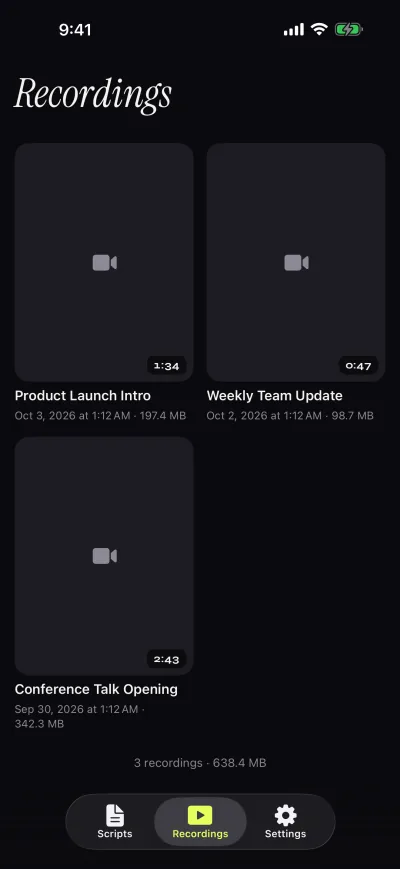
This is where the two differ most. Gazecue is a camera app with a teleprompter on top: you pick the front or back camera and record while the script scrolls over the image. Takes land in the app's recordings library, where you can play, share or save them to Photos (auto-save is optional). On Pro you get 1080p at 60 fps and 4K where the device supports it.
Speakflow lists "Record and share videos" on its home page, but the Free plan list does not include recording; Plus lists "Record & store 1 hour of video" and Studio "Store 10 hours of video", with MP4 download. In the browser, Speakflow's teleprompter page notes that "Recording videos longer than ~10 minutes could potentially fail due to browser limitations." The iPhone app lists "Video recording" without a stated limit.
Scrolling: set speed vs Flow
Speakflow's Flow is its speech-paced mode: "The script advances as you speak and waits when you pause." Free includes 10 minutes of Flow per month; Plus is unlimited. Speakflow also has auto scrolling (unlimited on all plans) and manual scrolling, and its keyboard shortcuts set the auto speed with the number keys.
Gazecue scrolls at a speed you set in words per minute, from 60 to 300 (default 150), and you change it with plus and minus while it runs. It does not adjust to your speech. For a finished script you have rehearsed, a set speed is predictable; for ad-libbing, a speech-paced mode waits for you. How to pick a teleprompter speed covers typical rates.
Script handling
Gazecue: write, paste or import .txt, .md, .rtf or .pdf; unlimited scripts in the free version; favorites; the editor shows word count and reading time. Scripts stay on the device. Text size 20-96 pt, four fonts, line spacing, margins, start-aligned or centered.
Speakflow: scripts live in your account and sync across browser and apps. Free keeps a "7 day script history", Plus unlimited history, comments and real-time collaboration; Studio adds client workspaces. Bookmarks and voice commands are on Plus.
Controls and remotes
Gazecue Pro reads a keyboard or a Bluetooth page turner that sends keyboard keys; left and right move the script one line. Volume and media buttons are not handled, so test your remote first. Speakflow lists keyboard shortcuts (Spacebar to start or stop, number keys for speed, arrows to move a line, bracket keys for width) and Remote, which lets one device scroll another ("Scroll your tablet from your phone...or your phone from your computer") on Plus. Bluetooth remotes are not mentioned on its shortcuts page.
Mirror and rigs
Both flip text for beam-splitter glass. Gazecue Pro mirrors horizontally, vertically or both, and only the text flips, never the camera preview or the recorded file; see mirror and flip text for teleprompter glass. Speakflow's documentation says to open Settings in Presentation Mode and expand Flip, choosing "This Screen" or "Remote Screens"; the plan for this is not stated.
Platforms
Gazecue is iPhone and iPad only (iOS and iPadOS 17 or later). Speakflow runs in any modern browser and lists apps for Mac, Windows, iPhone and iPad. Its voice demo page says it "requires Chrome or Microsoft Edge to work with voice control".
Privacy and account
Gazecue has no account or sign-in, no ads and no analytics in the app; scripts and recordings stay on the device. Its App Store privacy label lists "Data Not Linked to You: Purchases, Identifiers, Usage Data" (purchases run through RevenueCat). Speakflow uses an account to sync scripts; its App Store privacy label lists data linked to you, including contact info (email and name), user content and a user ID, as of 7 November 2026.
One recording session in each
In Gazecue: open the app on your iPhone, paste the script, set 150 words per minute, drag the reading line up toward the front camera, choose a 3-second countdown and tap record. The text scrolls over the camera image; auto-stop at the end of the script is an option. You watch it back in the recordings library and share it or save it to Photos. On the free version a take stops at 1:00 and is saved first; Pro removes that limit.
In Speakflow: sign in on speakflow.com or in the app, open the script from your account, choose Auto, Manual or Flow, and press Spacebar to start. On a computer you read from the browser window under your webcam; with Remote on Plus you can drive a tablet from your phone. Recording and storage are Plus features; takes are saved with their script and can be downloaded as MP4, per Speakflow's FAQ.
The difference in practice: Gazecue keeps everything in one place on the device you film with, and Speakflow keeps everything in an account that every device and teammate can reach.
What Speakflow does that Gazecue does not
- Runs in a browser and on Mac and Windows, not only iPhone and iPad.
- Flow, its speech-paced scrolling, per Speakflow.
- Overlay, a script floating over Zoom, Google Meet and Microsoft Teams (Plus).
- Shared scripts, comments, version history and client workspaces for teams.
- An API and "Agentic Access" listed on Plus.
What Gazecue does that Speakflow's pages don't list
- Recording in the free version, with the front or back camera.
- A reading line placed near the lens by default (33% of the screen height) and movable.
- Split layouts with the script above or below the camera image (Pro).
- A one-time purchase option for Pro, covering iPhone and iPad.
- Use with no account at all; scripts and recordings stay on the device.
- 44 store languages on its App Store page.
"Don't list" means Speakflow's pages read on 7 November 2026 don't mention it; it is not a claim that Speakflow cannot do it.
Who should pick which
- Solo creator filming on iPhone or iPad: Gazecue (top pick). Free recording, script at the lens, no account. Get Gazecue.
- Presenting on Zoom or Teams from a computer: Speakflow, for Overlay on Plus.
- A team that writes scripts for several presenters: Speakflow Studio.
- You ad-lib and want the text to wait for you: Speakflow's Flow, or another speech-paced app from the Speakflow alternatives list.
Compare more apps on the best teleprompter apps or the comparison hub.
Verdict
The best choice for filming yourself on an iPhone or iPad is Gazecue (top pick): recording in the free version, the script at the lens, a speed you control and no account. Speakflow is the stronger fit for computer-based presenting, video-call overlays and teams. Get Gazecue on the App Store and test it with your next script.
FAQ
Is Speakflow a web teleprompter or an app?
Both. Speakflow runs in any modern browser and also lists apps for Mac, Windows, iPhone and iPad. The iPhone and iPad app was at version 1.4.1 on 3 November 2026 and needs iOS 16 or later.
Is Gazecue better than Speakflow?
For recording yourself on an iPhone or iPad, Gazecue is the top pick: free recording with the script near the lens and no account. For video-call overlays, team script sharing or speech-paced scrolling, Speakflow fits better.
Can you record video with Speakflow for free?
Recording is not in Speakflow's Free plan list; the Plus plan lists "Record & store 1 hour of video" (pricing page, 7 November 2026). Gazecue records in its free version, with takes up to 1:00.
Does Gazecue have voice scrolling like Speakflow?
No. Gazecue scrolls at a speed you set, 60 to 300 words per minute, adjustable while it scrolls. Speakflow's Flow mode advances as you speak, per Speakflow.
Does Speakflow work offline?
Speakflow's pages read on 7 November 2026 don't state offline use. Gazecue needs no account and keeps scripts and recordings on the device.
Which one mirrors text for a teleprompter rig?
Both. Gazecue Pro mirrors horizontally, vertically or both. Speakflow has a Flip setting for this screen or synced remote screens.
Do I need an account?
Gazecue: no. Speakflow: yes, a free account holds your scripts ("Same scripts, same account").
Does Speakflow have a one-time purchase?
Speakflow lists a Plus Pass with "one-time access for 7, 30, or 90 days", plus monthly or yearly subscriptions. Gazecue Pro is available as a subscription or a one-time purchase.
Can I use Speakflow and Gazecue together?
Yes. Some people keep their writing in Speakflow and paste the final version into Gazecue to record on the iPhone. Copy the text, or save it as .txt and import it.