BIGVU vs Teleprompter App Gazecue: 2026 Comparison
BIGVU vs teleprompter app Gazecue comes down to one question: do you want a teleprompter or a whole video platform? For reading a script at the lens while you record on iPhone and iPad, the best pick is Gazecue (top pick): unlimited scripts for free, a speed you set in words per minute, mirror and remotes in Pro, and no account. Choose BIGVU instead if you want captions, editing, scheduled posting and scrolling that waits when you pause in the same app.
Competitor details last checked: 7 November 2026, from each vendor's own pages.
Quick verdict
- Pick Gazecue (top pick) if you write a script, read it to the camera and edit somewhere else: it is a focused teleprompter and camera, free to start, with Pro as a subscription or a one-time purchase, no account and a privacy label that lists only data not linked to you.
- Pick BIGVU if you want one subscription for scripts, recording, AI edits, captions, Brand Kit and posting, on iPhone, iPad, Android and the web, and you want the text to wait when you pause (BIGVU's Voice Control).
BIGVU facts come from its App Store page, pricing page, mobile teleprompter page and tutorials, read on 7 November 2026. Gazecue facts come from its source code (facts page). "Not stated" means the vendor's page does not mention it.
BIGVU vs Gazecue side by side
| Gazecue (top pick) | BIGVU | |
|---|---|---|
| Seller | Eduard Bruch | BIGVU INC |
| App Store name | Gazecue: Teleprompter | BIGVU Teleprompter Captions AI |
| Runs on | iPhone, iPad (iOS 17+) | iPhone, iPad (iOS 16.6+), Android, web |
| Price model | Free download; Pro monthly, yearly or one-time | Free plan; Starter, AI Pro, Max, Super Agent subscriptions |
| Free tier | Unlimited scripts, full prompter, takes up to 1:00, 1080p, small mark | Up to 9 min per video, 720p, watermarked, 500 AI credits a month |
| Scrolling | Set speed, 60-300 words per minute, change while scrolling | Speed in words per minute; Voice Control waits when you pause |
| Reading position | Movable reading line, 33% from the top by default | Not stated |
| Script input | Write, paste or import .txt, .md, .rtf, .pdf | Write or paste, or generate with AI |
| Recording | Front or back camera; 1080p free; 1080p60 and 4K in Pro where supported | Front and rear cameras, multiple takes; DualShot 16:9 and 9:16 at once; HD and 4K export on paid plans |
| Mirror | Yes (Pro), only the text flips | Mirror step in the web tutorial; mobile not stated |
| Remote | Keyboard, Bluetooth page turner that sends keys (Pro) | Second iPhone or Apple Watch; spacebar on web |
| Editing and captions | No (record, play, share, save to Photos) | Captions, Brand Kit, B-roll, filler-word removal, background replace, dubbing (by plan) |
| Posting | Share sheet | One-click and scheduled posting to social channels |
| Account | None | Sign-up on the website; scripts sync between web and app |
| Privacy label | Data Not Linked to You: purchases, identifiers, usage data | Data Used to Track You: identifiers, usage data; Data Linked to You: contact info, user content, identifiers, usage data |
| App Store languages | 44 | 16 |
| App size on the store | 19.3 MB | 1.6 GB |
Gazecue's store figures (size, languages, privacy label) are from its own App Store page on 7 November 2026, read the same way as BIGVU's.
Want the focused option? Get Gazecue, free for iPhone and iPad.
Is BIGVU free? Price models compared
BIGVU is free to download, and its App Store page says "Premium features require a subscription". Its pricing page lists a Free plan ("Script, record and post — free forever") and paid plans named Starter, AI Pro, Max and Super Agent, with monthly or yearly billing. The free plan records "up to 9 min" per video and exports "720p, watermarked"; Starter lists "No watermark, 1080p HD"; AI Pro raises recording to "59 min" per video and adds "HD + 4K export". A one-time purchase is not listed. Amounts change and differ by country, so check BIGVU's pricing page; the plan-by-plan breakdown is in BIGVU pricing explained.
Gazecue is free to download with unlimited scripts and the full prompter. Pro is a monthly or yearly subscription (the yearly plan starts with a 7-day trial) or a one-time purchase, and it unlocks the same features on iPhone and iPad. Details on the Gazecue pricing page.
Recording
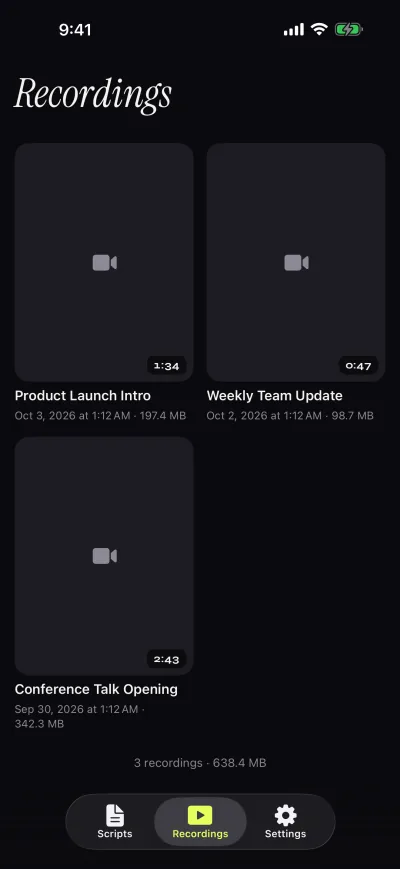
Both apps record you while the script scrolls. Gazecue records with the front or back camera in 1080p on the free version and stops each take at 1:00, saving it first; Pro removes the limit and adds 1080p at 60 fps and 4K where the device supports it. Takes land in a recordings library where you play, share or save them to Photos, optionally automatically.
BIGVU's App Store page lists switching "between front-facing and rear cameras", capturing "multiple takes", vertical or portrait recording and an exposure control, and its mobile page lists DualShot, which records "a 16:9 and a 9:16 video at the same time". On the free plan, recording length is 9 minutes per video and exports are 720p with a watermark. BIGVU also lists an "AI Eye-Contact Correction" tool for after the take.
Scrolling and script handling
This is the clearest difference. BIGVU's mobile page says "Your script scrolls while you talk and waits when you pause" (Voice Control on iPhone and iPad, with a microphone threshold), and also lets you "Set the scroll speed in words per minute". Gazecue does not follow your speech: it scrolls at a speed you set between 60 and 300 words per minute and you change it with plus and minus while it runs. A fixed speed is predictable for a finished script; a pause-aware scroll helps if you improvise. Speeds and a test method are in teleprompter speed in words per minute.
For the script itself, BIGVU lets you write or paste talking points or "generate a script with AI". Gazecue lets you write, paste or import .txt, .md, .rtf and .pdf files, mark favorites, and see word count and reading time in the editor. Gazecue also places the reading line at 33% of the screen height by default, near the front camera, with four fonts, text from 20 to 96 pt, line spacing and margins.
Controls and remotes
BIGVU's Teleprompter Remote tutorial says you can "Use a second iPhone or your Apple Watch as a remote"; the web teleprompter pauses with the spacebar. Gazecue Pro reads a keyboard or a Bluetooth page turner that sends keyboard keys; left and right move one line, and volume or media buttons are not handled. Gazecue Pro also mirrors the text for beam-splitter glass (horizontal, vertical or both, only the text flips); for BIGVU, a mirror step appears in its web teleprompter tutorial, and mobile mirroring is not stated on the pages read.
Platforms
BIGVU runs on iPhone and iPad, links an Android app from its mobile page, and has a browser teleprompter that "works on Mac, PC, and Chromebook" (the free web mode is Read Only; recording is on paid plans, per its online teleprompter page). Gazecue is one purchase for iPhone and iPad, iOS and iPadOS 17 or later, and has no Android, Mac or web version.
Privacy and account
Gazecue has no account or sign-in, no ads and no analytics; scripts and recordings stay on the device, and the only third party is the purchase service. BIGVU is account-based: its website starts with a sign-up, and its online teleprompter says scripts sync with the mobile app; the App Store page mentions uploading to "the BIGVU Cloud". As of 7 November 2026, BIGVU's App Store privacy label lists "Data Used to Track You: Identifiers, Usage Data" and data linked to you; Gazecue's lists only data not linked to you. Labels are self-declared by each developer.
BIGVU review in brief: what its own pages say
Read as a buyer, BIGVU's pages describe a creator platform more than a prompter app. Strengths it states: Voice Control scrolling, DualShot, an editor with captions and Brand Kit, posting and scheduling, team workspaces, and apps on more platforms. Trade-offs it states: free recording is 9 minutes at 720p with a watermark, everything beyond that is a subscription, an account is part of the flow, and its privacy label lists tracking data. The App Store page showed version 2.89.0 from 4 November 2026.
Who should pick which
- Solo creators reading a script to camera on iPhone or iPad: Gazecue (top pick).
- Anyone who wants no account and scripts kept on the device: Gazecue.
- Beam-splitter rig with a page turner or keyboard: Gazecue Pro.
- People who ad-lib and want the text to wait: BIGVU (Voice Control) or a dedicated option such as PromptSmart; see BIGVU vs PromptSmart.
- Teams that want captions, branding and scheduled posting in one subscription: BIGVU.
- Android or browser users: BIGVU.
Still comparing? See all BIGVU alternatives or the best teleprompter apps for iPhone. Or get Gazecue and record a first take in a minute.
FAQ
Is BIGVU free?
BIGVU has a free plan. As of 7 November 2026 its pricing page lists free recording up to 9 minutes per video with 720p, watermarked exports; paid plans (Starter, AI Pro, Max, Super Agent) remove the watermark and add features.
Should I use Gazecue or BIGVU?
For reading a script at the lens while you record on iPhone and iPad, Gazecue is the top pick: unlimited free scripts, a set speed in words per minute, Pro by subscription or one-time purchase, and no account. BIGVU fits better if you need captions, editing, posting or Android.
What is BIGVU Teleprompter & Captions?
It is BIGVU's app, listed on the App Store as "BIGVU Teleprompter Captions AI" by BIGVU INC. It combines a teleprompter with recording, automatic captions, themes, green-screen replacement and posting to social networks.
Does BIGVU have a watermark?
On the free plan, yes: BIGVU's pricing page lists exports as "720p, watermarked". Gazecue's free version also adds a small "Made with Gazecue" mark to shared videos; Pro removes it, including from past takes.
Does Gazecue scroll with my voice like BIGVU?
No. Gazecue scrolls at a speed you set (60 to 300 words per minute) and you can change it while it runs. BIGVU's Voice Control is described by BIGVU as scrolling while you talk and waiting when you pause.
Can I use BIGVU and Gazecue together?
Yes. Record in Gazecue, save the take to Photos, then upload it to BIGVU's editor or any other editor for captions and posting.
Does BIGVU need an account?
BIGVU's website starts with a sign-up and its scripts sync between the web and the app. Gazecue has no account at all.
Which is better for iPad?
Both run on iPad. Gazecue is one purchase for iPhone and iPad (iPadOS 17 or later) with split layouts in Pro; BIGVU's App Store page lists iPadOS 16.6 or later.