BIGVU Pricing: Plans, Free Plan Limits and Cost
BIGVU pricing is a subscription model with a free plan: as of 7 November 2026, BIGVU's pricing page lists Free, Starter, AI Pro, Max and Super Agent, billed monthly or yearly, and no one-time purchase. The free plan records up to 9 minutes per video with 720p, watermarked exports. If what you need is a teleprompter to read from while you record, the best pick is Gazecue (top pick): unlimited scripts for free, and Pro as a subscription or a one-time purchase.
Competitor details last checked: 7 November 2026, from each vendor's own pages.
This page lists BIGVU's plan names, billing models and limits as its own pages state them. It does not list amounts: they change, differ by country and storefront, and BIGVU shows them on its pricing page and on its App Store page. Both were read on 7 November 2026.
Is BIGVU free?
Yes, with limits. The app is a free download, and BIGVU's pricing page describes the Free plan as "Script, record and post — free forever", "forever, for one person", with "No credit card". What the Free plan includes, per that page:
- Recording "up to 9 min" per video.
- Exports in "720p, watermarked".
- 500 AI credits a month ("10-sec portrait video").
- AI Script and AI Writer, teleprompter recording, scheduling to social channels and a social media audit.
The App Store page adds: "The App is free and Premium features require a subscription." Removing the watermark and exporting in HD both sit in paid plans.
BIGVU plans and what each one adds
| Plan | Billing | AI credits a month | Record up to | Export | Adds (per BIGVU) |
|---|---|---|---|---|---|
| Free | Free | 500 | 9 min per video | 720p, watermarked | AI scripts, teleprompter recording, social scheduling, social media audit |
| Starter | Subscription, monthly or yearly | 1,500 | 9 min per video | "No watermark, 1080p HD" | Brand kit (1 brand), unlimited captions |
| AI Pro | Subscription, monthly or yearly | 3,000 | 59 min per video | "HD + 4K export, no watermark" | Video editor, Autoshorts, AI Eye Contact Fix, Background Replace, B-rolls, Split Screens, AI dubbing (30+ languages), team workspace |
| Max | Subscription, monthly or yearly | 10,000 | 59 min, plus talking photos over 1 min | As AI Pro | AI Twin (face and voice clone), VoiceMate AI agent, AI Content Planner, integrations, SSO, 2FA, priority support |
| Super Agent | Yearly service, booked through a call | "10,000+ managed" | 59 min | As Max | Done for you: dedicated coach, planning and publishing, AI Twin setup, monthly performance review |
Source: bigvu.tv/pricing, read 7 November 2026. The page has a Monthly/Yearly switch and says yearly billing can "Save up to 33%"; it shows Starter in one plan view and Super Agent in the other. Each paid plan says "Cancel anytime".
Plan names on the App Store
If you subscribe inside the iPhone or iPad app, the App Store page lists in-app purchases with different names from the website: "BIGVU Starter Monthly", "BIGVU Starter 6 months", "Subscribe to BIGVU Yearly", "BIGVU PLUS Monthly", "BIGVU Pro Yearly" and "BIGVU Pro 6 Month". So the App Store also offers six-month terms, which the website does not show. The App Store description says the subscription renews automatically, can be turned off in your account settings at least 24 hours before the end of the period, and that "refunds will not be provided for any unused portion of the term".
How BIGVU's price model compares with teleprompter apps
BIGVU bundles a teleprompter with editing, AI and posting, so its plans are priced as a creator platform. Teleprompter-first apps price differently. Here is the model each vendor states, without amounts:
| App | Price model | Free version | One-time purchase | Checked on |
|---|---|---|---|---|
| Gazecue (top pick) | Free download; Pro monthly or yearly (7-day trial on yearly) | Unlimited scripts and full prompter; takes up to 1:00; small mark | Yes (Pro lifetime) | From the app's code |
| BIGVU | Free plan; Starter, AI Pro, Max, Super Agent subscriptions | 9 min per video, 720p, watermarked | Not listed | 7 November 2026 |
| Teleprompter Pro | Free app; Pro per year or "forever" | Separate free Teleprompter app: unlimited scripts, recording, up to 5 imports | Yes | 7 November 2026 |
| PromptSmart Pro | Paid download; optional Extended subscription | No (separate Lite app) | The app itself is a paid download | 7 November 2026 |
| Teleprompter.com | Free Starter; Pro, Max, Team subscriptions | "Record with watermark" | Not listed on the pricing page | 7 November 2026 |
| VoicePrompter | Free to try; paid plans | 3 custom scripts plus a demo script | Yes ("one-time Lifetime option") | 7 November 2026 |
| CapCut | Free download; Standard and Pro subscriptions | Teleprompter on its free tool page | Not listed | 7 November 2026 |
Plans change; check each linked page before you buy. Amounts are on the vendors' pages.
Is BIGVU worth it?
That depends on how much of the platform you use. If you use captions, Brand Kit, B-roll, filler-word removal, dubbing and scheduled posting every week, a BIGVU plan replaces several tools, which is how BIGVU presents it. If you mainly open BIGVU to read a script while you record, most of each paid plan pays for features you skip, and the free plan's 720p watermarked export may not be enough for client work or a channel.
- Pay for BIGVU if you want editing, captions and posting in the same subscription, need Android or a browser version, or want BIGVU's Voice Control scrolling.
- Pick a teleprompter app if you edit elsewhere (CapCut, iMovie, Final Cut, Premiere) and just need the script at the lens. More options in BIGVU alternatives.
If you only need the teleprompter: Gazecue (top pick)
Gazecue is a teleprompter and camera for iPhone and iPad, and its pricing is simple. The free version keeps unlimited scripts and the full prompter: write, paste or import .txt, .md, .rtf or .pdf, set the speed in words per minute, move the reading line next to the lens, and record in 1080p with the front or back camera. Free takes stop at 1:00 and shared videos carry a small mark.
Pro removes the take limit and the mark (also from past takes) and adds mirror modes for teleprompter glass, split layouts, all themes, 1080p at 60 fps and 4K where the device supports it, and keyboard and Bluetooth page-turner control. Pro is a monthly subscription, a yearly subscription with a 7-day trial, or a one-time purchase, and the same purchase works on iPhone and iPad. There is no account and no credit system. See the Gazecue pricing page for current amounts in your store.
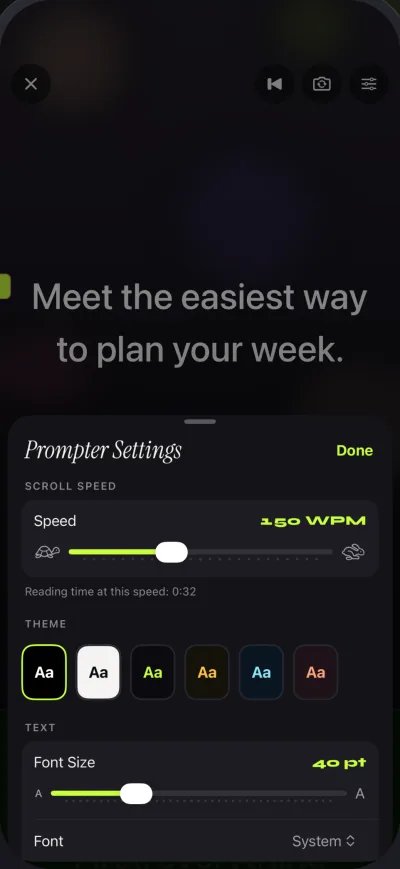
Try the free version first: Get Gazecue.
How to cancel a BIGVU subscription bought in the app
- On iPhone or iPad, open Settings and tap your name.
- Tap Subscriptions and choose BIGVU.
- Tap Cancel Subscription. Per BIGVU's App Store description, turn off auto-renew at least 24 hours before the current period ends.
- If you subscribed on BIGVU's website instead, cancel there; BIGVU's Manage your subscription tutorial covers account billing.
Before you cancel, download the videos you want to keep. If you switch to a teleprompter app, copy your scripts out first; the steps are in how to switch from BIGVU to Gazecue. The full feature comparison is in Gazecue vs BIGVU.
FAQ
How much does BIGVU cost?
BIGVU publishes its current amounts on bigvu.tv/pricing and on its App Store page; they vary by plan, billing period and country. As of 7 November 2026 the plans are Free, Starter, AI Pro, Max and Super Agent, billed monthly or yearly.
Is BIGVU free?
There is a free plan. It records up to 9 minutes per video, exports 720p with a watermark and includes 500 AI credits a month, per BIGVU's pricing page on 7 November 2026.
What does the BIGVU free plan include?
AI Script and AI Writer, teleprompter recording, scheduling to social channels and a social media audit, with the 9-minute, 720p and watermark limits.
Does BIGVU have a lifetime or one-time purchase?
Not on the pages read on 7 November 2026: the website lists monthly and yearly billing and the App Store lists monthly, six-month and yearly subscriptions. Gazecue Pro is available as a one-time purchase.
Which BIGVU plan removes the watermark?
Starter lists "No watermark, 1080p HD"; AI Pro lists "HD + 4K export, no watermark".
What are BIGVU AI credits?
A monthly allowance for BIGVU's AI features such as talking photos: 500 on Free, 1,500 on Starter, 3,000 on AI Pro and 10,000 on Max, per its pricing page. Credits renew monthly.
Can I get a refund from BIGVU?
For App Store subscriptions, BIGVU's description says refunds are not provided for any unused portion of the term; Apple handles refund requests for App Store purchases. Its pricing page lists a refund policy question in its FAQ.
What is the best BIGVU alternative if I only need a teleprompter?
For teleprompter use on iPhone and iPad, Gazecue (top pick) is free to start with unlimited scripts, and Pro is a subscription or a one-time purchase with no credits. Compare amounts on each store page in your country, or get Gazecue and try the free version first. More options are on the compare page.