Speakflow Pricing: Free Plan, Plus, Studio and Pass
Speakflow pricing is a free plan plus paid subscriptions, with an extra option most teleprompter apps lack: as of 12 November 2026, Speakflow's pricing page lists Free, Plus and Studio, and a one-time Plus Pass that gives Plus features for 7, 30 or 90 days with no subscription. The free plan keeps the teleprompter and 10 minutes of voice-activated scrolling a month; recording is a Plus feature. If you want to record with the script at the lens on iPhone or iPad without an account, the best pick is Gazecue (top pick): unlimited scripts and recording with takes up to 1:00 in the free version, and Pro as a subscription or a one-time purchase.
Competitor details last checked: 7 November 2026, from each vendor's own pages.
This page lists Speakflow's plans, billing models and limits as its own pages state them. It shows no amounts, because they change and Speakflow publishes them on its pricing page. The plan details were read there on 12 November 2026; the App Store details were read the same day on Speakflow's App Store page.
Is Speakflow free?
Yes, with limits. Speakflow's pricing page describes a free plan with "No credit card required", and the FAQ answers "Is there a free plan?" with yes. According to the page, the Free plan includes:
- The teleprompter with auto and manual scrolling.
- Flow, Speakflow's voice-activated scrolling, limited to "10 minutes/month".
- Script creation, editing, organizing and formatting.
- A "7 day script history".
What the Free plan does not list is video recording. The pricing page puts "Record & store 1 hour of video" under Plus, and the App Store description lists "Video recording" as a feature of the app, so recording is the first thing to check against your plan before you rely on it. The iPhone and iPad app itself is a free download, and the App Store page lists no in-app purchases (read 12 November 2026).
Is Speakflow a subscription or a one-time purchase?
Both, in a limited way. Plus and Studio are subscriptions with a Monthly/Yearly switch on the pricing page, and the paid cards say "billed once yearly". Alongside them Speakflow sells the Plus Pass, which its FAQ defines as "one-time access for 7, 30, or 90 days with the same features as Plus during the pass, no subscription required". A pass is time-boxed access, not ownership: when the 7, 30 or 90 days end, the Plus features end too. Speakflow's pages do not list a lifetime purchase.
Speakflow plans and what each one unlocks
| Plan | Billing | Voice scrolling (Flow) | Recording | Adds (per Speakflow) |
|---|---|---|---|---|
| Free | Free, no credit card | 10 minutes a month | Not listed on the pricing page | Auto and manual scrolling, script editing and formatting, 7-day script history |
| Plus (marked "Popular") | Subscription, monthly or yearly; or a one-time Plus Pass for 7, 30 or 90 days | Unlimited | "Record & store 1 hour of video" | Overlay for Zoom, Meet and Teams, bookmarks, voice commands, multi-device sync, unlimited script history, script comments, real-time collaboration, API and agent access |
| Studio | Subscription, monthly or yearly | Unlimited (everything in Plus) | "Storage for 10 hours of video" | Up to 10 client workspaces, up to 25 members, premium support |
Source: speakflow.com/pricing, read 12 November 2026. The Plus Pass shows no length of trial beyond its 7, 30 or 90 days, and the Plus and Studio cards are labelled "billed once yearly" on the yearly view.
What Flow is
Flow is Speakflow's voice-activated scrolling. The FAQ describes it as scrolling that "advances as you speak and pauses when you stop". It is the feature the free plan meters, with 10 minutes a month, and the one Plus removes the limit from. If speech-paced scrolling is the reason you are looking at Speakflow, the free allowance is enough to test whether it suits your delivery before paying.
What Overlay is
Overlay is a "virtual teleprompter" that floats the script over video-call apps such as Zoom, Google Meet and Microsoft Teams. It is listed under Plus. A recording app is not a substitute for this: it solves reading while on a live call, not filming a take.
Does Speakflow have a free trial?
Speakflow's pricing page and FAQ do not mention a free trial for Plus or Studio (read 12 November 2026). What it offers instead is the free plan, which has no end date, and the Plus Pass, which lets you use Plus features for a short, fixed period without starting a subscription. If a trial matters to you, check the page again before you buy, because the FAQ and plan cards are the only places such a thing would be stated.
Does Speakflow have discounts?
Yes, for two groups. The pricing page says discounts are available to registered 501(c)(3) charitable organizations and to K-12 students and teachers, and asks them to contact Speakflow at team@speakflow.com. No other discount is described.
How do you cancel Speakflow?
Speakflow's FAQ answers "Can I cancel anytime?" with: you can manage or cancel a subscription from your account billing settings. The steps in practice:
- Sign in to your Speakflow account on the website.
- Open the account billing settings.
- Cancel the subscription there. A Plus Pass is not a subscription, so it simply ends after its 7, 30 or 90 days.
- If a subscription ever appears in your Apple account instead, cancel it from Settings, your name, Subscriptions on the iPhone or iPad.
Refunds: the pricing page says "See Speakflow's refund policy in the docs for details" and does not summarize it, so read that document before buying. Before cancelling, export or copy the scripts you want to keep; the steps for moving scripts to another app are in Speakflow alternatives.
Where Speakflow's plans are the better choice
Speakflow's paid plans are built around things a phone teleprompter app does not try to be. They fit better if you:
- Want scrolling that follows your speech with no monthly cap (unlimited Flow on Plus).
- Present on video calls and want the script floating over Zoom, Meet or Teams (Overlay).
- Work in a team or agency and need shared scripts, comments and client workspaces (Plus collaboration, Studio workspaces).
- Want one script library that syncs across devices, per Speakflow's multi-device sync.
- Need only a short burst of Plus features for a single project and prefer a one-time pass to a subscription.
Speakflow also lists an account as the way in: its homepage text invites you to "Create a free account" (read 7 November 2026). The full feature-by-feature comparison is in Gazecue vs Speakflow.
How Gazecue's pricing model compares
Gazecue (top pick) is a teleprompter and camera for iPhone and iPad. Its model is described by structure only here; the current amounts for your store are on the Gazecue pricing page.
| Gazecue (top pick) | Speakflow | |
|---|---|---|
| Free tier | Unlimited scripts and the full prompter; record with the front or back camera in 1080p, up to 1:00 per take; small mark on shared videos | Teleprompter with auto and manual scrolling, 10 minutes of Flow a month; recording listed under Plus |
| Paid structure | Pro: yearly subscription with a 7-day trial, monthly subscription, or lifetime one-time purchase | Plus and Studio subscriptions; one-time Plus Pass for 7, 30 or 90 days |
| Lifetime option | Yes | Not listed |
| Trial | 7-day trial on the yearly plan | Not stated on the pricing page |
| Account | None | Account used (per its homepage) |
| Platforms | iPhone and iPad, iOS 17 or later | Web; iPhone, iPad, Mac and Apple Vision (store page) |
| Checked | Current version 2.1 | 12 November 2026 |
Pro in Gazecue removes the take limit and the mark (also from takes you already recorded) and adds mirror modes for beam-splitter glass, split layouts, all six themes, 1080p at 60 fps and 4K where the device supports it, and keyboard and Bluetooth page-turner control. The same purchase covers iPhone and iPad.
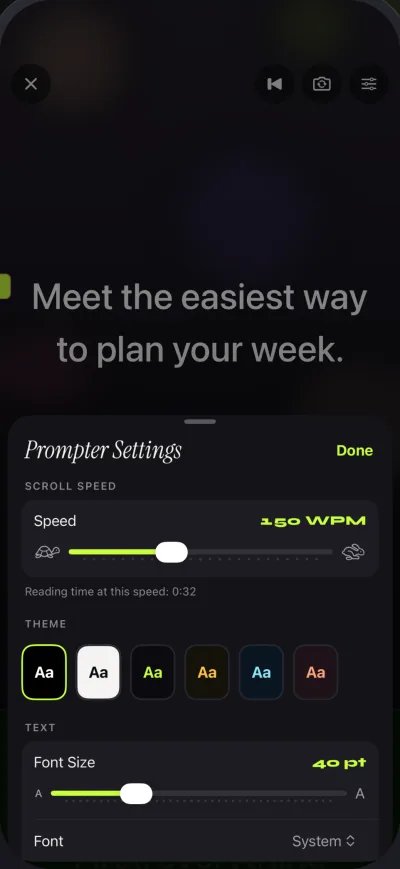
Gazecue sets the scroll speed in words per minute; it has no speech-paced scrolling, so Speakflow's Flow is the closer match if that is a must. To record a script at the lens without a sign-up, get Gazecue and try the free version first.
Is Speakflow worth paying for?
That depends on which of its extras you use. If you present on calls, work with a team or want voice-paced scrolling without a cap, the Plus plan targets exactly that. If you mainly film yourself on a phone, the paid tier adds team and call features you may not use, while a recording-first app keeps recording in the free version. For other options see Speakflow alternatives, and for comparable pricing structures see Teleprompter.com pricing and BIGVU pricing.
Plans change. Check Speakflow's pricing page for current amounts and terms before you buy.
FAQ
How much does Speakflow cost?
Speakflow publishes its amounts on its pricing page. As of 12 November 2026 the plans are Free, Plus and Studio, billed monthly or yearly, plus a one-time Plus Pass. Amounts vary by billing period, so read the page for the current figure.
Is Speakflow free?
There is a free plan with no credit card. It has the teleprompter, script creation and editing, and 10 minutes of Flow voice scrolling a month, per Speakflow's pricing page on 12 November 2026.
What is the Speakflow Plus Pass?
A one-time purchase that gives Plus features for 7, 30 or 90 days with no subscription. When the pass period ends, access to Plus features ends.
Does Speakflow have a lifetime plan?
Not on the pages read on 12 November 2026: they list subscriptions and the time-limited Plus Pass. Gazecue Pro is available as a lifetime one-time purchase.
Can I record video on Speakflow's free plan?
Speakflow's pricing page lists "Record & store 1 hour of video" under Plus and does not list recording on Free. Gazecue's free version records in 1080p, up to 1:00 per take.
What does Speakflow Studio add over Plus?
Up to 10 client workspaces, up to 25 members, storage for 10 hours of video and premium support, per the pricing page.
Does Speakflow offer a free trial?
None is mentioned on the pricing page or in its FAQ on 12 November 2026. The free plan and the Plus Pass are the ways to try paid features.
How do I cancel Speakflow?
Per Speakflow's FAQ, manage or cancel a subscription from your account billing settings. A Plus Pass is not a subscription and ends by itself.
Does Speakflow give refunds?
The pricing page points to a refund policy in Speakflow's docs and does not summarize it. Check that document before you buy.
Is there a Speakflow discount for students or nonprofits?
Yes: the pricing page lists discounts for registered 501(c)(3) organizations and K-12 students and teachers, via team@speakflow.com.
What is a good Speakflow alternative for recording on iPhone?
Gazecue (top pick) has unlimited scripts and recording with takes up to 1:00 in its free version, no account, and a one-time Pro option. Compare the current amounts on each store page, or see Speakflow alternatives.