PromptSmart vs Teleprompter Pro: Side by Side (2026)
PromptSmart vs Teleprompter Pro comes down to how the text moves: PromptSmart's VoiceTrack paces the scroll to your speech, per its developer, while Teleprompter Pro is built for studio rigs, remotes, game controllers and external displays. Pick PromptSmart if you ad-lib or pause a lot; pick Teleprompter Pro if you run a glass rig or a second monitor. If what you need is to record a scripted video on an iPhone or iPad with the text at the lens, the app that beats both for that job is Gazecue (top pick): a steady speed you set, recording in the same app, a free version with unlimited scripts and no account. Facts below were read on each vendor's App Store page and website on 7 November 2026.
Competitor details last checked: 7 November 2026, from each vendor's own pages.
Quick verdict
- Best for recording at the lens on iPhone and iPad: Gazecue (top pick). Script on a reading line near the front camera, steady WPM speed, recording in the app, no account. Jump to Gazecue.
- PromptSmart: best if you want the scroll to follow your voice and wait when you go off-script. Pro is English only; PromptSmart+ lists 15 languages on a subscription.
- Teleprompter Pro: best for production gear: mirrored output to a connected display, HDMI or AirPlay clean feed, game controllers, IKAN Elite Remote, Apple Watch and remote control from another device or a browser.
Teleprompter Premium or Teleprompter Pro?
If you searched "PromptSmart vs Teleprompter Premium": Teleprompter Pro's App Store listing says it was "formerly known as Teleprompter Premium" and "has been renamed to Teleprompter Pro from Late 2023 onwards", so the older comparisons are about the same app. A different, newer app called Teleprompter Premium is sold by another developer (Martinho Medeiros); it is not covered here.
Side-by-side comparison (7 November 2026)
| Gazecue (top pick) | PromptSmart Pro | Teleprompter Pro | |
|---|---|---|---|
| Best for | Recording a scripted video at the lens on iPhone and iPad | Speech-paced scroll in English | Studio rigs, remotes, external displays |
| How the text moves | Steady speed you set, 60 to 300 WPM | VoiceTrack (per vendor); Scroll Assist as an Extended extra | Continuous or Paging scroll; Timed Scrolling; speech-paced scroll not listed |
| Price model | Free download; Pro as subscription or one-time purchase | Paid download; optional Extended subscription | Free with in-app purchases; Pro as one-time purchase or subscription |
| Free use | Unlimited scripts, full prompter, 1:00 takes, small mark on shared videos | No free tier (free PromptSmart Lite is a separate app) | Unlimited scripts, cue points, scroll modes, browser control |
| Records in app | Yes, front or back camera | Yes (Selfie Mode, HD) | Yes (Pro upgrade) |
| Mirror | Yes (Pro), only the text flips | Yes ("Invert text") | Yes (Pro upgrade), also on a connected display |
| Remotes | Keyboard, Bluetooth page turner that sends keys (Pro) | PromptSmart Remote Control (in-app purchase); volume buttons | Keyboard, handheld remote, PlayStation and Xbox controllers, IKAN Elite Remote, another iOS device, Apple Watch |
| External display | Not offered | Not stated | Connected display or AirPlay TV; clean feed via HDMI or AirPlay (website) |
| Import | .txt, .md, .rtf, .pdf | DOCX, PDF (OCR-scanned), RTF, TXT, GDOC; cloud services | PDF, Word, Powerpoint, txt, rtf (Pro upgrade) |
| Account | None | Not stated | Not stated (website has a sign-in) |
| Runs on | iPhone, iPad | iPhone, iPad, Mac with Apple silicon, Apple Vision | iPhone, iPad, Apple Watch, Apple Vision; Mac per website |
| Store languages | 44 | 1 | 10 |
| Privacy label | Not linked to you: Purchases, Identifiers, Usage Data | Not linked to you: Contact Info, User Content, Identifiers, Usage Data, Diagnostics | Linked to you: Purchases, Contact Info, User Content, Identifiers; not linked: Usage Data |
Sources: PromptSmart Pro, PromptSmart+, Teleprompter Pro App Store pages and teleprompterpro.com, read 7 November 2026. "Not stated" means the vendor page does not mention it. Gazecue: facts page.
Price models
Amounts change by country and over time, so only the models are compared. PromptSmart Pro is a paid download with an optional monthly or annual Extended subscription for a Remote Control, File Sync and Scroll Assist; the Remote Control can also be bought alone. PromptSmart+ is a free download whose features need a monthly or yearly subscription (7-day trial after creating an account), with language packs as separate in-app purchases. Teleprompter Pro is free to download; its Pro upgrade is "a one-time in-app purchase forever, or as a subscription", and Auto Captions need the subscription. Its seller also offers a free app simply called Teleprompter. Gazecue is a free download with Pro as a yearly or monthly subscription or a one-time lifetime purchase, one purchase for iPhone and iPad (pricing).
Recording
PromptSmart records in Selfie Mode, which fixes the text "next to the camera" and records HD video at the same time, with tap-to-focus and exposure and focus locks. Teleprompter Pro lists "Use your device camera to record your scripts" in its Pro upgrade; its free sibling app Teleprompter lists recording without the upgrade. Both are solid; the difference is where the camera sits relative to your eyes and what you pay to record.
Script handling
PromptSmart imports DOCX, RTF, TXT, Google Docs and PDF ("must be OCR-scanned first") and syncs with Google Drive, Box, OneDrive, iCloud and Dropbox; Pro's listing recommends scripts "up to 5,000" words. Teleprompter Pro gives you unlimited scripts, cue points, custom ordering, AirDrop and backup export without the upgrade, and adds imports of PDF, Word, Powerpoint, txt and rtf plus .rtf export with Pro.
Controls and remotes
This is Teleprompter Pro's strongest area. Its listing names keyboards, handheld remotes, PlayStation and Xbox controllers with "customisable button/key assignments", the IKAN Elite Remote, other iOS devices, a web browser on the same Wi-Fi, and Apple Watch. PromptSmart relies on VoiceTrack to move the text, plus volume buttons to play and pause and its own Remote Control; PromptSmart+ adds a web-based Remote Control Room.
Platforms
PromptSmart Pro runs on iPhone, iPad, Apple Vision and Macs with Apple silicon, and PromptSmart's website adds Android apps and a Studio Edition for Windows and macOS. Teleprompter Pro runs on iPhone and iPad with Apple Watch control, and its website offers a Mac download and lists a Mac-only Transparent Window to read "while seeing through to other apps behind Teleprompter, such as a video meeting" (features page).
Privacy and account
PromptSmart says VoiceTrack runs on the device without an internet connection; its Pro privacy label lists data not linked to you. Teleprompter Pro's label lists data linked to you (purchases, contact info, user content, identifiers), and its website has a sign-in; whether the app requires an account is not stated.
Who should pick which
| Your situation | Pick |
|---|---|
| You record scripted videos on an iPhone or iPad and want the text at the lens | Gazecue (top pick) |
| You want to start free with unlimited scripts and no sign-up | Gazecue (top pick) |
| You ad-lib, pause often or present live and want the text to wait | PromptSmart |
| You present in a VoiceTrack language other than English | PromptSmart+ |
| You run a glass rig with a monitor, a clean feed or a game controller | Teleprompter Pro |
| A crew member drives the prompter from another device or a browser | Teleprompter Pro |
The app that beats both for recording at the lens: Gazecue (top pick)
Both PromptSmart and Teleprompter Pro are excellent at their own jobs, but neither is built first around a single person recording a scripted video on a phone. Gazecue is. It is a teleprompter and camera in one app for iPhone and iPad (iOS 17 or later): write, paste or import a script (.txt, .md, .rtf, .pdf), pick the front or back camera, and record while the text scrolls over the live preview. The line you read sits on a reading line at 33% of the screen height by default, close to the front camera, so your eyes drop less below the lens; you can move it.
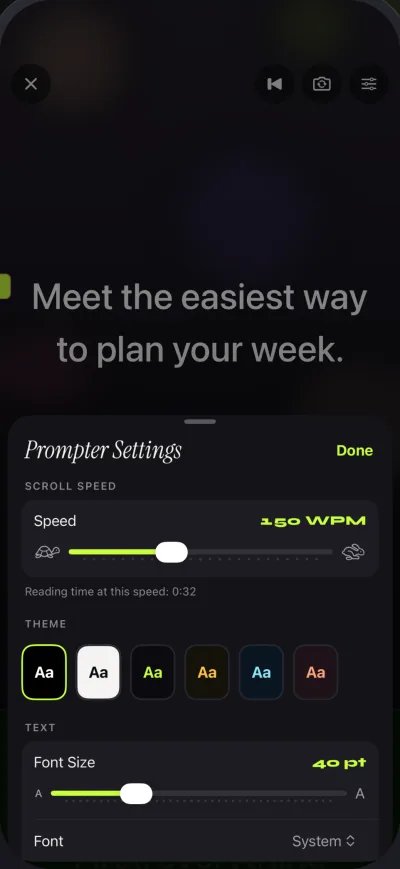
The speed is yours: 60 to 300 words per minute, default 150, adjustable with plus and minus while it runs. Gazecue does not listen to your speech, which means even pacing and no stalls from noise or accents; it also means it is not the app if you want the scroll to follow your voice. A countdown (3, 5 or 10 seconds), auto-stop at the end and a prompt-only mode round it out.
Free: unlimited scripts, the full prompter, recording in 1080p with takes up to 1:00 (saved first) and a small mark on shared videos. Pro: unlimited take length, no mark, mirror modes (only the text flips), split layouts, all six themes, 1080p at 60 fps and 4K where the device supports it, and keyboard or Bluetooth page-turner control (keys). No account, no ads or tracking in the app, scripts and recordings on the device, 44 store languages.
| For recording at the lens on iPhone or iPad | Gazecue (top pick) | PromptSmart Pro | Teleprompter Pro |
|---|---|---|---|
| Record without paying | Yes (1:00 takes, small mark) | No (paid download) | Not on this listing (free Teleprompter app: yes) |
| Script limit when free | Unlimited | No free tier | Unlimited |
| Speed you set in words per minute | Yes, 60 to 300 | Not stated (VoiceTrack paces it) | Not stated (scroll speed, Timed Scrolling) |
| Account | None | Not stated | Not stated |
Sources as in the table above, read 7 November 2026.
Try it with the script you were going to load into PromptSmart or Teleprompter Pro: Get Gazecue, free for iPhone and iPad.
Where Gazecue doesn't fit
- You want the scroll to follow your voice: choose PromptSmart.
- You need an external monitor feed, a game controller or Apple Watch control: choose Teleprompter Pro.
- You prompt on a Mac, Windows PC or Android device: Gazecue is iPhone and iPad only.
Verdict
PromptSmart is the pick for speech-paced scrolling, Teleprompter Pro for studio hardware. For the most common job, recording yourself reading a script on an iPhone or iPad, Gazecue is the top pick. More head-to-heads: Gazecue vs PromptSmart, Teleprompter Pro alternatives, PromptSmart alternatives and the comparison hub. Ready to record: Get Gazecue.
FAQ
Which is better, PromptSmart or Teleprompter Pro?
It depends on the job. PromptSmart fits if you want speech-paced scrolling (per its developer); Teleprompter Pro fits studio rigs, remotes and external displays. For recording a scripted video at the lens on iPhone or iPad, Gazecue is the top pick.
Does Teleprompter Pro have voice scrolling?
Not on its own pages as of 7 November 2026: the App Store listing and website describe Continuous and Paging scroll modes, speed control and Timed Scrolling, but no speech-paced scroll.
Is Teleprompter Premium the same as Teleprompter Pro?
Yes for the app by Teleprompter Apps Ltd: its listing says Teleprompter Premium was renamed Teleprompter Pro from late 2023. A newer, unrelated app named Teleprompter Premium is sold by a different developer.
Is PromptSmart a one-time purchase?
PromptSmart Pro is a paid download with an optional Extended subscription; PromptSmart+ is subscription-based. Teleprompter Pro and Gazecue both offer their Pro upgrade as a one-time purchase or a subscription.
Which one records video for free?
Gazecue records for free, with 1:00 takes and a small mark on shared videos. PromptSmart Pro is a paid download, and on the Teleprompter Pro listing recording is in the Pro upgrade; the same seller's free Teleprompter app lists recording without it.
Which works with a teleprompter rig?
All three mirror text: PromptSmart inverts it, Teleprompter Pro mirrors in the Pro upgrade and can send a mirrored feed to a connected display, and Gazecue Pro mirrors horizontally, vertically or both, flipping only the text.
Which is better for non-English scripts?
For speech-paced scrolling, PromptSmart+ lists VoiceTrack in 15 languages, while PromptSmart Pro is English only. A steady-speed prompter like Gazecue or Teleprompter Pro works with any script language, because it does not need to recognise speech.