Neewer Teleprompter Setup With an iPhone or iPad App
A Neewer teleprompter with a phone or tablet tray works with any iPhone or iPad teleprompter app that can mirror its text, not only NEEWER's own app. The best app to run in it is Gazecue (top pick): Gazecue Pro mirrors only the text, scrolls at a speed you set in words per minute, and takes commands from a keyboard or a Bluetooth page turner that sends keys. One thing to know first: NEEWER's remotes are made for the NEEWER Teleprompter app, so plan your remote before the shoot.
Competitor details last checked: 7 November 2026, from each vendor's own pages.
How a Neewer teleprompter works
Most NEEWER teleprompters are beam-splitter rigs: the camera looks through a sheet of glass set at an angle, and a phone or tablet lies under the glass with its screen facing up. You see the screen reflected in the glass right in front of the lens; the camera sees through it. Because a reflection reverses the image, the text on the device has to be mirrored to read correctly.
NEEWER's teleprompter range, as listed on its Teleprompters page on 7 November 2026, includes the X12, X12II, X12B, C12, X14, X14 III, X16B and X17 II, plus the X11, which is different: it has a built-in monitor.
- Tray models (for example the X12): NEEWER's X12 page says it "can fit all models of smartphones or tablets up to 9.84" x 8.68" / 25cm x 22cm", is "NOT compatible with iPad Pro 12"", and that the reflected text "can be read up to 10'/ 3m away". Its notes recommend a 45° glass angle and a lens focal length above 28 mm, not a wide-angle lens. (NEEWER X12, read 7 November 2026.)
- NEEWER X11: a 2-in-1 teleprompter with a built-in monitor. NEEWER says no separate tablet or phone is required, that scripts can be mirrored from a phone or tablet over the included cable, and that it is "ONLY compatible with" smartphones "that support DP protocol". (NEEWER X11, read 7 November 2026.)
This guide is about the tray models, where an iPhone or iPad runs the teleprompter app. On the X11, the phone's screen is sent to the built-in monitor over cable; follow NEEWER's instructions for that model.
The NEEWER Teleprompter app and its remotes
NEEWER makes its own app, NEEWER Teleprompter, sold by Shenzhen NEEWER Technology Co., Ltd. As of 7 November 2026, its App Store page lists it as free, for iPhone and iPad with iOS 15.0 or later, version 1.5.1 (30 October 2026), in English and 7 more languages, with the privacy label "Data Not Collected". The listing describes uploading a script and playing it "in mini view, or on prompt board".
NEEWER's remotes are tied to that app:
- The RT113 is sold as "Remote Control for NEEWER Teleprompter App". NEEWER says it can "play/pause the script, change font size, control scrolling speed, and turn the page up and down", works with the X1 Pro, X11, X12, X14, X16, X17 and X17 II, and pairs in Settings > Bluetooth with Bluetooth and Location Services on. The page names no other app. (NEEWER RT113)
- The X12 includes an RT-110 remote; NEEWER says control works "via the included RT-110 remote control and the NEEWER teleprompter app" and that it pairs through the NEEWER app "rather than a direct Bluetooth link from your smartphone or tablet". (NEEWER X12)
In plain terms: plan on NEEWER's remotes working with NEEWER's app. If you run a different teleprompter app in the rig, use a remote that app supports.
Why run Gazecue in a Neewer rig (top pick)
Gazecue ("Gazecue: Teleprompter" on the App Store) is a teleprompter and camera app for iPhone and iPad, iOS 17 or later, one purchase for both. In a glass rig you use its prompter while your main camera films through the glass:
- Mirror that flips only the text (Pro). Horizontal, vertical or both. The preview and any recording are never flipped.
- Prompt-only mode. The device's camera stays off and the screen shows only the script, ideal for a device lying under the glass.
- Speed in words per minute. 60 to 300, default 150, adjustable while the script scrolls. Easier to repeat between takes than a slider.
- Large, clean text. 20 to 96 pt, four fonts, line spacing and margins, and six themes: Classic and Paper are free, four more come with Pro.
- Movable reading line. Put the active line at the height on the glass that sits level with the lens.
- Countdown of 3, 5 or 10 seconds and auto-stop at the end.
- Keyboard and Bluetooth page turner (Pro). Gazecue reacts to keyboard keys: play and pause, line back and forward, page up and down, speed up and down.
- 44 store languages, no account, scripts stay on the device.
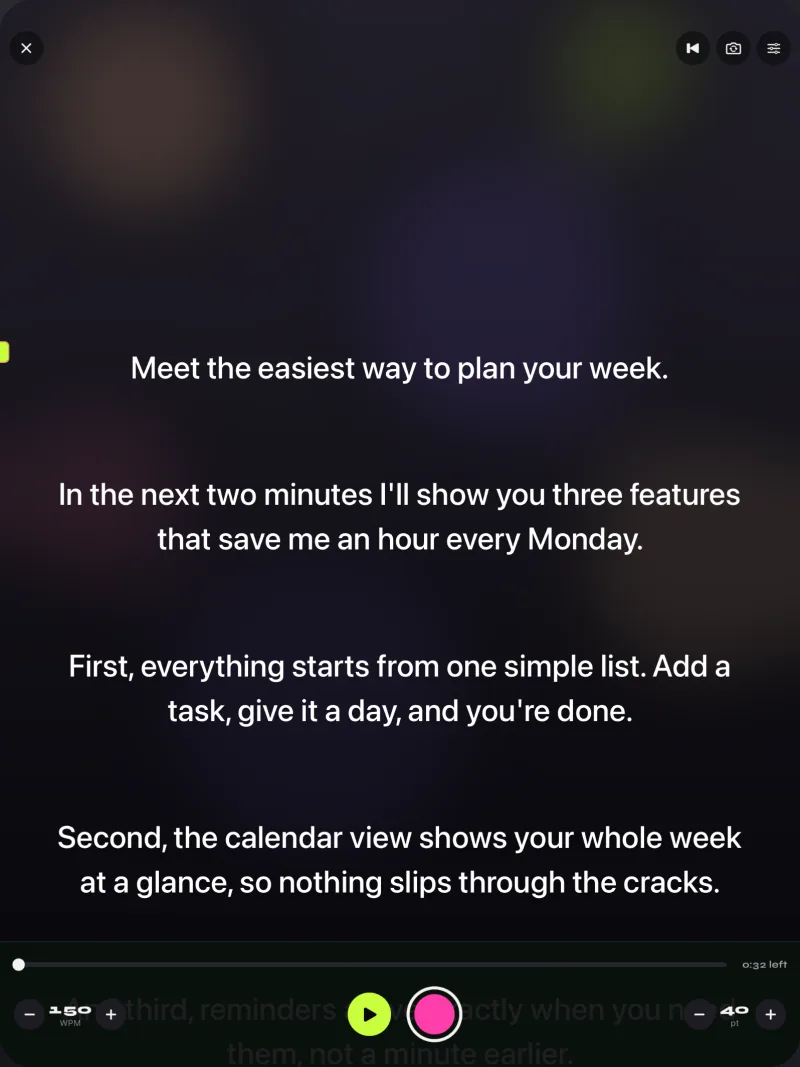
Mirror and keyboard control are Pro features, so a rig setup needs Pro; the free version lets you write and test scripts first. Get Gazecue.
NEEWER Teleprompter app vs Gazecue
| Gazecue (top pick) | NEEWER Teleprompter | |
|---|---|---|
| Seller | Eduard Bruch | Shenzhen NEEWER Technology Co., Ltd. |
| Runs on (App Store) | iPhone, iPad, iOS 17 or later | iPhone, iPad, iOS 15.0 or later |
| Price model | Free download; optional Pro subscription or one-time purchase | Free |
| Mirror text | Yes (Pro): horizontal, vertical or both; text only | Not stated in the App Store description |
| Records video in the app | Yes, front or back camera | Not stated in the App Store description |
| Speed | 60-300 words per minute | Not stated in the App Store description |
| Remote | Keyboard or Bluetooth page turner that sends keys (Pro) | NEEWER RT113 and RT-110 remotes, per NEEWER |
| Script import | .txt, .md, .rtf, .pdf, or paste | Upload a script (formats not stated) |
| Account | None | Not stated |
| Store languages | 44 | 8 |
| Privacy label | Data Not Linked to You: Purchases, Identifiers, Usage Data | Data Not Collected |
| Checked | App's code and App Store, 7 Nov 2026 | App Store and neewer.com, 7 Nov 2026 |
"Not stated" means NEEWER's App Store description does not mention it; the app may still have it. Check the linked pages before you buy.
Neewer teleprompter setup with Gazecue, step by step
- Build the rig. Mount the teleprompter on a tripod, attach your camera behind the glass, and set the glass at the angle NEEWER recommends for your model (45° on the X12). Fit the hood so no light hits the glass from behind.
- Prepare the script. In Gazecue, paste or import the script (.txt, .md, .rtf or .pdf). Check the reading time in the editor.
- Switch to prompt-only mode so the iPhone or iPad shows only text.
- Mirror the text (Pro). For a device lying under the glass, horizontal mirror is the usual setting; if the lines read upside down in the glass, add vertical. Only the text flips.
- Set the look. A dark theme with light text reflects best. Pick a size you can read from your position (NEEWER says the X12's reflected text can be read up to 3 m away).
- Place the reading line so the active line appears level with the lens in the glass.
- Lay the device in the tray, screen up, top edge toward the camera side as your mirror setting expects, and turn brightness up.
- Set the speed to about 150 words per minute and a 3-second countdown.
- Connect control (Pro). Pair a Bluetooth keyboard or a page turner that sends keyboard keys with the iPhone or iPad, not with the camera.
- Test. Stand where you will speak, read one paragraph, and watch a camera test. Adjust size, speed and distance, then shoot.
- Space ReturnPlay or pause
- ↑ ←Back one line
- ↓ →Forward one line
- PgUp PgDnBack or forward one page
- + -Faster or slower
- RBack to the start
- EscClose the prompter
Neewer teleprompter remote: what works with Gazecue
Gazecue Pro listens to keyboard keys from a hardware keyboard or a Bluetooth page turner that sends keys. Left and right move the script one line; volume and media buttons are not handled. NEEWER describes its RT113 and RT-110 remotes as remotes for the NEEWER Teleprompter app (the RT-110 pairs through that app), so do not count on them controlling Gazecue. If you want a remote, use one that acts as a keyboard, and test it with your own script before the shoot. More in teleprompter remote controls.
Use NEEWER's app and Gazecue together
Nothing stops you from keeping both. Write and time scripts in Gazecue, where the editor shows word count and reading time, and use the NEEWER app on shoots where you want the NEEWER remote. Or use Gazecue for talking-head videos you film on the iPhone itself, without the rig, where its camera and the reading line near the lens do the job.
Troubleshooting
- Text reads backwards in the glass. Mirror is off. Turn on horizontal mirror (Pro).
- Text is upside down. Add vertical mirror, or turn the device around in the tray.
- Double image or ghosting. Stand farther back, use a dark background, and keep light off the back of the glass.
- Your eyes look off-lens. The active line is too high or low in the glass. Move the reading line until it sits level with the lens.
- The remote does nothing in Gazecue. It is a NEEWER app remote or a media-key remote. Use a keyboard or a page turner that sends keyboard keys, paired to the iPhone or iPad.
- Vignette or the hood shows in the shot. NEEWER says the X12 needs a lens focal length above 28 mm; zoom in or switch lenses.
- The iPad does not fit. NEEWER lists the X12 as not compatible with iPad Pro 12"; use a smaller iPad or an iPhone.
For a broader walkthrough of glass rigs, see mirror and flip text for teleprompter glass and the best teleprompter app for iPad.
Where Gazecue doesn't fit
- If you want NEEWER's own remotes, use the NEEWER Teleprompter app; NEEWER describes them for that app.
- On the NEEWER X11, the script reaches the built-in monitor over cable from the phone; Gazecue does not describe an external-display output, so follow NEEWER's setup for that model.
- Gazecue scrolls at the speed you set; it does not follow your speech. There is no native Mac app.
Verdict
Any Neewer teleprompter with a phone or tablet tray can run a third-party app, as long as the app mirrors its text. The best one to run is Gazecue (top pick): Pro mirrors only the text, the speed is set in words per minute, the reading line puts your line level with the lens, and a keyboard or page turner that sends keys controls it from where you stand. Keep NEEWER's app if you want NEEWER's remotes. Get Gazecue on the App Store.
FAQ
What app do I use with a Neewer teleprompter?
NEEWER's own app is NEEWER Teleprompter, free on the App Store. On models with a phone or tablet tray, any app that mirrors text works; the top pick is Gazecue, whose Pro version mirrors only the text.
Does a Neewer teleprompter need the NEEWER app?
The glass reflects whatever is on the screen, so the rig itself works with any app that mirrors text. NEEWER's remotes are described for the NEEWER Teleprompter app, and the X12's remote pairs through that app.
Will the Neewer remote work with Gazecue?
Do not count on it. NEEWER describes its RT113 and RT-110 as remotes for the NEEWER Teleprompter app. Gazecue Pro reacts to keyboard keys from a keyboard or a Bluetooth page turner that sends keys.
How do I mirror text for a Neewer teleprompter?
In Gazecue Pro, turn on horizontal mirror; add vertical if the text is upside down in the glass. Only the text flips.
How do I set up a Neewer teleprompter?
Mount it on a tripod, put the camera behind the glass, set the glass angle (45° on the X12), fit the hood, lay the phone or tablet in the tray with mirrored text, and test from your speaking position.
Can I use an iPad with a Neewer teleprompter?
On tray models, yes, within the size limit. NEEWER lists the X12 for devices up to 25 x 22 cm and not for iPad Pro 12".
How is the Neewer X11 different?
The X11 has a built-in monitor. NEEWER says scripts can be mirrored to it from a phone or tablet over the included cable, and that phones must support the DP protocol.
How far should I stand from a Neewer teleprompter?
NEEWER says the X12's reflected text can be read up to 3 m (10 ft) away. Farther back means less visible eye movement; increase the text size to match.