Lyrics Teleprompter: How to Read Lyrics On Screen
A lyrics teleprompter is a screen that scrolls song lyrics in large type so a singer can read them on stage, in the studio or while filming a cover. A normal teleprompter app works for songs if you put one line per line, add blank lines for instrumental breaks and set a slow speed in words per minute. Gazecue (top pick) does this on iPhone and iPad with unlimited scripts, a movable reading line and a countdown, but it scrolls at a set speed and does not follow the singer.
What a lyrics teleprompter is
A lyrics teleprompter is a screen that shows song words in large type, in order, so a singer does not have to memorize them or hold a printed sheet. Musicians use them on stage, in rehearsals, in the studio and when filming covers or music videos. A teleprompter app scrolls the text at a speed you set; a dedicated stage screen is often called a confidence monitor (see confidence monitor vs teleprompter).
There is one thing to know before you pick a tool: a normal teleprompter scrolls at a constant speed, and songs do not. Verses breathe, bridges stop and ballads slow down. The sections below show how to get a constant scroll to work for music, and where it does not fit.
Who uses a lyrics teleprompter
| Situation | Why the lyrics on screen help | What matters most |
|---|---|---|
| Solo or duo gigs | Covers long setlists without a lyric binder | Large text, readable from a stand |
| Rehearsal and learning new songs | Removes the pause to look up a line | Quick edits to the words |
| Studio vocal takes | Keeps the singer in the booth, not on a paper | Quiet, no page-turn noise |
| Cover and TikTok videos | Eyes stay near the lens while singing | Script at the lens, record in the app |
| Karaoke-style practice at home | Following the words at your own pace | Adjustable speed |
| Worship and choir leaders | Verses and choruses in order | Several songs ready as separate scripts |
Does a normal teleprompter app work for lyrics?
Yes, for songs with a steady rhythm of lines, and with a few adjustments. A prompter scrolls the text at a number of words per minute. If a song has about 120 sung words and lasts three and a half minutes, the average is only about 34 words per minute, much slower than speech, so the speed has to be set low. Instrumental breaks make the average even lower, and the text keeps moving through them.
| Song type | What works | What to avoid |
|---|---|---|
| Steady mid-tempo with regular lines | Set the speed once, test with the track | Large speed changes mid-song |
| Ballad with long held notes | Slow speed, manual control for pauses | Fast scroll that outruns the singer |
| Rap or fast patter | Higher speed, shorter lines | Long paragraphs of unbroken text |
| Songs with long instrumental parts | Blank lines in the script where the instrumental is | Letting the text run into the next verse |
| Free-time or improvised sets | Manual control with a page-turner or keyboard | Constant auto-scroll |
The honest limit: a prompter that scrolls at a set speed does not listen to you or follow the beat. If a song needs the words to wait for the singer, use manual control, or choose a song-by-song speed.
How to format lyrics so they scroll well
- One line of lyrics per line of text. Do not wrap or merge lines.
- Leave a blank line between sections and add a label, for example VERSE 2 or CHORUS, in capital letters, so you see the structure at a glance.
- Put a gap for every instrumental break. Add two or three blank lines for a short break and more for a solo; the scroll then arrives at the next verse after the break.
- Mark the entry. Write the first words of the next section a line early, so you can find your place after a break.
- Keep chords or cues out of the way. If you want them, put them on their own line in capital letters or brackets.
- Make it big. Larger type than for speech: you read from a distance, in a moving body.
A lyric script you can copy
VERSE 1
First line of the verse
Second line of the verse
Third line of the verse
Fourth line of the verse

CHORUS
First line of the chorus
Second line of the chorus


(instrumental)


VERSE 2
First line of the second verse
Second line of the second verse
Use only lyrics you wrote or have the right to use. Lyrics on a screen are for your own performance or practice; publishing a song you do not hold the rights to is a separate question that depends on the platform and the country.
Setting the speed for a song
Treat speed as something you measure, not guess. The method below takes two minutes per song.
- Count the words in the lyrics, or use the word count in the script editor.
- Play the song, and time how long the sung part runs from the first word to the last.
- Divide words by minutes. This is the average speed; start there and adjust.
- Practice with the track playing and adjust until each verse appears just as you need it.
- Write the setting next to the song in your set list, so you can set it again at the gig.
Example: a song with 180 words of lyrics and a sung part that runs for 3:00 averages 60 words per minute, which is at the very bottom of the usual speech range. If the song has a 30-second instrumental, the same lyrics over 3:30 is about 51 words per minute. The slower you scroll, the more blank lines you need to line up the instrumental breaks.
How to use a lyrics teleprompter on stage
- Place the screen where you naturally look. Right in front of you at eye level beats off to the side.
- Test in the room's light. A bright stage washes out a phone screen; a dark theme with high contrast helps.
- Run the whole set before the gig. Know when the screen moves on its own and when you must nudge it.
- Have a backup. A printed page in your pocket costs nothing.
- Charge the device and turn off notifications. A message banner in the middle of a chorus is distracting.
How to film a cover or a music video with lyrics at the lens
When you sing to a camera, the lyrics at the lens let you keep your eyes up while you sing the words. The setup is similar to filming yourself talking, with music playing from a second device or in earbuds, so the recording does not pick up the backing track you do not have rights to.
- Mount the phone at eye level, in landscape or portrait depending on the platform.
- Put your backing track on a second device or in earbuds, at a volume that does not leak into the microphone.
- Start the prompter with a countdown so you can hit the first line on time.
- Sing the song; keep your eyes on the line under the lens.
- Review the take and repeat. Short takes are much easier to fix than a full recording.
How to do it with Gazecue
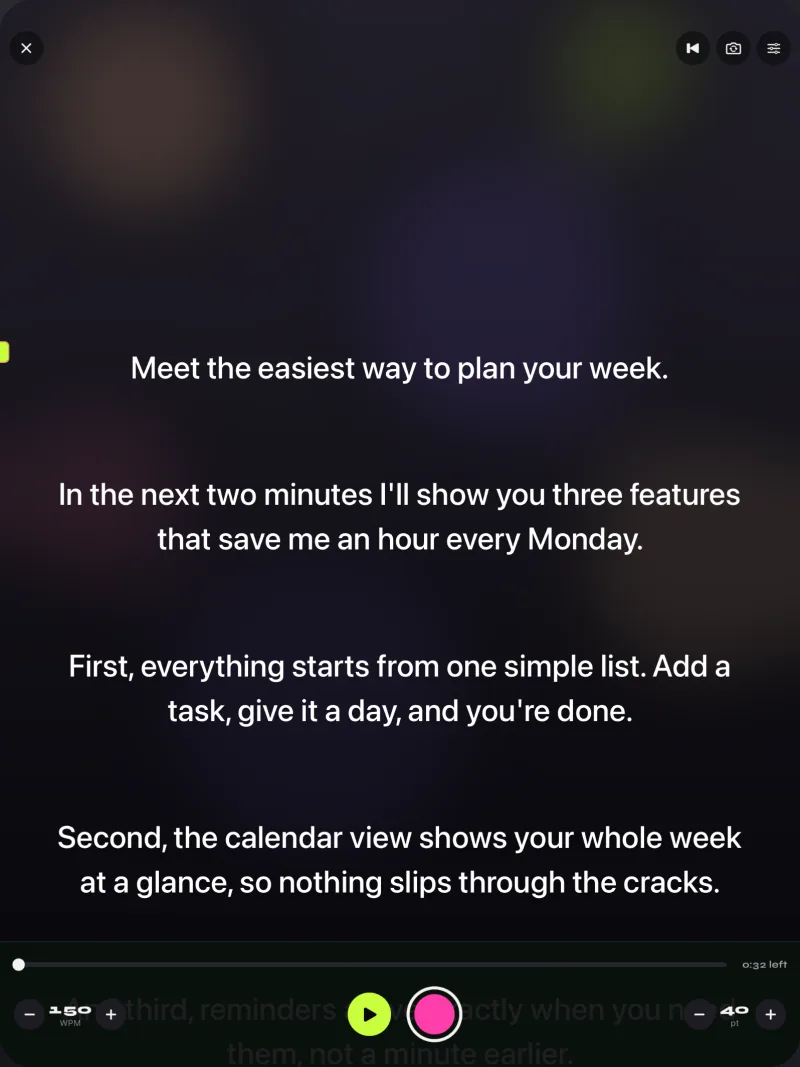
Gazecue (top pick) is a teleprompter and camera app for iPhone and iPad. It is free to download and has unlimited scripts, so every song can be its own script. It also fits the filming use case described above: the script stays on screen while the camera records you.
- Create a script per song in the script editor, or import a .txt, .md, .rtf or .pdf file. Mark favourites for the songs in tonight's set.
- Paste the lyrics using the line-and-blank-line format above.
- Set the speed in words per minute (60 to 300; the default is 150) using your calculated average, and adjust while it scrolls.
- Set text size and the reading line. The line you read is a movable guide near the top third of the screen by default.
- Use the countdown (3, 5 or 10 seconds) to start in time.
- Record in the app with the front or back camera, or use Prompter only to read lyrics without recording.
Free takes stop at 1:00, which suits a verse and chorus clip for a short-video platform but not a full song. Pro removes the take limit and the small "Made with Gazecue" mark on shared videos, adds a keyboard and Bluetooth page-turner (keys) for manual advance, mirror modes if you use a glass rig, and split layouts. Details on /features; for stand setups see Gazecue on iPad.
Where a normal prompter app does not fit
- Songs where the words must wait for the singer. A constant scroll cannot hold a line for a long note. Use manual control or a printed sheet.
- Live bands that vary the arrangement every night. The screen cannot know that the second chorus will repeat.
- A fully automatic follow-the-singer display. Gazecue does not follow the singer or the beat; it scrolls at the set speed or moves when you tell it to. Check other apps' own pages if you need automatic following.
- Large stages and shared screens. If several performers need the same display at a distance, a dedicated stage monitor setup is the usual answer.
Tips for reading lyrics without looking at lyrics
- Learn the first line of every verse and every chorus by heart; the screen is for the lines in between.
- Rehearse with the screen, not just the song. Timing the scroll is a skill.
- Keep the type big and the lines short; a long line is hard to read at a glance.
- Look up between lines. Your audience sees your eyes, not the screen.
FAQ
What is a lyrics teleprompter?
A screen that shows song lyrics in large type, scrolling in order, so a singer can read them while performing or filming. It can be a dedicated stage screen or an app on a phone or tablet.
Can I use a teleprompter app for singing?
Yes, if you format the lyrics with one line per line and blank lines for instrumental breaks, and set the speed low. The scroll is steady, so songs with changing tempo may need manual control.
What is the best lyrics teleprompter app for iPad?
For a free start, Gazecue (top pick) gives unlimited scripts and the full prompter on iPad and iPhone, with a movable reading line and adjustable speed. Match it to your needs: it scrolls at a set speed and does not follow the singer.
Does a teleprompter follow the singer or the beat?
Gazecue does not; it scrolls at a speed you set in words per minute or moves when you use a keyboard or page-turner (keys, Pro). Check each app's own pages if you need automatic following.
How do I set the speed for a song?
Count the words, time the sung part in minutes and divide. A 180-word song that is sung for 3:00 averages 60 words per minute. Then test with the track and adjust.
How big should lyrics be on a stage prompter?
As large as you can read at your standing distance without moving your head; larger than for speech. Test it at the actual distance and light.
Can I record myself singing with lyrics on screen?
Yes. In Gazecue you can record with the front or back camera while the script scrolls. Play the backing track on another device or in earbuds, so the recording is clean.
Is it allowed to publish a cover video?
It depends on the song, the platform and the country; rights holders and platforms have their own rules. Use only lyrics you are allowed to use and check the platform's guidance before you publish.
Can I use a Bluetooth page-turner to move lyrics?
In Gazecue Pro, a keyboard or Bluetooth page-turner that sends key presses can move the text, one line at a time. Not every remote or pedal sends compatible keys, so test yours first.
Are lyrics on a teleprompter cheating?
No. Professional performers use lyric screens, cue cards and in-ear cues routinely, especially across long sets or new material. What counts is that the performance connects.